Razer Viper Ultimate keeps disconnecting | Razer Insider
Skip to main content
Question

Razer Viper Ultimate keeps disconnecting

  • January 8, 2024
  • 38 replies
  • 12445 views

Show first post

38 Replies

  • Insider Mini
  • November 1, 2024

i just bought the daym mouse and i started having this weird experience where all my devices disconnect and reconnect over and over, and guess how i stop it, i unplug the charging dock thing and its all good, the moment i put that in it all borks, its actually pissing me off.


clubfirstDesert326

I just started having this issue  yesterday, was working fine then suddenly started acting up. I’ve tried restarting, upgrading to Synapse 4, resetting drivers, and even unplugging the charging dock and it still won’t work. Mouse only works in wired mode, which is fine, but I’d like to use it wireless, too.


I’ve had these issues for a long while now and as some said here, unplug the goddamn charging dock it fixed everything. Not only did the random disconnects disappear, it is not running even smoother all the time. 


FIRE OPALPaleGoldhead753

Also been having this issue for a while now. Today has been awful. It works for a bit disconnects and I have to plug it in several times for it to work but again only for like 5 minutes. No problem wired. And strange that it works intermittently must be a software/firmware issue on Razer’s end.


  • Insider Mini
  • January 11, 2025

i just bought the daym mouse and i started having this weird experience where all my devices disconnect and reconnect over and over, and guess how i stop it, i unplug the charging dock thing and its all good, the moment i put that in it all borks, its actually pissing me off.

I HAVE BEEN HAVING THIS ISSUE FOR OVER A YEAR
WHAT IS RAZER DOING?!?!?


bestpulseLightOrange302

Same issue with my wife’s mouse. This morning it just started connecting and disconnecting every time when dongle is connected. Uninstaling drivers and Synapse doesn’t help. Anyone solved it?


gulonggg
  • Insider Mini
  • June 1, 2025

I have had this issue for at at least  6months now and I noticed that every time my AC is off, it keeps on disconnecting and reconnecting, so the only way for me to be able to properly use it is by cranking up my AC inside the room.


  • Insider Mini
  • June 29, 2025

same in here, from the beginning from the day i bought it everyday when i use it it randomly disconnects from my pc and the razer synapse (color settings cursor movement etc.) from 3sec to 15sec for no reason, its very anoing when u play any game or you trying to focus on somethink, i see that its common problem with razer viper ultimate so it’s probably not manufacturing defect or an error in some series, judging by the number and date of comments. I can agree that if this problem won’t be somehow fixed that i will be forced to switch into logitech/stealseries :(


  • Insider Mini
  • August 12, 2025

same in here, from the beginning from the day i bought it everyday when i use it it randomly disconnects from my pc and the razer synapse (color settings cursor movement etc.) from 3sec to 15sec for no reason, its very anoing when u play any game or you trying to focus on somethink, i see that its common problem with razer viper ultimate so it’s probably not manufacturing defect or an error in some series, judging by the number and date of comments. I can agree that if this problem won’t be somehow fixed that i will be forced to switch into logitech/stealseries :(

 
“i see that its common problem with razer viper ultimate so it’s probably not manufacturing defect . . .”the fact this is occuring with hundreds of the same model, it IS most likely a manufacture defect, and they’re not doing anything about it - instead, the model is still available and if you want to purchase the newer model (the one that doesn’t have issues) - good luck!!! I have the pink one and it continously connects/disconnects, so there is the non stop “Ding” sound. . . .I fixed it by unplugging everything and putting the mouse and the dock in my filing cabinet with hopes that Razer agrees to replace it OR there is a class action lawsuit (not possible),  requiring them to replace all the faulty mice in the world​​


  • Insider Mini
  • August 24, 2025

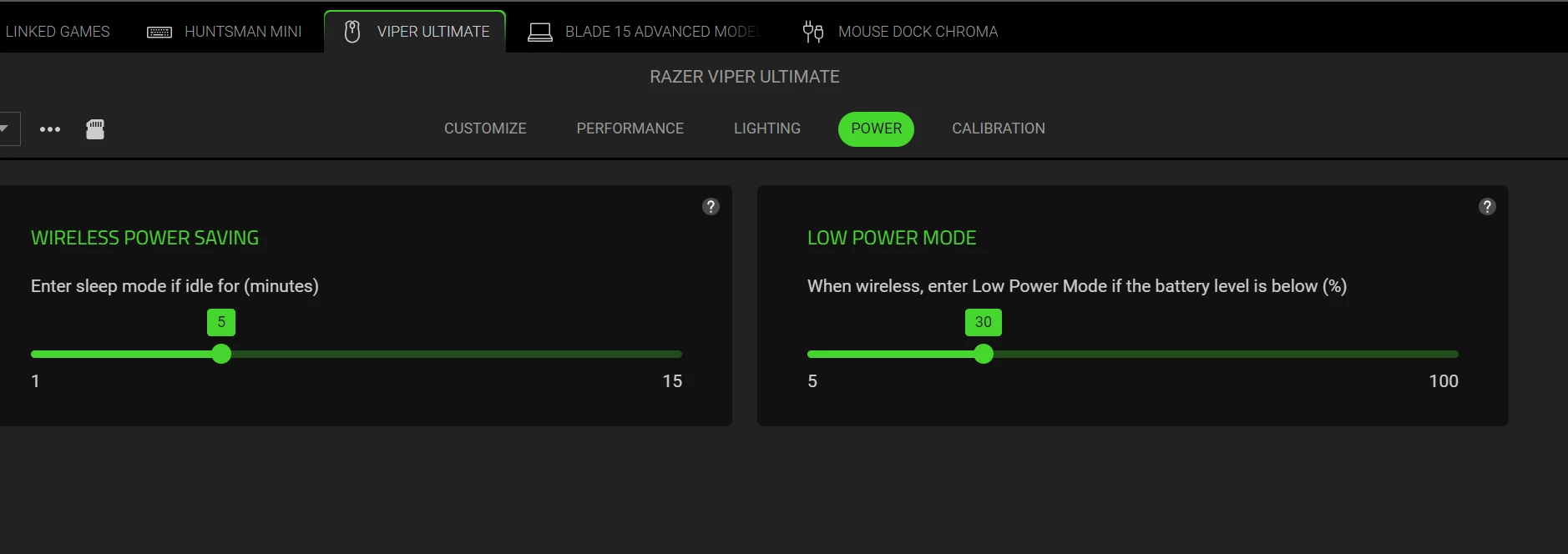
Guys, I found a solution that worked for me. I bought my razer viper ultimate about 4 or 5 years ago, and it worked completely fine until today while I was playing PUBG, my mouse started to stutter. It would constantly disconnect and reconnect every second and I was looking for help online. If I connect my mouse to the cable directly, it works perfectly fine, yet I still wanted to use it wirelessly. First, connect your mouse to your cable and go to razer synapse. Then go to power settings and change your wireless power saving settings to a higher number (I changed mine from 1 to 5) and it should fix it. I hope this works for everyone having this issue, and please let me know if it does.


  • Insider Mini
  • August 28, 2025

your solution has fixed my issue, thank you ​@jseo1322  !


ammoTurquoiseBluebuzz429

Honestly, with the number of people here who have the same problem with this mouse and who paid over $150++ for it, there really should be a class action lawsuit to get reimbursed or compensated. The issue has been going on for several months, even years, and clearly Razer is doing nothing to prevent it or find a solution, while continuing to sell the product. The solution is not to simply brush off the problem by buying a Logitech or another brand of mouse, because the issue will persist. I believe we should come together and take collective action against Razer.


  • Insider Mini
  • September 27, 2025

I FOUND A FIX, so if your mouse is disconnecting and reconnecting over and over again, its a default setting they set in the new synapse. If you open Synapse go to your mouse (mine is the Viper Ultimate), then go to power tab there is a setting for “Wireless Power Saving” it was by default set to “0” mins for me so the mouse kept going idle every second and reconnecting when i moved it. I HOPE THIS HELPS!!


EDIT: I just saw someone else had posted the same solution : ‘)