Razor Deathadder V3 Hyperspeed - Left click disabled | Razer Insider
Skip to main content
Answer

Razor Deathadder V3 Hyperspeed - Left click disabled

  • March 12, 2025
  • 8 replies
  • 482 views

Hello,


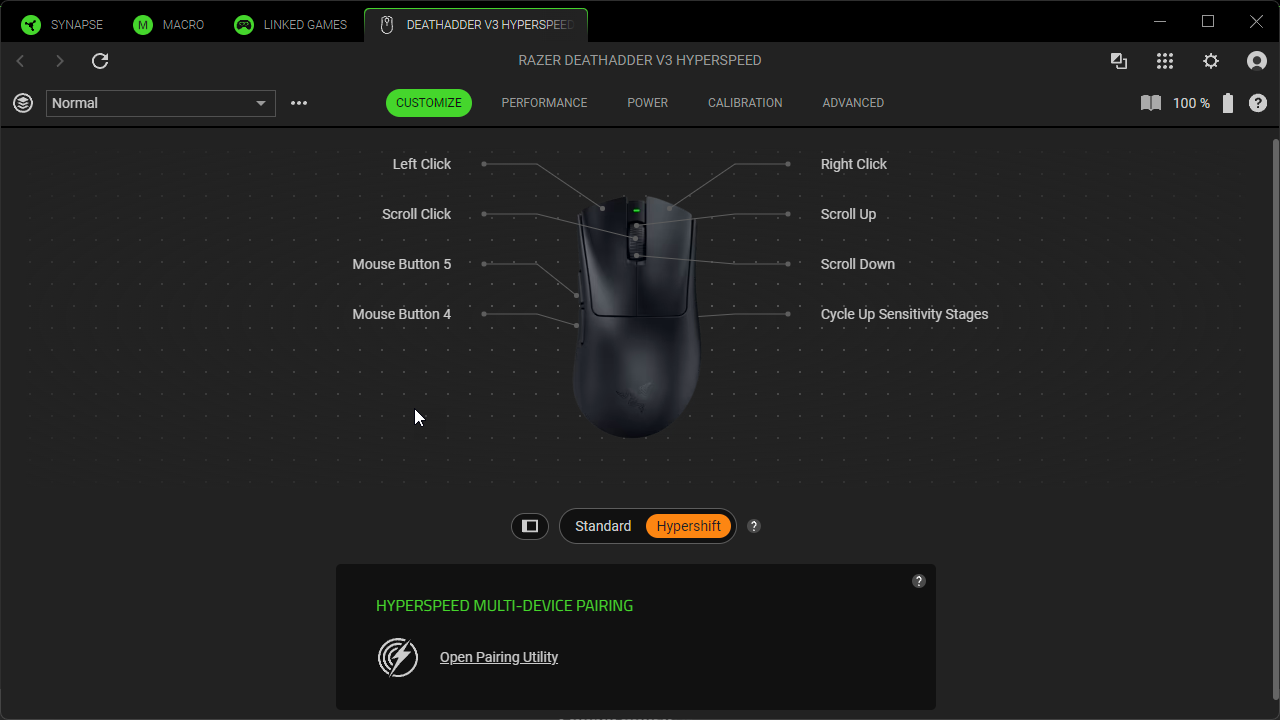
I just buy this mouse last week and it was working well in synapse, now the left click is disabled. I dont know why.


I tried to uninstall synapse, reboot. reinstall synapse - same thing


I tried to remove mouse driver from windows device manager, same problem.


Also can you change my name in forum ? It’s a generic name from my account from before i guess.


Thank you
 

Best answer by FiszPL

He didn’t acknowledged that it’s not normal - it’s only Support tech copy-pasta. This thing has been since Synapse 3.

It’s for preventing people completely unbinding left mouse button click, so they’ll left with no click possibility on the mouse (without hard resetting it).

Look, it’s that simple to rebind it, and reuse left mouse button for other function(s):

I only assume, that this function MIGHT be enabled only for mouse that doesn’t have any onboard memory like DeathAdder Essential (so the settings are never stored on the mouse itself). Basilisk X Hyperspeed, Orochi V2 etc. have onboard memory - so it’s just prevention mechanism for these mice.

8 Replies

FiszPL
Vanguard
Forum|alt.badge.img+1
  • VANGUARD
  • March 12, 2025

Dunno what you want to do.

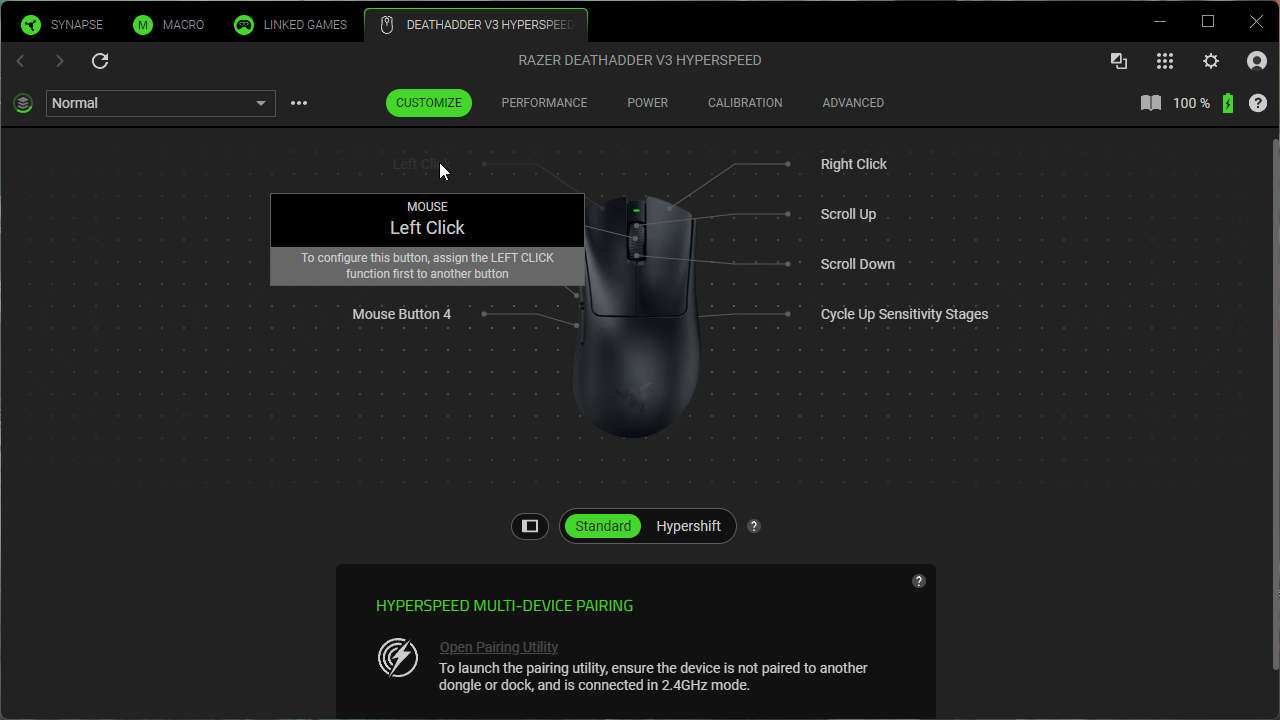
If you want to assign left mouse button into a different function, then you have to assign left click function into a different button first.

If want to reset mouse settings to default click on (?) button next to the battery indicator and click Reset button under Factory reset section.


Hello,


Before it was like this:


Now the button is greyed out.


Do you understand my concern ?


Thanks


FiszPL
Vanguard
Forum|alt.badge.img+1
  • VANGUARD
  • March 12, 2025

You have notification what to do, and why it’s grayed out.

If you want to assign some other function to left mouse button, then you must assign Left click into a different button (in the standard layer, not the hypershift layer). If you’ll have 2 left clicks, then you’ll be able to reassign the left button.


I apreciate your help but It is not normal behaviour, before it was a button i could change etc.


From this thread the mod acknoledge his issue but you just say it is normal… it is not.


see this post, thanks


FiszPL
Vanguard
Forum|alt.badge.img+1
  • VANGUARD
  • Answer
  • March 13, 2025

He didn’t acknowledged that it’s not normal - it’s only Support tech copy-pasta. This thing has been since Synapse 3.

It’s for preventing people completely unbinding left mouse button click, so they’ll left with no click possibility on the mouse (without hard resetting it).

Look, it’s that simple to rebind it, and reuse left mouse button for other function(s):

I only assume, that this function MIGHT be enabled only for mouse that doesn’t have any onboard memory like DeathAdder Essential (so the settings are never stored on the mouse itself). Basilisk X Hyperspeed, Orochi V2 etc. have onboard memory - so it’s just prevention mechanism for these mice.


Hello FiszPL,


Ok i see what you mean, thank you for your time and answer.


Do you know how I can get my normal name on forum for some reason it’s a generic name?


Thank you :)


FiszPL
Vanguard
Forum|alt.badge.img+1
  • VANGUARD
  • March 13, 2025

Hello FiszPL,


Ok i see what you mean, thank you for your time and answer.


Do you know how I can get my normal name on forum for some reason it’s a generic name?


Thank you :)

With name change you probably have to go to RazerID: https://razerid.razer.com/account click on RazerID → change name and save.


Bit of a necro-post but the same thing just happened to me, LMB unbound itself. The Razer software wasn’t even running (I’d disabled it at startup as it’s heavy and bloatsome). Opening the software showed LMB greyed out like yours. 


After rebooting the mouse would work for two minutes, then LMB died again. In another post the generic customer care chat said repair the installation. I tried that, but it didn’t work, no change in function. 


I’ve just uninstalled Synapse entirely and the mouse is now working fine. Unless there’s a specific reason to use Synapse (macros?) I’d bin it, it’s just bloatware.