Razor Nommo V2 Pro Firmware Updater v1.8 failing in control pod | Razer Insider
Skip to main content
Question

Razor Nommo V2 Pro Firmware Updater v1.8 failing in control pod

  • June 4, 2024
  • 5 replies
  • 268 views

VexxDaines

After several tries I was abble to update the speakers, but I cannot update the control pod firmare to v1.8 because I get stuck in this step:
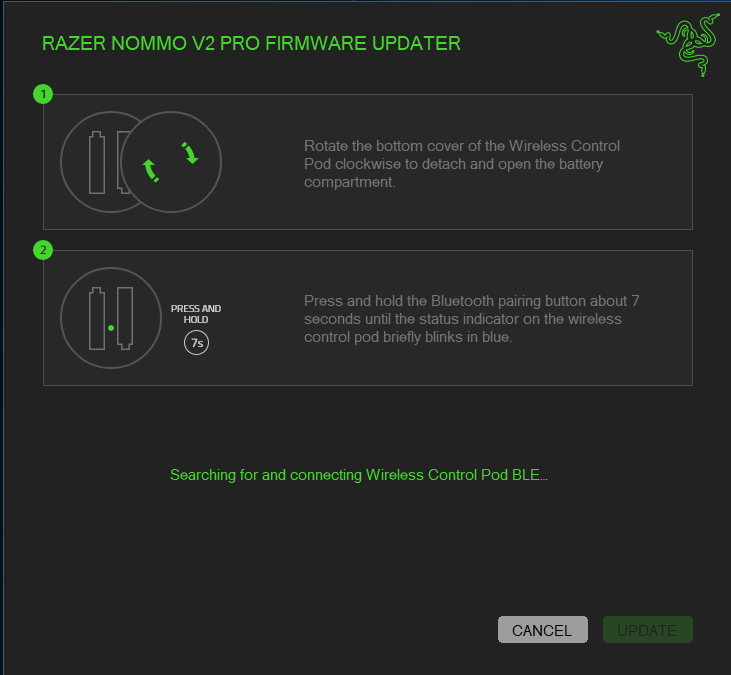


for more that I try, I can´t go further… the led never blinks in blue. It blinks orange…


Does anyone please have a suggestion?


Thanks in advance!
5 Replies

  • Insider Mini
  • June 15, 2024

I was only able to get everything to update by using my laptop.  It would always fail using my desktop. 


VexxDaines
  • Author
  • Insider Mini
  • June 17, 2024

I was only able to get everything to update by using my laptop.  It would always fail using my desktop. 


Which operating systems you use on desktop and laptop? I’m using windows 10 on desktop.


  • Insider Mini
  • June 21, 2024

Windows 11 on both.


PhazerOnest
  • Insider Mini
  • November 23, 2024

I’m having this same issue, although i was able to get one step further having my PC forget the control pod and then reconnecting it via bluetooth through the PC bluetooth settings. However, it is not stuck at 0% in the update.. 

I have had nothing but issues with most of the firmware updates, it always seems to be a process which i don’t understand. 


EDIT - finally got it to pair after like the 7th try.


I spent 5 hours trying to get mine working today to update. My original issue is that the unit wasn’t appearing in Synapse.

Fix for me: disconnect Razor mouse. Update no longer failed and worked first time to update firmware.


I can now see my speakers in Synapse software and change light settings etc.


I hope this helps someone