Secure Boot Violation 15 RZ09-0367BEC3 | Razer Insider
Skip to main content
Question

Secure Boot Violation 15 RZ09-0367BEC3

  • April 25, 2026
  • 2 replies
  • 62 views

​​​​​​

Secure Boot Violation on Razer Blade 15 (2021) RZ09-0367 


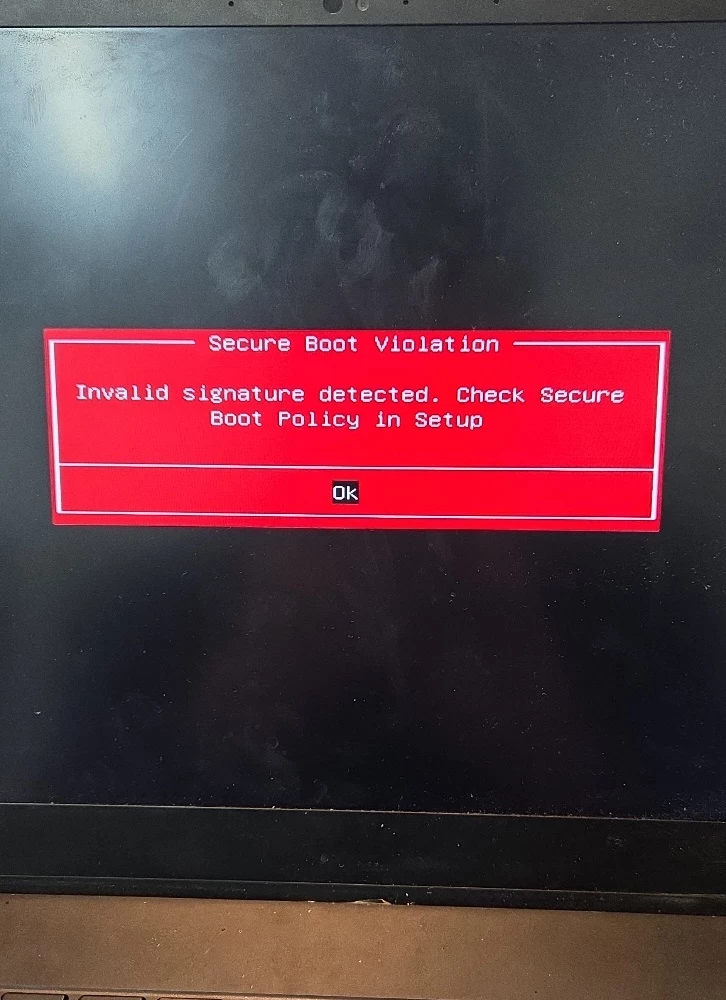
I am experiencing a "Secure Boot Violation" error on my Razer Blade 15 Advanced Model (Early 2021). I would like to resolve this while keeping Secure Boot enabled, but I am stuck with the following issues:


I have tried a bunch of trouble shooting with no progress and the next recommendation is to update the official BIOS firmware to update but I can’t find it. Please explain how to fix this issue 


I have tried bootloader repair. Additionally, I have seen a lot of posts about this that seem like they have been resolved. Why is there not a fix posted publicly on your site to avoid scammers trying to reply? 
This topic has been closed for replies.

2 Replies

  • Author
  • Insider Mini
  • April 26, 2026

Subject: Support Request - Persistent "Secure Boot Violation: Invalid Signature Detected" (Model: RZ09-0367)**

**Device Information:**

 * **Model:** Razer Blade 15 Advanced (Early 2021)

 * **Model Number:** RZ09-0367

 * **BIOS Date:** 03/05/2021

 * **Issue:** Boot-blocking error "Secure Boot Violation: Invalid signature detected. Check Secure Boot Policy in setup" whenever Secure Boot is enabled.

**Summary of Issue:**

I am unable to launch games requiring Secure Boot/Anti-Cheat (e.g., *Call of Duty*) because my laptop fails to boot into Windows when Secure Boot is enabled in the BIOS. The system only boots if Secure Boot is set to "Disabled," which prevents me from playing these games.

**Troubleshooting Steps Already Taken (and Failed):**

I have performed extensive troubleshooting to rule out user-level software errors, but the issue persists:

 * **Disk Configuration:** Confirmed the system drive is correctly formatted as GPT (GUID Partition Table).

 * **Bootloader Repair:** Accessed Windows Recovery Environment (WinRE) to run bcdboot C:\Windows /s S: /f UEFI (successfully repairing/creating boot files) to ensure the bootloader was correctly signed.

 * **BIOS Settings:** Verified that the BIOS is set to UEFI mode (no legacy/CSM options exist to toggle).

 * **Key Management:** Attempted to navigate BIOS security settings to "Restore Factory Keys," but no such options are available in my current firmware version (1.03/2021).

**Observations:**

I am aware that this is a documented issue for the Razer Blade 15 (2021) model line, often triggered by recent Windows security updates which appear to conflict with the older 2021-era BIOS/Secure Boot keys. Because I cannot manually "Restore Factory Keys" or "Reset to Setup Mode" in my current BIOS interface, and standard bootloader repairs have failed, I am requesting assistance with a firmware-level solution, such as a verified BIOS update or a specific recovery procedure for this known Secure Boot key invalidation.

Please advise on the next steps to resolve this firmware conflict.


Razer.ScarletRouge

Hey there, ​@Srfuscg 

Thank you for sharing your concern here. I understand that you are experiencing a secure boot violation error with your Razer Blade 15. Please try these troubleshooting steps below to help resolve your concern:  


1. Get an empty USB Thumb Drive

2. Disable the secure boot in BIOS, power up the system

3. Run Command Prompt as Administrator In a command window, copy the recovery app to the USB Thumb drive using the following commands (assuming the USB Thumb drive is the “D:” drive). Type each command separately and then press Enter:


md D:\EFI\BOOT


copy C:\windows\boot\efi\securebootrecovery.efi D:\efi\boot\bootx64.efi


4. Enable secure boot in BIOS

5. Insert the flash drive, restart the device, press F12 and select boot from the flash drive.

6. Follow on screen instruction


Issue should be resolved. If the issue come back after user disconnect power adaptor for more than 20s, that means the CMOS battery is no longer working, and user need to change that. 


If the issue persists after performing the troubleshooting steps, please send me a private message along with your device's serial number so I can check its details here in our system and assist you further. Thank you!


*Thread locked to curb conversation to PM.