Tartarus Pro: This mapping requires Razer Synapse | Razer Insider
Skip to main content
Question

Tartarus Pro: This mapping requires Razer Synapse

  • Sep 20, 2026 10:53 PM UTC
  • 10 replies
  • 284 views

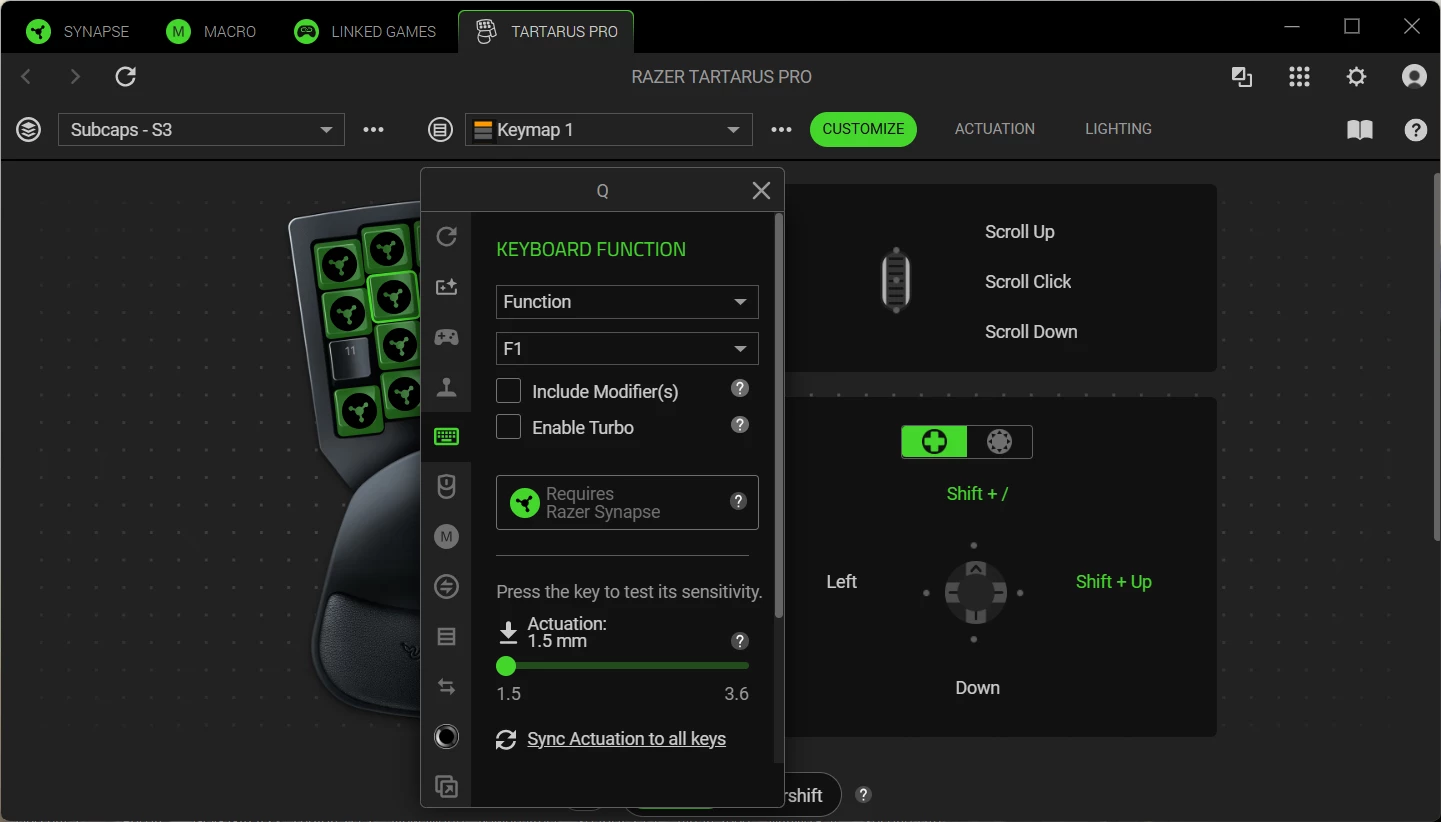
I am unable to use my Tartatus Pro key functions. It says here “This mapping requires Razer Synapse” but I already have Razer Synapse? The application says I am using Razer Synapse now. Please clarify what is going on and what to do. Thanks

10 Replies

FiszPL
Vanguard
Forum|alt.badge.img+1
  • VANGUARD
  • Sep 21, 2026 6:20 AM UTC

It’s just an notification, that macro requires Synapse to be running (in bg) to work properly. If you’ll close synapse from tray for eg - macro/keybind will not work.


Ok I plugged it in, it detects the device, Synapse is running, but when I press the keys nothing happens?


FiszPL
Vanguard
Forum|alt.badge.img+1
  • VANGUARD
  • Sep 22, 2026 3:00 PM UTC

Any screenshot from synapse how or what is configured?


F1, F2, F3, F4

Alt+F1, Alt+F2, Alt+F3, Alt+ F4

Ctrl+F1, Ctrl+F2, Ctrl+F3


L4WDogg
  • Insider Mini
  • Sep 23, 2026 4:58 PM UTC

I am having the same issue….Just started doing it a few days ago. I contacted razer support and after couple of days waiting and dancing around with them they forwarded the ticket to there software support….I am not expected to hear anything back or if I do it will most likely be same suggestions to fix it that i have already tried multiple times…..

Maybe it’s time to jump off the RAZER train and use different peripherals 


FiszPL
Vanguard
Forum|alt.badge.img+1
  • VANGUARD
  • Sep 25, 2026 5:13 AM UTC

​@Razer.Ten ​@Razer.ScarletRouge - could you look at this? Seems to be some Synapse bug?


  • Insider Mini
  • Oct 7, 2026 6:02 AM UTC

i have the same porblem do we have a fix already. its getting anoying.


I am having the same issue….Just started doing it a few days ago. I contacted razer support and after couple of days waiting and dancing around with them they forwarded the ticket to there software support….I am not expected to hear anything back or if I do it will most likely be same suggestions to fix it that i have already tried multiple times…..

Maybe it’s time to jump off the RAZER train and use different peripherals 


Yeah, I’ve been on and off with support on this for a year, seems every *New update* makes a new issue, or brings back an old issue, and I spend hours with support staff trying the same “Uninstall”, “Re-install”, “Clean up” with no resolutions most of the time, and sometimes my ticket just gets closed without any progress . . . 
Everything worked fine on Synapse 3, but ever since they put out Synapse 4 its just been constant issue for me.
My Red-Dragon products have onboard memory so theres no issues like this, so I’d recommend that strongly!


Rabapab
  • Insider Mini
  • Nov 11, 2026 2:11 AM UTC

Yeah it is completely broken, I cannot even create a new profile.  Way to go with the software there Razer.


  • Insider Mini
  • Nov 16, 2026 12:51 PM UTC

Same problem here. I’ve rebuilt macro’s and reprogrammed the buttons. Nothing has worked.