The analog thumbstick of the Razer Tartarus Pro V2 (released in September 2026) is physically rotated 90° counter clockwise. | Razer Insider
Skip to main content
Question

The analog thumbstick of the Razer Tartarus Pro V2 (released in September 2026) is physically rotated 90° counter clockwise.

  • September 21, 2026
  • 9 replies
  • 147 views

Behelith

The analog thumbstick of the Razer Tartarus Pro V2 (released in September 2026) is physically rotated 90° counter-clockwise. The X-axis is up-down and the Y-axis is forward back. This is counter intuitive because you have to move your thumb left-right to go forwards and backwards. The previous version of the Tartarus Pro had the orientation correct. Most people on reddit and YT-streamers mention this as well. There is also no way to change/correct the rotation of the axis in Synapse. There definitely has to be a solution for this issue, e.g. firmware update.

9 Replies

Behelith
  • Author
  • Insider Mini
  • September 21, 2026

Also, the thumbstick is the left stick for aiming instead of the right stick for movement. People using a gamepad like the Tartarus use a mouse for movement (facepalm). We have only five fingers on each hand and one of those fingers is made completely useless on your device that has 31 buttons and a joystick… who makes these kind of design decisions/mistakes?


Lrbrownii
  • Insider
  • September 22, 2026

This all goes back to the programming of the Tartarus V2, which carried over to the Tartarus Pro. When 4-way keys are bound, Synapse should support autofilling the diagonals, or at minimum let the user manually assign two keys to a diagonal input — currently neither option exists. To get around this, I built my own 8-way keybinds outside of Synapse — but unfortunately, that isn't allowed in games with anti-cheat software, so it's not a real fix.
This is one of the biggest oversights in Synapse yet. On top of that, my Razer Chroma Addressable RGB Controller works perfectly fine in 3rd party software, but loses its settings the moment Synapse is involved. I've already raised this exact issue before and asked for it to be fixed — and it still hasn't been.
Looks like I'll need to return this — even if these issues get fixed, the device still requires Synapse to function at all for thumbstick movement set as 8-way. This sucks!


Lrbrownii
  • Insider
  • September 22, 2026

They also broke the way Chroma light strip set would automatically connect and use mobile settings after PC shutdown. Freyja can be controlled from volume mixer cutting into it's ability to keep consistent haptic feedback. This should not be. Manually changing lighting on Nommo v2 no longer works to have the speakers on with PC off and get black lighting. Chroma Addressable RGB controller does not keep settings after shutdown. Z690 labeled as such only has features of the x570. Why did I do this? This whole ecosystem sucks now.


  • Insider Mini
  • September 24, 2026

Just got the new V2 Pro and it’s unusable. The Older Tartarus thumbstick was oriented correctly. Now I have years of muscle memory that fight me.

Y’all need to rush a firmware update. I love my Tartarus and was excited to hop on this new version, but I can’t use it. For now I am refunding. When/If you fix it I will revisit. 


Lrbrownii
  • Insider
  • September 24, 2026

27 days to drop off at Kohl's. I think at this point I need to return. With the above listed issues I will not be able to use this anyway. I am now seeing if I can apply my fix to Tartarus pro and v2.


  • Insider Mini
  • September 24, 2026

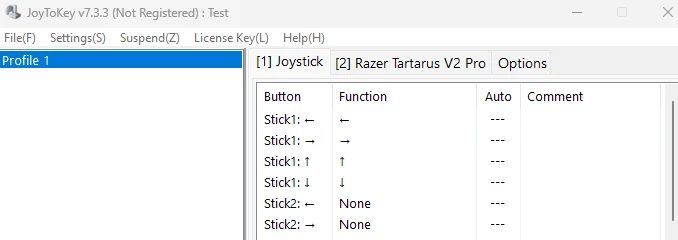
I used JoyToKey to re-map the inputs. Set the Tartarus Pro V2 thumbstick to True analog and use the JoyToKey UI to match the natural direction you want to move. It’s a hack, but hopefully can hold me over until Razer [hopefully] fixes this. 


Lrbrownii
  • Insider
  • September 24, 2026

I used JoyToKey to re-map the inputs. Set the Tartarus Pro V2 thumbstick to True analog and use the JoyToKey UI to match the natural direction you want to move. It’s a hack, but hopefully can hold me over until Razer [hopefully] fixes this. 

I asked for the abilty to bind the 8 way keys diagonals in 2017. Still can't. I have lost all faith in this company after Synapse 4 release. 18 months I asked for help on devices moving from saved position in Studio. Report after report just to get attention. Never again.


Lrbrownii
  • Insider
  • September 24, 2026

In the process of getting proper support for the Studio issue they created 11 other bugs. Really screwed up my whole setup.


+1 

Please let us configure the analog Joystick to a right or a left stick in Synapse 4, and let us configure the orientation of the analog Joystick. 

If it can help, I manage to configure the analog Joystick as a left stick with joytokey, and with functionnal diagonals. In Synapse, the analog joystick is in default 8-way input. In Joytokey,  in settings/configure joysticks I select Experimental Logic (Beta) for Input device types. In the main window, I then setup Stick1 (left, right, up, down) to the keyboard arrow keys. Then I configure the mouvements in the games  with these arrows. It works with WoW Forever for example or Roboquest.