

"Windows Dynamic Lighting is currently controlling your device's lighting" error | Razer Insider
Skip to main content
Question

"Windows Dynamic Lighting is currently controlling your device's lighting" error

  • April 4, 2025
  • 3 replies
  • 373 views

I am running Windows 10 Home (version 22H2, OS build 19045.5608) on the following PC:

Intel(R) Core(TM) i5-4690K CPU @ 3.50GHz   3.50 GHz
Installed RAM    16.0 GB (15.9 GB usable)
System type    64-bit operating system, x64-based processor
 

I have started getting the following error message from Razer Synapse Chroma Visualizer:

Windows Dynamic Lighting is currently controlling your device’s lighting. To disable this feature, go to Synapse Settings.”

The link to Synapse Settings does not work.

There appears to be a second error message behind this but I cannot click to remove the first one:
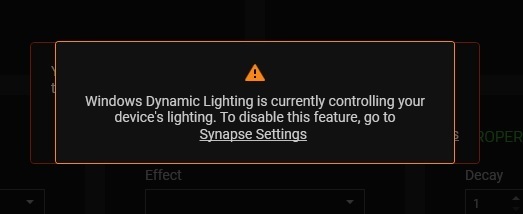
How do I turn off Windows Dynamic Lighting? My keyboard (a Razer Ornata Chroma) is now lit up like a Christmas tree because I can’t turn off the default lighting cycle.

3 Replies

  • Insider Mini
  • April 8, 2025

I've got the same issue since today (but on Windows 11)


Shirokaido09
  • Insider Mini
  • August 5, 2025

Have either of you found any fixes for this? I’ve got 10+ things on Chroma so my living room looks like a lightshow 


  • Insider Mini
  • August 17, 2025

I have same issue with my Razer Huntsman V3 Pro. Just suddenly lighs stopped working.. I turned off windows 11 new dynamic lightings settiings but still not working. sometimes i get lights when i got under settings and tap dynamic lighting to chroma rbg and back.. also lights go on during boot and loading windows on startup but shutdown as soon as something assumed windows dynamic lighting takes control..