
Synapse for Windows - V4.0.86.2610281118 / Chroma for Windows - V4.0.63.2610281118
RELEASE NOTES
29 OCTOBER 2026

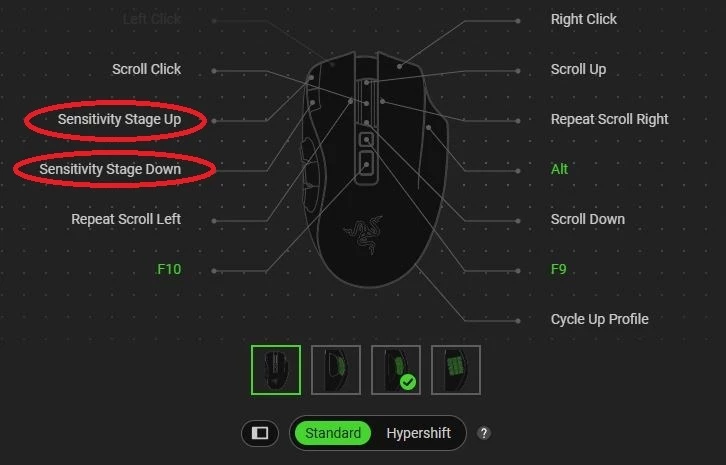
- Key mapping issues for certain mice on specific reassignment scenarios
- Razer Naga Hex V2
- Razer Mamba TE
- Razer Naga Chroma
- Razer Basilisk Mobile
- Razer DeathAdder V2 X HyperSpeed
- Razer Naga V3 Pro
PREVIOUS RELEASE NOTES
28 OCTOBER 2026
- Stability & Reliability
- App Launch & Crashes
- Chroma App dashboard could fail to load and show an error pop-up
- Synapse could crash when closing or restarting the app
- Using the Text function on a button could crash the app
- Macro module could crash after putting a folder inside another folder and opening a macro in it
- Settings page could appear empty
- Synapse window could open off-screen after being minimized
- Fixed a background service crash on certain laptops
- Synapse and Chroma App did not ask you to restart your PC when an install needed one
- App Launch & Crashes
- Device Detection & Connectivity
- When two of the same device were connected, only one appeared on the Synapse and Chroma App dashboards
- Chroma App dashboard showed an extra mouse tile that Synapse did not
- Xbox controller tile showed the wrong name, or overlapped other tiles when similar controllers were connected
- Devices could repeatedly reset when Windows reported many connection events in a short time
- Certain mice showed the wrong product name in Windows Device Manager
- Certain keyboards were wrongly detected as Sensa HD haptic devices
- On laptops, some keyboard features stayed locked to Synapse after closing Synapse through Task Manager
- Multi-Device Pairing
- Synapse did not update when a mouse was paired to a different receiver
- A previously paired device still showed on the pairing page after being paired elsewhere
- Device tab could appear twice after opening the pairing utility
- Devices connected through a multi-device receiver were not available to Chroma-enabled apps and games
- Chroma RGB
- Brightness Controls
- On laptops, brightness jumped back to 100% after turning it off with FN+F11 and moving the slider
- Brightness settings on certain speakers did not sync after powering on and opening Synapse
- Lighting Effects
- Lighting effects did not apply to media and volume keys on certain keyboards
- Changing the lighting effect on certain laptops applied the previous effect instead of the one you picked
- RGB lighting could freeze until the device was unplugged and plugged back in
- Lighting could stutter after the monitor woke from sleep on certain mice connected through a wireless charging mouse mat
- Reactive effect did not trigger when pressing the sensitivity up/down buttons on certain mice
- Lighting did not work properly on certain soundbars
- "Switch off lighting when idle" did not work on certain headsets and speakers
- "Prioritize effect" option on certain charging docks stopped working after sleep or locking the PC
- Wave quick effect showed the wrong colors
- Chroma Studio
- LED strips on the Chroma Hardware Development Kit stacked on top of each other when switching lighting profiles
- After using Undo with the Pen or Paint Bucket tool, the next color you painted came out blank
- Chroma Connect devices did not come back in Chroma Studio after being turned back on
- Devices could not be positioned on certain mouse mats
- Certain older laptops were not detected in Chroma Studio
- "ALL" in Quick Selections stayed partly selected even after selecting everything
- Brightness Controls
- Key Mapping & Customization
- Button Remapping
- Turbo options were missing for the scroll down function on certain mice
- High resolution scrolling turned itself off after reopening Synapse on certain mice
- Buttons could not be customized on certain mice because the tab appeared blank
- Scroll up/down stopped working when certain buttons were remapped
- Scroll Mode button only reacted after the button was released
- Using FN shortcuts after opening Synapse could mix up keys on certain keyboards
- Default secondary functions stopped working on some keys after closing Synapse
- FN sleep shortcuts did not work after closing Synapse on certain keyboards
- Settings were not kept on certain keyboards
- The "Factory Default" profile could be edited on certain keyboards
- A blank function could be saved without picking a button after moving the actuation slider
- Keypads (D-pad & Joystick)
- The joystick stopped working after pressing keys assigned to diagonal directions
- The D-pad could stop working, or act as a joystick instead of keyboard keys in 4-direction mode
- Pressing key 12 also pressed key 13
- Wrong keymap indicator was shown
- Switching keymaps could lag or freeze
- A switch-keymap macro on the joystick stopped working after importing a profile
- Turbo & Repeat Scroll
- Turbo clicked faster than the speed you set on certain mice
- High turbo speeds (20 clicks per second) did not apply correctly
- Scroll with Turbo was changed into Repeat Scroll after saving, and Repeat Scroll could change back to normal Scroll after reopening Synapse
- Repeat Scroll incorrectly offered a Turbo option
- Repeat Scroll at high Turbo speeds could cause stuttering and a system beep
- Hypershift
- Hypershift shortcut no longer cycled monitor light bar profiles
- Macro Keybinds page went blank after assigning a macro to Left Click in Hypershift
- Macros
- Macros could fail to work in-game on certain mice
- Text function did not work in certain games
- Macro delay changed by the wrong amount when using the arrows, and values starting with 0.0 could not be typed in
- Randomized delay could not be set below 1 second, and some delay settings showed the wrong default values
- Start delay countdown stopped after switching between Standard and Sequence macros
- Setting Right Shift as the shortcut key did not stop macro recording
- Recorded macros could get the wrong name
- Duplicating a macro also copied its device assignments
- On-The-Fly Macros could be assigned to the Multi-Functional Button by double or triple tapping
- "Requires Synapse" label was missing on some buttons with macros, and wrongly shown for macros with only mouse clicks or scrolls
- Macros on side panel buttons or D-pad buttons were missing or showed the wrong message in Macro Keybinds
- Playback options were missing after choosing the Queue option for scroll up/down
- Phased Macros: could be assigned to keys that can't be clicked, could hold other macros, and could be saved again with no changes
- Actuation & Rapid Trigger
- Actuation and Rapid Trigger stopped working after clicking "Reset To Default"
- Default actuation behavior was wrong on certain analog keyboards
- Actuation and Rapid Trigger changes made on the keyboard itself did not show in Synapse
- AI Prompt Master
- Could not log in to ChatGPT
- AI Prompt Master pop-up did not respond to clicks
- Button Remapping
- Audio & Sound
- THX Spatial Audio
- THX icon was missing on game profile tiles for supported games
- Headsets
- Active Noise Cancellation (ANC) did not work on certain headsets
- Sidetone did not turn on if the headset was muted before turning it off and on again
- EQ settings and mic preview did not work on certain headsets
- Microphones
- Settings could not be changed on certain microphones
- Double/triple tap shortcuts for mute and volume did not work correctly on certain microphones
- Audio Mixers
- Muting one channel muted all channels after the PC woke from sleep
- Mic Monitoring stopped working after the PC woke from sleep
- Audio activity still showed on channels set to 0
- The page could not be scrolled after setting a mixer value to 100
- Sensa HD (Haptics)
- Global Audio-to-Haptics (A2H) setting did not stay in sync between Synapse, Chroma App and each device
- Haptics settings did not sync when two haptic devices were connected
- Haptic feedback could lag behind the audio
- Mood Analyzer took longer than expected to turn on
- Mood Analyzer and Screen Sync were wrongly listed as Sensa HD games
- THX Spatial Audio
- Cameras
- Certain webcams could not save settings and showed an overexposed image
- Certain webcams could freeze after about 30 minutes of use
- Performance & Hardware Controls
- DPI & Polling Rate
- On-The-Fly Sensitivity and Sensitivity Clutch could only go up to 16000 DPI on certain mice
- Default and minimum sensitivity values were wrong on certain mice
- High polling rate was not kept after closing Synapse on certain keyboards
- Smart Tracking could not be reset on certain mice
- Laptop Performance (Blade series)
- Typing a value into the CPU Overclock box did not update it
- Manual fan speed did not work with lower-powered chargers
- Battery Health Optimizer checkbox did not untick after reaching 100% charge
- Hyperboost was shown on laptops that don't support it
- GPU frequency and temperature were missing for certain GPUs
- Smart Fan Curve on certain laptop cooling pads defaulted to the wrong fan speed
- DPI & Polling Rate
- Profiles & Settings
- Game-linked profiles could switch at the wrong time or go back to default during gameplay
- Game-linked profiles for games on an external drive had to be added again
- Switching to a Guest account replaced its profiles with your Razer ID's game-linked profiles
- Lighting on certain keyboards switched back to a quick effect when Synapse opened
- Two calibrated profiles could get the same name and could not be renamed
- Color profiles did not show up on certain laptops
- Alexa did not keep you signed in after installation
- UI/UX
- General UI improvements across devices and modules, including:
- Tooltips that were blank, flickering, cut off or in the wrong position
- Missing or wrong device images and icons
- Text and widgets that overlapped, were misaligned or had uneven spacing
- Notifications that overlapped or were missing text
- Buttons that did not highlight on hover
- General UI improvements across devices and modules, including:
- Localization
- Wrong product and edition names in Simplified Chinese, including during device installation and in Chroma Studio
- Missing translations for AI Prompt Master, AI Launcher, Macro settings, Stream Mixer, Impact Engine, Chroma and Sensa Immersive Experience, and Analog keyboard tooltips
- Laptop performance mode pop-ups and on-screen messages were not translated
- Searched mouse functions and "Launch Windows Copilot" were not translated
- Fixed cramped or cut-off translated text in some languages

- Lower memory usage when Synapse and Chroma App are open or minimized
- Finer macro delay control (adjust in 0.001-second steps)
- Improved Boss Key widget on certain mice