

- Home
- Community Overview
- The Razer Armory
- Systems
- I present to you Firebat's Blade 15! (144hz/i7-8750H)
I present to you Firebat's Blade 15! (144hz/i7-8750H)
- May 24, 2018
- 447 replies
- 1341 views



- The One
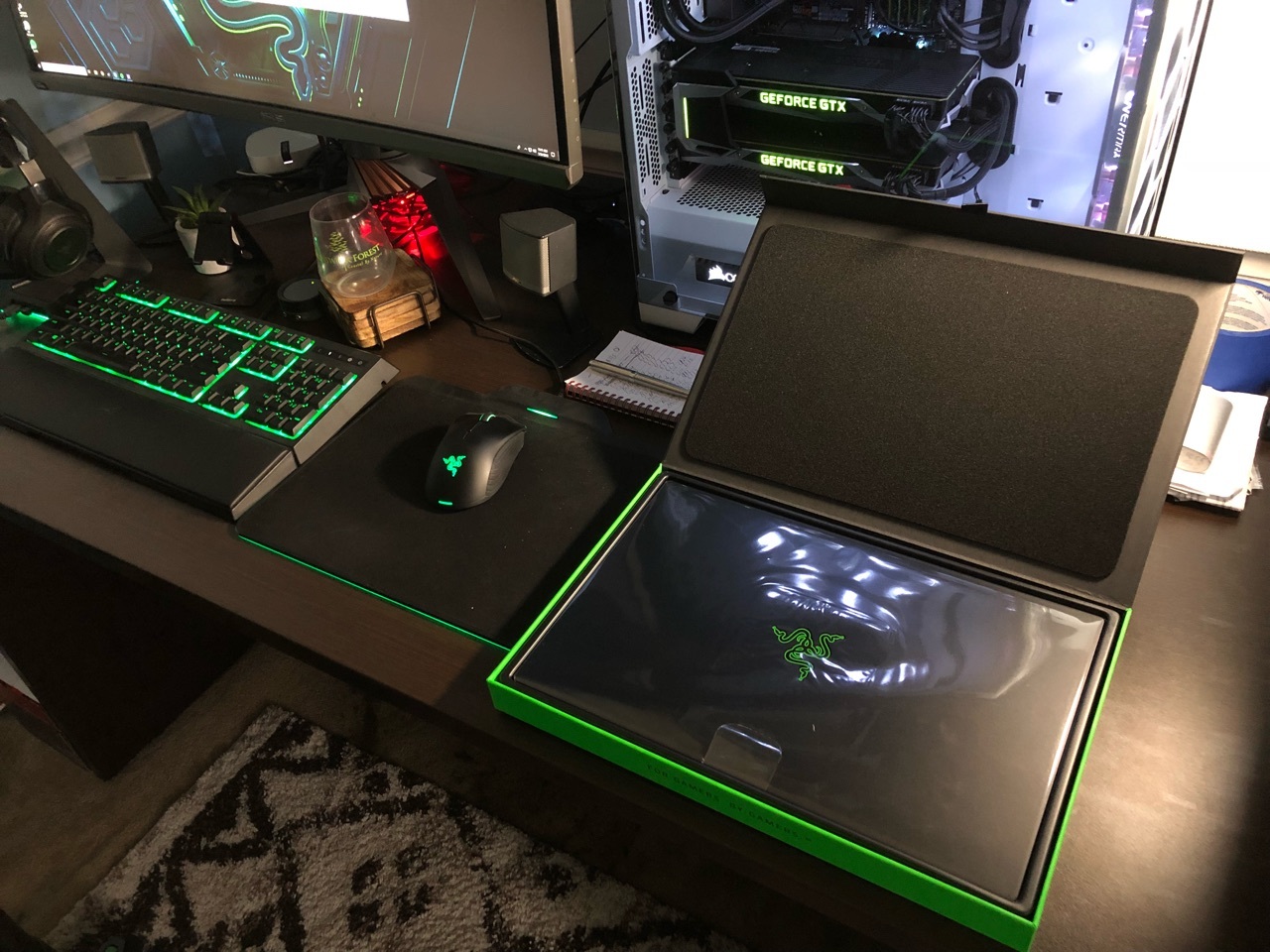
Hey everyone i'm happy to announce I received my Blade today! I will do my best to answer questions about it. Hopefully this thread gets some traction so we can use is as an information thread/comparison thread. Post pictures when you get your Blade etc. Let the games begin!
This topic has been closed for replies.
447 Replies
- Author
- The One
- August 8, 2018
JoikansaiWhen you get the chance send over your data with pictures. Short and sweet but showing the issues. I know you have been a big contributor with all the data you have.. I just need to get it all in one place so I can forward it. Could be via PM or on this thread.
Anyone should have it;) I’d like to share but now I let my Blade take his summer vacation at home after finishing Far Cry 5:), I’ll be back next weekend, I think till then someone should sharing that. I believe it’s unlocked somehow to throttle to 45 Watt on gaming mode and 35 watt on balanced mode after around 10 second on higher wattage, correct me if I’m wrong. I think they make it to keep lower temperature and quite Fans for Blade longevity, I wonder if the cpu could stay longer on high frequency, it’ll easily get full gtx 1070 laptops, since gpu performance is already blown away other maxq 1070 laptops, well at least on mine.

- Community Ranger
- August 8, 2018
Jump to 18:00 it’ll show how it throttles even on low temperature. Pretty sure they put “special break” to specific wattage on each synapse profile somehow.
Razer Blade 14 2021 QHD 165Hz | Ryzen 9 5900HX| RTX 3070 100W | 16GB DDR4 3200MHz | 1TB l Razer Blade 15 Advanced 2018 FHD 144Hz | i7-8750H | GTX 1070MQ | 16GB DDR4 2666MHz | 256 GB Corev2 | RTX 3070 Zotac Twin Edge OC | Razer Book 13 2020 FHD | i7-1165g7 | Intel Xe 96EU | 16GB LPDDR4X 4266MHz | 1Tb GB Razer Core V2 | RTX3070 | Zotac TwinOC Razer | Blade Stealth 13 2019 FHD | i7-1065g7 | GTX 1650MQ | 16GB LPDDR4 3744MHz | 512 GB | | Blade 14 2017 FHD | i7-7700HQ | GTX 1060 | 16GB DDR4 2400MHz | 512 GB | Razer Blade Stealth V2 2016 12,5 QHD | i7-7500U | HD620 | 8GB DDR3 1866MHz | 128 GB | | Blade 14 2015 IGZO QHD+ | i7–4720HQ | GT970M 3GB VRAM| 16GB DDR4 2400MHz | 256 GB | Razer Edge 2013 | i5-3317U | GT 640LE | 16GB DDR3 | 128 GB | Razer Phone 2| Razer Phone L33T Edition

- Insider
- August 9, 2018
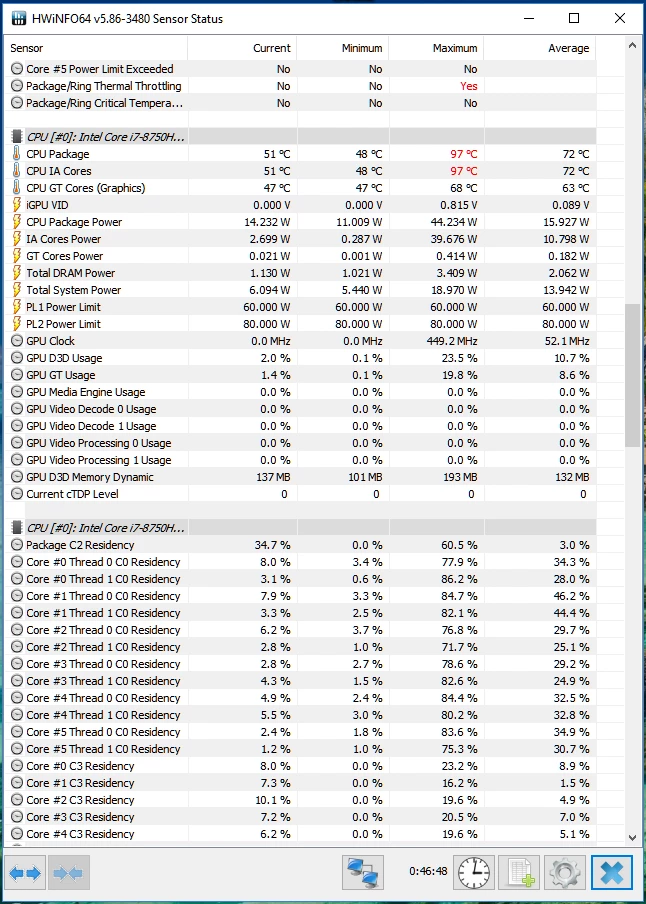
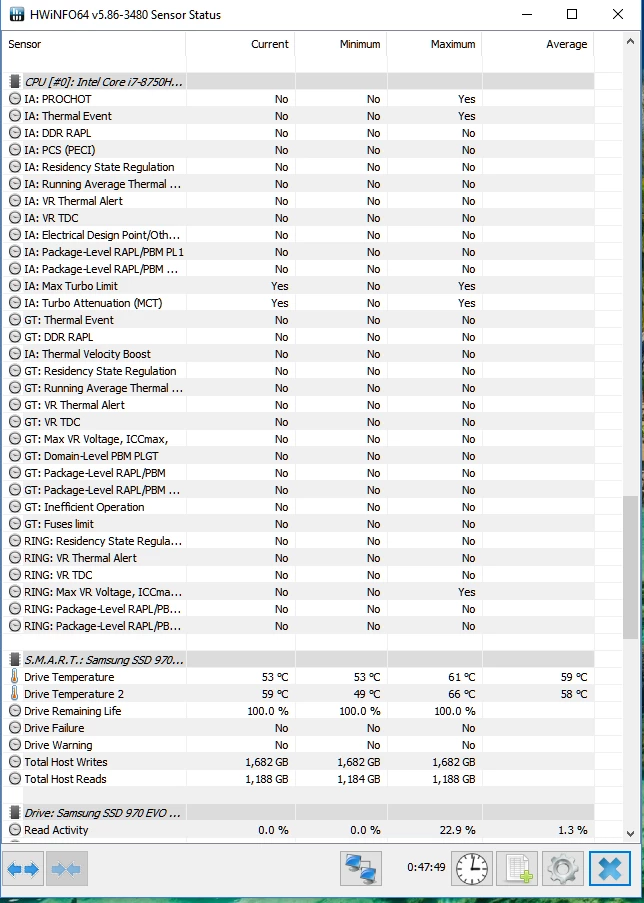
Here is some data from playing Doom for the last 45 minutes.
Patrick

- Author
- The One
- August 9, 2018
GR8-RideThanks for the info.. we are going to need a graph showing how your clock speeds were doing throughout. XTU is best for this.. just to keep everything streamlined if you don't mind! Thanks again! Make sure to check the boxes in XTU that will show the power limit and thermal throttling so we can see each.
Here is some data from playing Doom for the last 45 minutes. Patrick
- August 9, 2018
GR8-RideGreat info, thanks Patrick Do you find it changes much between balanced and gaming mode - I heard that balanced mode power limits the CPU to 35W (which should keep it cooler) - and gaming overclocks the GPU etc If you ever want a good way to check for yourself - when I was heat testing laptops I would check the save to a file button, play the game and then open in excel* other spreadsheets are available (as it saves as a CSV) You can then use "conditional formatting" to mark in orange anything between 90-95 and red at 95+ You can also do red for thermal throttling etc by doing conditional formatting on yes/true. Then a quick scan down the spreadsheet shows you how often its happening and if undervolting etc helps. It will give you a good idea of how much it's throttling/heating - I also say this for reassurance that the Razer is the right purchase as you may hear a lot of people kick off about anything over 90C Pretty much ALL the intel chips seem to be running too hot ATM. I've sent back 5 different ones for overheating (the zephyrus hit 107C after 10 mins in an airconditioned room when playing Origins)! It was only after I bought an MSI Titan and sent it back because it also overheated (With all that size and cooling) that I realised it's an Intel problem, not a design issue In the end I figured if I was going to have to undervolt, and aggressively cool a laptop when gaming regardless of which one I buy I may as well go for the nicest one available and am waiting for the 15 to be available in the UK
Here is some data from playing Doom for the last 45 minutes. Patrick

- Insider Mini
- August 11, 2018
I have 4 Blade 15's and I never seem to be able to get past 3.88Ghz. Only once did I ever see one it hit 4.1Ghz. Even with liquid metal repaste one two and upgraded thermal pads upgrades to all of them to where I never hit a thermal limit.
I'll grab some hardware info while playing some games, and XTU graphs.
Founder of Projekt Gaming, an esports organization.
Systems:
Blade 15 Advanced | Mid 2019
Blade 15 | 2018
Blade | mid-2016
Blade | 2016
Edge Pro | 2013
Core v2
Core v1
Sila (x3 Mesh Network wired backhaul)
Keyboards:
Huntsman (Green switches)
Hunstman Tournamant Edition (Red switches)
Hunstman Mini (Analog switches)
Orbweaver Chroma (Green switches)
Tartarus Pro (Analog switches)
BlackWidow Tournament Edition Chroma w/ Metal Keycap kit (Green switches)
Mice & Mats:
Basilisk Ultimate
Basilisk X Hyperspeed
Lancehead v2
Lancehead v1
Mouse Pouch v1 x2
Mouse Pouch v2 x2
Mouse Bungee V3 Chroma
Mouse Dock Chroma
Goliathus Extended Chroma
Goliathus Mobile Stealth Edition
Firefly Hard Edition
Phones:
Phone 2
Phone
Wireless Charger
Junglecat
Finger sleeve
Phone Cooler Chroma
Broadcast:
Siren Pro
Siren
Ripsaw (x3)
Ringlight
Kiyo Pro
Kiyo
Stargazer
Casual Gaming, Controllers, Audio etc:
Forge TV
Serval
Sabertooth
Raiju Mobile
Junglecat
Kishi
Analog Stick Rubber Grip Caps for Gamepad Control
- Author
- The One
- August 11, 2018
Ganym3de3.88 (3.9ghz) is max clock for running 6 cores. You would have to disable 2 of the cores or 4 of the cores to get to 4-4.1ghz. If you are steady at 3.8~ that's a good thing. Would just like to see this consistent during some demanding games.
I have 4 Blade 15's and I never seem to be able to get past 3.88Ghz. Only once did I ever see one it hit 4.1Ghz. Even with liquid metal repaste one two and upgraded thermal pads upgrades to all of them to where I never hit a thermal limit. I'll grab some hardware info while playing some games, and XTU graphs.
- Community Ranger
- August 11, 2018
Firebat246I was accidentally hitting 4,1, the secret is that I didn’t use it for a week during my holiday;) I checked when first back to home on Firestrike but after that it back again to 3,9. Btw here my xtu screen shoot, it shows even 70ish low temperature there’s still power limit throttling.
3.88 (3.9ghz) is max clock for running 6 cores. You would have to disable 2 of the cores or 4 of the cores to get to 4-4.1ghz. If you are steady at 3.8~ that's a good thing. Would just like to see this consistent during some demanding games.
Razer Blade 14 2021 QHD 165Hz | Ryzen 9 5900HX| RTX 3070 100W | 16GB DDR4 3200MHz | 1TB l Razer Blade 15 Advanced 2018 FHD 144Hz | i7-8750H | GTX 1070MQ | 16GB DDR4 2666MHz | 256 GB Corev2 | RTX 3070 Zotac Twin Edge OC | Razer Book 13 2020 FHD | i7-1165g7 | Intel Xe 96EU | 16GB LPDDR4X 4266MHz | 1Tb GB Razer Core V2 | RTX3070 | Zotac TwinOC Razer | Blade Stealth 13 2019 FHD | i7-1065g7 | GTX 1650MQ | 16GB LPDDR4 3744MHz | 512 GB | | Blade 14 2017 FHD | i7-7700HQ | GTX 1060 | 16GB DDR4 2400MHz | 512 GB | Razer Blade Stealth V2 2016 12,5 QHD | i7-7500U | HD620 | 8GB DDR3 1866MHz | 128 GB | | Blade 14 2015 IGZO QHD+ | i7–4720HQ | GT970M 3GB VRAM| 16GB DDR4 2400MHz | 256 GB | Razer Edge 2013 | i5-3317U | GT 640LE | 16GB DDR3 | 128 GB | Razer Phone 2| Razer Phone L33T Edition
- Insider
- August 14, 2018
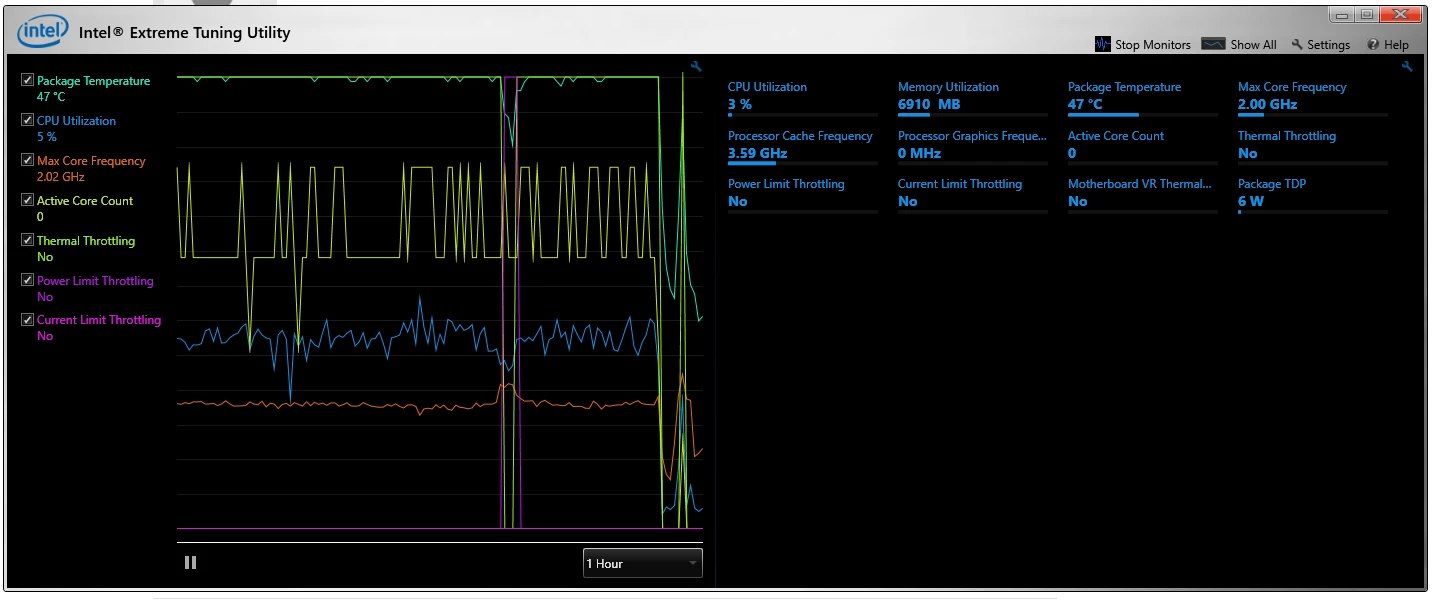
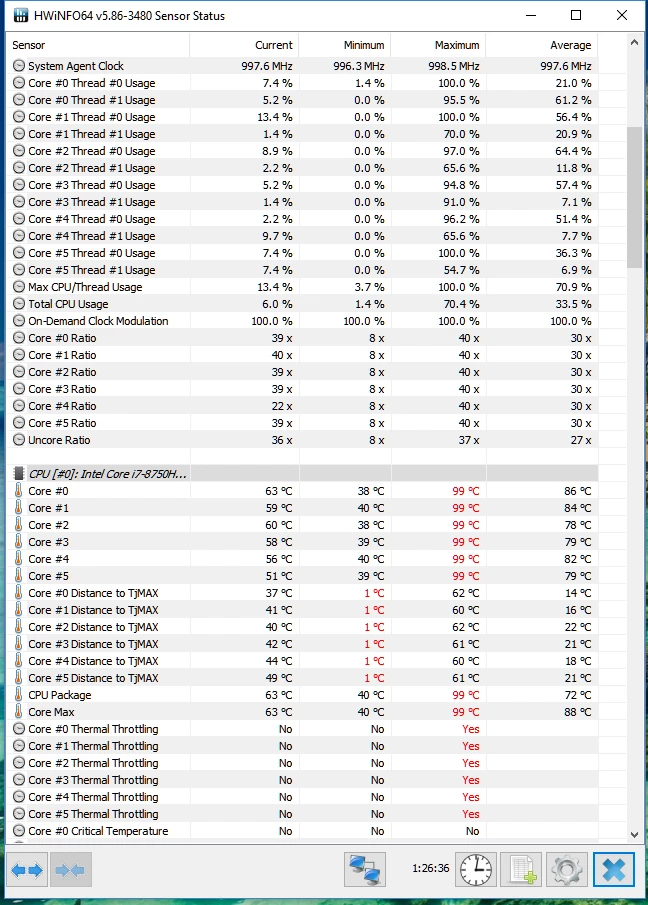
Firebat246Hopefully this is more what you're looking for. This shows one instance over the past hour of Power Limit throttling, on a bone stock Blade 15 (no undervolt etc). Patrick
Thanks for the info.. we are going to need a graph showing how your clock speeds were doing throughout. XTU is best for this.. just to keep everything streamlined if you don't mind! Thanks again! Make sure to check the boxes in XTU that will show the power limit and thermal throttling so we can see each.
- Community Ranger
- August 14, 2018
GR8-RideI believe there’s power limit throttling but on that screen I couldn’t fine any that shows it. It’s more thermal throttling proof. I never use default setting, always undervolting my Blade, but I’ll check. Though for doom i think it’s too high even on default. How high is ambient temperature? Power limit throttling can be solved with bios tweak like on gs65, but for avoiding such thermal throttle I think Razer lock it. Even seems every laptop not only Razer has various temperature. Note that Blade 15 gpu outperform other maxq laptops because gpu wattage is higher. With proper cooling and “right device“ Blade 15 can perform similar with full 1070 laptops. Source: me.
Hopefully this is more what you're looking for. This shows one instance over the past hour of Power Limit throttling, on a bone stock Blade 15 (no undervolt etc). Patrick
Razer Blade 14 2021 QHD 165Hz | Ryzen 9 5900HX| RTX 3070 100W | 16GB DDR4 3200MHz | 1TB l Razer Blade 15 Advanced 2018 FHD 144Hz | i7-8750H | GTX 1070MQ | 16GB DDR4 2666MHz | 256 GB Corev2 | RTX 3070 Zotac Twin Edge OC | Razer Book 13 2020 FHD | i7-1165g7 | Intel Xe 96EU | 16GB LPDDR4X 4266MHz | 1Tb GB Razer Core V2 | RTX3070 | Zotac TwinOC Razer | Blade Stealth 13 2019 FHD | i7-1065g7 | GTX 1650MQ | 16GB LPDDR4 3744MHz | 512 GB | | Blade 14 2017 FHD | i7-7700HQ | GTX 1060 | 16GB DDR4 2400MHz | 512 GB | Razer Blade Stealth V2 2016 12,5 QHD | i7-7500U | HD620 | 8GB DDR3 1866MHz | 128 GB | | Blade 14 2015 IGZO QHD+ | i7–4720HQ | GT970M 3GB VRAM| 16GB DDR4 2400MHz | 256 GB | Razer Edge 2013 | i5-3317U | GT 640LE | 16GB DDR3 | 128 GB | Razer Phone 2| Razer Phone L33T Edition

- August 14, 2018
JoikansaiYou can't trust nobody but yourself ;)
Source: me
-----------------------------------------
lots of RΛZΞR gear
- Community Ranger
- August 14, 2018
BadgertistaYes, nowadays sometimes it’s important:)
You can't trust nobody but yourself ;)
Razer Blade 14 2021 QHD 165Hz | Ryzen 9 5900HX| RTX 3070 100W | 16GB DDR4 3200MHz | 1TB l Razer Blade 15 Advanced 2018 FHD 144Hz | i7-8750H | GTX 1070MQ | 16GB DDR4 2666MHz | 256 GB Corev2 | RTX 3070 Zotac Twin Edge OC | Razer Book 13 2020 FHD | i7-1165g7 | Intel Xe 96EU | 16GB LPDDR4X 4266MHz | 1Tb GB Razer Core V2 | RTX3070 | Zotac TwinOC Razer | Blade Stealth 13 2019 FHD | i7-1065g7 | GTX 1650MQ | 16GB LPDDR4 3744MHz | 512 GB | | Blade 14 2017 FHD | i7-7700HQ | GTX 1060 | 16GB DDR4 2400MHz | 512 GB | Razer Blade Stealth V2 2016 12,5 QHD | i7-7500U | HD620 | 8GB DDR3 1866MHz | 128 GB | | Blade 14 2015 IGZO QHD+ | i7–4720HQ | GT970M 3GB VRAM| 16GB DDR4 2400MHz | 256 GB | Razer Edge 2013 | i5-3317U | GT 640LE | 16GB DDR3 | 128 GB | Razer Phone 2| Razer Phone L33T Edition
- Author
- The One
- August 14, 2018
GR8-RideSo this is thermal throttling as opposed to power limit. If you are hitting 100c you will definitely get thermal throttled. What is more important in this case is the power limit throttling even when temps are kept in check. Try again but with an undervolt and see what you get!
Hopefully this is more what you're looking for. This shows one instance over the past hour of Power Limit throttling, on a bone stock Blade 15 (no undervolt etc). Patrick
- Insider
- August 14, 2018
Firebat246Yeah, I get that....in a completely stock config, it will definitely thermal throttle (though there was 1 instance of PL throttling in the hour that I was playing BF1). I wanted to run a comparison of what it's like in a bone-stock config; I'll run one tonight with an undervolt of -140mV on both Core and Cache, and I'll run a third with the undervolt as well as Turbo limiters (I drop it down to 36x on all 6 cores). Those are three of my four profiles created in TS (fourth is battery mode with turboboost disabled). In the past, undervolting itself has not "solved" any thermal throttling issues, though it's usually only a single core that hits the thermal throttle limits (vs all 6 when stock). Limiting turboboost to 36x on all 6 cores keeps my temps below 90C the whole time, no matter how long I'm playing anything. No visible effect on framerates in games like Doom or BF1 so far. Patrick
So this is thermal throttling as opposed to power limit. If you are hitting 100c you will definitely get thermal throttled. What is more important in this case is the power limit throttling even when temps are kept in check. Try again but with an undervolt and see what you get!
- Community Ranger
- August 14, 2018
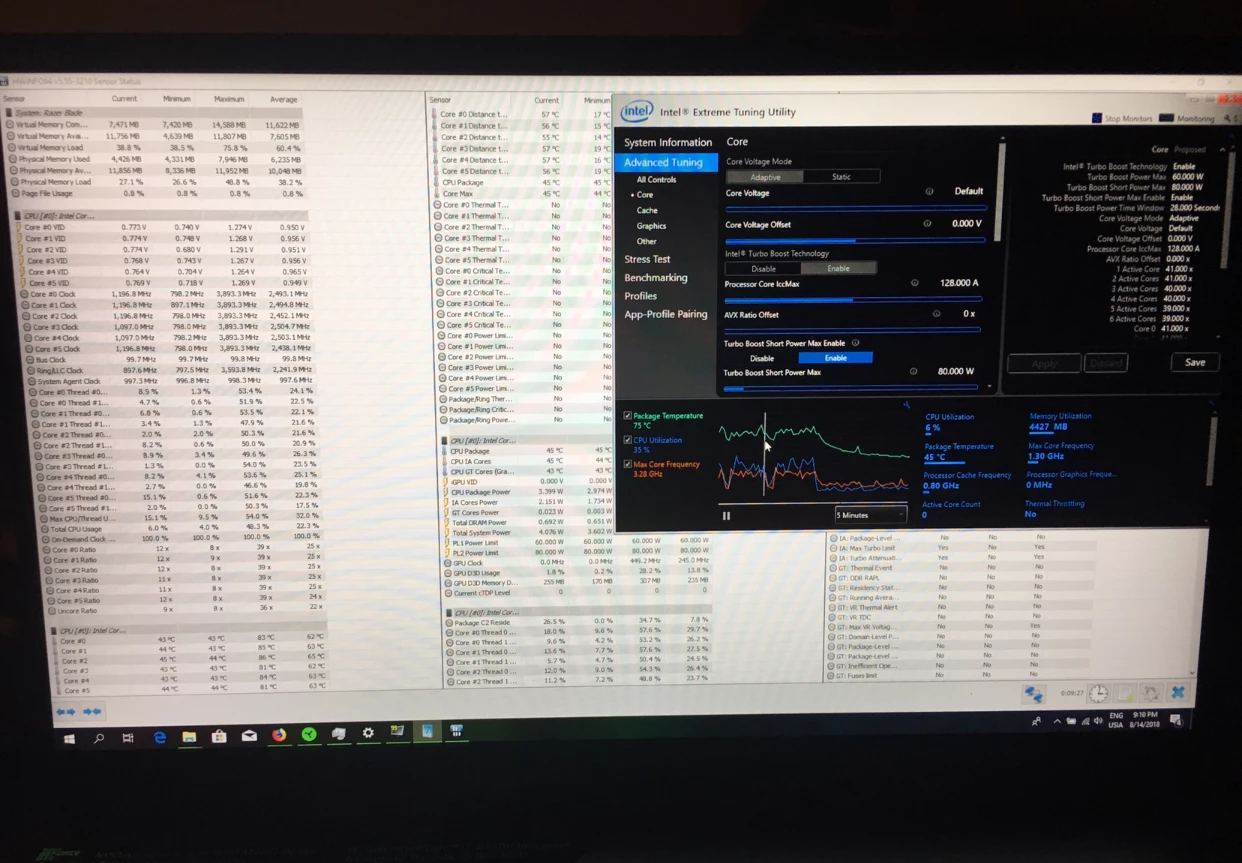
GR8-RideThis is what you should get on playing doom 1080p all maxed, just tested it till dr Lazarus lab boss fight, 30 minutes?...damn not enough ammo, can’t defeat that;), on default setting (no undervolting no limitation this and that, just as it’s), gaming mode 5000rpm Fan. Ambient temperature is 22. It’s cpu max 86 and gpu...never care about that...is 73. With undervolting it could max 81 or lower.
Yeah, I get that....in a completely stock config, it will definitely thermal throttle (though there was 1 instance of PL throttling in the hour that I was playing BF1). I wanted to run a comparison of what it's like in a bone-stock config; I'll run one tonight with an undervolt of -140mV on both Core and Cache, and I'll run a third with the undervolt as well as Turbo limiters (I drop it down to 36x on all 6 cores). Those are three of my four profiles created in TS (fourth is battery mode with turboboost disabled). In the past, undervolting itself has not "solved" any thermal throttling issues, though it's usually only a single core that hits the thermal throttle limits (vs all 6 when stock). Limiting turboboost to 36x on all 6 cores keeps my temps below 90C the whole time, no matter how long I'm playing anything. No visible effect on framerates in games like Doom or BF1 so far. Patrick
Razer Blade 14 2021 QHD 165Hz | Ryzen 9 5900HX| RTX 3070 100W | 16GB DDR4 3200MHz | 1TB l Razer Blade 15 Advanced 2018 FHD 144Hz | i7-8750H | GTX 1070MQ | 16GB DDR4 2666MHz | 256 GB Corev2 | RTX 3070 Zotac Twin Edge OC | Razer Book 13 2020 FHD | i7-1165g7 | Intel Xe 96EU | 16GB LPDDR4X 4266MHz | 1Tb GB Razer Core V2 | RTX3070 | Zotac TwinOC Razer | Blade Stealth 13 2019 FHD | i7-1065g7 | GTX 1650MQ | 16GB LPDDR4 3744MHz | 512 GB | | Blade 14 2017 FHD | i7-7700HQ | GTX 1060 | 16GB DDR4 2400MHz | 512 GB | Razer Blade Stealth V2 2016 12,5 QHD | i7-7500U | HD620 | 8GB DDR3 1866MHz | 128 GB | | Blade 14 2015 IGZO QHD+ | i7–4720HQ | GT970M 3GB VRAM| 16GB DDR4 2400MHz | 256 GB | Razer Edge 2013 | i5-3317U | GT 640LE | 16GB DDR3 | 128 GB | Razer Phone 2| Razer Phone L33T Edition
- Insider
- August 14, 2018
When I'm playing Doom, it tends to run a bit hotter than yours. I run max settings on Doom, and my GPU never gets above 73-75C. My CPU though, bone stock, will run all 6 cores up to high 90s C, and pretty much every one of them will thermal throttle. However that is on Gaming mode with default fans (Auto, max=4700);
I might try it with fans on manual and 5,000 RPM, to see what difference that makes in thermals. My home office tends to run a bit warmer than yours....it's probably 24-25C in my office.
Patrick
- Community Ranger
- August 14, 2018
GR8-RideYes try max Fans, it’s better to keep system cool, on previous Blade with synapse 2 that doesn’t have Fan Profile it’s also always Max on demanding games like Doom or BF1. Temperature may various every unit depends how lazy QC staffs checking that product but should not be a huge difference.
When I'm playing Doom, it tends to run a bit hotter than yours. I run max settings on Doom, and my GPU never gets above 73-75C. My CPU though, bone stock, will run all 6 cores up to high 90s C, and pretty much every one of them will thermal throttle. However that is on Gaming mode with default fans (Auto, max=4700); I might try it with fans on manual and 5,000 RPM, to see what difference that makes in thermals. My home office tends to run a bit warmer than yours....it's probably 24-25C in my office. Patrick
Razer Blade 14 2021 QHD 165Hz | Ryzen 9 5900HX| RTX 3070 100W | 16GB DDR4 3200MHz | 1TB l Razer Blade 15 Advanced 2018 FHD 144Hz | i7-8750H | GTX 1070MQ | 16GB DDR4 2666MHz | 256 GB Corev2 | RTX 3070 Zotac Twin Edge OC | Razer Book 13 2020 FHD | i7-1165g7 | Intel Xe 96EU | 16GB LPDDR4X 4266MHz | 1Tb GB Razer Core V2 | RTX3070 | Zotac TwinOC Razer | Blade Stealth 13 2019 FHD | i7-1065g7 | GTX 1650MQ | 16GB LPDDR4 3744MHz | 512 GB | | Blade 14 2017 FHD | i7-7700HQ | GTX 1060 | 16GB DDR4 2400MHz | 512 GB | Razer Blade Stealth V2 2016 12,5 QHD | i7-7500U | HD620 | 8GB DDR3 1866MHz | 128 GB | | Blade 14 2015 IGZO QHD+ | i7–4720HQ | GT970M 3GB VRAM| 16GB DDR4 2400MHz | 256 GB | Razer Edge 2013 | i5-3317U | GT 640LE | 16GB DDR3 | 128 GB | Razer Phone 2| Razer Phone L33T Edition
- Insider
- August 15, 2018
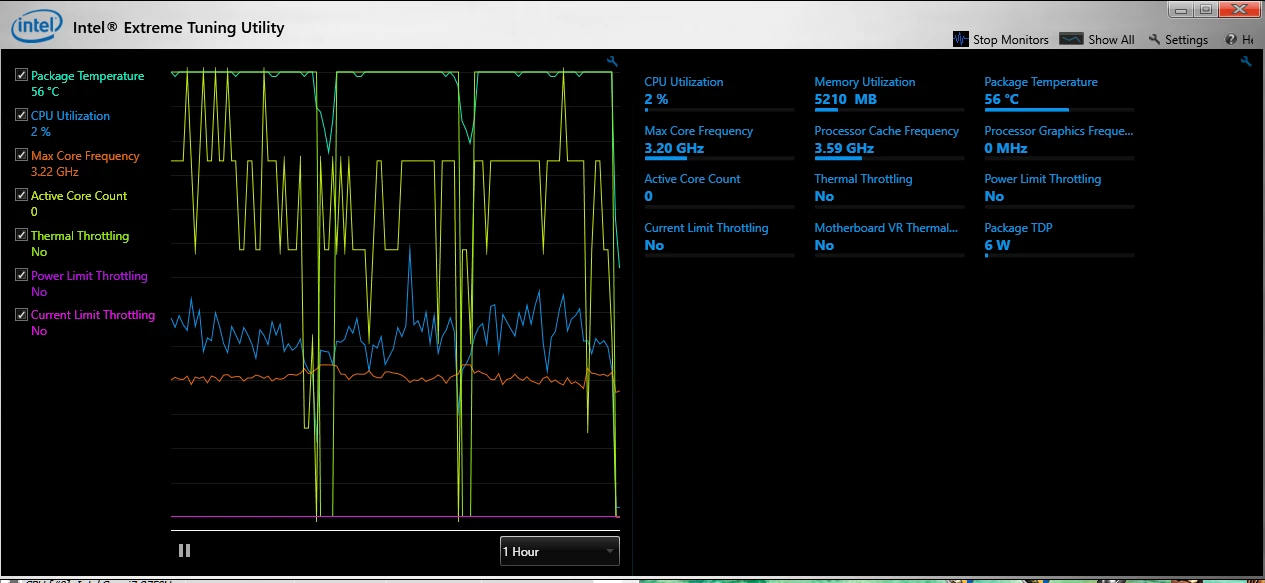
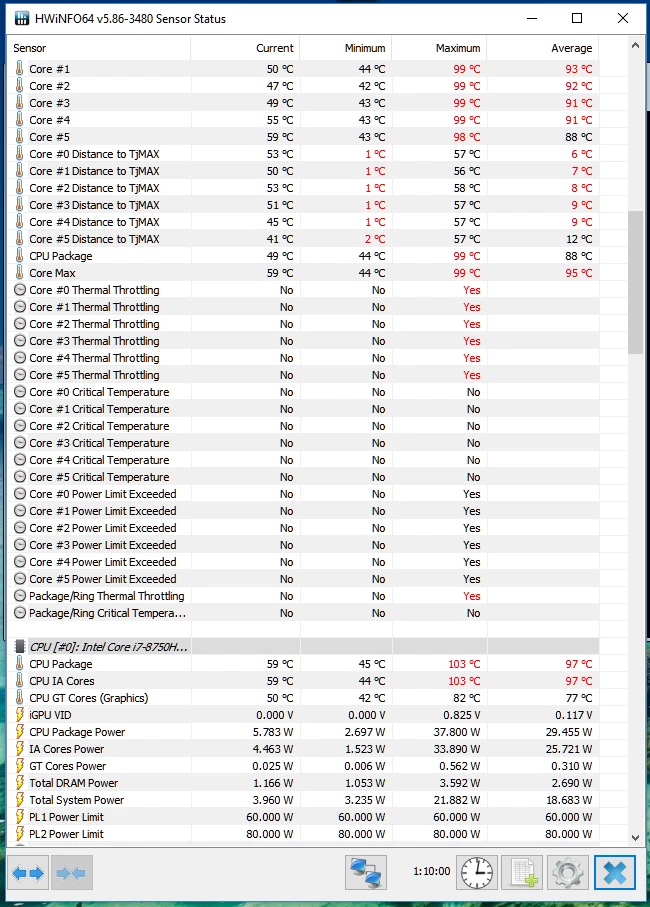
With Max fans (5,000 RPM, manual), and undervolting by -140mV, these are the latest results.
I still get all 6 cores to thermal throttle, though now I don't see any PL throttling according to XTU. HWInfo64, however, shows Core Power Limit reached on all 6 cores.
Running through the graph on XTU, it's interesting to see that my Package hits 100C a bunch of the time, yet CPU utilization is only about 40-60%.
I'll run another test tomorrow night in which I limit Turboboost to 36x on all 6 cores. That seems to generally keep my CPU temps well under 90C (on Doom anyway....not sure about BF1).
Patrick
- Author
- The One
- August 15, 2018
GR8-RideYou actually may want to contact support as your temps should not be hitting that high that often. Even when I stress test my Blade I never hit 100c if I undervolt. All of the Prime 95 tests for example don't even go near 100c. May not be able to test much further with your unit unfortunately. It is running way too hot in comparison to what I have seen.
With Max fans (5,000 RPM, manual), and undervolting by -140mV, these are the latest results. I still get all 6 cores to thermal throttle, though now I don't see any PL throttling according to XTU. HWInfo64, however, shows Core Power Limit reached on all 6 cores. Running through the graph on XTU, it's interesting to see that my Package hits 100C a bunch of the time, yet CPU utilization is only about 40-60%. I'll run another test tomorrow night in which I limit Turboboost to 36x on all 6 cores. That seems to generally keep my CPU temps well under 90C (on Doom anyway....not sure about BF1). Patrick
- August 15, 2018
For temps, stuff is all running too high (imho) at the moment, I think it's intel laptop chips in general.
You notice it more if you run a GPU and CPU intensive game like Origins, where as Destiny 2 tends to be fine as it's mostly GPU.
For the power limiting, I think companies are starting to do this on purpose, and to be fair it's *much* better to hit those that thermal throttling, which makes games really choppy.
Check which mode you are in too, Balanced caps you at around 35w and the boosted lets you get closer to 45w
A
- Anonymous
- August 15, 2018
JoikansaiMe too! You're my Ronaldo on razer insider. I wouldn't get razer blade, even though it's a good choice. I would get a huntsman elite keyboard. The keyboard on the razer blade is kind of jerky.
You’re my Messi on this Forum!! Thermal, Battery life of course and size compared to your old Blade 14:) PS: That HyperFlux, I burned now;)
- Insider
- August 15, 2018
Firebat246I think two things are going on with my latest results....one, I normally run TS to undervolt, and it was late last night, so I wasn't paying close attention when I posted the results, but it appears as though having both XTU and TS running wiped out my undervolt settings. Secondly, while the temps were higher than I'd like, it seems that across the board these latest 8th Gen Intel mobile CPUs are tending to run hot everywhere. I think if you have one that's running significantly cooler than anyone else's that you're likely to be the lucky winner of the silicon lottery, rather than the norm. I might think about a repaste of my CPU and GPU; maybe I did get a poor paste job from the factory. Patrick
You actually may want to contact support as your temps should not be hitting that high that often. Even when I stress test my Blade I never hit 100c if I undervolt. All of the Prime 95 tests for example don't even go near 100c. May not be able to test much further with your unit unfortunately. It is running way too hot in comparison to what I have seen.
- August 15, 2018
GR8-RideI'm with you here, I've done a ton of testing as every time I bought a laptop it ran too hot so I returned it. It wasn't until I bought an MSI Titan, and found that was getting to early 90c and even 97 on one of the cores - with standard but very loud fans that I realised it's not the laptops. I then returned that as I figured if my gaming laptop had to be undervolted AND full fans regardless of size I may as well get a nice one (and so am waiting for the new blade). I've seen all the reviews, for all the laptops I owned and none of them mentioned bad thermals - but I went through 5 laptops from different manufacturers and ALL of them ran far too hot in an air conditioned room (with the zephyrus hitting 107c after 5 mins playing origins!) I think it's possible your's is running too hot, but it's more likely they all do that and maybe the review units sent out were all "slightly different" from the customer ones - or even the slightest real world dust increases them enough. Find out what other people are really getting - and test on the same thing (ie both on Destiny 2 or both on AC Origins) as the main culpret seems to be when the CPU and GPU are both hit hard - which is why benchmarks, fortnite and PUBG make it look good as they mostly hit the GPU.
I think two things are going on with my latest results....one, I normally run TS to undervolt, and it was late last night, so I wasn't paying close attention when I posted the results, but it appears as though having both XTU and TS running wiped out my undervolt settings. Secondly, while the temps were higher than I'd like, it seems that across the board these latest 8th Gen Intel mobile CPUs are tending to run hot everywhere. I think if you have one that's running significantly cooler than anyone else's that you're likely to be the lucky winner of the silicon lottery, rather than the norm. I might think about a repaste of my CPU and GPU; maybe I did get a poor paste job from the factory. Patrick
- Community Ranger
- August 15, 2018
Hi @Firebat246, when you installed your SSD did you manage to clone it? I can clone it and Bios recognize the boot USB (my hdd is toshiba, so it states Toshiba windows boot, kind of) but can’t go further stuck on error display with options F1 F8 and F12 that also won’t go anywhere. Is there any protection again there. I’m too lazy clean install windows and updating installing this and that;) Any help also welcome.
Razer Blade 14 2021 QHD 165Hz | Ryzen 9 5900HX| RTX 3070 100W | 16GB DDR4 3200MHz | 1TB l Razer Blade 15 Advanced 2018 FHD 144Hz | i7-8750H | GTX 1070MQ | 16GB DDR4 2666MHz | 256 GB Corev2 | RTX 3070 Zotac Twin Edge OC | Razer Book 13 2020 FHD | i7-1165g7 | Intel Xe 96EU | 16GB LPDDR4X 4266MHz | 1Tb GB Razer Core V2 | RTX3070 | Zotac TwinOC Razer | Blade Stealth 13 2019 FHD | i7-1065g7 | GTX 1650MQ | 16GB LPDDR4 3744MHz | 512 GB | | Blade 14 2017 FHD | i7-7700HQ | GTX 1060 | 16GB DDR4 2400MHz | 512 GB | Razer Blade Stealth V2 2016 12,5 QHD | i7-7500U | HD620 | 8GB DDR3 1866MHz | 128 GB | | Blade 14 2015 IGZO QHD+ | i7–4720HQ | GT970M 3GB VRAM| 16GB DDR4 2400MHz | 256 GB | Razer Edge 2013 | i5-3317U | GT 640LE | 16GB DDR3 | 128 GB | Razer Phone 2| Razer Phone L33T Edition
A
- Anonymous
- August 16, 2018
Fellas, your temps are all nice and good but I'm more interested in noise.
Say if I disable 2 cores, limit turbo to 3.5, undervolt it and disable dGPU, do you think I will ever hear the fans while working in excel, word, web browser with 15 tabs etc? I also might switch to Linux for work related tasks.
For me RB15 should be a professional device with gaming as a bonus, so 60/40 = pro/gamer.
Also, I propose we always mention the GPU of the blade we're testing, there's a big difference in thermals between 1060 and 1070 RB15 and it might lead to misunderstandings if we compare them.
Sign up
Already have an account? Login
Log in with Razer ID to create new threads and earn badges.
LOG INEnter your E-mail address. We'll send you an e-mail with instructions to reset your password.