

- Home
- Community Overview
- The Razer Armory
- Systems
- I present to you Firebat's Blade 15! (144hz/i7-8750H)
I present to you Firebat's Blade 15! (144hz/i7-8750H)
- May 24, 2018
- 447 replies
- 1341 views



- The One
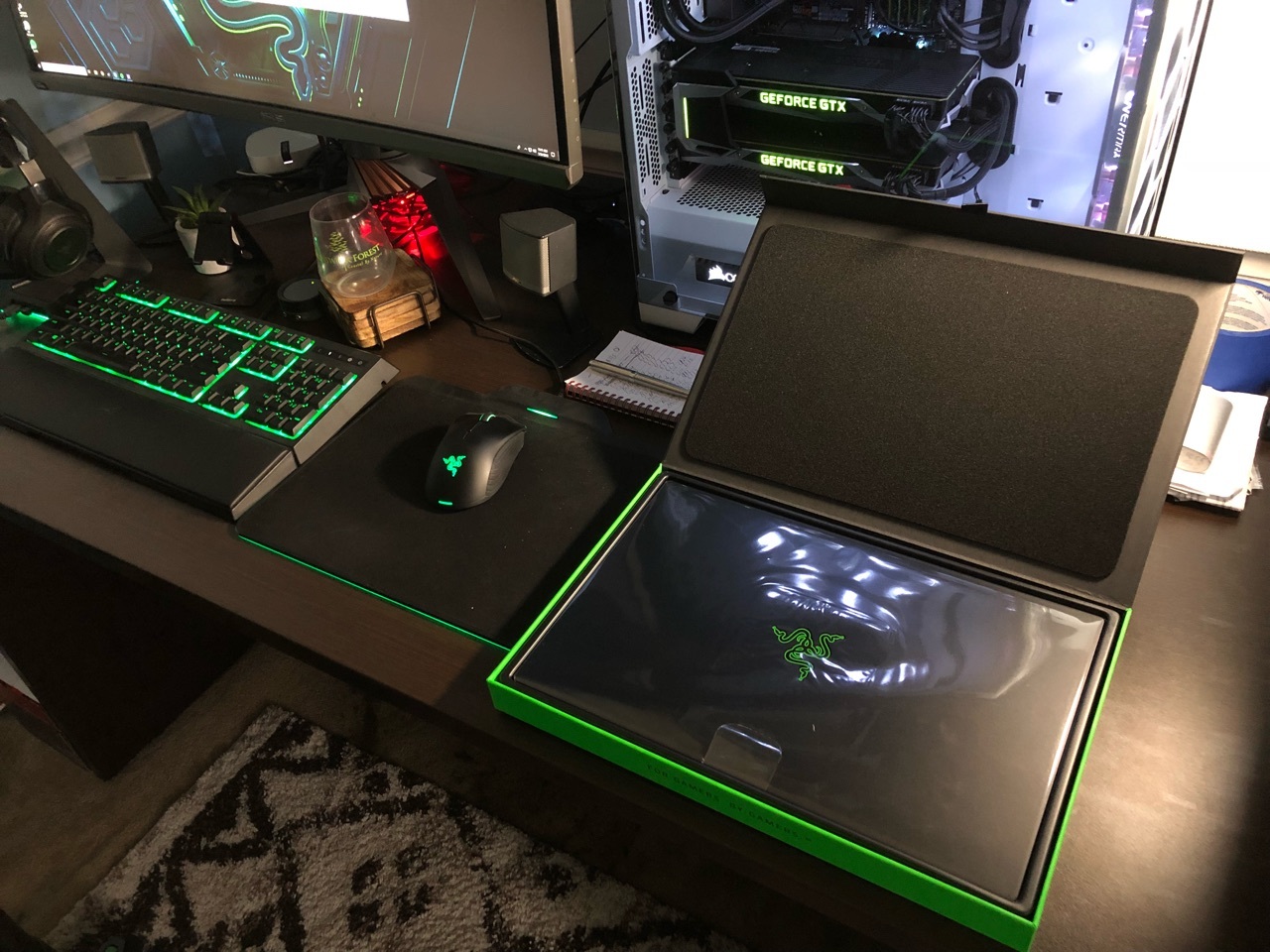
Hey everyone i'm happy to announce I received my Blade today! I will do my best to answer questions about it. Hopefully this thread gets some traction so we can use is as an information thread/comparison thread. Post pictures when you get your Blade etc. Let the games begin!
This topic has been closed for replies.
447 Replies

- Insider
- August 16, 2018
sleekByzantiumbuzz736So this is my exact use-case, though I'm probably 80 Pro / 20 Gamer. I travel extensively for business (30+ weeks per year), and the Blade allows me to have a system that can entertain me in the hotel room, while still having good battery life and not looking too "gamery" when I'm in customer meetings. I run PPT, Word and Excel constantly, and in the office, plugged in or not, the system is effectively silent. I never hear the fans at all, unless something major happens (I was testing Cinebench in the office, which obviously drove the fans up to full....). I also run it with a USB-C dock and an external monitor, and the system is virtually silent. For comparison sake, my system is a fully loaded Blade (FHD, 144 Hz, GTX-1070 Max-Q, 32GB RAM, 2TB Samsung 970-Evo). By the way, the system is virtually silent running in a completely stock power config (no undervolt, no turbo-disable, etc) on a day to day basis. With 10 tabs open in Chrome, MS Edge open with 4 tabs, Outlook, Word and Excel all currently running, my CPU utilization is about 20%, with an average temp across all 6 cores of approximately 43C (office room temp is 24C). Patrick
Fellas, your temps are all nice and good but I'm more interested in noise. Say if I disable 2 cores, limit turbo to 3.5, undervolt it and disable dGPU, do you think I will ever hear the fans while working in excel, word, web browser with 15 tabs etc? I also might switch to Linux for work related tasks. For me RB15 should be a professional device with gaming as a bonus, so 60/40 = pro/gamer. Also, I propose we always mention the GPU of the blade we're testing, there's a big difference in thermals between 1060 and 1070 RB15 and it might lead to misunderstandings if we compare them.
A
- Anonymous
- August 20, 2018
I am actually terribly curious of the power limit throttling is due to some arbitrary limit imposed by the firmware or the MOSFET/VRMs overheating?

- Community Ranger
- August 20, 2018
mjuehIt’s unfortunately so, under max load gaming mode it’ll throttle in around 10 second to minimum 45Watt and balanced mode to 35 watt. There’s also other manufacturer that setting similar with that, i think to keep cpu temperatures lower. Though they made max gpu wattage to 80 watt that made better performance on overclocking which is nice, other maxq laptops I think around 60 watt.
I am actually terribly curious of the power limit throttling is due to some arbitrary limit imposed by the firmware or the MOSFET/VRMs overheating?
Razer Blade 14 2021 QHD 165Hz | Ryzen 9 5900HX| RTX 3070 100W | 16GB DDR4 3200MHz | 1TB l Razer Blade 15 Advanced 2018 FHD 144Hz | i7-8750H | GTX 1070MQ | 16GB DDR4 2666MHz | 256 GB Corev2 | RTX 3070 Zotac Twin Edge OC | Razer Book 13 2020 FHD | i7-1165g7 | Intel Xe 96EU | 16GB LPDDR4X 4266MHz | 1Tb GB Razer Core V2 | RTX3070 | Zotac TwinOC Razer | Blade Stealth 13 2019 FHD | i7-1065g7 | GTX 1650MQ | 16GB LPDDR4 3744MHz | 512 GB | | Blade 14 2017 FHD | i7-7700HQ | GTX 1060 | 16GB DDR4 2400MHz | 512 GB | Razer Blade Stealth V2 2016 12,5 QHD | i7-7500U | HD620 | 8GB DDR3 1866MHz | 128 GB | | Blade 14 2015 IGZO QHD+ | i7–4720HQ | GT970M 3GB VRAM| 16GB DDR4 2400MHz | 256 GB | Razer Edge 2013 | i5-3317U | GT 640LE | 16GB DDR3 | 128 GB | Razer Phone 2| Razer Phone L33T Edition
- Author
- The One
- August 20, 2018
GR8-RideThe issue it not so much running hot.. as most of them are you're correct. The issue is that any throttling should not occur until a ted thermal point set up by Intel. It is usually around 95-98c. There should be NO power limit throttling prior to those temps. This is a work in progress as I gather data for the Engineers.
I think two things are going on with my latest results....one, I normally run TS to undervolt, and it was late last night, so I wasn't paying close attention when I posted the results, but it appears as though having both XTU and TS running wiped out my undervolt settings. Secondly, while the temps were higher than I'd like, it seems that across the board these latest 8th Gen Intel mobile CPUs are tending to run hot everywhere. I think if you have one that's running significantly cooler than anyone else's that you're likely to be the lucky winner of the silicon lottery, rather than the norm. I might think about a repaste of my CPU and GPU; maybe I did get a poor paste job from the factory. Patrick
JoikansaiI did a fresh install and have had WAY better results then most of those that go the cloning route. If you were able to get into windows before.. and now you cant?... I would suggest turning off fast boot and/or removing and re-installing the SSD and then try to boot again. That may help your problem.
Hi @Firebat246, when you installed your SSD did you manage to clone it? I can clone it and Bios recognize the boot USB (my hdd is toshiba, so it states Toshiba windows boot, kind of) but can’t go further stuck on error display with options F1 F8 and F12 that also won’t go anywhere. Is there any protection again there. I’m too lazy clean install windows and updating installing this and that;) Any help also welcome.
mjuehI am pretty sure it's not the VRM or Mosfet. This is a power limit put into place via EC/Firmware.
I am actually terribly curious of the power limit throttling is due to some arbitrary limit imposed by the firmware or the MOSFET/VRMs overheating?
- August 21, 2018
Question -
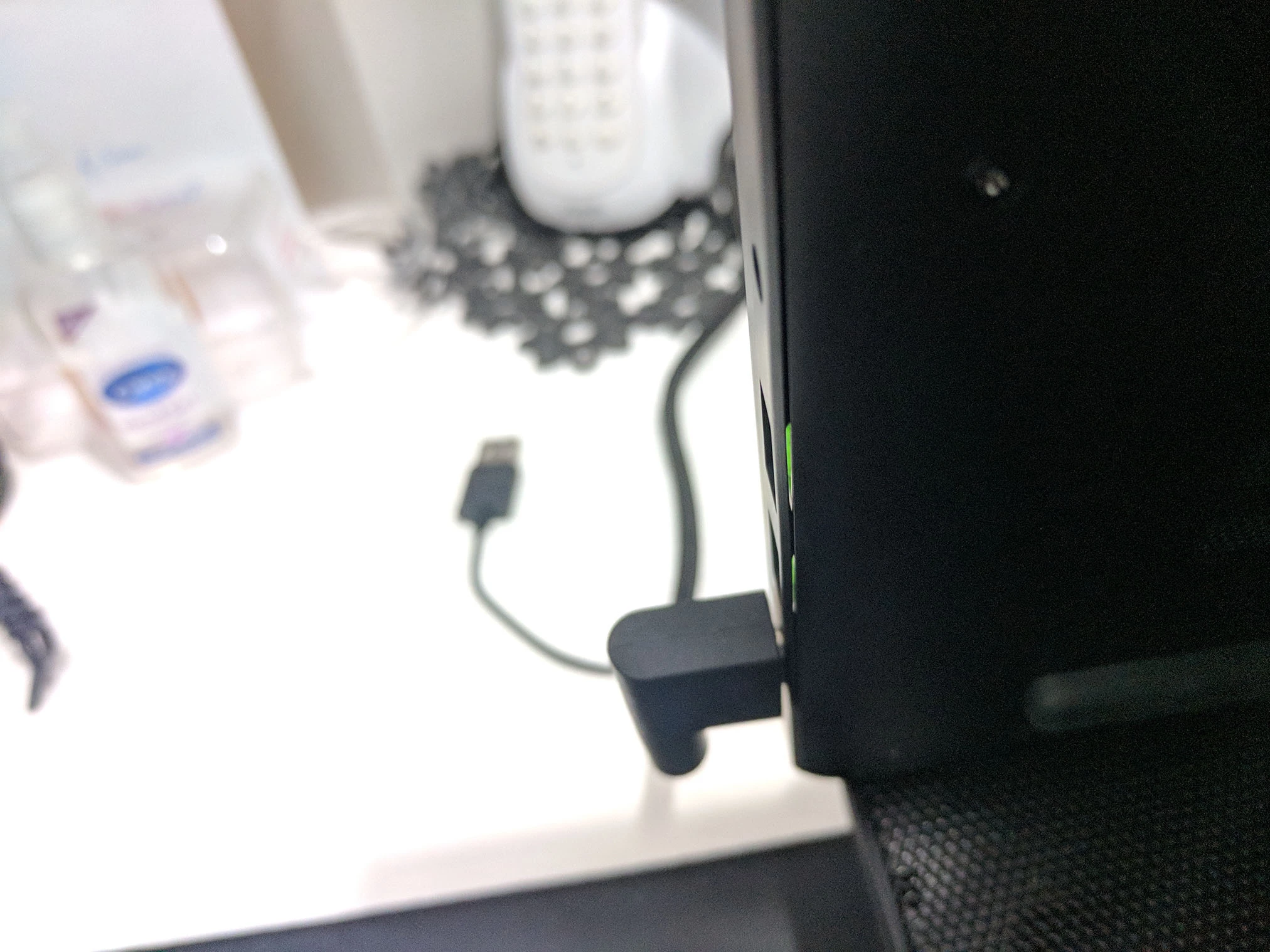
In my blade, If i look from a specific angle on the bottom towards the USB/HDMI slots, I can see a visible gap between the case and the side paneling (light passes through). Is this also in yours?
Wondering if mine needs to be returned or if thats normal?
- Community Ranger
- August 21, 2018
chrismarshallvstherockI don’t really notice on mine but it’s right there’s a gaps between it, i covered from my universal keyboard cover that always popping out and fall when I’m carrying it. I didn’t have such experience on previous Blade 14. Maybe it’s an improvement for lid closed usage to avoiding monitor touching the hot keyboard area to reduce hotter temperatures than design with no gap. They have also advertisement page with lid being closed, which on previous Blade was an issue.
Question - In my blade, If i look from a specific angle on the bottom towards the USB/HDMI slots, I can see a visible gap between the case and the side paneling (light passes through). Is this also in yours? Wondering if mine needs to be returned or if thats normal?
Razer Blade 14 2021 QHD 165Hz | Ryzen 9 5900HX| RTX 3070 100W | 16GB DDR4 3200MHz | 1TB l Razer Blade 15 Advanced 2018 FHD 144Hz | i7-8750H | GTX 1070MQ | 16GB DDR4 2666MHz | 256 GB Corev2 | RTX 3070 Zotac Twin Edge OC | Razer Book 13 2020 FHD | i7-1165g7 | Intel Xe 96EU | 16GB LPDDR4X 4266MHz | 1Tb GB Razer Core V2 | RTX3070 | Zotac TwinOC Razer | Blade Stealth 13 2019 FHD | i7-1065g7 | GTX 1650MQ | 16GB LPDDR4 3744MHz | 512 GB | | Blade 14 2017 FHD | i7-7700HQ | GTX 1060 | 16GB DDR4 2400MHz | 512 GB | Razer Blade Stealth V2 2016 12,5 QHD | i7-7500U | HD620 | 8GB DDR3 1866MHz | 128 GB | | Blade 14 2015 IGZO QHD+ | i7–4720HQ | GT970M 3GB VRAM| 16GB DDR4 2400MHz | 256 GB | Razer Edge 2013 | i5-3317U | GT 640LE | 16GB DDR3 | 128 GB | Razer Phone 2| Razer Phone L33T Edition
- Author
- The One
- August 24, 2018
chrismarshallvstherockAre you able to upload a picture at the right angle to show us?
Question - In my blade, If i look from a specific angle on the bottom towards the USB/HDMI slots, I can see a visible gap between the case and the side paneling (light passes through). Is this also in yours? Wondering if mine needs to be returned or if thats normal?
- August 24, 2018
Firebat246Attached is the image of one side. The other side is similar but not as pronounced. Only visible towards the back of the case. The image makes it look worse but is this warranty worthy?
Are you able to upload a picture at the right angle to show us?
- Community Ranger
- August 24, 2018
chrismarshallvstherockYou don’t need upload so many same pictures;) Yes I can notice also the gap but it doesn’t bother me, should I? Good to know that though, since it didn’t put attention on that areas at first check, my stealth and MacBook Pro 13 are covered well. Maybe because I opened it once to check inside parts meanwhile other my laptops screw are still tight, not opened yet.
Attached is the image of one side. The other side is similar but not as pronounced. Only visible towards the back of the case. The image makes it look worse but is this warranty worthy?

Razer Blade 14 2021 QHD 165Hz | Ryzen 9 5900HX| RTX 3070 100W | 16GB DDR4 3200MHz | 1TB l Razer Blade 15 Advanced 2018 FHD 144Hz | i7-8750H | GTX 1070MQ | 16GB DDR4 2666MHz | 256 GB Corev2 | RTX 3070 Zotac Twin Edge OC | Razer Book 13 2020 FHD | i7-1165g7 | Intel Xe 96EU | 16GB LPDDR4X 4266MHz | 1Tb GB Razer Core V2 | RTX3070 | Zotac TwinOC Razer | Blade Stealth 13 2019 FHD | i7-1065g7 | GTX 1650MQ | 16GB LPDDR4 3744MHz | 512 GB | | Blade 14 2017 FHD | i7-7700HQ | GTX 1060 | 16GB DDR4 2400MHz | 512 GB | Razer Blade Stealth V2 2016 12,5 QHD | i7-7500U | HD620 | 8GB DDR3 1866MHz | 128 GB | | Blade 14 2015 IGZO QHD+ | i7–4720HQ | GT970M 3GB VRAM| 16GB DDR4 2400MHz | 256 GB | Razer Edge 2013 | i5-3317U | GT 640LE | 16GB DDR3 | 128 GB | Razer Phone 2| Razer Phone L33T Edition
- Author
- The One
- August 25, 2018
chrismarshallvstherockHmm I don't see any kind of gap under mine.. have you contacted support to at least show them that?
Attached is the image of one side. The other side is similar but not as pronounced. Only visible towards the back of the case. The image makes it look worse but is this warranty worthy?
- Author
- The One
- August 25, 2018
chrismarshallvstherockTo me that looks warped.. I would contact support.. if you have any issues please PM me. If they think it's ok... and it doesn't bother you I don't think it will necessarily hurt the Laptop. BUT still reach out to them...
No do you think it is a build issue?
- August 25, 2018
Contacted support today to see if its normal or not.
Waiting to get a response, I wonder if its to do with tightness of screws? Too tight, too loose?
- Author
- The One
- August 25, 2018
chrismarshallvstherockIf you mean the screws around the bottom holding the back on then nah that wont make the chassis bend like that.
Contacted support today to see if its normal or not. Waiting to get a response, I wonder if its to do with tightness of screws? Too tight, too loose?
- Community Ranger
- August 25, 2018
Firebat246You can check if you can see the green usb port between the gap. I can see it, look at my picture, on stealth I couldn’t see that. I didn’t tight very hard the screws like factory default, that’s also could be the reason on mine.
To me that looks warped.. I would contact support.. if you have any issues please PM me. If they think it's ok... and it doesn't bother you I don't think it will necessarily hurt the Laptop. BUT still reach out to them...
Razer Blade 14 2021 QHD 165Hz | Ryzen 9 5900HX| RTX 3070 100W | 16GB DDR4 3200MHz | 1TB l Razer Blade 15 Advanced 2018 FHD 144Hz | i7-8750H | GTX 1070MQ | 16GB DDR4 2666MHz | 256 GB Corev2 | RTX 3070 Zotac Twin Edge OC | Razer Book 13 2020 FHD | i7-1165g7 | Intel Xe 96EU | 16GB LPDDR4X 4266MHz | 1Tb GB Razer Core V2 | RTX3070 | Zotac TwinOC Razer | Blade Stealth 13 2019 FHD | i7-1065g7 | GTX 1650MQ | 16GB LPDDR4 3744MHz | 512 GB | | Blade 14 2017 FHD | i7-7700HQ | GTX 1060 | 16GB DDR4 2400MHz | 512 GB | Razer Blade Stealth V2 2016 12,5 QHD | i7-7500U | HD620 | 8GB DDR3 1866MHz | 128 GB | | Blade 14 2015 IGZO QHD+ | i7–4720HQ | GT970M 3GB VRAM| 16GB DDR4 2400MHz | 256 GB | Razer Edge 2013 | i5-3317U | GT 640LE | 16GB DDR3 | 128 GB | Razer Phone 2| Razer Phone L33T Edition
- Author
- The One
- August 25, 2018
JoikansaiNo I cant see the port between the gap.. there is no gap on mine at all. I don't think I have seen many Blades with that issue yet.
You can check if you can see the green usb port between the gap. I can see it, look at my picture, on stealth I couldn’t see that. I didn’t tight very hard the screws like factory default, that’s also could be the reason on mine.
- August 25, 2018
I tried taking all screws off and moving the back around to try and fix the gap.
Nothing worked. There was always gaps on both sides. Its the build shape.
- Community Ranger
- August 26, 2018
Firebat246It’s not really matter to me, it could be also the reason why my Blade has good thermal and not to hot to touch as some users reported, it has more heat out put lol;). Yes i don’t see Blade 15 user reported such thing too and on my previous Blade 14 i think I don’t have it, since i compared the build quality with my old MacBook Pro.
No I cant see the port between the gap.. there is no gap on mine at all. I don't think I have seen many Blades with that issue yet.
Razer Blade 14 2021 QHD 165Hz | Ryzen 9 5900HX| RTX 3070 100W | 16GB DDR4 3200MHz | 1TB l Razer Blade 15 Advanced 2018 FHD 144Hz | i7-8750H | GTX 1070MQ | 16GB DDR4 2666MHz | 256 GB Corev2 | RTX 3070 Zotac Twin Edge OC | Razer Book 13 2020 FHD | i7-1165g7 | Intel Xe 96EU | 16GB LPDDR4X 4266MHz | 1Tb GB Razer Core V2 | RTX3070 | Zotac TwinOC Razer | Blade Stealth 13 2019 FHD | i7-1065g7 | GTX 1650MQ | 16GB LPDDR4 3744MHz | 512 GB | | Blade 14 2017 FHD | i7-7700HQ | GTX 1060 | 16GB DDR4 2400MHz | 512 GB | Razer Blade Stealth V2 2016 12,5 QHD | i7-7500U | HD620 | 8GB DDR3 1866MHz | 128 GB | | Blade 14 2015 IGZO QHD+ | i7–4720HQ | GT970M 3GB VRAM| 16GB DDR4 2400MHz | 256 GB | Razer Edge 2013 | i5-3317U | GT 640LE | 16GB DDR3 | 128 GB | Razer Phone 2| Razer Phone L33T Edition
A
- Anonymous
- August 31, 2018
chrismarshallvstherockI would recommend you contacting support. The screws on my Razer Blade Stealth (2016) have been loose from early on. When I contacted support about a loud fan and bad thermals I noticed a screw missing which they put back once they replaced my fan. But since then I keep checking and tightening the screws but they get loose quickly and have been losing them over time. I had support ship me new ones but they don't hold because the problem is with the chassis. Over time it has led to the bottom getting bent. One day I had my laptop open and had not seen that one screw near the display has missing and when I tried closing the laptop it got stuck. So I had to push the bottom lid by hand to close it. And over time and after replacing many of the screws over and over, the plastic parts at the corners near the display broke. Now the screen can only stay in some positions and when closed it doesn't close all the way and leaves a gap. My lesson from this experience: Never buy Razer again.
No do you think it is a build issue?
- Community Ranger
- September 1, 2018
KxS85You can forget those screws loose issues on Blade 15, it’s really tight. Idk about stealth, never open it and actually if I say honest opinion my stealth is better build quality than Blade 15. Some hardware like speaker are even actually better than Blade 15. But the performance difference is like heaven and hell, so I can accept it. Sounds you got lemonade device, I literally bring my stealth late 2016 anywhere from caffe, work until to bathroom, it’s damn good ultrabook, well if you got good device I think.
I would recommend you contacting support. The screws on my Razer Blade Stealth (2016) have been loose from early on. When I contacted support about a loud fan and bad thermals I noticed a screw missing which they put back once they replaced my fan. But since then I keep checking and tightening the screws but they get loose quickly and have been losing them over time. I had support ship me new ones but they don't hold because the problem is with the chassis. Over time it has led to the bottom getting bent. One day I had my laptop open and had not seen that one screw near the display has missing and when I tried closing the laptop it got stuck. So I had to push the bottom lid by hand to close it. And over time and after replacing many of the screws over and over, the plastic parts at the corners near the display broke. Now the screen can only stay in some positions and when closed it doesn't close all the way and leaves a gap. My lesson from this experience: Never buy Razer again.
Razer Blade 14 2021 QHD 165Hz | Ryzen 9 5900HX| RTX 3070 100W | 16GB DDR4 3200MHz | 1TB l Razer Blade 15 Advanced 2018 FHD 144Hz | i7-8750H | GTX 1070MQ | 16GB DDR4 2666MHz | 256 GB Corev2 | RTX 3070 Zotac Twin Edge OC | Razer Book 13 2020 FHD | i7-1165g7 | Intel Xe 96EU | 16GB LPDDR4X 4266MHz | 1Tb GB Razer Core V2 | RTX3070 | Zotac TwinOC Razer | Blade Stealth 13 2019 FHD | i7-1065g7 | GTX 1650MQ | 16GB LPDDR4 3744MHz | 512 GB | | Blade 14 2017 FHD | i7-7700HQ | GTX 1060 | 16GB DDR4 2400MHz | 512 GB | Razer Blade Stealth V2 2016 12,5 QHD | i7-7500U | HD620 | 8GB DDR3 1866MHz | 128 GB | | Blade 14 2015 IGZO QHD+ | i7–4720HQ | GT970M 3GB VRAM| 16GB DDR4 2400MHz | 256 GB | Razer Edge 2013 | i5-3317U | GT 640LE | 16GB DDR3 | 128 GB | Razer Phone 2| Razer Phone L33T Edition
A
- Anonymous
- September 1, 2018
JoikansaiI see that you have the 2nd gen of the stealth with i7-7500U. I have the 1st gen with i7-6500U. Glad that they have fixed the screw problem on the stealth but personally after this experience I will never buy anything from them. At least not until they improve considerably the quality control and durability of their products. There is a reason why so many people are unhappy with Razer. High price but low quality. They do have nice designs but I'm not willing to pay just for the design.
You can forget those screws loose issues on Blade 15, it’s really tight. Idk about stealth, never open it and actually if I say honest opinion my stealth is better build quality than Blade 15. Some hardware like speaker are even actually better than Blade 15. But the performance difference is like heaven and hell, so I can accept it. Sounds you got lemonade device, I literally bring my stealth late 2016 anywhere from caffe, work until to bathroom, it’s damn good ultrabook, well if you got good device I think.
- Community Ranger
- September 1, 2018
KxS85QC Problem isn’t only on Razer even Apple and Dell has that, Dell has good price because of lowering technology that most normal users don’t know like their TB3 technology, heard they revised it with officially PCIe3x4 lanes, but in reality, performance wise on eGPU performance isn’t as great as stealth with dual cores. Well I moved from MacBook Pro to Razer Edge, that tablet runs still great despite battery and nowadays games requirements, it’s over 4 years so I think I can say that is not all expensive Razer products have a bad quality and durability. It was expensive for a tablet, I think I can sell the accessories more than its mrsp now if I want.
I see that you have the 2nd gen of the stealth with i7-7500U. I have the 1st gen with i7-6500U. Glad that they have fixed the screw problem on the stealth but personally after this experience I will never buy anything from them. At least not until they improve considerably the quality control and durability of their products. There is a reason why so many people are unhappy with Razer. High price but low quality. They do have nice designs but I'm not willing to pay just for the design.
Razer Blade 14 2021 QHD 165Hz | Ryzen 9 5900HX| RTX 3070 100W | 16GB DDR4 3200MHz | 1TB l Razer Blade 15 Advanced 2018 FHD 144Hz | i7-8750H | GTX 1070MQ | 16GB DDR4 2666MHz | 256 GB Corev2 | RTX 3070 Zotac Twin Edge OC | Razer Book 13 2020 FHD | i7-1165g7 | Intel Xe 96EU | 16GB LPDDR4X 4266MHz | 1Tb GB Razer Core V2 | RTX3070 | Zotac TwinOC Razer | Blade Stealth 13 2019 FHD | i7-1065g7 | GTX 1650MQ | 16GB LPDDR4 3744MHz | 512 GB | | Blade 14 2017 FHD | i7-7700HQ | GTX 1060 | 16GB DDR4 2400MHz | 512 GB | Razer Blade Stealth V2 2016 12,5 QHD | i7-7500U | HD620 | 8GB DDR3 1866MHz | 128 GB | | Blade 14 2015 IGZO QHD+ | i7–4720HQ | GT970M 3GB VRAM| 16GB DDR4 2400MHz | 256 GB | Razer Edge 2013 | i5-3317U | GT 640LE | 16GB DDR3 | 128 GB | Razer Phone 2| Razer Phone L33T Edition
- Author
- The One
- September 9, 2018
JoikansaiI have had my fair share of QC issues with Alienware/Asus in the past... Honestly have had the best overall experience with Razer.
QC Problem isn’t only on Razer even Apple and Dell has that, Dell has good price because of lowering technology that most normal users don’t know like their TB3 technology, heard they revised it with officially PCIe3x4 lanes, but in reality, performance wise on eGPU performance isn’t as great as stealth with dual cores. Well I moved from MacBook Pro to Razer Edge, that tablet runs still great despite battery and nowadays games requirements, it’s over 4 years so I think I can say that is not all expensive Razer products have a bad quality and durability. It was expensive for a tablet, I think I can sell the accessories more than its mrsp now if I want.
- September 19, 2018
Firebat246
Thanks for the info.. we are going to need a graph showing how your clock speeds were doing throughout. XTU is best for this.. just to keep everything streamlined if you don't mind! Thanks again! Make sure to check the boxes in XTU that will show the power limit and thermal throttling so we can see each.
JoikansaiHi Hast this power limit throttling been acknowledged by Razer? I get immediate throttling when stress test on xtu and temperature in 60s and 70s and so cannot be thermal throttling. In XTU the power limited throttling is constant after several seconds. In fact temperature won't get up into the 80s. If I undervolt in XTU, then I can progressively allow CPU speed to increase to the advertised max but for short bursts. Only at -160mV does CPU finally increase to 3.8 and temperature then allowed to rise. But still very low. I wonder how many people not prepared to dabble live with a laptop running at 60% of its chip capacity Thanks Chris
.... Btw here my xtu screen shoot, it shows even 70ish low temperature there’s still power limit throttling.
Razer Blade 15 2019 FHD 144Hz | i7-8750H | GTX 2080MQ | 6 GB GDDR6 VRAM | 16GB DDR4 2666MHz | 512 GB| FireStrike TimeSpy
- Community Ranger
- September 19, 2018
crypticcTry change it to gaming mode, with balanced mode that I think 35 Watt, you won’t get 3,9ghz. And check also on HWinfo while you are running xtu stress if it stays on 3,9, i think last time i did that it was stable at 3,9 even power limit throttled. Note when all cores are boosting it’ll only reach 3,9, not 4,1, I think (saw sometimes max at 4,1 on some core after gaming or benchmarking).
Hi Hast this power limit throttling been acknowledged by Razer? I get immediate throttling when stress test on xtu and temperature in 60s and 70s and so cannot be thermal throttling. In XTU the power limited throttling is constant after several seconds. In fact temperature won't get up into the 80s. If I undervolt in XTU, then I can progressively allow CPU speed to increase to the advertised max but for short bursts. Only at -160mV does CPU finally increase to 3.8 and temperature then allowed to rise. But still very low. I wonder how many people not prepared to dabble live with a laptop running at 60% of its chip capacity Thanks Chris
Razer Blade 14 2021 QHD 165Hz | Ryzen 9 5900HX| RTX 3070 100W | 16GB DDR4 3200MHz | 1TB l Razer Blade 15 Advanced 2018 FHD 144Hz | i7-8750H | GTX 1070MQ | 16GB DDR4 2666MHz | 256 GB Corev2 | RTX 3070 Zotac Twin Edge OC | Razer Book 13 2020 FHD | i7-1165g7 | Intel Xe 96EU | 16GB LPDDR4X 4266MHz | 1Tb GB Razer Core V2 | RTX3070 | Zotac TwinOC Razer | Blade Stealth 13 2019 FHD | i7-1065g7 | GTX 1650MQ | 16GB LPDDR4 3744MHz | 512 GB | | Blade 14 2017 FHD | i7-7700HQ | GTX 1060 | 16GB DDR4 2400MHz | 512 GB | Razer Blade Stealth V2 2016 12,5 QHD | i7-7500U | HD620 | 8GB DDR3 1866MHz | 128 GB | | Blade 14 2015 IGZO QHD+ | i7–4720HQ | GT970M 3GB VRAM| 16GB DDR4 2400MHz | 256 GB | Razer Edge 2013 | i5-3317U | GT 640LE | 16GB DDR3 | 128 GB | Razer Phone 2| Razer Phone L33T Edition
Sign up
Already have an account? Login
Log in with Razer ID to create new threads and earn badges.
LOG INEnter your E-mail address. We'll send you an e-mail with instructions to reset your password.