

- Home
- Community Overview
- The Razer Armory
- Systems
- I present to you Firebat's Blade 15! (144hz/i7-8750H)
I present to you Firebat's Blade 15! (144hz/i7-8750H)
- May 24, 2018
- 447 replies
- 1341 views



- The One
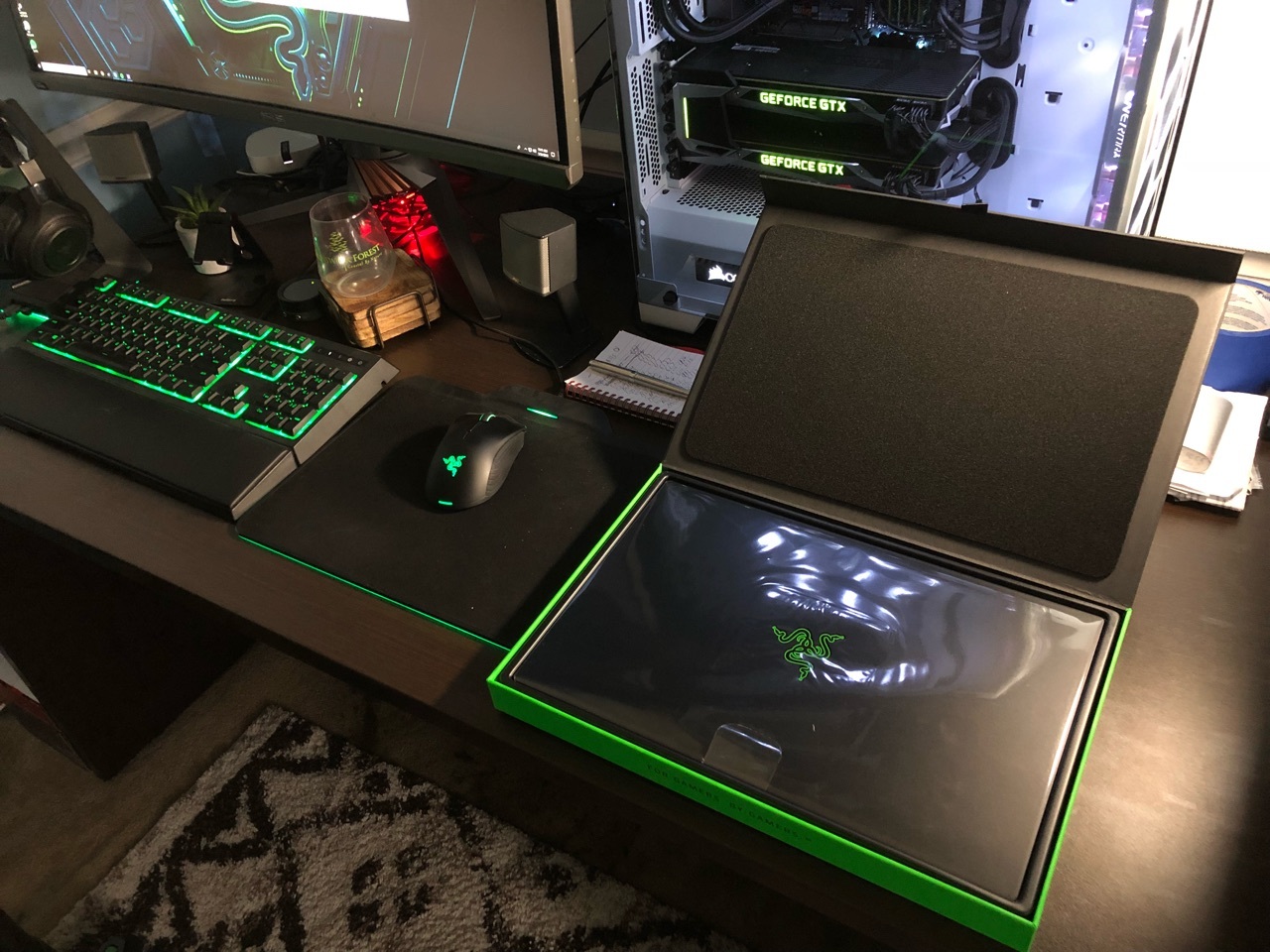
Hey everyone i'm happy to announce I received my Blade today! I will do my best to answer questions about it. Hopefully this thread gets some traction so we can use is as an information thread/comparison thread. Post pictures when you get your Blade etc. Let the games begin!
This topic has been closed for replies.
447 Replies

- Community Ranger
- June 17, 2018
misterg36Thanks for sharing info, some advance users is also starting find out how to keep cpu on low temperatures without opening the Blade. It’s still a month old device compared to some laptops you mentioned above, EU buyer may even just receive the Blade this week and I think it will come other user who find new improvement.
I have a feeling the high temps are an issue on ALL new laptops at the moment. I don't know if HWinfo has got more accurate, or Intel are boosting something to stop the SPECTR/Meltdown fixes killing speed. I have now bought, and returned due to very high temps (97-104c):The MSI was the best,but no idea why core 2 was 5-7c higher than other cores. It also thermal throttled and absolutely huge (way bigger than my old MSI Dominator!!). I could have lived with the size if it gamed well, but the fans ran near full the second you ran a game and it's still overheating at stock. With this in mind I've ordered a Razer Blade 15. I figure if I have to consider undervolting, external cooling etc I may as well have a nice looking thin and light. So I have a feeling that it's an Intel issue rather than a particular vendor, and as no reviewer has mentioned the temps, I've either been really unlucky or the review ones are all repasted.
- Alienware 17R4 (1080) - was hitting 97c+
- Alienware 15R3 (1070) - worst of the lot at > 100c
- Acer Predator (1080) - mid 90c but had a total power failure 1 week in
- ASUS Zephyrus (1080) - 97c after 2 mins of gaming in an aircond room (was v disapointed)
- MSI GT75 Titan 8RG - 97c on core 2 93c on the rest
Razer Blade 14 2021 QHD 165Hz | Ryzen 9 5900HX| RTX 3070 100W | 16GB DDR4 3200MHz | 1TB l Razer Blade 15 Advanced 2018 FHD 144Hz | i7-8750H | GTX 1070MQ | 16GB DDR4 2666MHz | 256 GB Corev2 | RTX 3070 Zotac Twin Edge OC | Razer Book 13 2020 FHD | i7-1165g7 | Intel Xe 96EU | 16GB LPDDR4X 4266MHz | 1Tb GB Razer Core V2 | RTX3070 | Zotac TwinOC Razer | Blade Stealth 13 2019 FHD | i7-1065g7 | GTX 1650MQ | 16GB LPDDR4 3744MHz | 512 GB | | Blade 14 2017 FHD | i7-7700HQ | GTX 1060 | 16GB DDR4 2400MHz | 512 GB | Razer Blade Stealth V2 2016 12,5 QHD | i7-7500U | HD620 | 8GB DDR3 1866MHz | 128 GB | | Blade 14 2015 IGZO QHD+ | i7–4720HQ | GT970M 3GB VRAM| 16GB DDR4 2400MHz | 256 GB | Razer Edge 2013 | i5-3317U | GT 640LE | 16GB DDR3 | 128 GB | Razer Phone 2| Razer Phone L33T Edition
- June 17, 2018
JoikansaiI think my final realisation was when the MSI was also getting high temps. With so much space and cooling, it can't just be the laptop design and more likely something chip side. It also means we may need to accept high temps in all new laptops - though i wish undervolting was something you could just set in the motherboard.
Thanks for sharing info, some advance users is also starting find out how to keep cpu on low temperatures without opening the Blade. It’s still a month old device compared to some laptops you mentioned above, EU buyer may even just receive the Blade this week and I think it will come other user who find new improvement.
- Insider
- June 18, 2018
misterg36Manufacturers could just ship their laptops undervolted through the BIOS, but they intentionally set chips to use more voltage than they need in order to avoid instability, so unfortunately it will probably always be left up to the user to determine the best stable undervolt for their individual machine. You can set it through the BIOS yourself though!
I think my final realisation was when the MSI was also getting high temps. With so much space and cooling, it can't just be the laptop design and more likely something chip side. It also means we may need to accept high temps in all new laptops - though i wish undervolting was something you could just set in the motherboard.
Blade Stealth:
The 2020 Blade Stealth Bible (Optimization and Troubleshooting Guide)
The 2019 Blade Stealth Bible
2017 Blade 14:
Razer Blade 14 Optimization Guide (Undervolting CPU & GPU)
Blade 14 Temperatues: Open vs. Closed
- Insider
- June 18, 2018
Well this is what Razer support has replied. They said hitting 100C is ok, What do you guys think?
And was told to run this BIOS Update
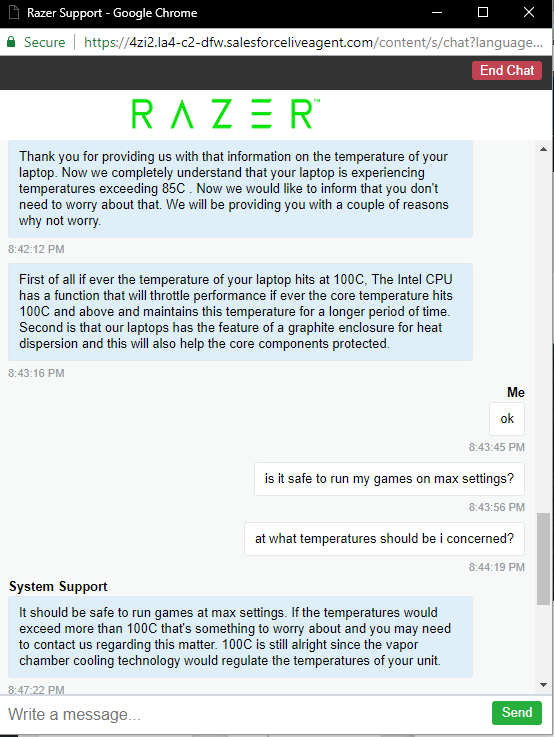
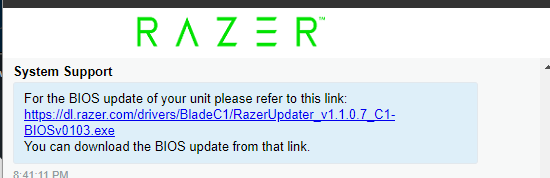
- Author
- The One
- June 18, 2018
TimDoggI was going to mention this.. but after some more research into the 8750H it is clear this CPU is absolutely capable of running in the 90s and even hitting 100c on occasion. It's not going to hurt it at all.. not even for long term use. The biggest issue I saw was the heat damaging components around it.. since that it much more likely to happen first. I have spoken with Razer about this and they are very confident that the other components will withstand the heat. The only thing I am working on currently is how to get the power limit taken care of. Thermals.. while you can improve them... are less of a concern as most people think.
Well this is what Razer support has replied. They said hitting 100C is ok, What do you guys think? And was told to run this BIOS Update
- Community Ranger
- June 18, 2018
TimDoggHitting 100 often is not good for laptops lifespan imo, as @Firebat246 told it even cpu can handle it but there’s components around it that also should bare high temperature. Low 80ish is my key to keep past Blade to have less hardware issue and could be sold in mint condition. So I rather have better temperature and not play on max setting. Btw a user on Reddit told that uVolting, speedshift tweak, and cooling pad help his temperature below 80 on gaming and firestrike test without big performance drop (around-500, to around 14000 overall FS), and I think he didn’t re pasting it, open box he got also 90~, i think that will be the setting that I’ll aim once I use it for long time purposes.
Well this is what Razer support has replied. They said hitting 100C is ok, What do you guys think? And was told to run this BIOS Update
Razer Blade 14 2021 QHD 165Hz | Ryzen 9 5900HX| RTX 3070 100W | 16GB DDR4 3200MHz | 1TB l Razer Blade 15 Advanced 2018 FHD 144Hz | i7-8750H | GTX 1070MQ | 16GB DDR4 2666MHz | 256 GB Corev2 | RTX 3070 Zotac Twin Edge OC | Razer Book 13 2020 FHD | i7-1165g7 | Intel Xe 96EU | 16GB LPDDR4X 4266MHz | 1Tb GB Razer Core V2 | RTX3070 | Zotac TwinOC Razer | Blade Stealth 13 2019 FHD | i7-1065g7 | GTX 1650MQ | 16GB LPDDR4 3744MHz | 512 GB | | Blade 14 2017 FHD | i7-7700HQ | GTX 1060 | 16GB DDR4 2400MHz | 512 GB | Razer Blade Stealth V2 2016 12,5 QHD | i7-7500U | HD620 | 8GB DDR3 1866MHz | 128 GB | | Blade 14 2015 IGZO QHD+ | i7–4720HQ | GT970M 3GB VRAM| 16GB DDR4 2400MHz | 256 GB | Razer Edge 2013 | i5-3317U | GT 640LE | 16GB DDR3 | 128 GB | Razer Phone 2| Razer Phone L33T Edition
- June 18, 2018
If you saw my post earlier, I haven't had a new laptop that didn't sit in the 90-100c temp range when gaming.
I think it's a chip issue personally (or they are pushing it to get performance numbers) so all non-repasted laptops are doing it as far as I can tell.
The only thing to watch is how much thermal throttling you get and how long it stays at that/does it affect your games.
- Insider
- June 18, 2018
JoikansaiAt the risk of repeating, I really prefer the matte screen and I think that's one major factor that sold me on the Razer. Question on the temps. The youtube reviews all seemed to have temps in the 80s, maybe 90s, why are people hitting the 90s and even 100c?
Yep i like glossy screen better like my old MacBook
- Insider
- June 18, 2018
DarthVader0I’m maxing out graphics on older games. For reposting th thermal paste is it something8 should do myself or try to send it in and have razer do it for me
At the risk of repeating, I really prefer the matte screen and I think that's one major factor that sold me on the Razer. Question on the temps. The youtube reviews all seemed to have temps in the 80s, maybe 90s, why are people hitting the 90s and even 100c?
- Insider
- June 18, 2018
TimDoggForgive my ignorance but if I run games at a lower resolution or setting, then the temps will be that much better?
I’m maxing out graphics on older games.
- Insider
- June 18, 2018
DarthVader0Yes, But even on Low settings im still hitting the occasionally (every 10-15 mins or so) 91-92. sometimes it does jump to 100C/ tried with lowest settings on BF4. For Diablo i lowered the physics, clutter, and anti-aliasing and i only hit 90-91 couple times while gaming. Even for Diablo I may have to lower the graphics even more. I will be configuring other games as well to make sure it doesn't run too hot. I'll inform on here if you guys think is useful. Edit: its such a beautiful labtop. I love it, I'm worried about it like its my child though.
Forgive my ignorance but if I run games at a lower resolution or setting, then the temps will be that much better?
- Insider
- June 18, 2018
TimDoggThanks, I think the majority of my usage will be non-gaming. The design and components is what's drawing me in. Having the ability some games is a plus and I consider this the icing on the cake, so to speak. If/when I get it, I'll probably push a stress test to see how the temps will be.
Yes,
TimDoggYeah, I can understand that, one Review had the temps of the SSD rather high and that has me a tad concerned.
Edit: its such a beautiful labtop. I love it, I'm worried about it like its my child though
A
- Anonymous
- June 18, 2018
The core temp is easily addressed by turbo limiting, an undervolt and running synapse game mode for the fans.
The SSD temps have me more worried. Even with the above, my SSD regularly hits 73-74C while gaming (path of exile).
- Insider
- June 18, 2018
mrvortepAre there any options to try to keep the SSD cool?
The SSD temps have me more worried. Even with the above, my SSD regularly hits 73-74C while gaming (path of exile).
A
- Anonymous
- June 18, 2018
DarthVader0I think so - see here: https://www.reddit.com/r/razer/comments/8rs56i/rb_thermals_sanity_check/
Are there any options to try to keep the SSD cool?
- Insider
- June 18, 2018
mrvortepThanks, that reddit thread seems to indicate those pads are working well
I think so - see here: https://www.reddit.com/r/razer/comments/8rs56i/rb_thermals_sanity_check/
- Insider
- June 18, 2018
Guys are you aware of graphite pads.
https://www.innovationcooling.com/products/ic-graphite-thermal-pad/
For the 8th Gen from what I am reading has hot spots. The pad spreads heat sideways exceptionally well and from my understanding of vapour chambers which are separated spreading the heat to all of these will boost cooling.
Whilst it might not offer better than paste on older cpu's I think it would excel with the 8750.
Note it does need to have high pressure applied to it.
What's your thoughts and is anyone going to try it?
Enhancing Blade 15 owners with regular YouTube uploads
https://www.youtube.com/iDATUS | https://www.iDATUS.tech
Includes Razer phone 2, Razer Lian Li O11 PC, Razer Gear!
- Insider
- June 19, 2018
iDATUSHere's a video from Linus Tech tips - it is electrical conductive
Guys are you aware of graphite pads. https://www.innovationcooling.com/products/ic-graphite-thermal-pad/
- Insider
- June 19, 2018
Yes its that video that's me thinking. Especially about the heat spreading.
Enhancing Blade 15 owners with regular YouTube uploads
https://www.youtube.com/iDATUS | https://www.iDATUS.tech
Includes Razer phone 2, Razer Lian Li O11 PC, Razer Gear!

- Insider
- June 19, 2018
I find it ridiculous that all of this troubleshooting and maintenance needs to be done on a brand new $2,400 + laptop. We shouldn't need to be opening this thing up for thermal paste, graphite pads and whatever else. The only reason we should be opening these things up is to upgrade them. This is holding me back from ordering.
- Insider
- June 19, 2018
Cyraxus,
I read what your saying and its not that the laptop or any others won't perform or protect them selves from excessive temps.
What we are discussing is to lower the temps even further so the fans will come on less if at all and reduce throttling.
Benchmark stress testing is not a normal activity and you will probably find what ever your normal usage is, it will perform admirably. Example, I don't know what equipment you currently use but how often (if at all) is cpu/gpu at 100%
The only cooling I would say is a please consider and wont void or challenge anyone is to put thermal pad on the SSD.
Enhancing Blade 15 owners with regular YouTube uploads
https://www.youtube.com/iDATUS | https://www.iDATUS.tech
Includes Razer phone 2, Razer Lian Li O11 PC, Razer Gear!
- Insider
- June 19, 2018
iDATUSCan I RMA it and have razer repaste the thermal? I never re-pasted only applied it to a new CPU and motherboard. Im very afraid to take it off and I don't want to void the warranty even though its one year since im hitting such high temps
Cyraxus, I read what your saying and its not that the laptop or any others won't perform or protect them selves from excessive temps. What we are discussing is to lower the temps even further so the fans will come on less if at all and reduce throttling. Benchmark stress testing is not a normal activity and you will probably find what ever your normal usage is, it will perform admirably. Example, I don't know what equipment you currently use but how often (if at all) is cpu/gpu at 100% The only cooling I would say is a please consider and wont void or challenge anyone is to put thermal pad on the SSD.
- Insider
- June 19, 2018
TimDoggI doubt it, I would think that they're not setup to repaste, just for the sake of repasting. Besides one reason that many people repaste, is to use a higher quality thermal grease, so having them re-do it, may not give you the results that others receive.
Can I RMA it and have razer repaste the thermal?
CyraxusI agree but for me, its more about lowering the heat. While I don't have a RB15 yet, I'm looking at what steps I can perform to lower the temps, so if they're in the 80c, I'd like to see what options I have to push them down to 70c. I personally won't be re-pasting the RB15, I've done it before but I'd rather avoid it this go around
I find it ridiculous that all of this troubleshooting and maintenance needs to be done on a brand new $2,400 + laptop.
- Community Ranger
- June 19, 2018
DarthVader0Playing monopoly or solitaire, maybe you’ll get 70c, Kidding;) You can lowering max processors state on power option like to 80 or 70%, i think you’ll get lower cpu temperature but with lower cpu performance as trade off. Low 80ish is okay on long term usage. I saw Razer support even said over 90 is okay, but not for me, and I won’t also opening my Blade, maybe in the future for upgrade only.
I agree but for me, its more about lowering the heat. While I don't have a RB15 yet, I'm looking at what steps I can perform to lower the temps, so if they're in the 80c, I'd like to see what options I have to push them down to 70c.
Razer Blade 14 2021 QHD 165Hz | Ryzen 9 5900HX| RTX 3070 100W | 16GB DDR4 3200MHz | 1TB l Razer Blade 15 Advanced 2018 FHD 144Hz | i7-8750H | GTX 1070MQ | 16GB DDR4 2666MHz | 256 GB Corev2 | RTX 3070 Zotac Twin Edge OC | Razer Book 13 2020 FHD | i7-1165g7 | Intel Xe 96EU | 16GB LPDDR4X 4266MHz | 1Tb GB Razer Core V2 | RTX3070 | Zotac TwinOC Razer | Blade Stealth 13 2019 FHD | i7-1065g7 | GTX 1650MQ | 16GB LPDDR4 3744MHz | 512 GB | | Blade 14 2017 FHD | i7-7700HQ | GTX 1060 | 16GB DDR4 2400MHz | 512 GB | Razer Blade Stealth V2 2016 12,5 QHD | i7-7500U | HD620 | 8GB DDR3 1866MHz | 128 GB | | Blade 14 2015 IGZO QHD+ | i7–4720HQ | GT970M 3GB VRAM| 16GB DDR4 2400MHz | 256 GB | Razer Edge 2013 | i5-3317U | GT 640LE | 16GB DDR3 | 128 GB | Razer Phone 2| Razer Phone L33T Edition
Sign up
Already have an account? Login
Log in with Razer ID to create new threads and earn badges.
LOG INEnter your E-mail address. We'll send you an e-mail with instructions to reset your password.