Hypershift Stopped Working After December 2020 Synapse Update. | Razer Insider
Skip to main content

Hypershift Stopped Working After December 2020 Synapse Update.

  • December 24, 2020
  • 17 replies
  • 39 views

Huntsman Elite. Hypershift stopped working after this latest update. Everything was working fine before that. It seems that I am not the only one with this problem. TEST YOUR UPDATES BEFORE PUSHING THEM!!! Synapse Log File: (*Omitted)
This topic has been closed for replies.

17 Replies

Razer.Speedcr0ss
adingess
Huntsman Elite. Hypershift stopped working after this latest update. Everything was working fine before that. It seems that I am not the only one with this problem. TEST YOUR UPDATES BEFORE PUSHING THEM!!! Synapse Log File: https://www.dropbox.com/s/4hxgaiekji1f44u/SynapseLogs.zip?dl=0
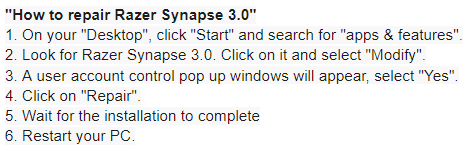
Hi there! Thanks for initiating this thread. Allow me to help. Please perform the steps below and see if it helps:

  • December 25, 2020
I tied this, and it works once after reboot as before. I boot, put to sleep with the hypershift, then wake up, and then it wont put it back to sleep. None of the buttons, such as key luminance work. I can try to completely uninstall and reinstall...

  • Author
  • December 25, 2020
I have the same problem. It worked once, but now it has STOPPED working AGAIN.....

  • December 25, 2020
Repair did nothing for me, i didnt use it too much mainly for lighting profiles. ill just wait for an update

  • December 26, 2020
I am also having this problem. I have repaired, uninstalled, restarted and other things but none of them solve the issue. The Fn key will light up all the basic functions but it does not work. It only works once then if I turn off, sleep, or hibernate it doesn't work the next time. Only functions properly when synapse it closed completely, and stops working once opened again.

  • December 26, 2020
For me, It works only after restart. when you boot the pc after shutting it down, hypershift stops working.

  • December 27, 2020
Didn't fix it for me and exactly the same issue

  • Author
  • December 27, 2020
Razer, Any Update? Are your techs looking into this?

  • Author
  • December 29, 2020
Hello Razer. Is anyone looking into this???

  • Author
  • December 29, 2020
From Reddit: "Yes, this is a known problem for the Hunstman Elite that everyone is having which was caused due to the December update, It should work if you disconnect the wrist rest however for a temporary fix and hope that razer patches this soon." Razer, is anyone looking into this? Are you working on a patch, or can you provide a DL link for an older version of synapse in the meantime?

Razer.Speedcr0ss
Hi everyone! Hi everyone! Razer is aware of this issue. I need everyone's cooperation. Please collect the Synapse 3.0 logs, and let our Support Team take over by submitting a case. Ensure to save the compressed files via Google Drive or to any online drive account, then paste the link in the message field.

  • Author
  • December 30, 2020
Thank you. I have posted my Dropbox files in the OP. LMK if there's anything else I can to do help escalate this ticket. In the meantime can you please provide an older version of synapse that we can download and use? It was working fine up until the latest update.

  • December 31, 2020
Hello fellow members. I have the same issue since the last update. Hypershift returns after I reinstall the synapse software, however crashes and never returns after I suspend my machine or restart it. I have created a new support ticket. Hope this gets resolved soon. I wish everyone a very happy new year!

Same issue here... its soo frustrating have to uninstall and then install again to make it work only for once then again it wont work what more frustrating is there is no way to go back to previous version.....

  • Author
  • January 3, 2021
It's been almost 2 weeks since this was submitted. Why has there not been ANY updates on this? When someone spends $200 on a keyboard, you better believe they WANT IT TO WORK!!! Razer.... Updates. Now! Please!

  • Author
  • January 3, 2021
On a side note, Is anyone else getting random website errors when trying to post a reply? It never says what error has been called, and I have to click "Post Reply" about 7-10 times before it actually posts a reply???

Razer.Speedcr0ss
Hey everyone! Our Support Team is aware of it. I recommend submitting a case to our Support Team so they track the affected users and gather your laptop's Razer Synapse 3.0 logs too. Hi adingess! I have the same issue. I've reported this to our team and waiting for our devs follow-up.