
 The problem is that is not always possible to access the Device Manager panel when more keys are "stuck".
Not to mention how annoying this problem is when it happens in the middle of an intense gaming session.
Any fix for this seriously annoying bug?
The problem is that is not always possible to access the Device Manager panel when more keys are "stuck".
Not to mention how annoying this problem is when it happens in the middle of an intense gaming session.
Any fix for this seriously annoying bug?
Razer Naga Epic Chroma drivers in conflict with Corsair K70 RGB

Issue description:
- It randomly happens that Windows recognize some of the keboard keys as stuck (usually the CTRL key, but not only).
Workaround:
- Normally, I used to restart the computer and the issue was gone for a while.
- Spamming the "stuck" keys or closing Razer Synapse / iCUE would not help at all.
At first I thought it could be a faulty keyboard or my computer's USB ports.
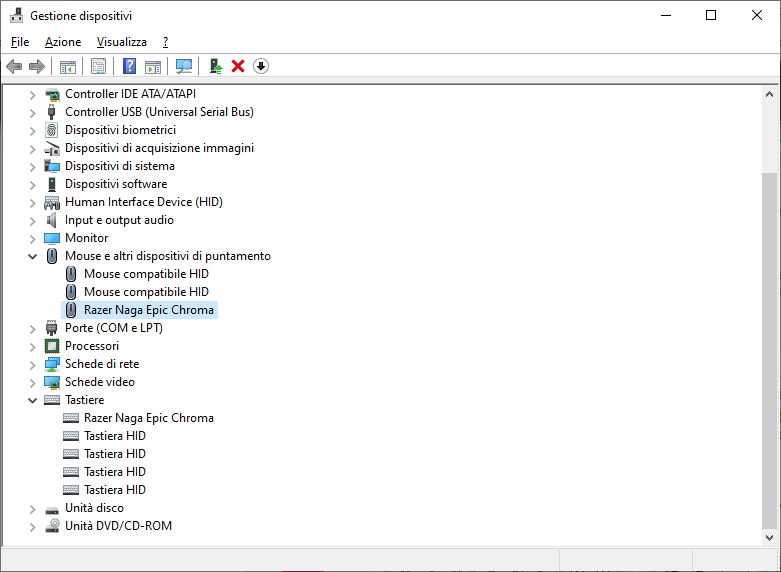
Today, after 2 years driving me crazy, I finally found out that the Razer Naga Epic Chroma drivers are in conflict with the Corsair ones.
Infact, disabling \\ re-enabling the selected HID item instantly fix it (screenshot attached).
The problem is that is not always possible to access the Device Manager panel when more keys are "stuck".
Not to mention how annoying this problem is when it happens in the middle of an intense gaming session.
Any fix for this seriously annoying bug?
The problem is that is not always possible to access the Device Manager panel when more keys are "stuck".
Not to mention how annoying this problem is when it happens in the middle of an intense gaming session.
Any fix for this seriously annoying bug?This topic has been closed for replies.


 The HID Keyboard is the Corsair K70 RGB instead.
I've sent you the serial number as well.
The HID Keyboard is the Corsair K70 RGB instead.
I've sent you the serial number as well.Sign up
Already have an account? Login
Log in with Razer ID to create new threads and earn badges.
LOG INEnter your E-mail address. We'll send you an e-mail with instructions to reset your password.