


Razer Ornata Chroma V2 keys not working | Razer Insider
Skip to main content
Question

Razer Ornata Chroma V2 keys not working

  • April 1, 2023
  • 7 replies
  • 3037 views

DrJeckyl

Hi have a Ornata Chroma V2 for a couple a years now and some time 2 years ago, I had the same issue I’m currently having with it.


For some reason, the keys: num lk, /, *, -, 4, 5, 6, and + on the numpad tend to not work. It’s a come and go issue, meaning that when starting the pc, I’m playing roulette with it…

I’ve tried uninstalling the keyboard, synapse and razer central for a couple of times now and still the same behavior. Took out keys, cleaned the keyboard and same situation.


Like I said, it happened a couple of years ago, stopped for about 2 years and now started again all of a sudden.


Really hopeful someone can give me support on this.
7 Replies

  • Insider Mini
  • May 13, 2023

Same issue here.


Home, Page Up, Num pad keys not working.

Makes document management VERY hard.


  • Insider Mini
  • May 17, 2023

Hello,

I understand that you have been facing an issue with your Ornata Chroma V2 keyboard for quite some time now. Specifically, the keys on the numpad, including num lk, /, *, -, 4, 5, 6, and +, intermittently stop working. This problem occurred previously, then stopped for about two years, and has recently resurfaced.

It appears that you have already attempted some troubleshooting steps, such as uninstalling the keyboard, Synapse, and Razer Central software, as well as cleaning the keyboard. However, the issue persists despite these efforts.

Given the intermittent nature of the problem, it could indicate a potential hardware issue within the keyboard itself. To further diagnose and resolve the issue, I recommend the following steps:

  1. Test the keyboard on a different computer: Connect your Ornata Chroma V2 to another computer and observe if the issue persists. This will help determine if the problem is specific to your current computer or if it occurs across multiple devices.

  2. Update keyboard drivers: Visit the Razer website and ensure you have the latest drivers installed for your keyboard model. Download and install any available updates.

  3. Contact Razer support: Reach out to Razer's customer support directly and provide them with detailed information about the issue. Explain that you have already tried the suggested troubleshooting steps and the problem is recurring. Razer's support team will be able to provide specialized assistance and further guidance to help resolve the issue.

When contacting Razer support, it may be helpful to mention that this problem occurred previously, stopped for a period of time, and has now reoccurred. This information could aid them in identifying any potential patterns or known issues related to your specific keyboard model.

I hope this guidance helps, and I wish you the best of luck in finding a resolution to the issue with your Ornata Chroma V2 keyboard!


I’ve encountered the same issue. After reading this and one other post with the same resolution, decided I had nothing to lose by attempting percussive maintenance on the keyboard. A few firm but controlled palms to the right side of the keyboard has mine working again for now.


  • Insider Mini
  • March 24, 2025

What do you mmean by percussive maintenance😂. Do you mean slamming it and hitting it cuz i dont wanna try it lol. I have the same problem and after all these years of being a fan of razer and im dissapointed….


😁Well, not slamming it, but hitting it, yes. Not the keys, but the side of the keyboard next to the keypad, and not really hard, but firmly. Takes a few tries sometimes. I am far outside the warranty period and haven’t gotten around to opening it up and looking around yet. If I do get around to it and find something, I’ll update.


  • Insider Mini
  • August 14, 2025

😁Well, not slamming it, but hitting it, yes. Not the keys, but the side of the keyboard next to the keypad, and not really hard, but firmly. Takes a few tries sometimes. I am far outside the warranty period and haven’t gotten around to opening it up and looking around yet. If I do get around to it and find something, I’ll update.

Shit! This worked! How pathetic hahaha. Razer support keeps asking to try another computer like it's not a known issue from their product


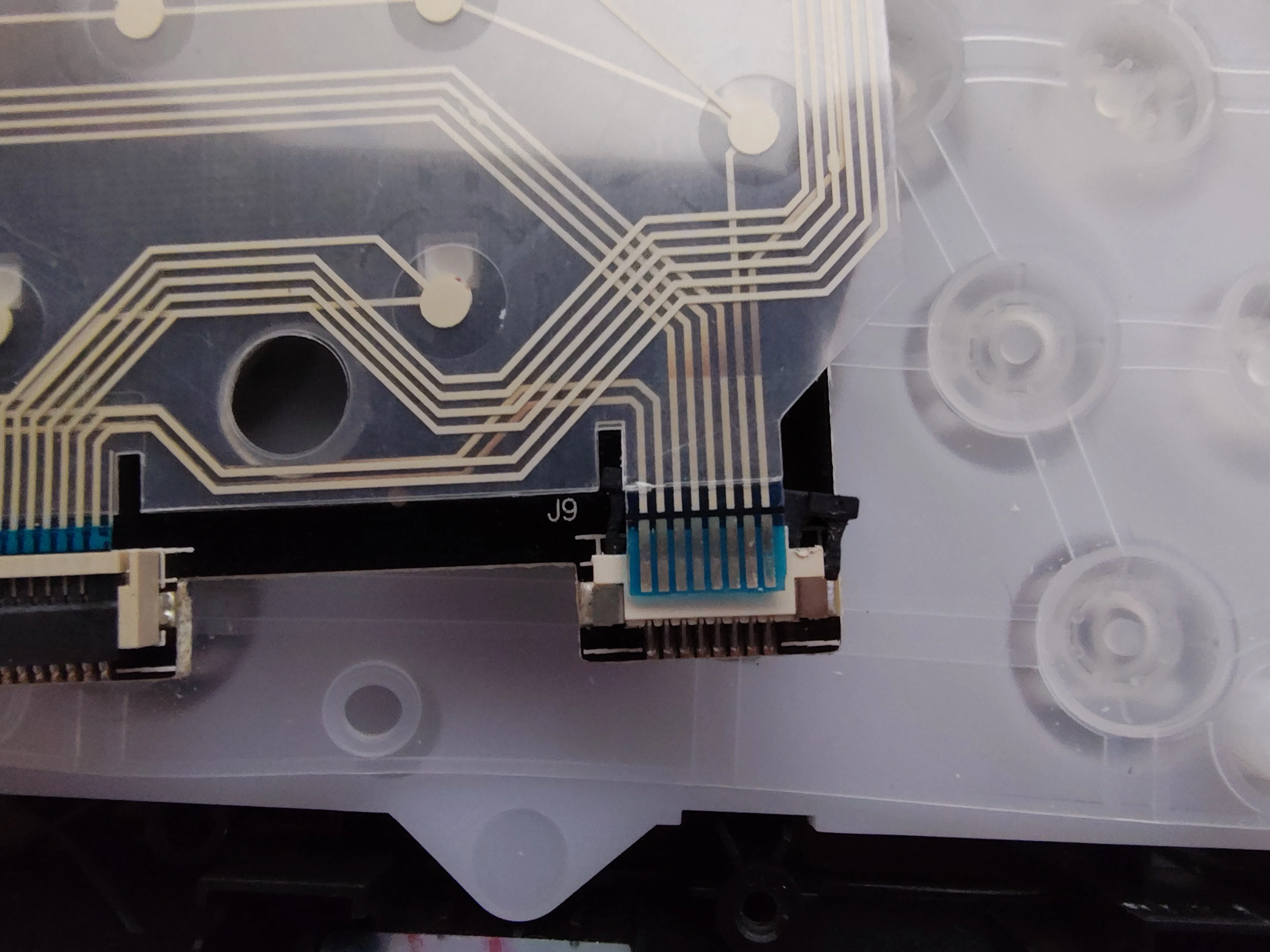
The percussive maintenance method started working for me less and less and I bruised my palm on the corner a couple of times, so I finally got around to opening it up. Found some discoloration on the traces leading to the small ribbon connector for the keypad. Carefully undid the strain relief and freed the cable to find the contacts were heavily oxidized. After very carefully cleaning the contacts and reassembling, the issue is resolved. I can’t say definitively that’s what causing the issue for anyone else, but that’s what it turned out to be for me. Good luck!