

I’m using an Apple Mac laptop to play my Favorite game that I’ve been playing for years but My favorite razer Mouse does not have the software support for Apple Mac so I’m kind of crippled or limited for what I can do and I really just need support for my mouse for my Apple Mac. gaming on Apple isn’t that bad. I just need support for my mouse on an Apple Mac so I can have all the features. My favorite mouse that i use is a RAZER Naga v2 HyperSpeed. I just really need this to happen.
- Home
- Community Overview
- The Razer Armory
- Mice and Surfaces
- Naga V2 HyperSpeed for Apple Mac
Naga V2 HyperSpeed for Apple Mac
- April 27, 2024
- 17 replies
- 5269 views
17 Replies
- Insider Mini
- November 12, 2024
I’ve just bought this mouse and after the purchase I understood that macos is not supported. The features are not working without this software and those features are the main reason for me to but this mouse.
That is totally disappointing. I prefer the company to emphasize this lack of support at all product pages but this is not the case.
I believe there should be plenty of macos users having the same problem. Because not all the users of this mouse are buying it for the gaming. I bought it for the function keys to assign them some special commands during software development and some other daily tasks. I hope somebody see this message and act and develop the required software for macos.

- Insider Mini
- July 9, 2025
The Razer Naga V2 Hyperspeed mouse has limited native support on macOS. While the mouse itself will function with basic functionality, the Razer Synapse software, which is required for customization like button remapping and RGB control, is not officially supported on macOS. However, there are third-party options and workarounds to achieve some level of customization.
Here's a breakdown:
-
Basic Functionality:
The Naga V2 Hyperspeed will work as a standard mouse on macOS, allowing for cursor movement and clicks.
-
Razer Synapse:
Razer Synapse, the software used to customize the mouse's features on Windows, is not compatible with macOS.
-
Third-Party Software:
- Razer macOS: This GitHub project provides a way to customize RGB and potentially other features on Razer devices, including some Naga models, but might not support all features of the V2 Hyperspeed.
- SteerMouse: This paid software offers button remapping, including for the Naga V2 Hyperspeed, and cursor speed customization, but does not control RGB.
-
Workarounds:
- Windows Setup: You can use a Windows computer to configure the mouse with Synapse, save the settings to the mouse's onboard memory, and then use it on your Mac. This allows you to retain button mappings and other settings.
- Older Synapse Versions: Some users have reported success with using older versions of Razer Synapse (version 2) on macOS to provide runtime support for the mouse.
In conclusion, while the Razer Naga V2 Hyperspeed isn't fully supported on macOS, you can still use it with basic functionality and potentially gain some customization options through third-party software or by configuring it on a Windows machine first.

- Insider Mini
- October 19, 2025
Hey everyone! I saw this thread while looking for others with the same frustration - I've been using a Naga V2 Hyperspeed on my Mac and was tired of not being able to use the side buttons properly.
I just released a free, open-source macOS app that solves this exact problem: https://github.com/DParent10/NagaController/releases
*What it does:**
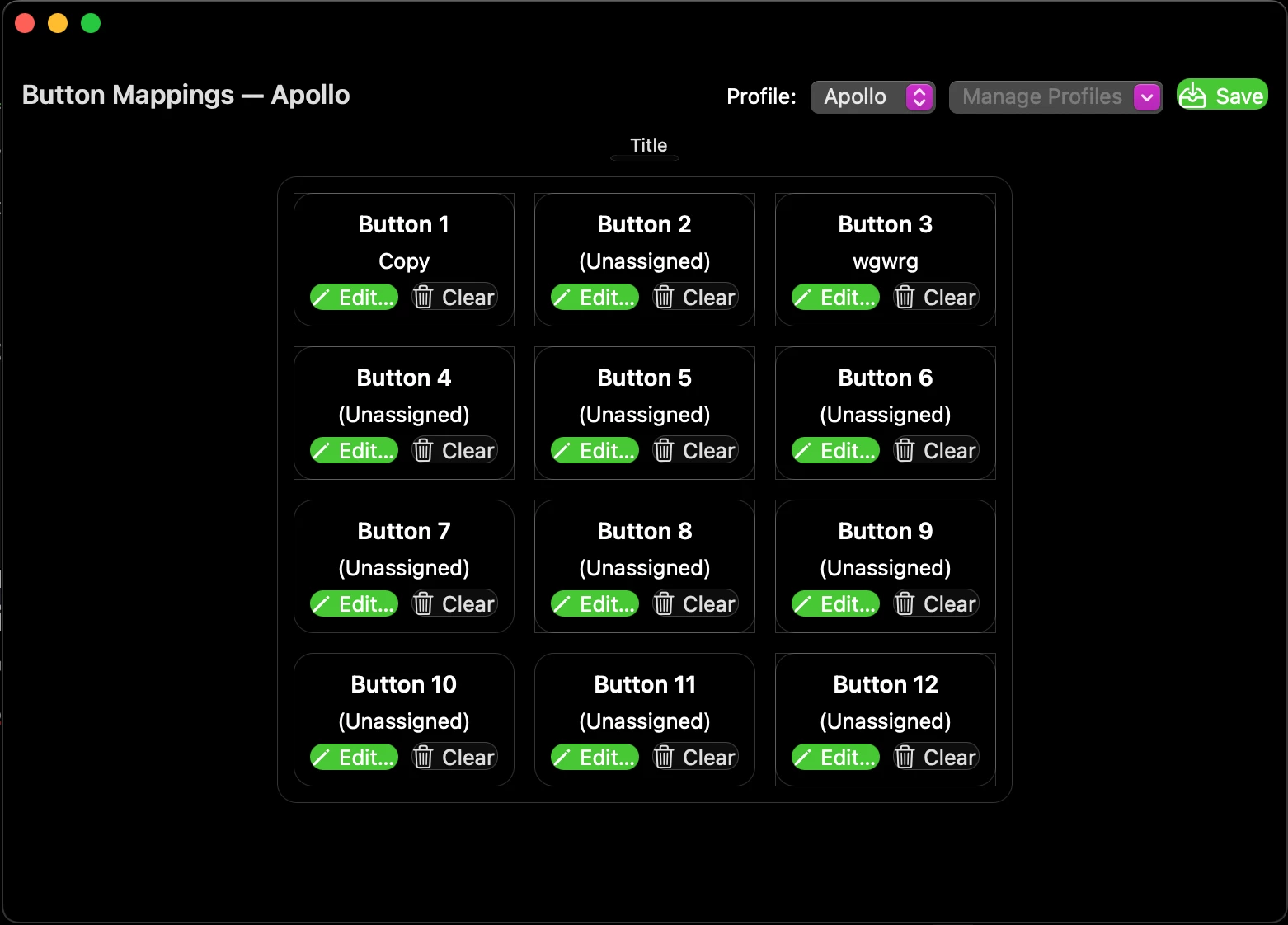
- Remaps all 12 side buttons to any key combination you want
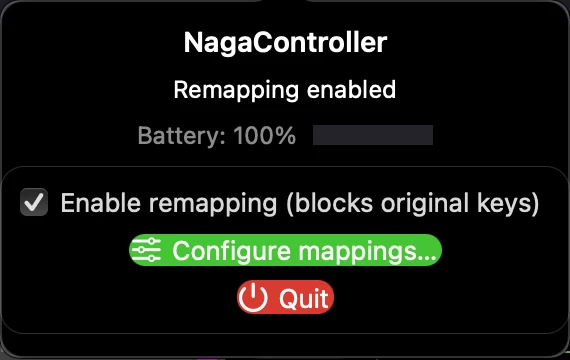
- Shows battery level when connected via Bluetooth
- Lives in your menu bar with easy on/off toggle
- Works specifically with the Naga V2 Hyperspeed
**Quick setup:**
1. Download the app from the release page
2. Move to Applications, right-click → Open (one-time Gatekeeper bypass since it's unsigned)
3. Grant Accessibility permission
4. Configure your button mappings through the menu bar
It's completely free and open source. I built this because I needed it for my own work (I'm also a developer like @sefaozkan), and figured others would benefit too.
I just released v0.1.0 today, so feedback is very welcome. If you run into any issues, please let me know on GitHub.
Hope this helps you all get more use out of your Naga on Mac!
Note: This is an independent project, not affiliated with Razer Inc.
- Insider Mini
- October 20, 2025
Update on NagaController v0.1.0:
The app is now fully signed with an Apple Developer ID and notarized by Apple! 🎉
What's changed:
- ✅ No more Gatekeeper bypass needed - just download and run
- ✅ Professional DMG installer (drag-and-drop to Applications)
- ✅ Seamless installation experience
Download: https://github.com/DParent10/NagaController/releases/latest
Installation is now as simple as:
- Download NagaController-v0.1.0.dmg
- Open and drag to Applications folder
- Launch and configure!
Thanks for the interest
- Insider Mini
- October 20, 2025
Update on NagaController v0.1.0:
The app is now fully signed with an Apple Developer ID and notarized by Apple! 🎉
What's changed:
- ✅ No more Gatekeeper bypass needed - just download and run
- ✅ Professional DMG installer (drag-and-drop to Applications)
- ✅ Seamless installation experience
Download: https://github.com/DParent10/NagaController/releases/latest
Installation is now as simple as:
- Download NagaController-v0.1.0.dmg
- Open and drag to Applications folder
- Launch and configure!
Thanks for the interest
This is fantastic - I believe ;)
Im currently working with Razer Naga Trinity that ive used for years with my PC. Now that I’ve switched over to Mac Studio + MBP, im struggling to make it work properly with Macs.
I downloaded the app (looks epic), but understandably it doesnt wanna work with my Naga Trinity.
However, im gonna go ahead and buy the Naga V2 Hyperspeed and run it through your app.
Thanks!
- Insider Mini
- October 20, 2025
Actually, would you mind testing it with your Naga Trinity first? The app might already work - or at least partially!
I'd love to add proper Trinity support. Could you help me gather some diagnostic info?
Here's how:
-
Open Terminal (Applications → Utilities → Terminal, or search "Terminal" in Spotlight)
-
Run these commands (copy and paste each line, press Enter):
   cd /Applications
./NagaController.app/Contents/MacOS/NagaController-
The app will launch and show diagnostic info in the Terminal window
-
If prompted to grant Terminal permissions (Accessibility and/or Input Monitoring):
- It's safe to grant these temporarily for testing
- Remember to revoke them afterward: System Settings → Privacy & Security → Accessibility/Input Monitoring → uncheck Terminal
- Note: You'll see the diagnostic logs I need even without granting these permissions
-
Turn on "Enable remapping" in the menu bar
-
Press each side button on your Trinity (1-12 or however many you have)
-
Share the output - especially any lines that say
[HID]:-
Option 1: Post right here in this thread (easiest!), You could DM me the results also.
-
Option 2: Create a GitHub Issue if you have an account: https://github.com/DParent10/NagaController/issues/new
-
This will help me (and other Trinity users) get proper support added!
Might save you from needing to buy a new mouse. 🎮
- Insider Mini
- October 21, 2025
Actually, would you mind testing it with your Naga Trinity first? The app might already work - or at least partially!
I'd love to add proper Trinity support. Could you help me gather some diagnostic info?
Here's how:
-
Open Terminal (Applications → Utilities → Terminal, or search "Terminal" in Spotlight)
-
Run these commands (copy and paste each line, press Enter):
   cd /Applications
./NagaController.app/Contents/MacOS/NagaController-
The app will launch and show diagnostic info in the Terminal window
-
If prompted to grant Terminal permissions (Accessibility and/or Input Monitoring):
- It's safe to grant these temporarily for testing
- Remember to revoke them afterward: System Settings → Privacy & Security → Accessibility/Input Monitoring → uncheck Terminal
- Note: You'll see the diagnostic logs I need even without granting these permissions
-
Turn on "Enable remapping" in the menu bar
-
Press each side button on your Trinity (1-12 or however many you have)
-
Share the output - especially any lines that say
[HID]:-
Option 1: Post right here in this thread (easiest!), You could DM me the results also.
-
Option 2: Create a GitHub Issue if you have an account: https://github.com/DParent10/NagaController/issues/new
-
This will help me (and other Trinity users) get proper support added!
Might save you from needing to buy a new mouse. 🎮
I sent you a DM :)
- Insider Mini
- October 28, 2025
Sadly for my this application does not work. It might be because I’m running it on my company MacBook.
Do I need to install Razer MacOS software?
It doesn’t matter what I set in button mapping, I always get buttons I’ve set in Razer Synapse on Windows.
- Insider Mini
- February 4, 2026
Update on NagaController v0.1.0:
The app is now fully signed with an Apple Developer ID and notarized by Apple! 🎉
What's changed:
- ✅ No more Gatekeeper bypass needed - just download and run
- ✅ Professional DMG installer (drag-and-drop to Applications)
- ✅ Seamless installation experience
Download: https://github.com/DParent10/NagaController/releases/latest
Installation is now as simple as:
- Download NagaController-v0.1.0.dmg
- Open and drag to Applications folder
- Launch and configure!
Thanks for the interest
Works perfectly for me thank you! Just one thing I’m missing: the possibility to map the left / right /middle scroll click. Is this something you could add?
Thanks for your work
- Insider Mini
- June 15, 2026
Here in June 2026 still wishing Razer Synapse for Mac OS would support the Naga Hyperspeed V2...

- Insider Mini
- August 19, 2026
how can i remap one button to be like the ‘’enter’’ from keyboard or ‘’backspace’’ I tired everything and i could not succeed. Did you manage? If i hit enter as a key it will not record; It just saves and closes the window without remaping the button to be ‘’enter’’ key

- Insider Mini
- September 9, 2026
I had the exact same question as RetroMidnight :)
- Insider Mini
- September 10, 2026
how can i remap one button to be like the ‘’enter’’ from keyboard or ‘’backspace’’ I tired everything and i could not succeed. Did you manage? If i hit enter as a key it will not record; It just saves and closes the window without remaping the button to be ‘’enter’’ key
@retroMidnightBlueload384 @headRoseQuartzsource601 — you found a real bug, thanks for reporting it. In the editor, Return is wired to the Save button, so macOS hands it to Save before the capture box ever sees it. That's why pressing Enter "just saves and closes the window". Escape does the same thing to Cancel.
It's fixed in the code now: the capture box takes over Return and Escape while it has focus, and the Quick Presets dropdown in the Key tab has a new "Special Keys" section with Return, Enter, Tab, Escape, Delete (Backspace) and Space, so you don't have to fight the capture box at all. It'll be in the next release.
Backspace should already record in v0.1.0 — click the capture box first so it has the green border, then press Backspace. If it doesn't, let me know what shows in the box.
- Insider Mini
- September 10, 2026
Sadly for my this application does not work. It might be because I’m running it on my company MacBook.
Do I need to install Razer MacOS software?
It doesn’t matter what I set in button mapping, I always get buttons I’ve set in Razer Synapse on Windows.
@bookVividYellowgeo342 — no, you don't need any Razer software on the Mac, and it's not your company MacBook. What you're seeing is the mouse itself: the Naga stores your Synapse button assignments in its on-board memory, and those stay active over Bluetooth on the Mac. NagaController expects the side buttons to send their default keys (1–12), so when the mouse sends your Windows assignments instead, the app doesn't recognise them and your Synapse mappings win.
Fix: connect the mouse to a Windows PC, open Synapse, reset the on-board profile to defaults (or set the side buttons back to 1–12), then reconnect it to the Mac. After that NagaController's mappings apply. I hit exactly this on my own mouse this week, so it's now covered in the setup guide. The next release also adds a "Learn Hardware Trigger" option that can pick up non-default buttons directly.
- Insider Mini
- September 10, 2026
Update on NagaController v0.1.0:
The app is now fully signed with an Apple Developer ID and notarized by Apple! 🎉
What's changed:
- ✅ No more Gatekeeper bypass needed - just download and run
- ✅ Professional DMG installer (drag-and-drop to Applications)
- ✅ Seamless installation experience
Download: https://github.com/DParent10/NagaController/releases/latest
Installation is now as simple as:
- Download NagaController-v0.1.0.dmg
- Open and drag to Applications folder
- Launch and configure!
Thanks for the interest
Works perfectly for me thank you! Just one thing I’m missing: the possibility to map the left / right /middle scroll click. Is this something you could add?
Thanks for your work
@easyPastelRedheat508 — glad it's working for you. Tilt left/right and middle click aren't mappable yet: those send mouse-button events rather than keystrokes, and the app currently only intercepts keystrokes. It's on the list, tracked at https://github.com/DParent10/NagaController/issues — I'll update here when it lands.
- Insider Mini
- September 10, 2026
Quick update for everyone on this thread: a new NagaController release is on the way with a lot of new ground, thanks largely to some contributors (JoshGatto and hydramst on GitHub):
- Hypershift: a second layer of mappings while a chosen button is held or toggled
- Media and macOS keys: play/pause, volume, brightness, Mission Control, Show Desktop
- Profile switching from a mouse button, with the active profile shown in the menu bar
- Learn Hardware Trigger, which can pick up buttons from other Razer mice
- DPI buttons as mappable buttons, with a documented way to stop them changing sensitivity
- A setup guide covering permissions, profiles, Hypershift and the DPI setup
One correction to my earlier Terminal instructions: on current macOS, launching the binary directly gets the app killed the first time it touches Bluetooth. If I ask anyone for diagnostics again, the command is `open --stdout /tmp/naga.log --stderr /tmp/naga.log /Applications/NagaController.app`, then share /tmp/naga.log.
Download: https://github.com/DParent10/NagaController/releases/latest
- Insider Mini
- September 25, 2026
Hey, found a fix for the Shift/Ctrl/Alt thing with the side buttons on Mac.
Grab Karabiner-Elements:
brew install --cask karabiner-elements
or the dmg from https://github.com/pqrs-org/Karabiner-Elements/releases
Approve the driver extension and Input Monitoring when it asks. That's the
whole setup. Open a text field, hold Shift, hit side button 1, and you get "!"
Everything stays at default. Karabiner runs all your keyboards through one
virtual keyboard, so your keyboard and the mouse grid share modifier state,
which is what makes the modifiers land. Still one press = one keystroke.
Naga V2 HyperSpeed on the dongle, Karabiner 16.3.0. Took about two minutes.
Sign up
Already have an account? Login
Log in with Razer ID to create new threads and earn badges.
LOG INWelcome to Razer Insider
No account yet? Create an account
Log in with Razer ID to create new threads and earn badges.
LOG INEnter your E-mail address. We'll send you an e-mail with instructions to reset your password.