Hello,
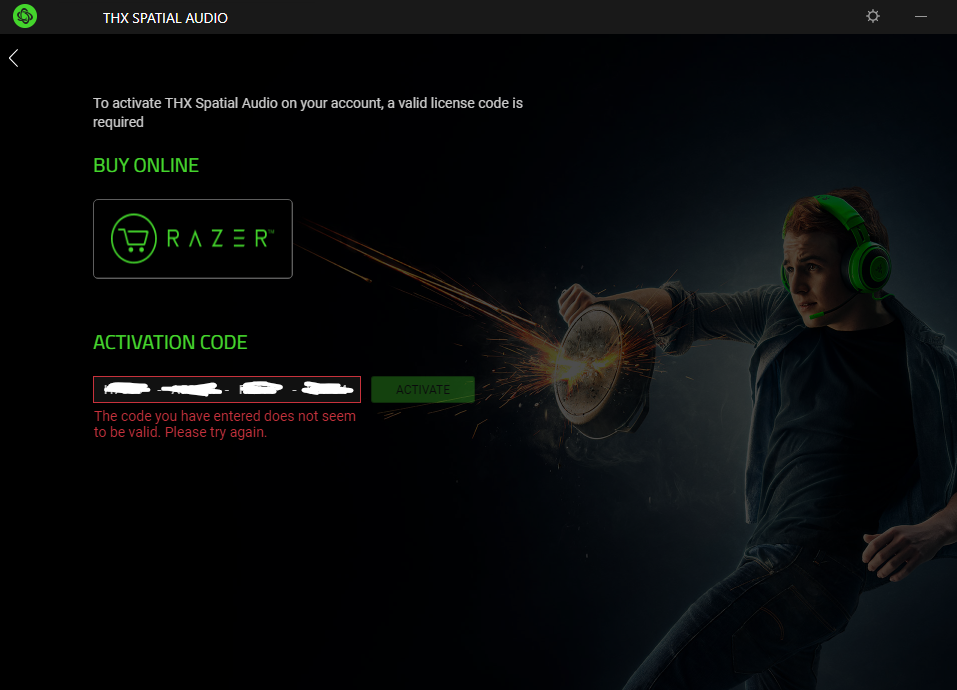
Activation code that was sent from razer is not working (Photo). What should i do?

Hello,
Activation code that was sent from razer is not working (Photo). What should i do?
Best answer by Razer.sushi.boi
Hi there,
You need the 7.1 Surround Sound software for this one. Please follow the steps below:
- Download the 7.1 Surround Sound software.
- Run the 7.1 Surround Sound installer.
- Click “INSTALL”.
- Launch the 7.1 Surround Sound app when the installation is completed.
- Log in with your Razer ID.
- Enter the activation code that came with your purchase.
- Click “ACTIVATE”.
Feel free to reach out via PM if you need further assistance.
*Thread locked to curb conversation to PM.
Already have an account? Login
Enter your E-mail address. We'll send you an e-mail with instructions to reset your password.