Basilisk Ultimate stopped working out of nowhere | Razer Insider
Skip to main content
Question

Basilisk Ultimate stopped working out of nowhere

  • September 2, 2024
  • 2 replies
  • 88 views

Hi guys , so my Basilisk Ultimate stopped working wirelessly after 3 perfect years.I have misplaced the box the mouse came with and the og razer cable so I can’t tell if it will work with a razer cable. But I’m pretty sure it’s the mouse or the 2.4ghz receiver at fault since it’s not working either on my pc with all driver updated or rolled back or uninstalled, nor on my laptop where I have no software related to any peripherals at all. And I used it from time to time on my laptop before without software so that’s how I know it should work. I also can’t find the right 2.4ghz receiver for my mouse so maybe you have an idea? (located in Germany)

2 Replies

  • Author
  • Insider Mini
  • September 2, 2024

Also wanted to add that the mouse “works” for 1 sec and then stops like it’s disconnecting , and then works again for 1 sec after 10-15 sec. So…. idk , connectivity issue? 


  • Insider Mini
  • June 26, 2025

Hey bud! Hope all is well. I just saw this today and had the same issue with my Razer Basilisk Ultimate about a week ago, I know I am over 9mo late, but figured I’d make a post for any future people having the same issue.

What happened with my Basilisk Ultimate is that it was working fine, then all of a sudden stopped tracking the mouse after 1 second of being turned on/woken from sleep, but the lights still worked. It was the weirdest thing. However, luckily, I had a second one for my laptop that I could plug in and use until I had time to troubleshoot it. 


The first thing I thought of was that perhaps the drivers were outdated, so I checked about updating the drivers. Check out this link from Razer that offers a program download to update your device’s firmware: https://mysupport.razer.com/app/answers/detail/a_id/4552

I updated the firmware with the above instructions, I be it was frustrating to have to keep toggling the mouse on/off to progress through the prompts, but after the firmware was updated from 1.07.XX to 1.08.00, the mouse is now working normally with the cord connected, but not in wireless mode. Afterwards, I noticed with Synapse open and it in wireless mode, it is power cycling on and off to the frequency of 1sec in the app. I will restart my computer to see if that will fix it and I will update this thread.


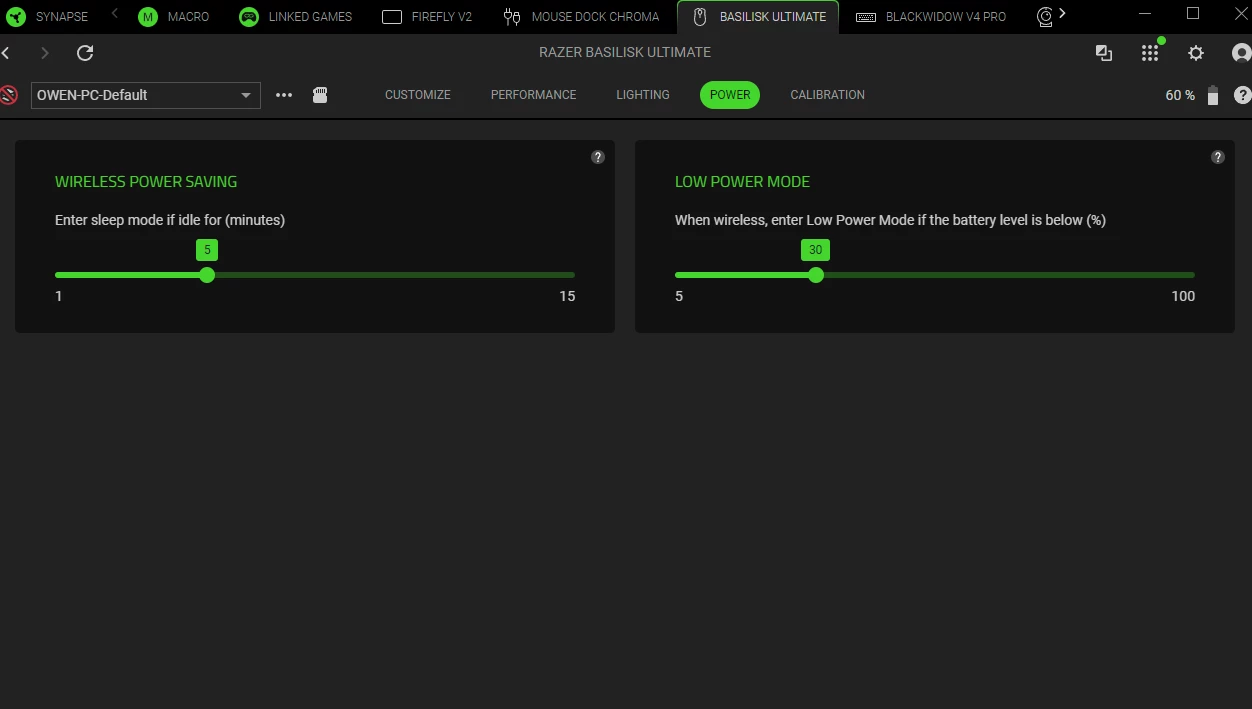
Update: I have returned and with mouse in wireless mode now, staying on, and working! What I had noticed before restarting is that in Synapse, in the power tab for my mouse, the “wireless power saving” setting was all the way over to the left. Even though it said “1”, I just slid it over to “5” and it’s working like normal. If I had to guess, it seems like a combination of firmware update and a bug with Synapse that the “1” is behaving like a “0”, in the “wireless power saving” setting. This would cause it to power cycle continuously.


I wish I could speak to a rep at Razer to let them know of this bug with Synapse, but I am only met with “your product is out of warranty” road block.


I hope that helps you out and anyone in the future that finds the same problem, with their mouse out of warranty.