

Basilisk ultimate / Synapse not able to install | Razer Insider
Skip to main content
Solved

Basilisk ultimate / Synapse not able to install

  • January 2, 2026
  • 2 replies
  • 223 views

Hello, and happy new year !


I just got a basilisk ultimate mouse, but I’m having troubles for the setup :

  • The mouse works properly when it comes to moving and clicking, either cabled or dock-linked
  • Additionnal buttons, including 4, are not recognized. They don’t seem to send any output at all when pressed, as I have been unable to manually set them in games.
  • After installing synapse, here is the situation
    • Mouse is properly detected by synapse 4 (a tab is created)
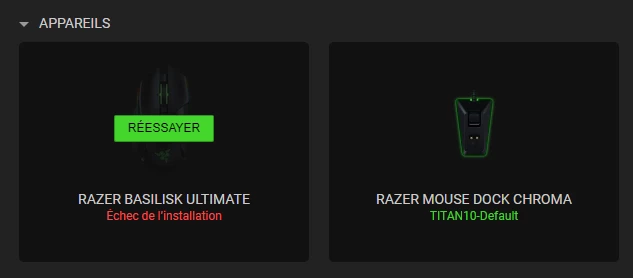
    • It can’t seem to install it. It downloads the files, but I get a “installation failure” message.
    • I tried uninstalling synapse, the mouse, deleted the pilots, etc.

In advance, thanks a lot <3


Edit : WIndows 10
Best answer by byteDeepPeachGARNET982

The format took care of it as it was a Windows related issue : it now works perfectly.


Big cheers to the technical service who tried to fix it yesterday :)

2 Replies

Hi again. Unfortunately, I have had no luck making synapse install the mouse.

I can handle the dock without issue, can even set the light intensity and all, but still can’t use the previous button =D


I’m not giving up, but if anyone has an idea besides the following, I would be very glad to hear about it <3

  • Updating the firmware (done on dock and mouse)
  • Running synapse as administrator 
  • Uninstalling drivers & synapse, clearing the program and program data folders (found this one on reddit)
  • Making a voodoo doll

Is it possible that this is an access / rights issue ? It would seem weird that it’d work with the dock and not the mouse in this case, but you never know.

I’ll be trying a full format in a few days, but if I could figure out a way to make it work before...

Thanks !


The format took care of it as it was a Windows related issue : it now works perfectly.


Big cheers to the technical service who tried to fix it yesterday :)