Deathadder V3 (wired) | Razer Insider
Skip to main content

Deathadder V3 (wired)

  • January 6, 2026
  • 14 replies
  • 86 views

I have a Razer DeathAdder V3 (wired) mouse. I've made my settings via Synapse. There are no issues. The firmware is up to date.  However, every time I restart my computer, the mouse operates at 125 Hz. For the mouse to function properly, I have to unplug and plug the cable back in each time. Is there a solution for this? Otherwise, I'll have to return it.


And please add Turkish language support to the Synapse app. It's terrible that you haven't added a language to such a simple app when you have such a large sales market in this country.


14 Replies

FiszPL
Vanguard
Forum|alt.badge.img+1
  • VANGUARD
  • January 7, 2026

Synapse 3 or 4?


  • Author
  • Insider Mini
  • January 8, 2026

Synapse 3 or 4?

ı tried 4 and 3.

but the same problem persists.


FiszPL
Vanguard
Forum|alt.badge.img+1
  • VANGUARD
  • January 9, 2026

What app are you using to check the polling rate?

Did you’ve tried the cleanup tool? https://rzr.to/Tf53xj

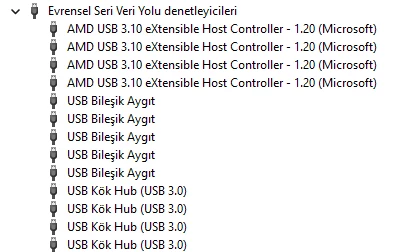
If this won’t help - I’d try one more thing → go to device manager expand universal serial bus controllers - remove any USB Root hub instance then reboot PC.


  • Author
  • Insider Mini
  • January 9, 2026

I'm using Razer's own application (polling rate tester). But you don't even need the application. Because you can see it with the naked eye.

I haven't tried the other steps yet. I'll get back to you after I've tried them.


  • Author
  • Insider Mini
  • January 10, 2026

After you said that, I tried everything, but it didn't work.


FiszPL
Vanguard
Forum|alt.badge.img+1
  • VANGUARD
  • January 10, 2026

After you said that, I tried everything, but it didn't work.

I’d test it on another PC with Synapse. I think it’s an OS related problem, that something is blocking the polling rate.


  • Author
  • Insider Mini
  • January 10, 2026

I use a laptop. Could this be related to that? 


FiszPL
Vanguard
Forum|alt.badge.img+1
  • VANGUARD
  • January 10, 2026

I use a laptop. Could this be related to that? 

It’s not hardware related. I’d still bet on some windows stuff broken.


  • Author
  • Insider Mini
  • January 10, 2026

So what should I do? How can I be sure there is no problem with the mouse? 


  • Author
  • Insider Mini
  • January 10, 2026

So what should I do? How can I be sure there is no problem with the mouse? 

I think I've found the problem. There are three USB ports on the laptop. All three are occupied (headphones, mouse, keyboard). When I remove one, the mouse works fine. Now I don't know how to solve this problem :) Would a hub work?


FiszPL
Vanguard
Forum|alt.badge.img+1
  • VANGUARD
  • January 11, 2026

So what should I do? How can I be sure there is no problem with the mouse? 

I think I've found the problem. There are three USB ports on the laptop. All three are occupied (headphones, mouse, keyboard). When I remove one, the mouse works fine. Now I don't know how to solve this problem :) Would a hub work?


Hub is NOT an option - it’s just a splitter. Also Razer periperals are selecrive about hubs. Are these 3 ports are at least USB 3.0?

You can also try updating laptop drivers/firmware/bios for all things.


  • Author
  • Insider Mini
  • January 11, 2026

Yes, all of them are 3.0


and everything is up to date


 I have a bloody brand keyboard, and when I remove it, the problem disappears. I don't understand. 


FiszPL
Vanguard
Forum|alt.badge.img+1
  • VANGUARD
  • January 13, 2026

Strange… maybe some motherboard limitation. I’d try updating BIOS for your motherboard and check.


  • Author
  • Insider Mini
  • January 13, 2026

Brother, I really thank you. You really helped me a lot but the BIOS is up to date. I don't think there's much I can do. For now, I'll keep using it by plugging it in and out.