GameManagerService3.exe Crashing_Razer DeathAdder V3 | Razer Insider
Skip to main content

GameManagerService3.exe Crashing_Razer DeathAdder V3

  • November 19, 2025
  • 5 replies
  • 57 views

MAX_PC

Hello everyone.

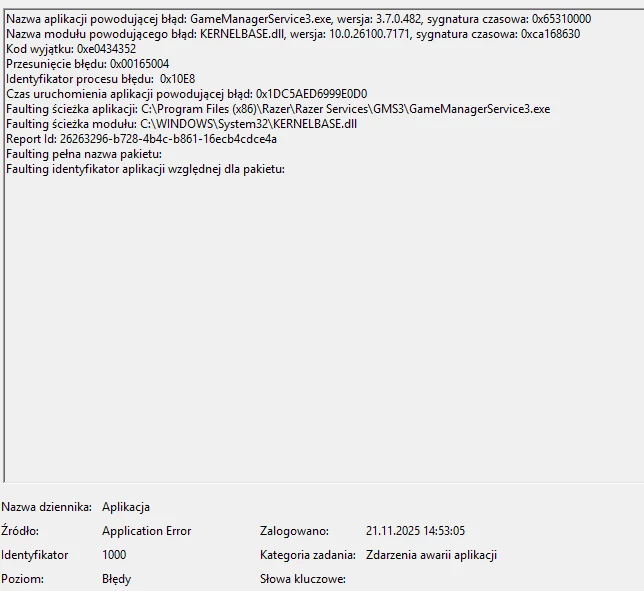
A few days ago, I bought a Razer DeathAdder V3. The mouse itself works great, but the software has problems shutting down Windows 11.
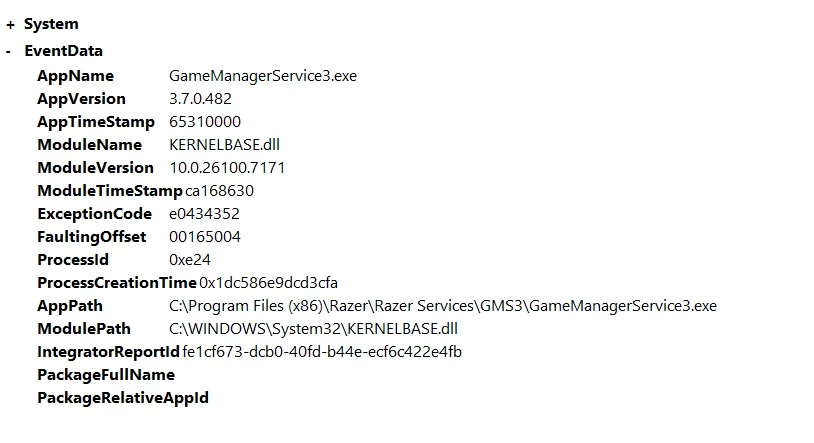
So what did I do?

I uninstalled Razer/Synapse and run the DriverCleanup tool as suggested in the other thread.

After a fresh install the issue is repeatable every time after reboot/restart!

PLEASE fix this issue!


My system:

Windows 11 Home version

Version 25H2

Installed on ‎12‎11‎2025

OS build 26200.7171

5 Replies

FiszPL
Vanguard
Forum|alt.badge.img+1
  • VANGUARD
  • November 21, 2025

I’d uninstall Synapse 3 completely, and check if the same thing is happening on Synapse 4. Also after uninstalling Synapse 3: use this tool to remove any razer driver: https://mysupport.razer.com/app/answers/detail/a_id/20339/~/razer-driver-clean-up-tool


MAX_PC
  • Author
  • Insider Mini
  • November 21, 2025

I've been using Synapse 4 exclusively since the beginning. I'll try uninstalling and cleaning it using the program you sent.


MAX_PC
  • Author
  • Insider Mini
  • November 21, 2025

After following these steps, the problem still occurs: 

1. Uninstall Razer Synapse. 
2. Unzip the Razer Driver Clean-up tool and run the CleanupRazerDrivers.exe application. 
3. Reboot your PC. 
4. Reinstall Razer Synapse. 
5. Log in to your Razer account.


FiszPL
Vanguard
Forum|alt.badge.img+1
  • VANGUARD
  • November 22, 2025

I like the ponglish translation in windows xD like “faulting ścieżka modułu”.

It looks like something is wrong with the OS itself, so I’d run CMD as an admin and type “sfc /scannow” - it’ll scan all OS files and try to repair them if problem found.


btw you can also run powershell as admin and try this (but for most cases sfc /scannow helped)::

DISM /Online /Cleanup-Image /RestoreHealth


MAX_PC
  • Author
  • Insider Mini
  • November 22, 2025

Hehe, it's not a mistake.

Windows has always translated some phrases in Event Viewer this way. And yes, I'm from Poland.

Regarding Repairing Corrupted or Adding Missing System Files using System File Checker, I got the following result:
Windows Resource Protection did not find any integrity violations.
You don't have any missing or corrupted system files.