

Hi, I purchased a Blackwidow V4 Pro 75% with ISO layout. I am a Mac and PC user and was hoping on being able to use the keyboard with both machines.
This is what the ISO Layout looks like on the Blackwidow V4 75%, borrowed picture from techradar.
So as you can see in the image of the ISO, on a true ISO Layout, or the 2.4 mode, the keyboard has this layout (which is correct). Take note of the Red squares, shorter left shift and bigger enter/return key. Also pay attention to the key on the right of the left shift and on the top left of the keyboard, marked in orange.
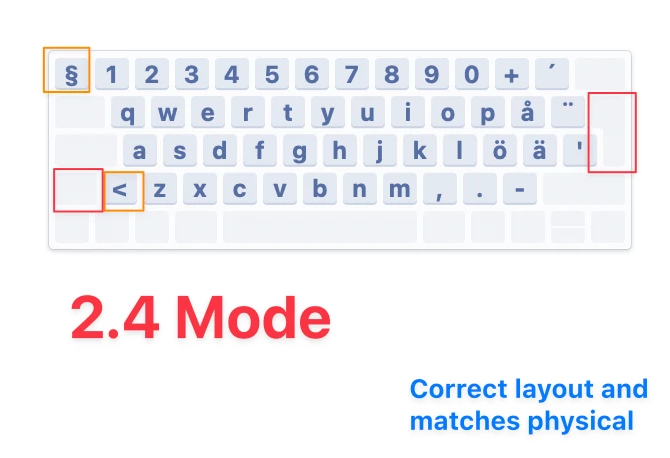
The issue I’m facing is that on the 2.4 mode, the orange angle bracket <> and paragraph keys are correct, but on my Mac, whenever I switch to Bluetooth or Wired mode on the keyboard, for some reason the keyboard thinks it is some weird ANSI-looking layout rather than the actual ISO layout it has in both physical form and on 2.4 mode.
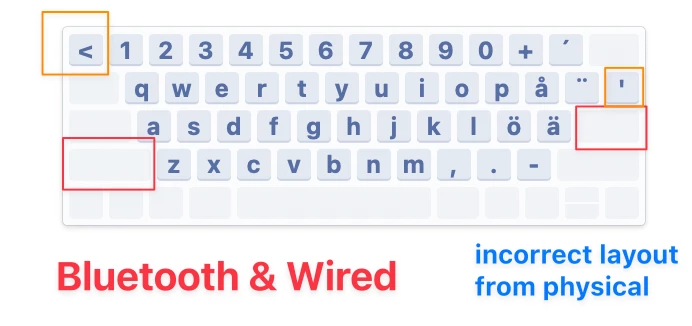
So when I press that top left key it should output § but instead outputs <, and if I press the key to the right of the left shift, it does the opposite (it should output < but instead outputs §).
I rely quite a lot on using the angle brackets <> as i work as a developer and I need to find a way to resolve this for wired and bluetooth mode.
I can circumvent the issue by toggling the keyboard to 2.4 mode but for a premium product that also comes with a premium price tag, that limitation will create a less optimal experience than intended in the long run. I should be able to use wired and bluetooth mode.
Another issue I am facing is that I am not able to pair the Blackwidow V4 Pro 75% together with the Naga Pro V2 through the Hyperspeed Multi-Device Pairing in Synapse, so I end up having to connect both through their dongles.
I think thats a bit of a blunder honestly. Ideally as a consumer, I’d expect that support (as advertised) to sort of be in place when a new keyboard is being released into the same product lines.
I am wondering, is it possible that the board under the hood on the Blackwidow V4 Pro 75% keyboards are the same that are in the ROG Azoth keyboards? Because I’ve had this exact same problem with that keyboard.