Razer AIO Hanbo 360 problems | Razer Insider
Skip to main content
Question

Razer AIO Hanbo 360 problems

  • May 6, 2024
  • 2 replies
  • 812 views

Hi there,


I built a new PC and have the following components:

  • ASRock Z690 Taichi Razer Edition
  • Intel i7-14700
  • Razer Hanbo AIO 360, fan connected to CPU_FAN1 of the motherboard
  • Razer PWM Fan control.ler with 6x Kunai Chroma attached to it


Thing is, when I start Windows 11,  I get two faults:


  • FAN COUNT ERROR
    FAN/S NOT CONNECTED


Also, inside Razer Synapse, the fan speed for the CPU shows 0. I read different topics that this was the case with other intel 13th gen CPU's, but the latest fw of the Hanbo (1.2.0) mentions that it is solved. 
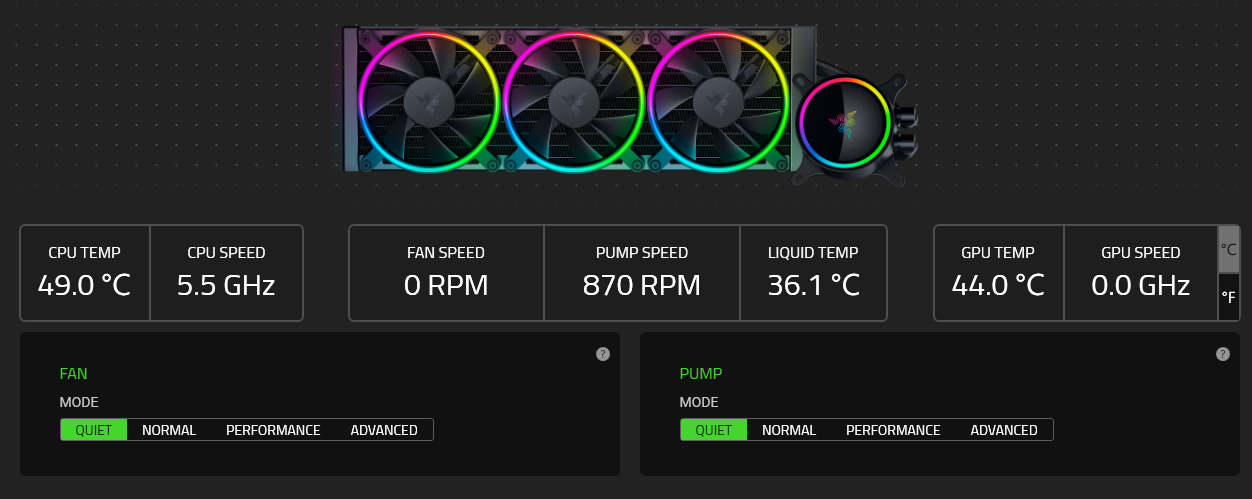


I have tried formatting Windows and reconfiguring everything, but I can't solve the faults and my CPU speed keeps showing 0. It is also worth mentioning that inside the BIOS I can see the FAN speed of CPU_FAN1.


Any ideas on how to solve this?

 

2 Replies

jbhabis
  • Insider Mini
  • August 21, 2024

I had a similar issue.  Make sure the fans for your AIO are plugged into your AIO’s fan ports and not your Fan controller.  This fixed the issue for me.  


alexkywalker
  • Insider Mini
  • May 19, 2025

This is such a hit or miss device. I have bought 4 Hanbos in the last 6 months for different builds, and I’ve had problems with 2 and zero issues with the other 2.

One went back to Razer and they replaced it, though it took weeks for the whole thing.


Another on brand new I just installed, upgraded firmware and all and still complains about fan count errors. My theory is that the USB-C to usb motherboard header cable is the one to blame, since everything works fine if I run a USB cable from the Hanbo to the back of the motherboard into another USB-C port.

This is my last one, not buying it again.