Razer Freyja haptics only work with audio | Razer Insider
Skip to main content
Question

Razer Freyja haptics only work with audio

  • December 26, 2025
  • 99 replies
  • 2110 views

Show first post

99 Replies

Lrbrownii
  • March 5, 2026

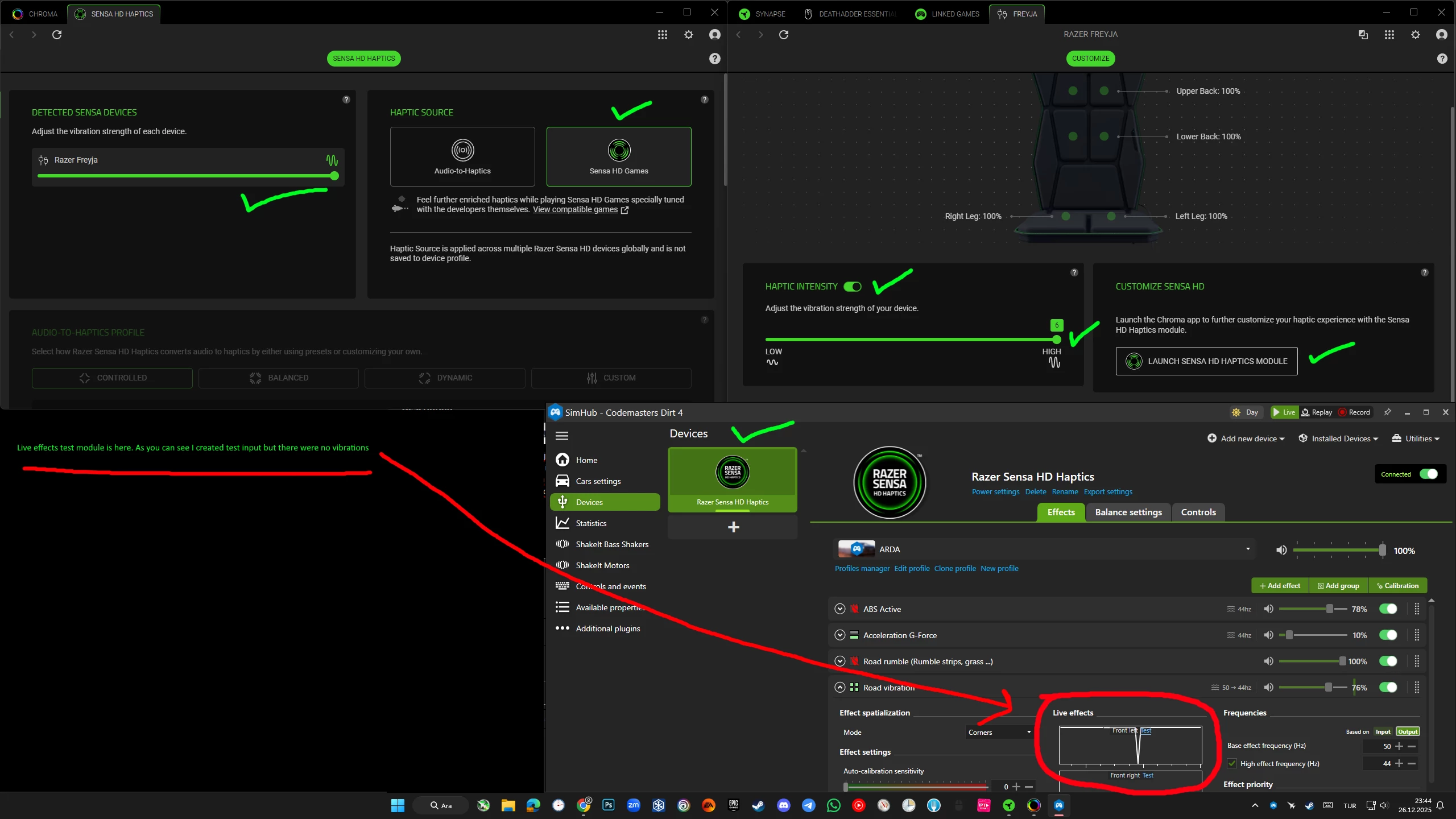
Since the latest update, the situation seems to have gotten worse for me. Previously, at least Audio-to-Haptics was working, but now Freyja is not producing any haptic feedback at all.

Is anyone else experiencing the same problem after the latest Synapse / Chroma update?

The device is detected normally in Synapse and SimHub, but no vibration is produced anymore. This definitely looks like another software-side issue, not a hardware problem.

Would be helpful to know if others are seeing the same behavior after the update.

i have same issue, still continue doesnt working.

I did uninstall. Disconnect devices, Run a driver cleaner. Then new install. Make sure you are updated with the newest Synapse full release version.


I had audio to haptics and did Simhub with Asseto Corsa EVO and Asseto Corsa Competizone. 


meyukselen
  • Insider Mini
  • March 5, 2026

Since the latest update, the situation seems to have gotten worse for me. Previously, at least Audio-to-Haptics was working, but now Freyja is not producing any haptic feedback at all.

Is anyone else experiencing the same problem after the latest Synapse / Chroma update?

The device is detected normally in Synapse and SimHub, but no vibration is produced anymore. This definitely looks like another software-side issue, not a hardware problem.

Would be helpful to know if others are seeing the same behavior after the update.

i have same issue, still continue doesnt working.

I did uninstall. Disconnect devices, Run a driver cleaner. Then new install. Make sure you are updated with the newest Synapse full release version.


I had audio to haptics and did Simhub with Asseto Corsa EVO and Asseto Corsa Competizone. 


thx for help to me but i tried this writes, never working.


Lrbrownii
  • March 5, 2026

thx for help to me but i tried this writes, never working.

Hmm what games? I will try to duplicate.


meyukselen
  • Insider Mini
  • March 6, 2026

thx for help to me but i tried this writes, never working.

Hmm what games? I will try to duplicate.

FH5, AC Evo, Hogwards Legacy and audio effect doesn’t working. I sended ticket. 


  • Insider Mini
  • March 8, 2026

Battlefield 5 Sensa HD not working. Audio to haptics, and Simhib with MS Flightsimulator 2024 is working. Using version 4.0. [removed by moderator] .


  • Insider Mini
  • March 8, 2026

Reinstalled and its working now...


  • Insider Mini
  • March 9, 2026

For me it’s still unstable. Sometimes it works, sometimes it doesn’t. If you launch racer apps manually before any other app - it can work. Than after 5-10 min in a game it can stop (sensa hd). If I turn off sensa hd after that - sound to haptics might work. Sometimes it can work for hours. Idk, what it depends on. I mainly play ETS 2 , ATS. If I launch Simhub first - haptics don’t work. If I open a browser before launching razer apps, or if I set them to autorun - haptics don’t work. Idk why is it so unstable… 


quickDustStormbuzz929

scusate, ho appena preso un razer feyja ma non riesco a farlo funzionare con simhub, prettamente gioco ad AMS2 e altri simulatori di corse…cosa bisogna fare??


Sensa mode hasn't been working since I got it. We got used to it, but now audio mode isn't working either after last update. I wanted to post about it on Reddit, but the moderators deleted it.

Hello,

I've been following this thread for quite some time and honestly, the situation has become very frustrating.

It has been around two months and the issue is still not resolved. This is clearly not an isolated case, multiple users here are experiencing the exact same problem.

At first, Sensa HD Games was not working, but at least Audio-to-Haptics was usable. Now, after recent updates, even the audio mode has become unreliable or completely non-functional for some of us. At this point, the device is effectively unusable.

This is not a minor feature. This is the core functionality of the product.

I purchased Freyja expecting a premium experience, but instead I ended up with a device that cannot consistently deliver its main purpose due to software issues. The hardware clearly has potential, but the software side is seriously letting it down.

I've personally spent a significant amount of time troubleshooting:

• Clean installs
• Service checks
• Manual fixes (including restoring missing components like HapticService)
• Testing across multiple games and versions

Nothing has resolved the issue.

To be completely honest, this was my first Razer product and unless this situation is handled properly, it will likely be my last. It's very difficult to justify this kind of experience for a product at this price point.

What's most disappointing is the lack of clear communication. After this much time, we still don't have:

• A confirmed root cause
• A clear status update
• Any reliable workaround

At the very least, the community deserves transparency on what is happening and whether this is being actively worked on.

Right now, it feels like the product has been left in a broken state.

I really hope the Razer team can address this properly, because in its current state, Freyja is not delivering what it promises.

Thank you.


meyukselen
  • Insider Mini
  • March 18, 2026

...

Today I received the following response from Razer; it has been confirmed by the technical teams that the issue has been fixed in the current version. Please update your application to the following versions.

- Synapse App Version: 4.0.660

  • Synapse Software Version: 4.0. [removed by moderator]

  • Chroma Software Version: 4.0. [removed by moderator]

Please update to these versions and test your setup again. If the issue persists, kindly let us know so we can continue investigating further.

I am already using this version and I sent my log records to Razer about 1 week ago. But they have not been able to resolve anything for 1 week. The product is currently in a trash state and cannot be used at all.


  • Insider Mini
  • March 18, 2026

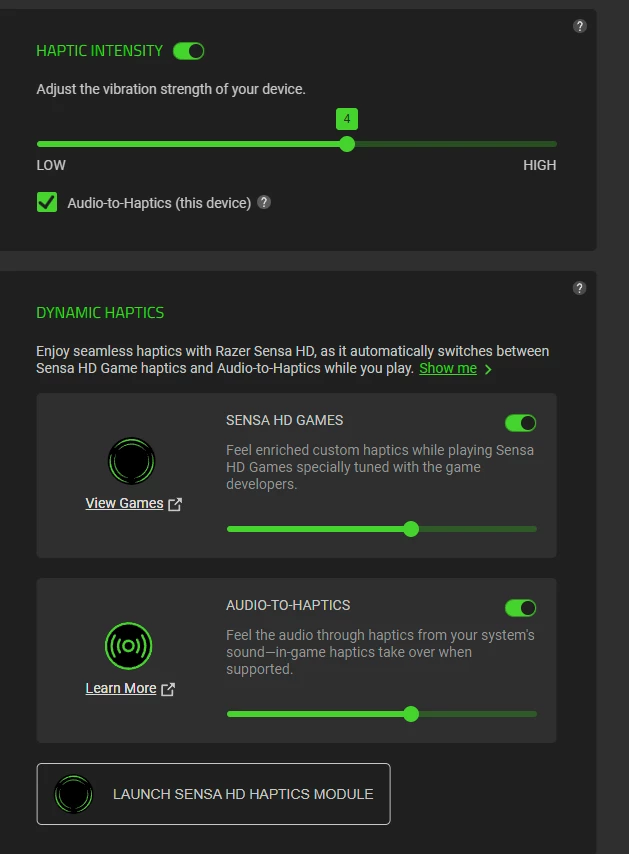
For those who struggle even with audio-to-haptics: try disabling autostart for razer software and start it manually when windows starts, before you start any other program. And also disable sensa haptics - for some reason they don’t work combined with audio haptics. In this way audio works stable for me. Game haptics is pretty unstable though - it can work or not, or even stop working at random moment in the game. But sound seems more stable, so this is the only one I use at the moment. Sadly, I got a product which doesn’t perform its main advertized function for which I purchased it - simhub integration and sim racing usage.


DenimBluesharplab634

hii..

i connected my Frejya to my computer.it worked well in thr first days,both in games and audio.This continued for a while and everything was fine.Afer some time ,i noticed that the vibrations stopped.they suddenly cut off,both in games and in audio.could this problem br caused by an updete? i tried a lot but i couldnt get it working again.if it wont be fixed,i will return it ...


meyukselen
  • Insider Mini
  • March 19, 2026

hii..

i connected my Frejya to my computer.it worked well in thr first days,both in games and audio.This continued for a while and everything was fine.Afer some time ,i noticed that the vibrations stopped.they suddenly cut off,both in games and in audio.could this problem br caused by an updete? i tried a lot but i couldnt get it working again.if it wont be fixed,i will return it ...

Hi buddy a lot of people live same situtaion. If i have change to return, i would do.


Hi, i’m also facing problem that my Razer Frejya stop working for like the last two days, Sensa HD, Audio to haptics are all unfunction. I take a look on the Razer Synapse APP and found out that they actually detect the audio, I can see the audio hz bars goes up and down, but the weird thing is there are no haptic vibrations on my Frejya. Now, this gaming cusion just became a regular cusion. Considerd the price of this product, this is not acceptable, please fix it. I really like the product idea and enjoy the immersion it provides. But now it won’t work at any time.


DenimBluesharplab634

It’s fixed…


No matter how many times I uninstalled and reinstalled the program, ‘Frejya’ wouldn’t work. I even formatted my PC, but it still didn’t fix the issue. At one point, ‘Synapse 4’ wasn’t even detecting the ‘Aether Pro’.
In the end, I formatted the PC again and did a clean installation. I downloaded all the files from the internet and set it up as a brand-new PC. First, I installed the other drivers, then I installed Synapse. I started with the ‘Aether Pro’, and it was detected. After that, I installed ‘Frejya’, then ‘Barracuda Pro’ and ‘Nommo V2 Pro’, and finally the rest.
Now it’s working well in terms of performance, but I don’t know what will happen in the future. I’m worried that if Synapse updates again, the same issue might happen.


meyukselen
  • Insider Mini
  • March 23, 2026

It’s fixed…


….

Hello, after reading your comment, I wiped one of the SSDs in my computer and performed a clean installation of Windows 11 on it. I unplugged all USB devices connected to the PC (SteelSeries keyboard, mouse, headset, Fanatec steering wheel), and only kept a Logitech K400 wireless keyboard with touchpad connected.

After installing Windows 11 this way, I completed all Windows updates, then installed Synapse 4 and Chroma. After the installation, I plugged the Freyja into the power out and connected the USB dongle to the PC and tested it with music. Freyja was not responding. I adjusted the settings and turned off Sensa HD mode, but the result was the same—Freyja still did not respond.

I’m glad you managed to fix the issue, but I hope Razer engineers understand that the problem is not that simple. I couldn’t get it to work. It was mentioned that it works on version 4.00.33, so at least let’s roll back to that version and use it that way. Because even when I tried it on my work laptop, I couldn’t get Freyja to work. It seems pretty clear to me that the issue is software-related rather than hardware-related.


  • Insider Mini
  • April 9, 2026

It’s fixed…


….

Hello, after reading your comment, I wiped one of the SSDs in my computer and performed a clean installation of Windows 11 on it. I unplugged all USB devices connected to the PC (SteelSeries keyboard, mouse, headset, Fanatec steering wheel), and only kept a Logitech K400 wireless keyboard with touchpad connected.

After installing Windows 11 this way, I completed all Windows updates, then installed Synapse 4 and Chroma. After the installation, I plugged the Freyja into the power out and connected the USB dongle to the PC and tested it with music. Freyja was not responding. I adjusted the settings and turned off Sensa HD mode, but the result was the same—Freyja still did not respond.

I’m glad you managed to fix the issue, but I hope Razer engineers understand that the problem is not that simple. I couldn’t get it to work. It was mentioned that it works on version 4.00.33, so at least let’s roll back to that version and use it that way. Because even when I tried it on my work laptop, I couldn’t get Freyja to work. It seems pretty clear to me that the issue is software-related rather than hardware-related.

what software do you have installed? I noticed this happens when I use ISCL.


meyukselen
  • Insider Mini
  • April 13, 2026

It’s fixed…


….

Hello, after reading your comment, I wiped one of the SSDs in my computer and performed a clean installation of Windows 11 on it. I unplugged all USB devices connected to the PC (SteelSeries keyboard, mouse, headset, Fanatec steering wheel), and only kept a Logitech K400 wireless keyboard with touchpad connected.

After installing Windows 11 this way, I completed all Windows updates, then installed Synapse 4 and Chroma. After the installation, I plugged the Freyja into the power out and connected the USB dongle to the PC and tested it with music. Freyja was not responding. I adjusted the settings and turned off Sensa HD mode, but the result was the same—Freyja still did not respond.

I’m glad you managed to fix the issue, but I hope Razer engineers understand that the problem is not that simple. I couldn’t get it to work. It was mentioned that it works on version 4.00.33, so at least let’s roll back to that version and use it that way. Because even when I tried it on my work laptop, I couldn’t get Freyja to work. It seems pretty clear to me that the issue is software-related rather than hardware-related.

what software do you have installed? I noticed this happens when I use ISCL.

only windows updates and razer synapse, chroma. 


  • Insider Mini
  • April 13, 2026

It’s fixed…


….

Hello, after reading your comment, I wiped one of the SSDs in my computer and performed a clean installation of Windows 11 on it. I unplugged all USB devices connected to the PC (SteelSeries keyboard, mouse, headset, Fanatec steering wheel), and only kept a Logitech K400 wireless keyboard with touchpad connected.

After installing Windows 11 this way, I completed all Windows updates, then installed Synapse 4 and Chroma. After the installation, I plugged the Freyja into the power out and connected the USB dongle to the PC and tested it with music. Freyja was not responding. I adjusted the settings and turned off Sensa HD mode, but the result was the same—Freyja still did not respond.

I’m glad you managed to fix the issue, but I hope Razer engineers understand that the problem is not that simple. I couldn’t get it to work. It was mentioned that it works on version 4.00.33, so at least let’s roll back to that version and use it that way. Because even when I tried it on my work laptop, I couldn’t get Freyja to work. It seems pretty clear to me that the issue is software-related rather than hardware-related.

what software do you have installed? I noticed this happens when I use ISCL.

only windows updates and razer synapse, chroma. 

try to disable sensa hd and disable haptic right after and just close chroma window and test again. try to customize to different profile dynamic , try on different computer . 


meyukselen
  • Insider Mini
  • April 13, 2026

It’s fixed…


….

...

what software do you have installed? I noticed this happens when I use ISCL.

only windows updates and razer synapse, chroma. 

try to disable sensa hd and disable haptic right after and just close chroma window and test again. try to customize to different profile dynamic , try on different computer . 

Thank you for your advice. I tried what you suggested, but the result is the same. I can't get it to work.


There is still no progress.

I have tested again after the latest updates and the situation remains exactly the same — Sensa HD Games is not working and game detection is still completely broken. In some cases even Audio mode is unreliable.

At this point, after all the troubleshooting already shared in this thread, it’s clear that this is not a user-side issue.

Honestly, this has turned into a very disappointing experience. The device has strong hardware potential, but without stable software support it simply cannot be used as intended.

For anyone considering this product, I strongly recommend following this thread closely and waiting until these issues are properly resolved.

Looking forward to an official update from Razer.


  • Insider Mini
  • April 14, 2026

There is still no progress.

I have tested again after the latest updates and the situation remains exactly the same — Sensa HD Games is not working and game detection is still completely broken. In some cases even Audio mode is unreliable.

At this point, after all the troubleshooting already shared in this thread, it’s clear that this is not a user-side issue.

Honestly, this has turned into a very disappointing experience. The device has strong hardware potential, but without stable software support it simply cannot be used as intended.

For anyone considering this product, I strongly recommend following this thread closely and waiting until these issues are properly resolved.

Looking forward to an official update from Razer.

can you test it on other computer first ? its wifi so there shouldn't be issue.

could you check if you have service running like gamein0utservice and try to disable it? did you run the XBOX app after windows install and updates all the apps? it could be Xbox tries to talk to haptic devices.

also check windows updates it update some device we don't have and it could cause issues. sadly it is not razer issue because it works. but for now yes there is something that making it hard to understand . it could be both as we know 


There is still no progress.

I have tested again after the latest updates and the situation remains exactly the same — Sensa HD Games is not working and game detection is still completely broken. In some cases even Audio mode is unreliable.

At this point, after all the troubleshooting already shared in this thread, it’s clear that this is not a user-side issue.

Honestly, this has turned into a very disappointing experience. The device has strong hardware potential, but without stable software support it simply cannot be used as intended.

For anyone considering this product, I strongly recommend following this thread closely and waiting until these issues are properly resolved.

Looking forward to an official update from Razer.

can you test it on other computer first ? its wifi so there shouldn't be issue.

could you check if you have service running like gamein0utservice and try to disable it? did you run the XBOX app after windows install and updates all the apps? it could be Xbox tries to talk to haptic devices.

also check windows updates it update some device we don't have and it could cause issues. sadly it is not razer issue because it works. but for now yes there is something that making it hard to understand . it could be both as we know 

Thanks for the suggestions.

I’ve already tested the device on three different PCs and the result is exactly the same on all of them. So it doesn’t seem to be a system-specific issue.

Audio input is detected correctly (the spectrum is moving), but there is no haptic output at all. About a month ago, with an older Synapse beta version, Audio-to-Haptics was working fine (even though Sensa HD Games was not fully functional). After recent updates, even audio-based haptics stopped working.

Also, another user contacted Razer support and received this response:


(We are aware of the current issue and are actively working on resolving it. As we are continuously improving the software, rest assured that any available fixes will be included in upcoming Synapse updates, and that you will be notified as soon as these updates are deployed. We appreciate your patience and understanding as we work to enhance your experience)

So at this point it looks like a known software issue rather than a configuration problem.

I’ll wait for an official fix from Razer.