
I bought and have been using the Tartarus V2 Pro, its a great product but has some software limitations that are holding it back.
Mainly when using the 8-way directional mode, it does not register diagonal inputs at all and doesn’t seem to differentiate between 4-way mode and 8-way mode, making the usage of the device VERY limited in games where analog input isn’t possible due to limitations found in MANY games…
I just want to be able to use this device properly, please fix the 8-way directional mode and while you’re at it, add a way to add more than 1 keypress to a single input, such as (W+A) or (Up+Left) to allow for diagonal inputs.

Solved
Razer Tartarus V2 Pro 8-way input not functioning as intended
Best answer by Lrbrownii
Looks like they released some kind of a fix to the 8-way d-pad because now I CAN get inputs to go through the diagonal directions but Its NOT smooth at all, there’s still no feature to do (UP+Left / W+D) or something similar, I’ve tried making macros for this but it seems to STOP the input before switching to the macro which causes the player in whatever game to pause for a second, stop moving, and then continue moving after a second which is EXTREMELY game-breaking for any game requiring smooth/nuanced movement.
I am very disappointed in Razer for not being quicker to address the issue considering this is one of the MAIN feature sets to incentivize purchasing the product.
Also Lrbrownii at this point I would gladly PAY for a fix to the issue, I am glad I am not the only one experiencing this. Its otherwise such a great product, its just sad the company that makes it is so slow to update/respond.
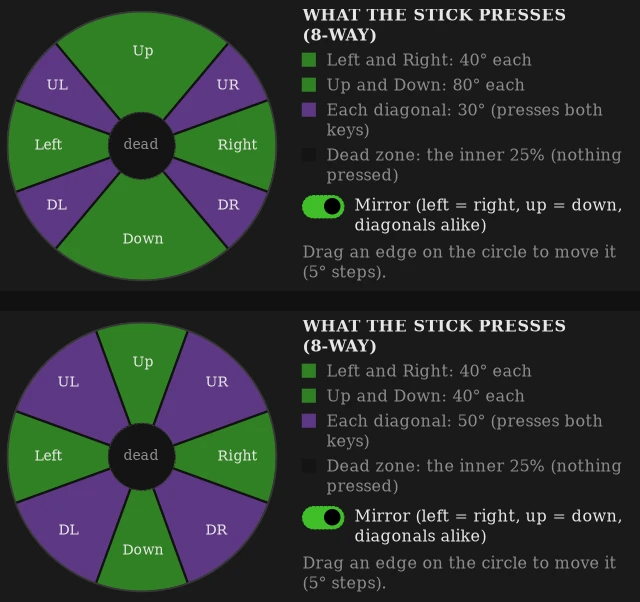
Firmware update took the stick from raw input to keypresses in 4way or 8way mode. It's sloppy and the 8way needs dual keypress assignments. In 4way you get key rollover. In 8way you get joystick options. Neither truly address the refinement issues. That's why I added 5° increments. You as the user assign the actuation point of the dual key press diagonal.
I made sure to report this as best as possible in hopes the oem provides the proper solution.

Sign up
Already have an account? Login
Log in with Razer ID to create new threads and earn badges.
LOG INEnter your E-mail address. We'll send you an e-mail with instructions to reset your password.