

Hello I have a problem with my mouse. Razer synapse is saying that my mouse is charged at 100% when I didnt charge it for 2 days. I usually charge the mouse one the battery hits 15%. It happened when I fell asleep after that my keyboard went black (my keyboard is supposed to shine green even when PC sleeps …) and then synapse said that my battery on the mouse is 100%
Now it is only stuck at 100% and I don’t know if its hardware or software issue.
It is connected with the original dongle it came with. I bought the mouse 17.08.2024
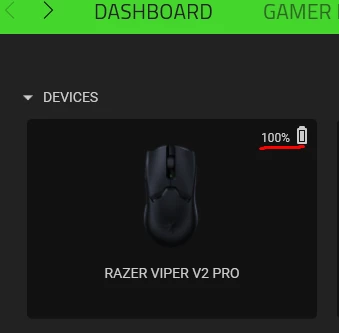
here is the picture and what I tried
I tried repairing Razer Synapse, updated firmware, changed the ports of the mouse, Reinstalled the whole razer synapse 3. I tried charging it for a 2-3 minutes to see if the number will move (only the charging icon showed up saying its at 100%) I’ve tried restarting the computer, rolling back some updates on this BS …
Mouse works, but I am not able to sleep with a feeling that something might be wrong with it since I didnt even had it for a month …
I am open to all suggestions and hope I get response from Razer themselves. Othervise I will have to get my mouse swapped for a new one which will be only annoying...