

Synapse 2 problems on Mojave | Razer Insider
Skip to main content

Synapse 2 problems on Mojave

  • May 26, 2019
  • 2 replies
  • 8 views

Hi Razer, and community, I attempted to report this problem via Razer Synapse, but it appears Synapse failed to send it. Synapse is still running poorly on Mojave. Here is my Top Processes Snapshot by Memory: Process (count) RAM usage (Source - Location) RzUpdater 2.88 GB (Razer USA Ltd.) RzDeviceEngine 1.02 GB (Razer USA Ltd.) Synapse crashes often and is generally unstable. I'd appreciate it if Razer would provide the mac user community with more clarity on what it supports and what its plans are for the Mac platform.
This topic has been closed for replies.

2 Replies

  • Razer Support
  • 259 replies
  • May 30, 2019
Hey! Let's see if clean reinstallation of Synapse can help address this issue. Please follow these steps: Step 1: Open the Application Finder. Click on Utilities and launch Terminal. In your terminal: stop and remove launch agents by typing these commands one at a time: launchctl remove com.razer.rzupdater launchctl remove com.razerzone.rzdeviceengine sudo rm /Library/LaunchAgents/com.razer.rzupdater.plist sudo rm /Library/LaunchAgents/com.razerzone.rzdeviceengine.plist Step 2: Remove HID kernel extension sudo rm -Rf /System/Library/Extensions/RazerHid.kext Step 3: Manually delete Razer Synapse app from Applications in Finder Step 4: Delete Razer files from ""Application Support"" folders: sudo rm -rf /Library/Application\\ Support/Razer/ Step 5: Download and install Synapse for Mac: http://rzr.to/synapse-mac-download

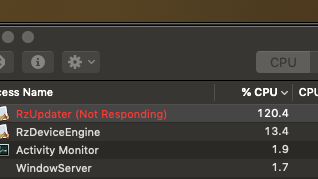
Hi I followed your instructions. Unfortunately, they did not improve the situation. After restarting once I completed reinstalling the software, Razer immediately crashed, and uses >100% of the CPU to "update" software, and is unresponsive. If I attempt to launch Synapse from the icon on the top menu, all I see is the rainbow ball.