Tartarus v2 Joystick not working | Razer Insider
Skip to main content
Question

Tartarus v2 Joystick not working

  • June 25, 2026
  • 45 replies
  • 2425 views

Show first post

45 Replies

ok i tried the following above so strange it broke it like this but it’s working now.


I tried everything to fix this,

Did all the steps made the macros, rolling back the driver settings on the  fixed this for me HID Keyboard device settings fixed this for me. 


Full 360 movement is working perfectly again


soloLavabus900

I’m playing LegueOfLegends with my Tartarus. Camera movement was on my thumbstick.

All your fixes actually “works” for me, but all the macros etc are so clunky. 

Best way (for me) to fix it was to map my thumbstick to:

(UP) → [

(DOWN) → /

(LEFT) → ;

(RIGHT) → ‘


And then just change keymapping ingame to those. Works like a charm.


  • Insider Mini
  • September 9, 2026

For those of you who play WoW, I did this to fix mine. Remapped the joystick keys to W for Up, Q for strafe left, E for strafe right, & S for down. Then changed the keybindings in the game to match.


  • Insider Mini
  • September 9, 2026

Same issue for me all working yesterday and nowe joystick dead, it works again when i launch the repair of the softwarre … why they dont fix it yes ???


  • Insider Mini
  • September 10, 2026

had my old game pad for years with no issues (before it finally broke) this new one have had nothing but issues and not i turn on my PC on my one day off to play and the joystick wont work! have tried the above methods but can’t fix it.


  • Insider Mini
  • September 10, 2026

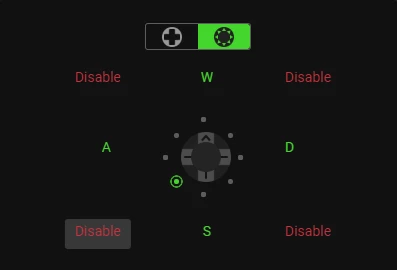
Here’s the fix. Disable 4 way all together then in the other stick movement option disable all corners and replace up, down, left, right,

with W D S A.

same problem just started for me, this fixed it for my in the interim


Well, I guess it’s good to know its not just me. I don’t use any special key bindings, I just use my thumbstick to work default as arrow/camera keys in League. But now,  my arrow keys don’t work at all when the Synapse software is running - games or otherwise. 

I now have a $90 brick. IT WORKED FINE BEFORE why do they do this??


  • Insider Mini
  • September 10, 2026

Here’s the fix. Disable 4 way all together then in the other stick movement option disable all corners and replace up, down, left, right,

with W D S A.

same problem just started for me, this fixed it for my in the interim

That means you can go 4 directions but I use the 8 keys for movement, so that fix doesn't work for those of us wanting to use it as it's meant to be used.

Ended up fixing it by logging out of synapse.

Wish another company made game pads cause razer products always break or don't work properly. This game pad is only a few months old. 


Monstermed59
  • Insider Mini
  • September 10, 2026

i had to change my 4 directions by WADS, instead of UP DOWN LEFT RIGHT.

I had to change on everything games.

Need a fix !!!


This is absolutely insane… the third time this has happened with software updates. Absolute garbage.


heather65
  • Insider Mini
  • September 11, 2026

I tried that with mine as well as other supposed fixes including uninstalling and reinstalling synapse 4 several times, still cannot use the joystick so I cannot use my Tartarus at all to play wow I'm going to have to find a different piece of Hardware I guess. I tried this on two different Tartarus by the way so it's not the hardware.


  • Insider Mini
  • September 11, 2026

yeah, same. my friend is having the exact same issue as well as myself, we tried everything. Trying to play wow. Changing from dpad to the other function works but it plays like absolute garbage since the movement is not fluid and it’s completely bricked when trying to go diagonal.please fix


Cahlwyn
  • Insider Mini
  • September 11, 2026

The “fix’ didn’t even work for me. It’s still non-responsive. It’s frustrating that it has happened like three times now in the past year. Every time they do a patch they break it it seems. No official acknowledgement or time table for a fix either.


  • Insider Mini
  • September 12, 2026

The “fix’ didn’t even work for me. It’s still non-responsive. It’s frustrating that it has happened like three times now in the past year. Every time they do a patch they break it it seems. No official acknowledgement or time table for a fix either.


My thought exactly. Just found out - mine is broken the same (no left/right arrows on the joystick). Neither of above ideas worked again. Also 3-rd time in the past year or so. Recovered on its own eventually. But the weekend is ruined... :)


Worked perfectly. Thanks 😁


I was able to downgraded my synapse to 4.0.699 and also blocked certain Razer files from accessing the internet, because Synapse auto installs the newest update.  After this, all my keybinds and dpad work as they should.  If anyone wants a walkthrough on how I did it, please let me know. Glad to help the community.


coolRubineRedDIAMOND313

I have the same problem with WOW and tartarus V2 after the update. The solution to delete 4 of the 8 directional buttons isn't working as it should.
You need to look into this and fix it immediately.


heather65
  • Insider Mini
  • September 13, 2026

So many of us are having this problem but I don't see anyone from Razor replying for any kind of fix this is getting really annoying! I can't even play wow effectively especially as a raid healer!


  • Insider Mini
  • September 13, 2026

I’m playing LegueOfLegends with my Tartarus. Camera movement was on my thumbstick.

All your fixes actually “works” for me, but all the macros etc are so clunky. 

Best way (for me) to fix it was to map my thumbstick to:

(UP) → [

(DOWN) → /

(LEFT) → ;

(RIGHT) → ‘


And then just change keymapping ingame to those. Works like a charm.

I’ve been trying for the past few days to use one of the “fixes” to make mine work. Frustratingly have played for the past couple days thinking this was just the new normal. The bricked movement with constant freezes during gameplay while just simply trying to navigate around mechanics.

The quoted post is the ONLY thing that has actually worked for me. I used a few different keys than the ones listed here but the following below worked for me. I manually changed the key binding in Synapse in 4Way Directional Mode as well as in Game.

I have used this game pad for years and have NEVER had this problem.

(UP) - [

(DOWN) - ]

(LEFT) - \

(RIGHT) - ‘