Tartus v2 and Synapse 4 issue with Sept 2026 update | Razer Insider
Skip to main content
Question

Tartus v2 and Synapse 4 issue with Sept 2026 update

  • September 8, 2026
  • 24 replies
  • 371 views

Will_Crespo

My Tartus v2 wont let me use my custom key maps after the latest update. It says I need Synapse 4 running, which it is. I tried the repair options, I also tried a clean re-install. But nothing. I use this for both work and gamming, so this really has me in a bind as it was apart of my workflow. Any help would be appreciated. Im on windows 10 but with the most updated security features.

24 Replies

KimmyCakes
  • Insider Mini
  • September 8, 2026

I am experiencing the exact same issue and have done the same troubleshooting steps. Also use it as part of my own workflow as well. Chiming in to hopefully get some more visibility. I’m on Windows 11, fully updated.


tobarstep
  • Insider Mini
  • September 8, 2026

My movement pad on  my Tartarus v2 stopped working with the latest update.  I was actively playing a game with it earlier and it was fine.  I came back to the computer later and noticed that Synapse had updated, and now it no longer works.  This isn’t the first time a Synapse update has broken keybinds, sadly.


  • Insider Mini
  • September 8, 2026

I’m experiencing the same issue as well. Tartarus d-pad was working fine earlier, updated Windows and now it’s unrecognized by Synapse 4. The only solution I’ve found was to uninstall Synapse entirely and remap all the keybinds in my games to match the default Tartarus output. Really hope they fix this soon as the default output is awful.


tobarstep
  • Insider Mini
  • September 8, 2026

I’m experiencing the same issue as well. Tartarus d-pad was working fine earlier, updated Windows and now it’s unrecognized by Synapse 4. The only solution I’ve found was to uninstall Synapse entirely and remap all the keybinds in my games to match the default Tartarus output. Really hope they fix this soon as the default output is awful.


For the d pad, a workaround that I found in a thread last from last year is to change the d pad to the 8 directional layout, then manually map the up, down. left, and right directions to the arrows on your keyboard.  I had to make macros (up arrow + left arrow, etc.) for the diagonals.  This actually works, but the movement is still kind of janky compared to the default movement.  If you don’t need diagonals you can disable them. For some reason this only works on the 8 directional and not the 4.


Zeraphe63
  • Insider Mini
  • September 8, 2026

m having the exact same issue with my Tartarus V2 since the latest Synapse update.

I was playing without any problems until the middle of the afternoon. I started playing again later in the evening and suddenly noticed the issue, even though I hadn’t changed anything in Synapse.

After several tests, I can confirm that the correct custom profile is loaded and that the key mappings are displayed correctly in Synapse.

I performed a complete uninstall of Synapse and Chroma, then reinstalled everything from scratch. The Tartarus V2 is now detected correctly, but the problem remains.

I am currently using Synapse in Guest Mode, so no cloud profile or account synchronization is involved.

The issue is specifically with the D-Pad in 4-way mode: the four directional inputs are not registered at all, even outside of WoW. The other mapped buttons on the Tartarus still work normally.

If I completely close Synapse, the D-Pad works again with its default behavior, which confirms that the hardware itself is working.

As a temporary workaround, I switched the D-Pad to 8-way mode and created macros for each direction and diagonal. This works, but movement is noticeably less smooth and more jerky when changing directions compared to the normal 4-way mode.

I really hope Razer releases a patch quickly, because this issue appears to have been introduced by the latest Synapse update and makes the D-Pad much less comfortable to use for movement in games.


  • Insider Mini
  • September 8, 2026

Zeraphae and I are experiencing the EXACT same issue.. I cannot resolve this by myself it seem. 


Add me to the list of people experiencing this problem. Not cool, Razer. Not cool.


  • Insider Mini
  • September 9, 2026

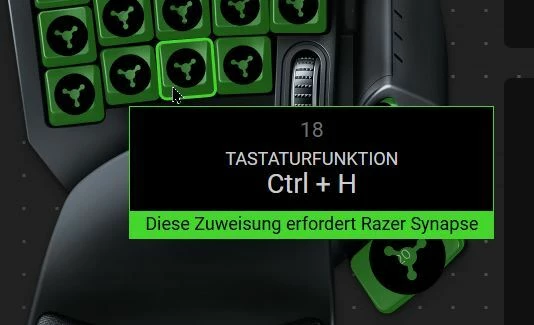
Meine Fresse!! Wann hören die endlich auf shit zu bauen und NORMAL FUNKTIONIERENDE SOFTWARE zu machen. Es hat doch früher normal funktioniert. WARUM, muss irgend ein VOLLIDIOT wieder sein Scheiß implementieren und mir meine ganze Belegung zerschießen. WENN ES FUNKTIONIERT DANN LASS ES !! Warum muss ich mit chatGPT diese Fehlersuche machen, um zu erfahren, dass anscheinend sich hier im Forum Leute schon beschwert haben (diesen Beitrag fand die KI). MEINE FRESSE, RAZER, HÖRT ENDLISCH AUF SHIT ZU BAUEN !!! UND WAS SOLL DIESE “Diese Zuweidung erfordert Razer Synapse”-Meldung bei jeder Taste ??? Es ist doch schon alles verbunden und ich bin überall eingeloggt, was soll der Shit ???? Wissen die eigentlich wie HÄSSLICH das jetzt aussieht???


  • Insider Mini
  • September 9, 2026

https://mysupport.razer.com/app/answers/detail/a_id/20339/track/AvP25gpfDv8U~TCSGtAe~yL3IqoqYS75Mv_3~zj~PP9_

I had the same problem, went through a million steps, was in contact with support. This eventually (for now) worked, give it a try. 


EDIT: No forget it I am an idiot for thinking this would work. It made the D-pad work, but none of the mapped keys work, even though synapse shows they should be. Still working on a solution.


bitPistachioplace871

Same here, my d-pad left not working anymore !!! Fix that ASAP please !


Dannil85
  • Insider Mini
  • September 9, 2026

same here. Come on Razer, fix thi synapse it’a real problem…


technoVioletRedvine317
Same problem since yesterday—my gamepad stops working as soon as I connect to Razer. It's a huge pain.
 

tobarstep
  • Insider Mini
  • September 9, 2026

I tried the driver cleaner tool, and that did restore d-pad functionality, but now I’ve got the other issue (that I didn’t have before) where none of the other keybinds work.  I even remapped keys on the default profile, but they still aren’t recognized.  Synapse is running though, I can watch it switch profiles whenever a linked game is running.


rsxtitan
  • Insider Mini
  • September 9, 2026

Why is Synapse 4 such hot garbage? Auto updates that break more than they fix. The software is so bad it makes me want to switch from using razer hardware which I’m going to look into today. tired of this nonsense


rsxtitan
  • Insider Mini
  • September 9, 2026

The thread below contains workaround instructions to get 8 way movement working again until they patch the sept code update. Basically you create macros for all 8 movement directions and then map them to the d-pad. scroll down toward the bottom of the first page of the thread. it took 3 weeks for them restore d-pad movement last time they broke it in July


tobarstep
  • Insider Mini
  • September 9, 2026

The thread below contains workaround instructions to get 8 way movement working again until they patch the sept code update. Basically you create macros for all 8 movement directions and then map them to the d-pad. scroll down toward the bottom of the first page of the thread. it took 3 weeks for them restore d-pad movement last time they broke it in July


That does work for the d-pad issue, but I ran a driver cleanup (using Razer’s tool) and that also restored d-pad use, even on the normal 4 way.  However, it caused the other issue that people are experiencing, which is none of the custom keymaps are working now.  They appear to be loaded and working, but when used they only register whatever the default keys would be.  So, out of the frying pan and into the fire, I guess.


rsxtitan
  • Insider Mini
  • September 9, 2026

The thread below contains workaround instructions to get 8 way movement working again until they patch the sept code update. Basically you create macros for all 8 movement directions and then map them to the d-pad. scroll down toward the bottom of the first page of the thread. it took 3 weeks for them restore d-pad movement last time they broke it in July


That does work for the d-pad issue, but I ran a driver cleanup (using Razer’s tool) and that also restored d-pad use, even on the normal 4 way.  However, it caused the other issue that people are experiencing, which is none of the custom keymaps are working now.  They appear to be loaded and working, but when used they only register whatever the default keys would be.  So, out of the frying pan and into the fire, I guess.


thats fair. I didn’t have those issues so can’t comment on them


  • Insider Mini
  • September 9, 2026

My d-pad is broken as well.


blarf123
  • Insider Mini
  • September 10, 2026

My Dpad is not working, everything else is. Idk how this is allowed to be a recurring issue, how the hell does an update break inputs as simple as arrow keys??


My razer tartarus v2 Dpad also isn´t working it works fine when synapse is turned off... but then i lose all my keybinds. The 8 direction fix also does not work for me anyone have tips or an idea when razer will fix this?


Leobearbear
  • Insider Mini
  • September 10, 2026
All key not work today

All Key not working, How to fix?


  • Insider Mini
  • September 10, 2026

exactly the same issue here .. hot fix coming or do we get ignored .. who allows these updates to release obviously untested


  • Insider Mini
  • September 10, 2026

Can anyone else confirm that if you map the direction pad to anything else (Page Up/Page Down for exmaple) do those functions work for you? I am able to use Macros, WASD, shortcuts, etc. Just not directional arrows or the joystick directions which is the profile default I believe.


  • Insider Mini
  • September 10, 2026

D-pad “works” when Synapse is off( ie. scrolling, thus inputs happening)… Once Syn4 is started all D-pad inputs are broken/gone. I’ve remapped to basic navigation,  key recordings, etc….Whenever Syn4 is open D-pad is dead…..

First post ever because 8 years of finding workarounds and I CANT find one here. god a hate razer( yet i luvz my Tart)