

Unusual Core Temperature Spike on Intel i9-14900HX (Razer Blade 18) | Razer Insider
Skip to main content
Question

Unusual Core Temperature Spike on Intel i9-14900HX (Razer Blade 18)

  • June 1, 2025
  • 2 replies
  • 375 views

Hello,

I’m experiencing an unusual thermal behavior on my Razer Blade 18 with the Intel Core i9-14900HX processor. While monitoring CPU temperatures using Core Temp, I noticed that Core #5 reaches 100°C, even though the laptop is idle or under minimal load. The rest of the cores remain in a much lower range (around 48–57°C).
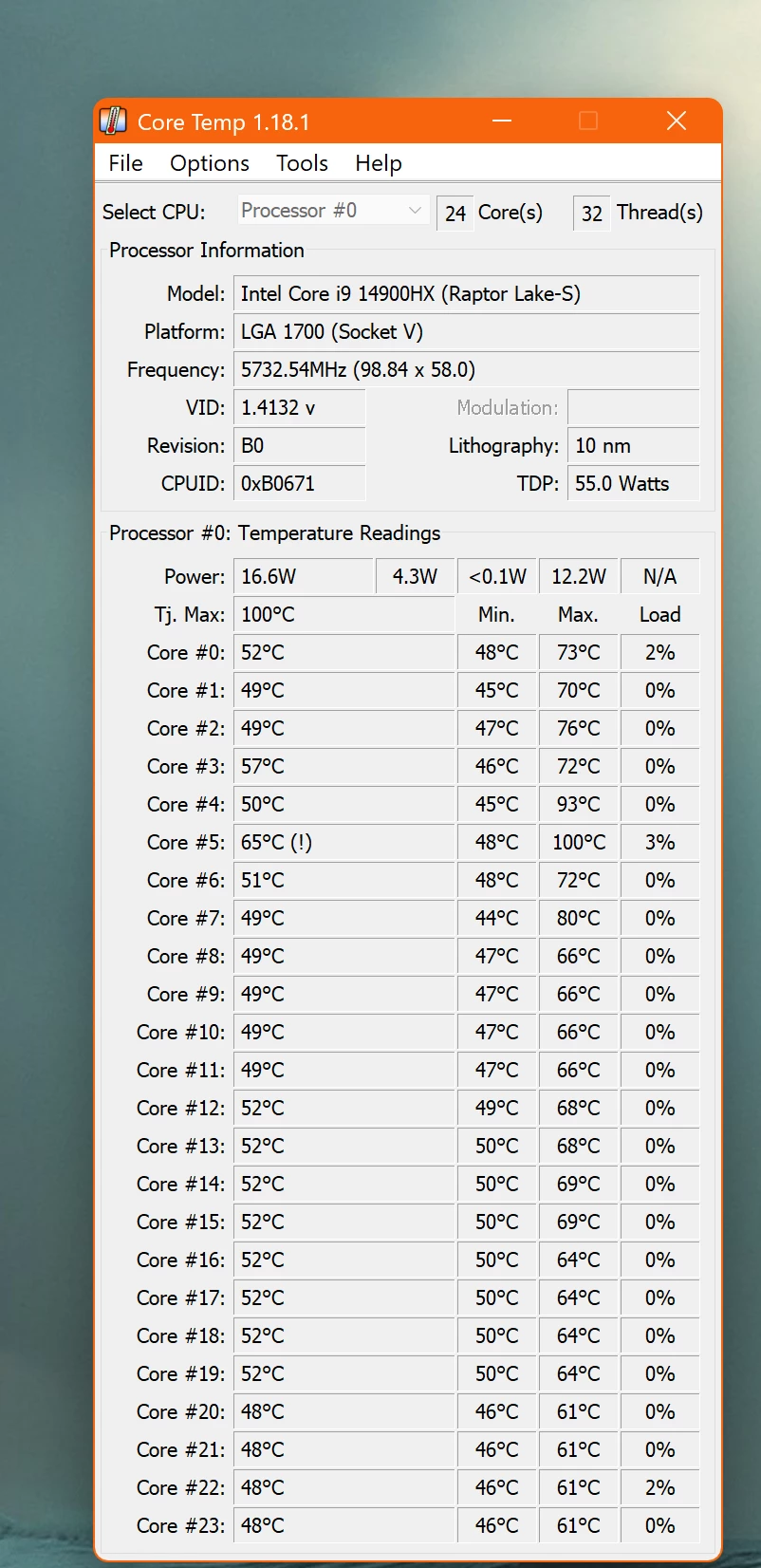
I’ve attached a screenshot showing the temperature readings for reference. This behavior is concerning because:

  • The system is not under heavy load (no rendering or intense applications).

  • The laptop is running Windows High Performance mode and Balanced mode in Razer Synapse.

  • Only one core spikes to the thermal maximum (100°C), suggesting a possible thermal imbalance.

Could this be due to a cooling issue, uneven heatsink contact, or a known issue with the thermal design or BIOS behavior? I would appreciate your assistance in diagnosing whether this is within expected operating conditions or if service is recommended.

System Info:

  • Razer Blade 18 (2024 model)

  • Intel Core i9-14900HX

  • Razer Synapse: Balanced mode

  • Windows Power Plan: High Performance

  • Screenshot of Core Temp included

Please advise on next steps. Thank you!

2 Replies

  • Insider Mini
  • June 2, 2025

This is EXACTLY what I see on my Aorus 17X. #5 is hotter than the other cores consistently and if the 100C mark gets hit/exceeded, 99% of the time it’s the culprit. I was considering having the CPU removed, repasted and replaced until I read your post. I’m also using a Razer cooling pad (pretty sure it’s their most recent model). When I know I’m going to load the CPU and GPU I just peg all the internal and cooling pad fans at 100%. I still get 100C on #5. I have seen this behavior even when I’m not actively using the machine.

I also use Core Temp. I use Gigabyte’s Control Center to control the internal fans and I use Razer Synapse to control the laptop cooler’s fan. I have been playing with the fan curves to try to keep things in a “normal” range of operating temps (50-60C for the CPU) and also avoid the RPM surges from the fans. The GPU (RTX 4090) seems very sensible about it’s low-load temps so I have the laptop cooler fan synched with the CPU temp(s).

I haven’t noticed any symptoms related to heat when I’m pushing it. For example, when I play HD2 (full max/ultra settings on a 49” 5120x1440 at ~90FPS) I have a smooth play experience for hours. The keyboard on the laptop is very warm to the touch but not too hot to leave my hand on it. I’ve read that the i9 14900HX is designed to run “shockingly hot” and I’m actively trying to embrace that, but like you, #5 caught me eye...


You probably have a blown heat sink have you opened up the chassis to inspect it? I have started a thread about producing a replacement heat sink for your laptop. Let me know if you have any questions