Okay. This may sound strange, but the solution to your Razer peripheral problem might be in your Device Manager. For years, my Razer Huntsman keyboard was failing to work on a few specific keys: "Z", "Y", ".", and "/".
Several months ago, my Razer Naga Trinity started having left-click issues. Sometimes it would double-click, sometimes it wouldn't hold the click, and sometimes it wouldn't click at all. And recently, the left-click on the mouse scroll wheel (when you push the scroll wheel to the left) stopped working altogether.
The modular side of my Razer Naga Trinity mouse also started to show some inconsistencies, not detecting the pressing of the buttons.
Now, at this very moment, I opened my Windows Device Manager. I clicked on "View" and then on "Show hidden devices".
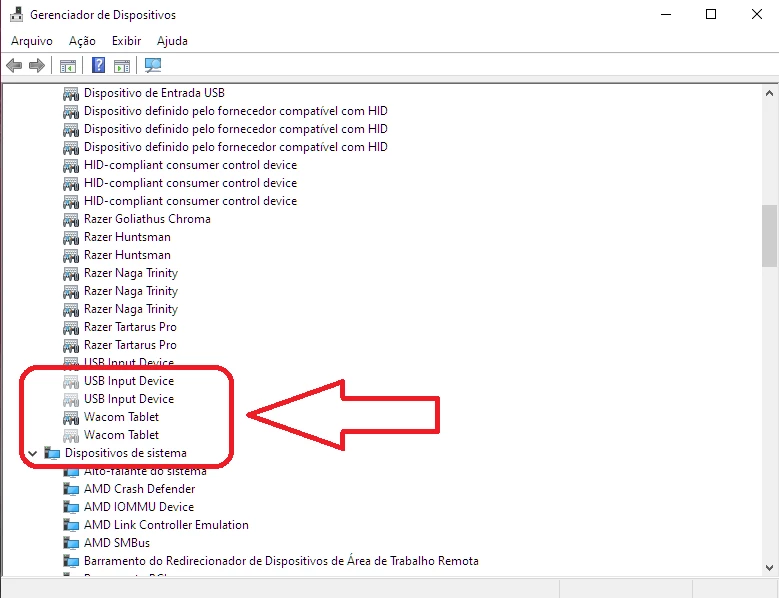
The device manager displayed a huge number of devices with faded colors (devices not in use, see screenshot below). Among them were many faded replicas of my Razer Huntsman and Razer Naga Trinity.
After uninstalling most of the devices with the faded color (including non-Razer-related items like the monitor, generic USB, etc.), all functions on my Razer Naga Trinity returned to working order. Double-clicking disappeared, the modular buttons worked consistently, and the left scroll wheel returned to working order. I tested my Razer Huntsman, and all the keys worked consistently again. I didn't even need to restart my computer.
Before uninstalling the last hidden devices (with the faded color), I decided to take a screenshot to illustrate for you (see screenshot below).
I'm amazed and very happy because I thought it might be a problem with my motherboard hardware or the Razer peripheral itself. However, the problem was simply a conflict within Windows itself, which generates new devices every time we physically remove the device and reinsert it.
I'd like to share this solution with you, and I hope you have the same results as I did. I hope this post helps the community. See you later!