


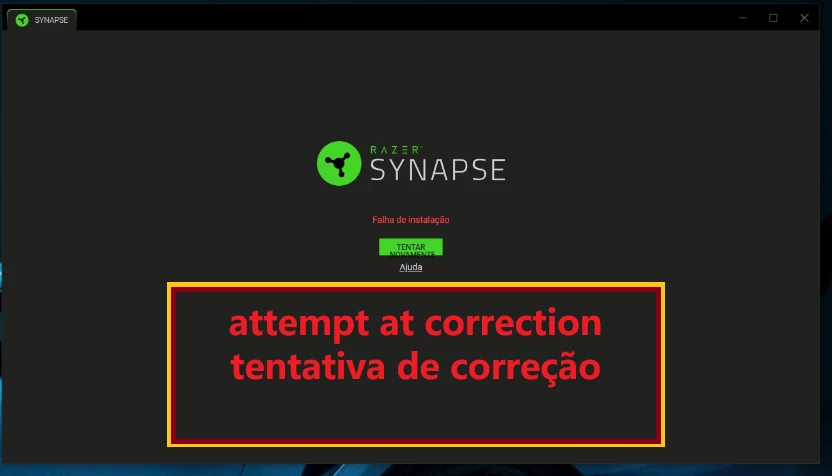
salve galera, boa tarde.
Recentemente peguei este erro de falha de instalação no Razer Synapse 4 em um computador aonde a toda instalação estava apresentando o erro e a resolução que identifiquei foi mais simples que pensava.
1 PASSO - FECHE OS PROCESSOS DO SYNAPSE E DA RAZER
2 PASSO - TENTE O DNSJUMPER
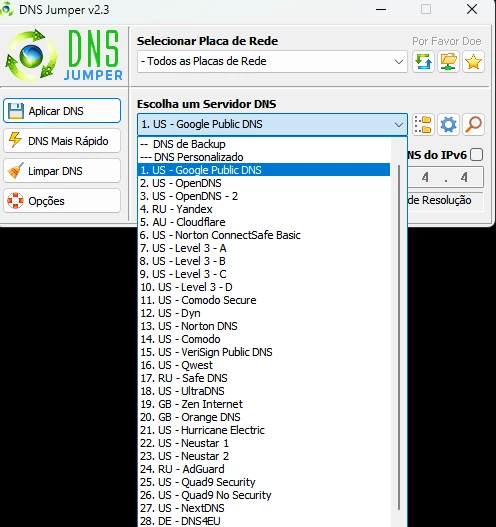
A solução aplicada foi realizar a troca do DNS do computador para o DNS público do Google.
Acredito que a forme mais simples de fazer a realização é alterando manualmente o dns.
Mas para deixar mais simples recomendo o DNSJUMPER:
https://dnsjumper.net/
Após o download você irá extrair a pasta do aplicativo > Executar o aplicativo >
*DICA IMPORTANTE*
VERIFIQUE QUAL A SUA PLACA DE REDE
4 PASSO - REPARE O APLICATIVO DO RAZER SYNAPSE
4.1 Aperte windows + R para abrir o executar
4.2 Coloque o comando “ appwiz.cpl ”
4.3 Vá em Razer Synapse e clique em “Alterar”; Provavelmente irá aparecer o softare da razer e acredito que em alguma parte de seleção do Synapse ou de outros aplicativos da Razer instalados, tenha uma opção de reparar.
4.4 Assim que reparado, inicialize o programa novamente.
ATENÇÃO : CREIO QUE ESSA NÃO SEJA A SOLULÇAO DEFINITIVA, MAS VALE A PENA TESTAR.
________________________________________________________________________________________________
Hey everyone, good afternoon!
I recently encountered this installation failure error with Razer Synapse 4 on a computer where every installation attempt was failing. The solution I found was simpler than I expected.
STEP 1 — CLOSE ALL RAZER AND SYNAPSE PROCESSES
Make sure all Razer Synapse and Razer-related processes are closed before proceeding.
STEP 2 — TRY DNS JUMPER
The solution I applied was to change the computer's DNS settings to use Google's public DNS servers.
I believe the easiest way to do this is to change the DNS settings manually. However, to make things simpler, I recommend using DNS Jumper:
After downloading the application:
-
Extract the downloaded folder.
-
Run the application.
IMPORTANT TIP:
Make sure you select the correct network adapter.
SET THE DNS TO GOOGLE PUBLIC DNS
STEP 4 — REPAIR THE RAZER SYNAPSE APPLICATION
4.1 Press windows + R open the Run dialog.
4.2 Enter the following command:
appwiz.cpl
4.3 Find Razer Synapse in the list and click Change.
The Razer software installer should open. Look for an option to repair Razer Synapse or other installed Razer applications.
4.4 Once the repair process is complete, launch the application again.
IMPORTANT NOTE
I don't believe this is a guaranteed or permanent fix, but it's definitely worth trying!
I hope this helps anyone experiencing the same issue.