


Macro to hold down a key/button. | Razer Insider
Skip to main content
Question

Macro to hold down a key/button.

  • January 7, 2025
  • 3 replies
  • 2782 views

CaillinEVO

Hi guys, is it a known bug that the old Synapse 3 macro feature of recording a key down press and no up press resulted in the key being held down when activated doesn’t work in Synapse 4?

Has anybody been able to find a workaround for this on Synapse 4 or is downgrading back to 3 the only way to get that capability back?

Cheers.
3 Replies

CaillinEVO
  • Author
  • Insider Mini
  • January 10, 2025

I’m guessing this is not possible?


  • Insider Mini
  • March 5, 2025

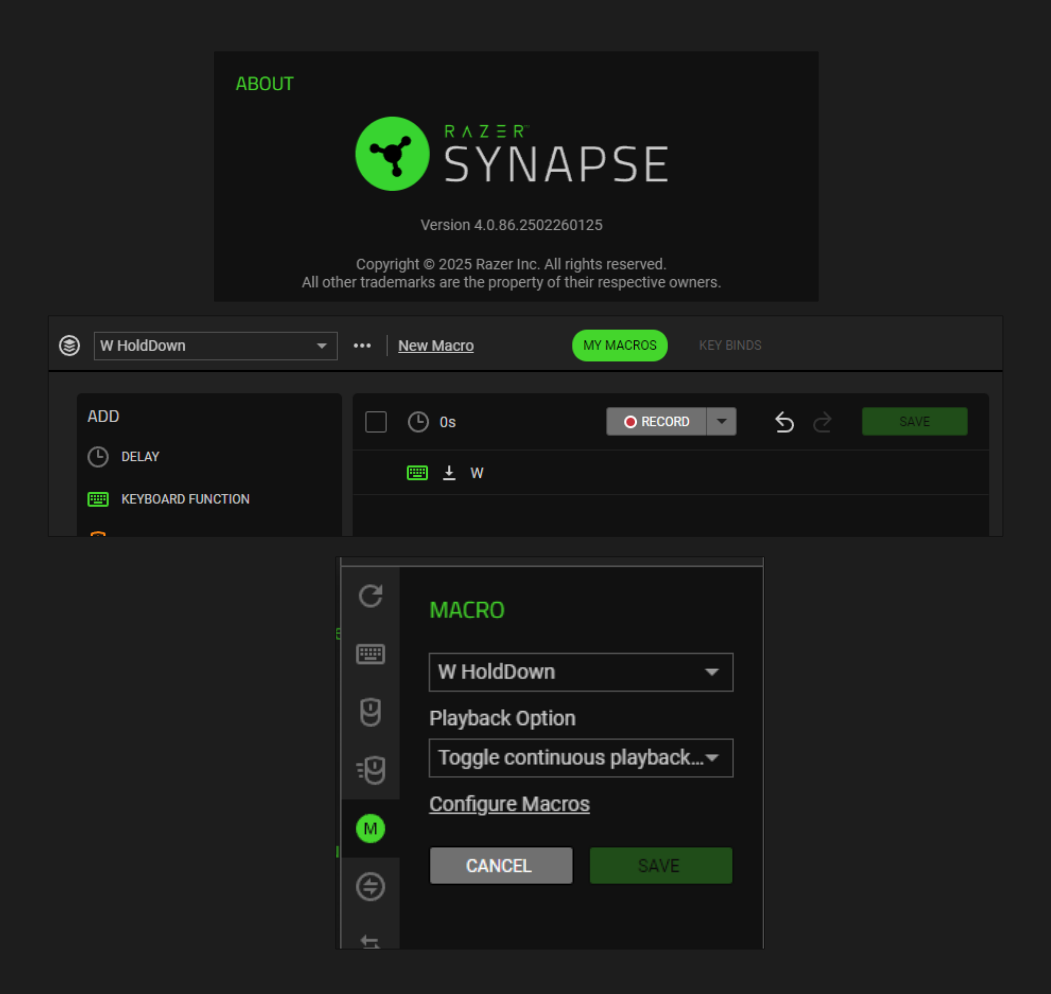
I did this for automove in Cyberpunk 2077.
(the game doesn’t ahve normal auto-walk)


set W to to just “press down”

then set macro to “toggle continuous feedback”

you need to press the same button to turn off the macro.

did it on Synapse 4 as you can see in the screenshot.


I did this for automove in Cyberpunk 2077.
(the game doesn’t ahve normal auto-walk)


set W to to just “press down”

then set macro to “toggle continuous feedback”

you need to press the same button to turn off the macro.

did it on Synapse 4 as you can see in the screenshot.


Sadly this workaround only works when there are no other buttons involved. I wanna have a button pressed at the end of a Macro.

Any other solutions?