Razer Synapse 4 Hold Mouse Button | Razer Insider
Skip to main content
Question

Razer Synapse 4 Hold Mouse Button

  • January 26, 2025
  • 5 replies
  • 1163 views

In Synapse 3 I could create a mouse macro that would press down left click and not release it, meaning left click would stay down until I manually clicked the left mouse button.

This no longer works in Synapse 4 - the macro releases the left mouse button even without being told to.

Is there a way to get this back/could this be re-added to Synapse? Don’t really want to downgrade back to Synapse 3 but I really need this.


5 Replies

  • Insider Mini
  • February 27, 2025

Same thing here, I upgraded to synapse 4 today only to find out my hold left click macro stop working, im gonna stay downgraded till this is a feature that works again


imminiman
  • Insider Mini
  • April 13, 2025

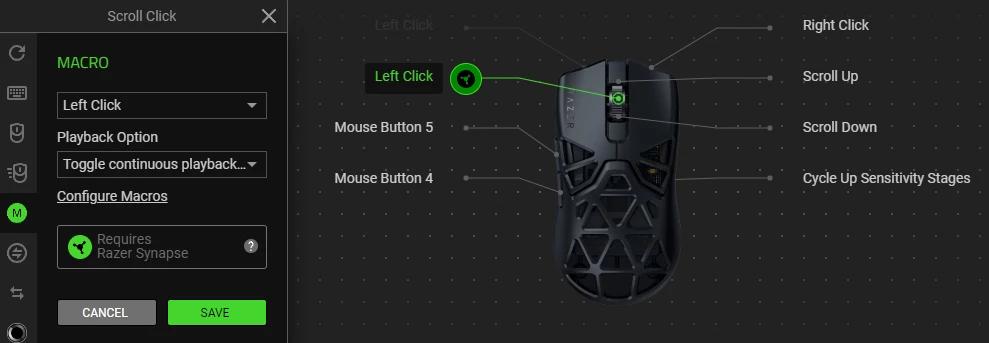
The only workaround I’ve found so far is instead of playing the macro once (“play once”), enable “ toggle continuous feedback”.

After using the macro, and then clicking normally with your mouse, the mouse key will be released, but the macro isn’t “finished” yet. So if you want to activate the macro again, you’ll need to press the macro key twice. First to turn it off, then to turn it back on again.


Bump, same issue, had to downgrade to synapse 3

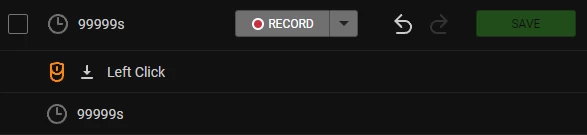
Edit: screenshot of macro in question


  • Insider Mini
  • June 16, 2025

I’m experiencing the same issue and it’s preventing me from migrating to synapse 4


Forsticcc
  • Insider Mini
  • July 16, 2025

The solution I found is to set the release delay to 99999s which is the max value possible. Then in playback set to Toggle. I have my scroll click set to the macro and it will hold for 99999s.