Razer Synapse 4 not starting with Windows or launching very late | Razer Insider
Skip to main content
Question

Razer Synapse 4 not starting with Windows or launching very late

  • October 14, 2025
  • 6 replies
  • 344 views

Hi everyone,

My device: Razer Blade 18 (2024) – Intel i9-14900HX / RTX 4080 / Windows 11 Home


I’m having an issue where Razer Synapse doesn’t start automatically with Windows, or if it does, it launches very late after the system boots. Until Synapse finally loads, my keyboard shows random lighting effects instead of my saved Chroma profile.


Here’s what I’ve already tried (without success):


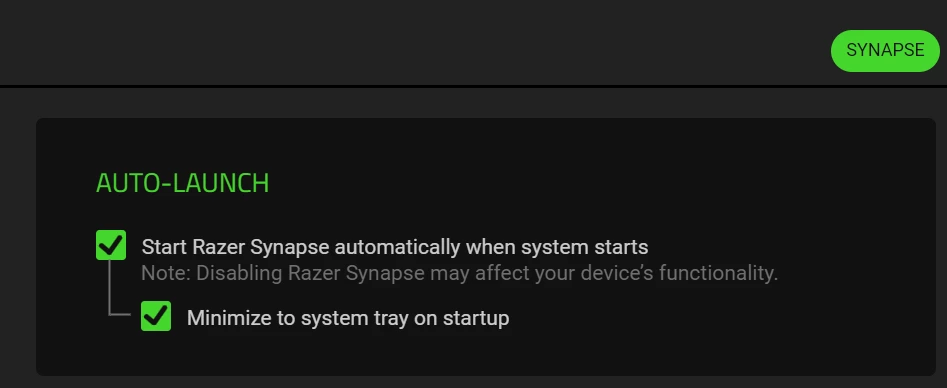
Enabled “Start Razer Synapse on system startup” in the settings.


Checked Task Manager → Startup tab (Synapse is enabled).


Made a custom Task Scheduler entry to start Synapse at login (with and without delay).


Set Synapse to run as administrator.


Verified that Razer Synapse Service and Razer Central Service are set to “Automatic” and running.


Reinstalled Synapse completely (including deleting leftover Razer folders from AppData and Program Files).


Despite all this, Synapse still doesn’t appear in the system tray after boot, and the lighting only applies if I manually open the app.


Is there any reliable fix or workaround to make Synapse start consistently and load lighting profiles immediately after Windows starts?


Thanks in advance for any help!

6 Replies

GMdoghunter666

I’m having the exact same issue as you with Synapse 4 loading late,orsometimes even not at all.I have also tried what you have as well,with no success.

Up until now i haven’t found any fixes for these issues tha twe are both having.

If i do though i will post it.

I even went to the extent of completely reinstalling my os (windows 11) again No success.

Thank goodness i do not have one of there laptops,as i really would feel your pain there as Synapse 4 at the moment is completely broken.

Honestly thoguh synapse 3 you would have thought they would have learned from that,obviously not though as the software is absolutely awful.

I will be honest her if it wasn’t for my Naga pro v2 mouse i would be using other hardware.


  • Insider Mini
  • October 15, 2025

Same issue as both of you.

For me, I had re-installed windows to clean up my computer, but upon re-installation of Windows 11 began running into “Critical Process Died” errors. After reinstalling, I continued running into blue screen of deaths, unless I immediately opened Razer Synapse upon boot.

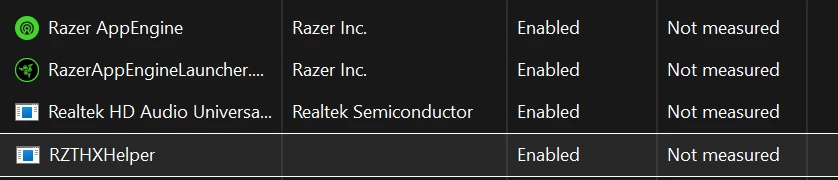
Despite enabling the setting within synapse for “Start Razer Synapse Automatically,” it does not appear within the Task Manager startup tab. In comparison, after installing Razer THX, it did appear in the startup tab. So I have no clue how to get Razer Synapse to actually start immediately on boot.


For additional context, these are the only Razer startup apps that currently appear.  (Yes I launched my Razer Synapse Installer in Admin mode)


TerminatorSAW2k

Hello, i have the same Problems! Could razer fix this shit?


My hypershift mode is offline after pc restart with my Razer Keyboard, pls fix it , too!


Gib Save Button pls xD.


GMdoghunter666

Same issue as both of you.

For me, I had re-installed windows to clean up my computer, but upon re-installation of Windows 11 began running into “Critical Process Died” errors. After reinstalling, I continued running into blue screen of deaths, unless I immediately opened Razer Synapse upon boot.

Despite enabling the setting within synapse for “Start Razer Synapse Automatically,” it does not appear within the Task Manager startup tab. In comparison, after installing Razer THX, it did appear in the startup tab. So I have no clue how to get Razer Synapse to actually start immediately on boot.


For additional context, these are the only Razer startup apps that currently appear.  (Yes I launched my Razer Synapse Installer in Admin mode)


Funnily enough the previous update they actually mixed up the game/chatmix channels on the kraken v4 pro,then this update we are getting all these issues.

especially your issue with THX which would also make me think this is somehow related to THX in some way.

It’s so annoying then you get the usual runaround from support as well which is next to no help.

Same thing as me i actually reinstalled windows 11 so on a fresh install also.

They need ot fix there crapware.


Archhanny
  • Insider Mini
  • November 26, 2025

Insane that this isn’t fixed yet.


  • Insider Mini
  • November 27, 2025

I had the same startup issue months ago, then decided to roll back to Synapse 3. I can’t believe it's still not been fixed.