Synapse 4 DPAD button remaps wiped as soon as I change keybind on one of other keys | Razer Insider
Skip to main content
Question

Synapse 4 DPAD button remaps wiped as soon as I change keybind on one of other keys

  • August 8, 2025
  • 17 replies
  • 444 views

I need help with an issue that just started recently:


I have the Tartarus Pro.

I map my dpad/joystick button, usually to numbers on my keyboard (1 through 4 in this example)

I also change a few of the keys on the keyboard portion. (Caps gets changed to CTRL, C gets changed to ALT, and the keybind switch button gets changed to M).

For some reason, I’ll map the dpad to those numbers listed above and as soon as I map one of the other keyboard keys its like the profile forgets. It shows up in Synapse 4 as remaped correctly but it doesn't work. The keyboard remaps (CTRL, ALT, M) work correctly but the dpad just defaults even though they show remapped in Synapse 4.


Any suggestions? I have reinstalled Synapse 4, factory reset etc.

17 Replies

Having exactly the same issue as of yesterday. I can remap in the synapse software, and it shows as being assigned to that key, but the dpad functions only as arrow keys regardless.


I have been experiencing the same issue on my device since today.
If I change even one of the numeric key settings, the D-Pad settings are no longer reflected.
Resetting the key bindings causes the D-Pad settings to be reflected again.
Naturally, resetting the key bindings will cause all key settings to be lost.


  • Insider Mini
  • August 8, 2025

I'm having the same issue. I've tried deleting all my profiles and even creating a new account, and the problem persists.


I went back to Synapse 3. Dpad remapping is working fine on it, and the profile ported over with no trouble at all.


  • Insider Mini
  • August 8, 2025

I went back to Synapse 3. Dpad remapping is working fine on it, and the profile ported over with no trouble at all.

Thx! I can confirm: Synapse 3 is working as intended.


  • Insider Mini
  • August 8, 2025

I went back to Synapse 3. Dpad remapping is working fine on it, and the profile ported over with no trouble at all.

is it possible to export rs4 profiles back to rs3?


  • Author
  • Insider Mini
  • August 8, 2025

I guess I am glad I am not alone with this issue but also annoyed. Something must of changed. I will most likely try Synapse 3, as suggested. Thanks for the feedback!


sCORpios_c
  • Insider Mini
  • August 9, 2025

Same here too cannot use WASD to the Dpad anymore, started as soon as the new logitech G-Hub update happened, while it does go up, down, left or right, there is no movement like it used too; while I can make a new profile set the WASD again to the Dpad and works fine but the second I remap any other key, it stops using WASD and defulats to arrow keys so I can move around in menu’s but no longer can move. Checked the driver said there was an error so did a repair and problem still exist, not sure what is causin this but was fine 24 hours ago.


  • Insider Mini
  • August 9, 2025

Having same issue - have not been able to find a way to make DPAD work, even tried removing all joystick keys across all of the different color profiles and hyper.


  • Insider Mini
  • August 9, 2025

Same problem here but the Binding doesnt stick at all as far as i can tell.. The D-Pad is stuck as arrow keys only.


sCORpios_c
  • Insider Mini
  • August 9, 2025

From there support team I was given this as a temporary solution till they fix the issue

“Dear valued customer,
 
I am Lily from Razer Support, and I’ll be assisting you today.
 
First and foremost, thank you for taking the time to report the issue you’ve encountered with your Razer Tartarus Pro related to D-Pad customization input. We sincerely apologize for the inconvenience this has caused — this is certainly not the experience we want our valued customers to go through. Please rest assured that we are committed to assisting you and working toward a solution.
 
In the meantime, we would like to recommend a temporary workaround that has resolved the issue for some users:
 
Workaround Steps:
1. Delete the current profile or create a new one in Synapse.
2. Change the D-Pad setting from “4 directions” to “8 directions.”
3. Set the keyboard function for Up, Down, Left, Right (8-way).
4. Disable the 4 corner inputs from the 8-way configuration.
5. Once done, you should be able to set keyboard functions for the remaining 19 keys and the scroll.
 
If the issue persists after applying the workaround, we kindly ask you to share the following so we can escalate the matter to our development team:
 
1. Video recording demonstrating the issue:
- Please include the customization process in Synapse and show the Tartarus Pro while reproducing the issue.
- If the video file is too large, feel free to upload it to cloud storage (e.g., Google Drive) and share the link (ensure it’s publicly viewable).
 
2. Razer Synapse 4 Logs: 
- Download the Razer Log Collector from: https://rzr.to/C2Qbo 
- Unzip and run the application 
- Click "Save To..." and choose your preferred location and filename
 
The logs will be saved as a single zip file.
 
Your cooperation is greatly appreciated. We’re here to support you every step of the way and will do our best to ensure this is resolved as soon as possible. Thank you again for your patience and for being part of the Razer community.
 
To update this case, you can reply to this email or use our Razer Support Portal.
 
Razer Support Team”

This is a temporary work around and may not work for all


SoulrePR24
  • Insider Mini
  • August 10, 2025

I’m having the same issue with my Razer Tartarus Pro (Mercury White). It’s incredibly frustrating. I tried uninstalling and reinstalling Synapse 4 three times last night, but the problem persists. I ended up switching back to my old Tartarus V2, which works, but I really dislike how it feels after getting used to the Pro.

From my testing, the problem happens as soon as you remap anything outside the D-pad, the settings just don’t stick. If you only want to remap the D-pad, you’ll need to create a new profile dedicated to that without any other key bind outside the D-pad.


  • Insider Mini
  • August 11, 2025

Thats realy bad. I am not able to use the joystick assigned with keys. Please bring back that solution.


sCORpios_c
  • Insider Mini
  • August 11, 2025

Razer support got back to me with a temporary solution but it’s clunky AF but here’s what they explained to me in brief terms.

Must make new profile for the game, old or existing will not work. (I do not recommend deleting them without backing them up first)

Set you’re D-pad to the 8-way direction setting with the switch button.

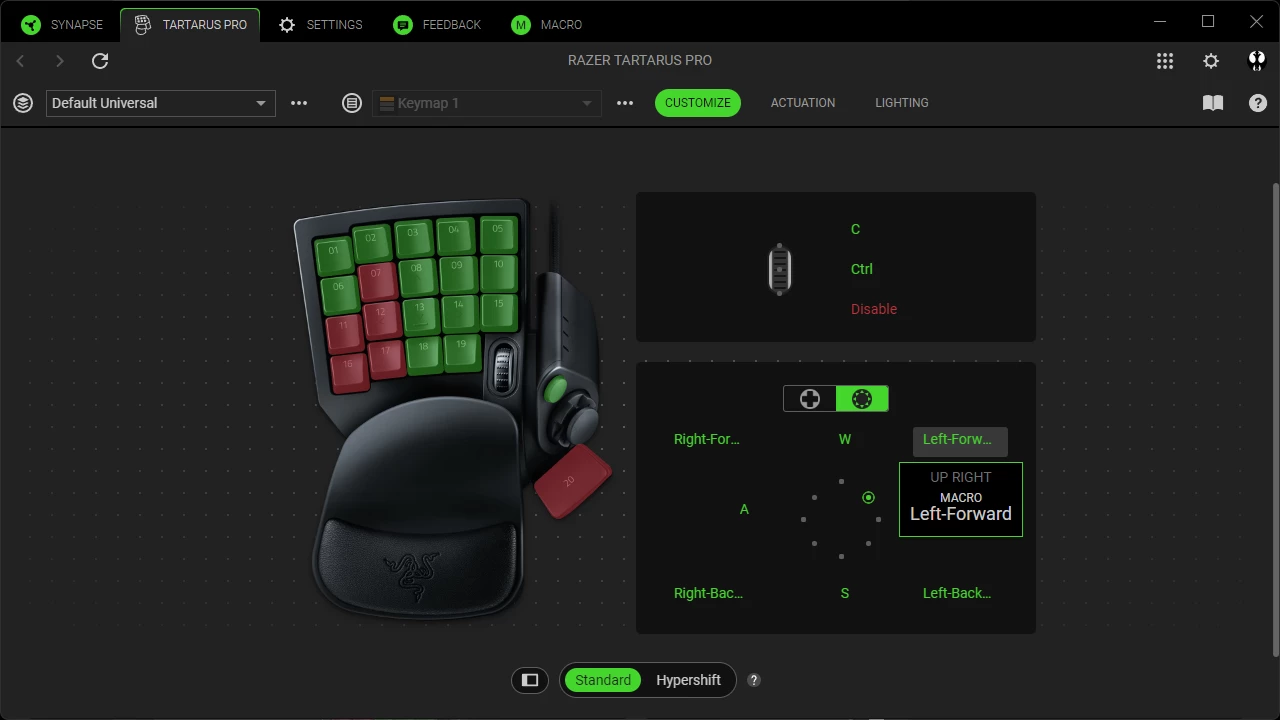
Change up, down, left and right to your corresponding inputs, for example I chose W, A, S & D, most games use these as movement keys by default as shown in the diagram .

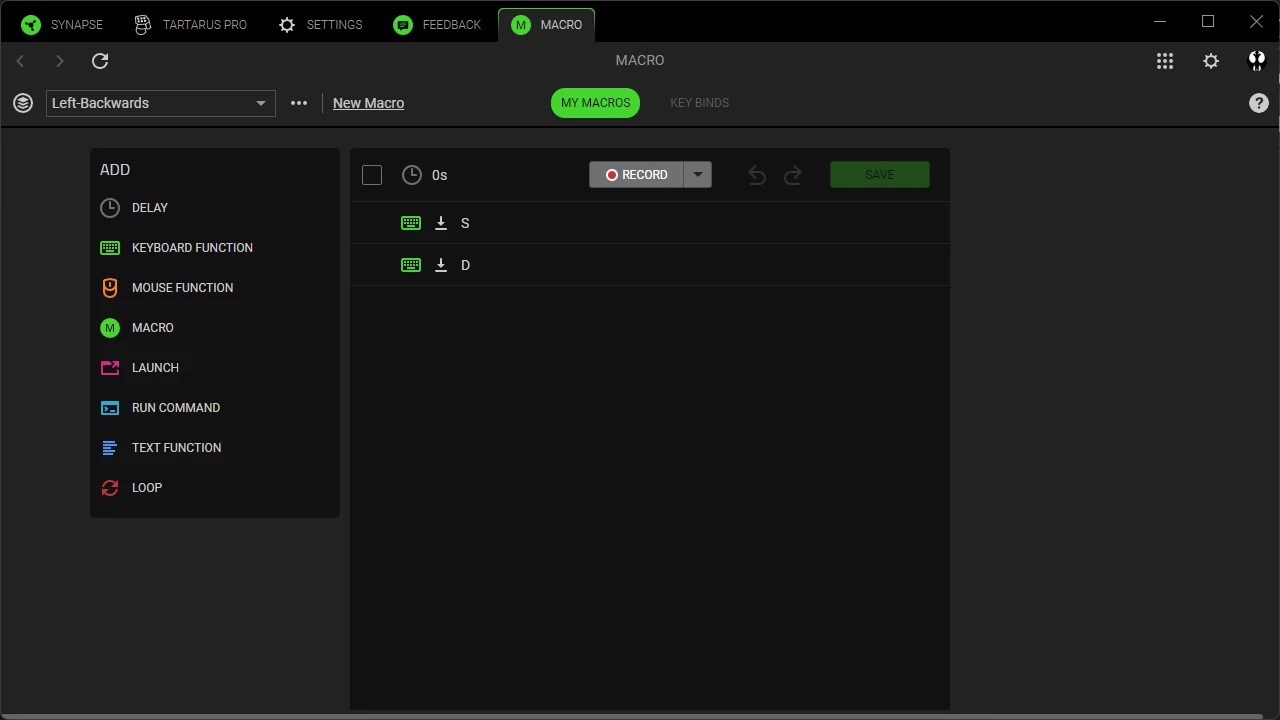
Then for the up-left, down-left, up-right, left-right I used macro’s while this causes some clunkiness it’s the best I could come up with as a solution, diagram of macro below, make one for each of the up-left, up-right, down-left and down-right directions. They recommended to disable these but it’s worst with the clunk.
 

Anyway I really hope this helps some until they fix this issue that suddenly came to existence.


This problem occurred suddenly, but it was suddenly resolved yesterday.
There were no updates.
I don't know if it was only resolved in my environment.
Has anyone else had this problem resolved?


This problem occurred suddenly, but it was suddenly resolved yesterday.
There were no updates.
I don't know if it was only resolved in my environment.
Has anyone else had this problem resolved?

Yesterday I reverted back to Synapse 3 then I saw your post. After re-updating to Synapse 4, my existing profile that initially had a faulty d-pad suddenly works.


  • Insider Mini
  • August 14, 2025

I updated from 3 to 4. Everything works now.