Synapse 4 Flicker and Glitching | Razer Insider
Skip to main content

Synapse 4 Flicker and Glitching

  • October 31, 2024
  • 23 replies
  • 4092 views

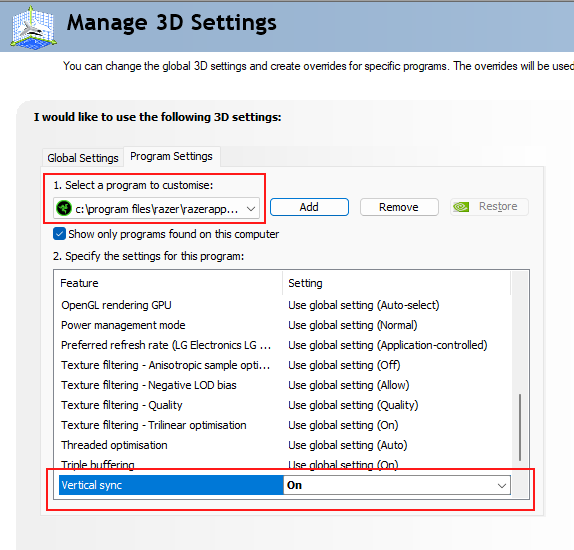
I finally made the switch to Synapse 4 and found the contents of the Synapse and Chroma app windows would flicker and glitch like crazy. Luckily I’ve seen this once before and know it happens when an app doesn’t play nice with G-Sync variable refresh rate. The workaround is to create a program profile in the GeForce drivers to enforce Vertical sync for the RazerAppEngine.



23 Replies

  • Author
  • Insider Mini
  • November 14, 2024

So it would seem this fix needs to reapplied after every Synapse update because the file path changes. 🙁

C:\Program Files\Razer\RazerAppEngine\app-4.0.406\RazerAppEngine.exe

I’m running the latest GeForce drivers; 566.14


  • Insider Mini
  • March 7, 2025

Dude, this is so annoying. The suggested fix doesn’t even work and why is Synapse the only app on my entire PC that can’t deal with adaptive sync? Razer needs to fix this ASAP.


  • Author
  • Insider Mini
  • March 7, 2025

Hmm, fix is working fine for me.

Are you sure you picked the right executable? The exact path changes after each update and so needs to be adjusted. Once you apply the settings, you have to completely close down all Razer/Synapse processes and then relaunch (or a system reboot would do it).


  • Insider Mini
  • March 8, 2025

There is an alternate possible fix that worked for me while I was having this problem with various programs including razer. Apparently, the Hardware Accelerated GPU Scheduling in windows can largely be responsible for it. To get there, go to Settings → Display → Graphics → Change default graphic settings → Turn off Hardware Accelerated GPU Scheduling. The default graphic settings may be called something similar instead depending on your version of windows. Also, be aware that some games use this setting for some in-game graphics settings like Upscaling in Monster Hunter Wilds.


  • Author
  • Insider Mini
  • March 8, 2025

Thanks for posting that, it is good to have options. I am a little wary of settings which affect all applications and might reduce system performance overall. This option switches parts of the graphics workload between the CPU and GPU. More info here:

https://devblogs.microsoft.com/directx/hardware-accelerated-gpu-scheduling/


  • Insider Mini
  • April 28, 2025

thank you i now dont have a seizure every time i open razer app thank you so much  this shouldnt be an issue in the first place


  • Author
  • Insider Mini
  • April 28, 2025

I agree that it is annoying that this is necessary to workaround the bugs in Razer’s software.

I reported this issue to Razer back in November 2024 and they acknowledged the bug:

Our Software Team is still investigating the issue on their end and the issue has been acknowledged. We require that you keep your Razer Synapse up to date. We are unable to provide an estimated date for the update fix because the issue will be fixed in future updates.

After 5 months and several updates later and we are still waiting for a fix.


SpidyWomack
  • Insider Mini
  • May 7, 2025

I have tried all of these and none of the fixes worked. I made sure to have the right path for Nvidia control panel and tried the accelerated GPU fix. still graphics freaking out and jumping back and forth between windows inside razer. Makes the app wholly unusable.


  • Author
  • Insider Mini
  • May 14, 2025

Still flickering and glitching in 4.0.503 with the latest GeForce drivers 576.40

Razer have supposedly been working on a fix for this for 6 months.

Thankfully, the workaround of adding a vsync profile for C:\Program Files\Razer\RazerAppEngine\app-4.0.503\RazerAppEngine.exe still works for me.


  • Author
  • Insider Mini
  • May 31, 2025

Razer have curled out 4.0.523. Still flickering and glitching with the latest GeForce drivers 576.52

200 days since this was reported to Razer.


I have no idea how its still not fixed, you are a huge company razer


  • Insider Mini
  • June 27, 2025

It’s barley usable.  The flickering and glitching is really bad.  The v sync does nothing for me even in global.  Other apps have done this and its usually associated with hardware acceleration.  I don’t see a way to turn that off here. 


  • Insider Mini
  • June 27, 2025

chatgpt:


🧠 Why Do Some Apps Flicker When HAGS Is On?

This is a known issue with some software. Here’s why it happens:

  • The app uses older graphics APIs or improperly implemented acceleration.

  • When HAGS is on, the system handles frame scheduling differently — and if the app isn’t coded to handle that properly, it can cause flickering, window corruption, or crashes.

  • Some Chromium-based apps (like Slack, Teams, or Electron-based programs) are notorious for this.


  • Author
  • Insider Mini
  • July 3, 2025

Razer Support emailed me today with an update on this issue. They provided a “solution” which is the exact workaround I gave to them, and posted here, 8 months ago! 🤦

So after 7-8 months the best their Software Team could do was to feed my own advice back to me.
What muppets.


  • Insider Mini
  • July 11, 2025

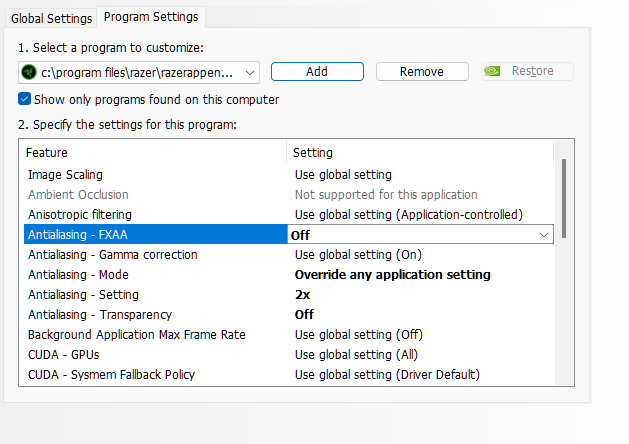
For those who tried to force Vsync On via nVCP, and it didn’t fix the issue (like in my case,) I also changed these settings which did appear to correct the issue. Not exactly “crisp” to my vision, but Synapse and Chroma are definitely no longer blurry.

Edit: The changes are the settings in bold, in case anyone looks and doesn’t realize. o7


  • Author
  • Insider Mini
  • July 21, 2025

After a couple more email exchanges my case was closed again by Razer. I guess that helps with the stats.

They claim it will be fixed in a future update. No timeline for this, and of course, no change log will be published.


NyanzaONYXeasy160

Thanks for this.  I have AMD graphics card, and was able to create a similar profile for the app.

  1. Pull up AMD Software:
  2. Gaming tab.
  3. Add a game from the 3 dots dropdown menu.
  4. Default path: “C:\Program Files\Razer\RazerAppEngine\app-4.0.406\RazerAppEngine.exe”.
  5. Click on the RazorAppEngine profile.
  6. Wait for Vertical Refresh > Always On.

Still get a screen flicker whenever I switch in or out of the app.


  • Insider Mini
  • August 2, 2025

I only recently just started having this problem. It was either the Nvidia 580.88 driver or an auto update to Synapse. I have a gsync monitor at 480hz but I set it to fixed for almost every game, so it’s fixed refresh globally and vsync is set to “on” for this app. Flickers like hell. I can’t use it anymore.


  • Insider Mini
  • August 5, 2025

Fck Razer. Time to buy Steelseries


LSWBM
  • Insider Mini
  • August 12, 2025

На своё горе установил 11 Винду и тоже появилась с проблема с мерцаниями и размытием. Приложением невозможно пользоваться. Решения вышек мне нге помогли.


DemosPro
  • Insider Mini
  • August 16, 2025

Dude, this is so annoying. The suggested fix doesn’t even work and why is Synapse the only app on my entire PC that can’t deal with adaptive sync? Razer needs to fix this ASAP.

Not the only one. SteelSeries GG also has a flickering interface.


rushTeaGreenside573

Im not the type of person to usually voice my opinion, but i do believe that one voice can be heard and make an impact. Its only a shame that a company as large as Razer can have such QC issues and not have the staff to remedy these issues for MONTHS…. Id understand if the issues were causing just minor annoyances with the software being alittle glitchy but this is costing me ALOT OF MONEY… I have RAZER for dang near half my gaming supplies… About o3 weeks ago i couldnt get neither Synapse 3 or 4 to recognize my $300 Dollar Freyja Haptic Gaming Cushon at all, Ive uninstalled, reinstalled, registry edits and ran all the scans windows has got… now started up last night i cant even have any Razer apps on my device or either Icue or Armoury Crate go Bonkers… Screens are not even remotely usable as they continue to flash on and off until i exit out of ALL process trees leaving nothing from Razer running in the background…. SO over 100 dollars for the Tartarus V2 thats a freaking Brick now cuz i cant adjust rgb or switch out binding without paying for REwize… $50 Bucks for my FireFly rgb mousepad as the rgb cant be controlled anymore either… and best of all, $300 Dollars down the drain for the Freyja Haptic Cushon!!! So $450 so far… Since now i had to order a new Reddragon one handed keyboard that cost me $49 dollars. Plus (2)50w DaytonAudio Bass shakers , (1)300w DaytonAudio Bass shaker , a 160w 2 channel amp, a 300w single channel amp and all the mounts and 14g wire to rig it all up to my sim rig… all that for $300!!! So on the Safe side id say no less than $800 Dollars out my pocket and a couple of hours that its gonna take to hook the shakers all up… ALL because a company cant keep the software from being so bad its causing peoples whole systems to be rendered useless… Im not looking for a fix or a refund, Advice or workaround….. The entire Gaming industry has gone to crap, you dont own any game you pay for anymore. all the games are now coming out with as little as 1/10th of the game finished, calling it something cute like Early Access… Thats just plumb crazy, 60 dollars for an unfinished barely optimized piece of software that the gaming portal that you use squeezes all your rights to the game you just bought down the drain in the fine print… ill end with my last rant, The Freyja Haptic Cushon that was supposed to be this new technology and they were gonna make it soooo great… 4 months down the road from the launch they realize they cant handle the programming and run to SimHub for help… Another Expense for the pro version, if i want to use all the features that i thought i was paying for in the first place for $300 bucks… all this is at the hands of Razer… Shameful as F&#% if you ask me...


  • Author
  • Insider Mini
  • October 5, 2025

The flickering and glitching only appears for me if I have a global setting of Vertical sync Fast. This used to be recommended setting to maximise frame rate and minimise latency. However, since then, monitor refresh rates have increased and Nvidia has introduced their Reflex technology. The recommendation now is to run a G-SYNC monitor with Vertical sync On which doesn't cause flickering and glitching in apps like Synapse. The Vertical sync Fast setting it only for people who are chasing extreme FPS and responsiveness, like pro competition gamers. In which case you can always set this option for a specific game/app via an override profile.

If none of these Vsync settings are helping on your system there is a final option. If you add the parameter
-disable-gpu
to the shortcut for Razer Synapse this will disable all hardware acceleration for the app.