Synapse 4 Never ending list of bugs | Razer Insider
Skip to main content

Synapse 4 Never ending list of bugs

  • February 16, 2025
  • 58 replies
  • 3467 views

Show first post

58 Replies

  • Insider Mini
  • October 25, 2025

Hey guys,
I’ve just upgraded from Synapse 3 to Synapse 4 after a big popup warned me that v3 support is ending. Unfortunately, this has caused several issues for my setup that worked flawlessly in Synapse 3.

My setup

  • Use case: Two profiles

    • Work profile: mouse/keyboard/mouse mat all green

    • Gaming (Diablo IV) profile: all red + special macro

  • Expected behavior (Synapse 3): When I ALT+TAB out of Diablo IV to the desktop, lighting instantly switches back to green (work profile). When I return to the game, it switches back to red.

  • Actual behavior (Synapse 4):

    1. ALT+TAB no longer switches the profile—everything stays red even on desktop. Macros etc. still work, but lighting doesn’t follow focus.

    2. After exiting the game, the devices often remain red for up to ~30 seconds. Synapse shows the profile as “Default,” but the lighting doesn’t update. During this period the mouse pointer jumps, the keyboard double-types, and when I type fast it drops characters.

Questions

  1. Is Synapse 4 considered a final/stable release already? The upgrade prompt suggested moving off Synapse 3 soon, but this feels like a regression for my workflow.

  2. Can Synapse 4 switch profiles on ALT+TAB like Synapse 3 did? If so, how do I configure it so desktop focus (ALT+TAB) forces the Work (green) profile again?

  3. What can I do about the 20–30s lighting delay and the temporary input glitches after exiting Diablo IV? Synapse shows “Default,” but lighting/input don’t immediately recover.

Extra details

  • Synapse 4 version: fully updated

  • Windows: 11 Pro 25H2, fully updated

  • Devices: Razer mouse Deathadder v2 pro, keyboard deathstalker v2 pro, and mouse mat (Chroma)

  • Tried so far: reinstall Synapse 4, remove all profiles and macros and create new one.

Any guidance, workarounds, or settings I should change would be much appreciated. If logs or a diagnostic package would help, I’m happy to provide them.

Thanks!


  • Insider Mini
  • October 25, 2025

Hey guys,
I’ve just upgraded from Synapse 3 to Synapse 4 after a big popup warned me that v3 support is ending. Unfortunately, this has caused several issues for my setup that worked flawlessly in Synapse 3.

My setup

  • Use case: Two profiles

    • Work profile: mouse/keyboard/mouse mat all green

    • Gaming (Diablo IV) profile: all red + special macro

  • Expected behavior (Synapse 3): When I ALT+TAB out of Diablo IV to the desktop, lighting instantly switches back to green (work profile). When I return to the game, it switches back to red.

  • Actual behavior (Synapse 4):

    1. ALT+TAB no longer switches the profile—everything stays red even on desktop. Macros etc. still work, but lighting doesn’t follow focus.

    2. After exiting the game, the devices often remain red for up to ~30 seconds. Synapse shows the profile as “Default,” but the lighting doesn’t update. During this period the mouse pointer jumps, the keyboard double-types, and when I type fast it drops characters.

Questions

  1. Is Synapse 4 considered a final/stable release already? The upgrade prompt suggested moving off Synapse 3 soon, but this feels like a regression for my workflow.

  2. Can Synapse 4 switch profiles on ALT+TAB like Synapse 3 did? If so, how do I configure it so desktop focus (ALT+TAB) forces the Work (green) profile again?

  3. What can I do about the 20–30s lighting delay and the temporary input glitches after exiting Diablo IV? Synapse shows “Default,” but lighting/input don’t immediately recover.

Extra details

  • Synapse 4 version: fully updated

  • Windows: 11 Pro 25H2, fully updated

  • Devices: Razer mouse Deathadder v2 pro, keyboard deathstalker v2 pro, and mouse mat (Chroma)

  • Tried so far: reinstall Synapse 4, remove all profiles and macros and create new one.

Any guidance, workarounds, or settings I should change would be much appreciated. If logs or a diagnostic package would help, I’m happy to provide them.

Thanks!

It feels like the profile is hanging. Is the game linked to your profile? Because after the update, the profiles are transferred, and the profile link to the game may disappear and you need to link the profile to the game again. I'm currently working with synapse 4 beta myself. Razer chroma is also a beta version. It works stably, unlike the release version.


  • Insider Mini
  • October 25, 2025

I’ve read about many bugs when migrating from Synapse 3 to Synapse 4, so I fully uninstalled Synapse 3, did a clean install of Synapse 4, recreated my macros, and re-linked the game. So it doesn’t seem to be a profile-link issue, but thanks for the suggestion.


  • Insider Mini
  • October 30, 2025

Given all these comments here… how “stable” is v4 now?

Or (still) better wait until Feb 3, 2026? (the ‘official’ EOL of Synapse 3).


ChuckleBerryFin

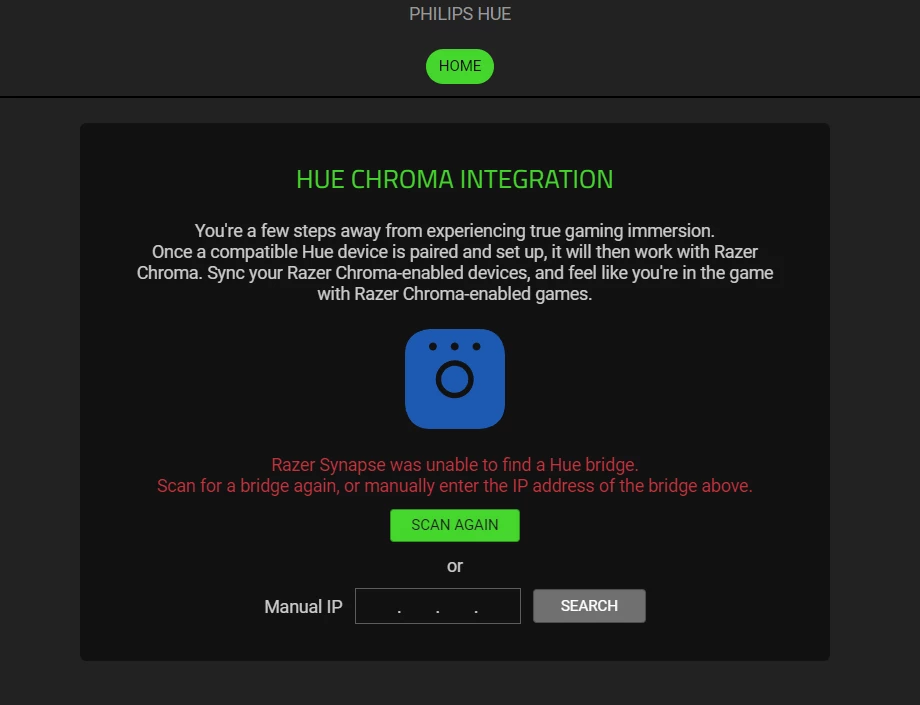
My main issue right now is, and has been this stupid integration never working. Tried uninstalling Synapse, manual IP, restarting my bridge, resetting the ent. areas, just refusing to connect. Driving me mad.


So I fixed this issue - reset the Hub, but now Synapse will literally non-stop crash, and it’s just pissing me off. How can this massive company not have the ability to at least have a working app, is beyond me… If Synapse hasn’t crashed then the Chroma app has. Such a joke, I’ve spent so much money but I think I’m really ready to go elsewhere, because the reason you buy a Razer product is quality and the RGB, RGB being the BIGGEST thing they flex on, yet that never seems to work. If I spend premium money, I expect premium support, and premium experience. No matter how nice the mouse or keyboard is, if the stupid RGB app keeps crashing.

This has been my issue since first trying Synapse 4. I have so many Razer products that it takes 30 minutes to start, that's if it decides to actually do its job. 99% of the time I'm waiting for it to respond or not crash. What an absolute embarrassment, and we're days away from discontinued support from Synapse 3...


  • Insider Mini
  • January 11, 2026

See the thread about Blackshark users (like myself). Spatial audio got broken and it hadn’t been fixed for months. Even after returning to Synapse 3 there are still problems.
I was a Razer fanboy for many years but my hope in Razer is about to be gone. I am sad to say this but the next purchase probably won’t be from them.

People here saying that all companies have problems with the software but in my opinion not that big like here. All basics things for example logitech are working in the app.

I had issues with Logitech/Logitech software as well … Every time an update was released on their GHub I had to reinstall software clean, reconfigure my mouse again and again even though the profile was saved on-board.
And software wise I don’t think Logitech is any better. I think that any american software/technology has this issue since none of them has the consumer satisfaction in their focus but consumer milking.


  • Insider Mini
  • January 11, 2026

Hey guys,
I’ve just upgraded from Synapse 3 to Synapse 4 after a big popup warned me that v3 support is ending. Unfortunately, this has caused several issues for my setup that worked flawlessly in Synapse 3.

My setup

  • Use case: Two profiles

    • Work profile: mouse/keyboard/mouse mat all green

    • Gaming (Diablo IV) profile: all red + special macro

  • Expected behavior (Synapse 3): When I ALT+TAB out of Diablo IV to the desktop, lighting instantly switches back to green (work profile). When I return to the game, it switches back to red.

  • Actual behavior (Synapse 4):

    1. ALT+TAB no longer switches the profile—everything stays red even on desktop. Macros etc. still work, but lighting doesn’t follow focus.

    2. After exiting the game, the devices often remain red for up to ~30 seconds. Synapse shows the profile as “Default,” but the lighting doesn’t update. During this period the mouse pointer jumps, the keyboard double-types, and when I type fast it drops characters.

Questions

  1. Is Synapse 4 considered a final/stable release already? The upgrade prompt suggested moving off Synapse 3 soon, but this feels like a regression for my workflow.

  2. Can Synapse 4 switch profiles on ALT+TAB like Synapse 3 did? If so, how do I configure it so desktop focus (ALT+TAB) forces the Work (green) profile again?

  3. What can I do about the 20–30s lighting delay and the temporary input glitches after exiting Diablo IV? Synapse shows “Default,” but lighting/input don’t immediately recover.

Extra details

  • Synapse 4 version: fully updated

  • Windows: 11 Pro 25H2, fully updated

  • Devices: Razer mouse Deathadder v2 pro, keyboard deathstalker v2 pro, and mouse mat (Chroma)

  • Tried so far: reinstall Synapse 4, remove all profiles and macros and create new one.

Any guidance, workarounds, or settings I should change would be much appreciated. If logs or a diagnostic package would help, I’m happy to provide them.

Thanks!

You must link your work profile to several apps that you consider part of your “work profile” nad are always there. In my case i know I have always open Brave or File Explorer, etc etc.

There is no trigger for “I’m not in the game anymore”

Alt+Tab si a windows shortcut > switch focus to app.

The only thing I still haven’t figured out is what does “Apply in-game only” for “Gaming mode” since nothing happens and what it was supposed to do doesn’t happen.


scorpio72
  • Insider Mini
  • January 11, 2026

Hello,

Macro is no longer working.

You've just lost a customer. I'll be looking elsewhere for my future purchases, and certainly not at Corsair.

Good luck, guys.