
Tartarus Pro - Actuation key travel adjustment not saving | Razer Insider
Skip to main content
Question

Tartarus Pro - Actuation key travel adjustment not saving

  • November 21, 2024
  • 10 replies
  • 210 views

louhours

This was buggy on Synapse 3 and broke in beta. So, grateful to see Synapse 4 was taken out of beta with all the bugs included too.. And even more bugs, as things that were half working now completely don’t anymore.. Awesome progress 😂


Problem: Actuation key travel adjustments do not save, and stay at the default 2.5mm, even when setting all keys using the sync all keys to say the max 3.6mm... it will still stay at 2.5mm!!!


This is the most annoying bug, as it has literally removed a major functionality from the device. So, I’d be very grateful if it could be fixed. Then maybe I can at least half use it for something other then using it to catch dust 🤷


And before you say reinstall it, etc.. Already tried  all the 101 of installation fixing.. 
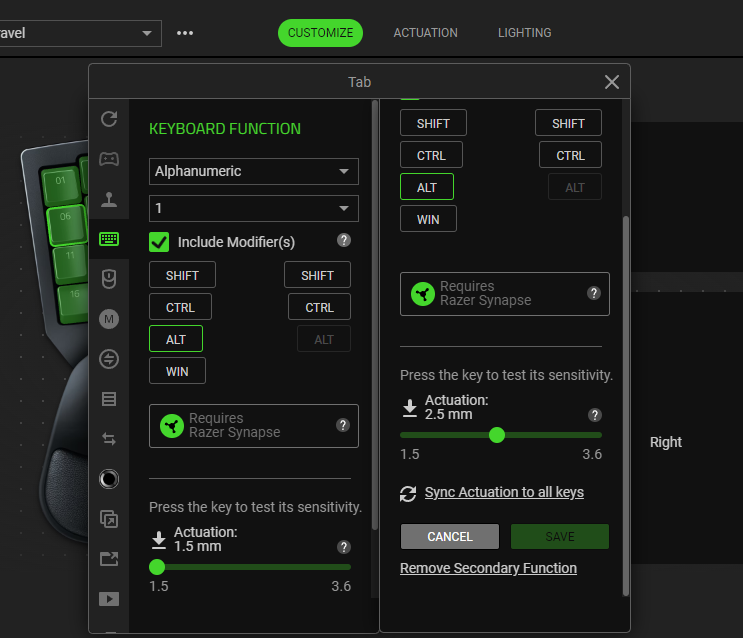
 

10 Replies

thecrocodilefarm

Same thing here. All the usual remedies don’t do a thing


zt1mq
  • Insider Mini
  • December 1, 2024

i have problems with tartarus pro in synapse 4 too


every program start Tartarus is downloading smth, so all other chroma devices are waiting for him) fix this plz


The actuation key travel bug on Tartarus Pro is a known issue in Synapse 4—settings like 3.6mm don’t save and default back to 2.5mm. Since reinstalling doesn’t help, best option is to report it to Razer Support and wait for a software update. Rolling back to Synapse 3 (if usable) might help temporarily.


  • Insider Mini
  • May 12, 2025

I'm experiencing the same issue. Razer is by far the most disappointing company I've dealt with—their software is absolute garbage.


For anyone searching for a reliable Qatar Visa Check App, our platform makes it easy to check your Qatar visa status online, get updates instantly, and find complete guidance for QVC appointments. It’s simple, secure, and designed to help travelers save time.


I’m also having the exact same problem with the Tartarus Pro actuation settings not saving in Synapse 4, always stuck at 2.5mm no matter what profile or “sync all keys” setting I use. It’s frustrating because the adjustable actuation is supposed to be the main selling point of this device.

I’ve reached out to support already, but it would be great if Razer could prioritize a fix, especially since many of us rely on this for gaming and productivity. Here in El Salvador, Razer gear is expensive and harder to replace or return, so having the software working properly is essential.


I’m also having the exact same problem with the Tartarus Pro actuation settings not saving in Synapse 4, always stuck at 2.5mm no matter what profile or “sync all keys” setting I use. It’s frustrating because the adjustable actuation is supposed to be the main selling point of this device.

I’ve reached out to support already, but it would be great if Razer could prioritize a fix, especially since many of us rely on this for gaming and productivity. Here in El Salvador, Razer gear is expensive and harder to replace or return, so having the software working properly is essential.

Is there any update on fixing the Tartarus Pro actuation bug in Synapse 4, especially since devices like this are costly to replace here in El Salvador?


I’m also having the exact same problem with the Tartarus Pro actuation settings not saving in Synapse 4, always stuck at 2.5mm no matter what profile or “sync all keys” setting I use. It’s frustrating because the adjustable actuation is supposed to be the main selling point of this device.

I’ve reached out to support already, but it would be great if Razer could prioritize a fix, especially since many of us rely on this for gaming and productivity. Here in El Salvador, Razer gear is expensive and harder to replace or return, so having the software working properly is essential.

Is there any update on fixing the Tartarus Pro actuation bug in Synapse 4, especially since devices like this are costly to replace here in El Salvador?

Here’s a good reply you can post:

No official update has been released yet regarding a fix for the Tartarus Pro actuation bug in Synapse 4, the issue is still affecting many users and continues to default to 2.5mm regardless of custom settings. Razer Support is aware of it, but they haven’t provided a timeline for a patch.

If you want, I can share a complete workaround that makes the actuation travel adjustments actually stick until the software is properly updated. Just let me know!


I’m also having the exact same problem with the Tartarus Pro actuation settings not saving in Synapse 4, always stuck at 2.5mm no matter what profile or “sync all keys” setting I use. It’s frustrating because the adjustable actuation is supposed to be the main selling point of this device.

I’ve reached out to support already, but it would be great if Razer could prioritize a fix, especially since many of us rely on this for gaming and productivity. Here in El Salvador, Razer gear is expensive and harder to replace or return, so having the software working properly is essential.

Is there any update on fixing the Tartarus Pro actuation bug in Synapse 4, especially since devices like this are costly to replace here in El Salvador?

Here’s a good reply you can post:

No official update has been released yet regarding a fix for the Tartarus Pro actuation bug in Synapse 4, the issue is still affecting many users and continues to default to 2.5mm regardless of custom settings. Razer Support is aware of it, but they haven’t provided a timeline for a patch.

If you want, I can share a complete workaround that makes the actuation travel adjustments actually stick until the software is properly updated. Just let me know!

Yes, sure! Please share it.


I’m also having the exact same problem with the Tartarus Pro actuation settings not saving in Synapse 4, always stuck at 2.5mm no matter what profile or “sync all keys” setting I use. It’s frustrating because the adjustable actuation is supposed to be the main selling point of this device.

I’ve reached out to support already, but it would be great if Razer could prioritize a fix, especially since many of us rely on this for gaming and productivity. Here in El Salvador, Razer gear is expensive and harder to replace or return, so having the software working properly is essential.

Is there any update on fixing the Tartarus Pro actuation bug in Synapse 4, especially since devices like this are costly to replace here in El Salvador?

Here’s a good reply you can post:

No official update has been released yet regarding a fix for the Tartarus Pro actuation bug in Synapse 4, the issue is still affecting many users and continues to default to 2.5mm regardless of custom settings. Razer Support is aware of it, but they haven’t provided a timeline for a patch.

If you want, I can share a complete workaround that makes the actuation travel adjustments actually stick until the software is properly updated. Just let me know!

Yes, sure! Please share it.


  • Create a new profile in Synapse 4.

  • Set actuation on one key, apply, wait a few seconds.

  • This workaround helps a lot, especially for users in El Salvador where replacements are harder to get.

  • Copy that setting to all keys.

  • Unplug the Tartarus Pro.

  • Fully close Synapse.

  • Plug it back in and confirm the settings saved.

This workaround helps a lot, especially for users in El Salvador where replacements are harder to get.