
Bug Reporting Guidelines | Razer Insider
Skip to main content

Bug Reporting Guidelines

  • May 8, 2025
  • 13 replies
  • 422 views

dekades

Bug Reporting Guidelines 

Our goal is to collect reports on issues affecting the Razer Synapse for Mac Preview. This will be an extremely valuable tool for our team and will be the main source of information and issue tracking. 

Our staff and engineers will be monitoring this forum and will be working together to assess which bugs will need to be squished asap. If you don't see your bug being addressed, please bear in mind that there may be more critical issues that need to be dealt with. There may be times where we'll request more information regarding your issue, please be as accommodating as possible. 

It is crucial to stay on topic. Focus your threads around bug reports, workarounds and bug triggering. 

  • Opinions and criticisms should be directed to the General Discussion forum. 
  • Technical issues regarding installation, launching and staying connected to should be posted in the Technical Issues forum. 
  • Please don't double post your bugs. 
  • If you find multiple bugs, create a separate thread for each one. It'll be easier for our team to organize and address. 
  • Please do not hijack other bug reports by posting your own similar bug. This is not efficient and may lead to your bug being missed or causing the original bug report to be ignored. 
  • Your subject must have a clear summary of your bug. "Razer Synapse for Mac Preview crashing after detecting my keyboard" is good. “Razer Synapse for Mac Preview sucks!" or "Nobody is helping me!" is bad and counterproductive. Not only does that mark your thread for removal but may impact your participation in the Preview program as well. 
  • Computer problems suck and can lead to emotions being left unchecked. We totally understand. But there will be zero tolerance for abusive behavior. 

This forum exists as a tactical approach to creating the ultimate Razer Synapse for Mac Preview experience for our community. We appreciate all the hard work our community members put in and hope to deliver the best product through your contributions. 

13 Replies

macbook air m4 and Razer Ornata Chroma i bought a few years ago. I think it’s a listing like this:
https://www.amazon.com/Razer-Ornata-Chroma-Mecha-Membrane-Individually/dp/B01LVTI3TO
i know I definitely have this style keycap with the membrane and the click though, i figured it’d be a little more protected from spills.

anyway yeah i just bought this macbook from bestbuy MC9K4LL/A model, i have a FlePow thunder dongle or whatever you call it that hooks up to the 2 usb-c plugs with an hdmi an usb ports.

i have an account on windows so i know my keyboard works there, but i downloaded synapse and i’m not seeing my device connect.


App does not detect the mice basilisk v3x on macbook m2 max, i can't set macros etc on mac. and can use by default without any settings only


Hi, is there coming support for the Deathadder V3 to Synapse for Mac Preview? I’ve seen that the Deathadder V3 PRO is compatible, but the ‘’normal’’ Deathadder V3 not (as far as i’m aware of).


  • Insider Mini
  • June 6, 2025

Having several issues with Razer Naga V2 Pro, Firmware Version 1.3.0.0 (latest) on the Mac Synapse 4 Preview Version 4.0.86.2504290730, on MacOs 15.5.

Synapse sees the mouse and I can program the buttons and load the profiles into the mouse. However, if Synapse is open the side buttons only work as a number pad, but if I close Synapse the programmed functions will work. However, the only way the lighting profile works is with Synapse open. So I can either have synapse open and have the lighting work properly, or have Synpase closed and have the buttons work properly. I have figured out that these issues are mitigated by cycling the power on the mouse after I have mapped the buttons in Synapse. So I can get the profile setup and saved into the mouse, cycle the mouse power, and then the buttons and lighting will work with Synapse open. However, that doesn’t fix the next issue.

With Synapse open I also cant change the scroll wheel settings without clicking on the scroll wheel setting I want to select in Synpase. Having Synapse open keeps the button on the mouse from changing the scroll wheel settings.


  • Insider Mini
  • June 8, 2025

Tool doesn’t work as intended. I’m using the Naga Pro V2 with 6 side buttons panel. I can map each button, that's great but MacBook Air M4 doesn’t recognize those mapped buttons as in-built keyboard, thus e.g. if I mapped “button 1” as “1” and use “shift” and “1” it gives back “1” instead of “!”. Please do something about it!


Hi, the Synapse (V4) software does not recognize my razer basilisk v3 on mac at all. The mouse connects, lights up, and i can use basic mouse buttons, but I can not change its lighting, set up macros, or rebind any key, as the mouse isn’t recognized by the software at all

I’ve tried reinstalling synapse, reconnecting the mouse, and restarting synapse/my laptop as well


joernard
  • Insider Mini
  • June 15, 2025

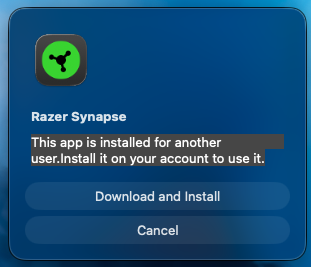
Hey! i found no way to start  the Synapse App for Mac. i tried on mac Mini M4. Installer is sucsessfull, but the App wontg start. Nice little window with : “This app is installed for another user.Install it on your account to use it.” comes up.

I have only one Account and this is Admin… I tryed several times. 


  • Insider Mini
  • June 17, 2025

Hi there,

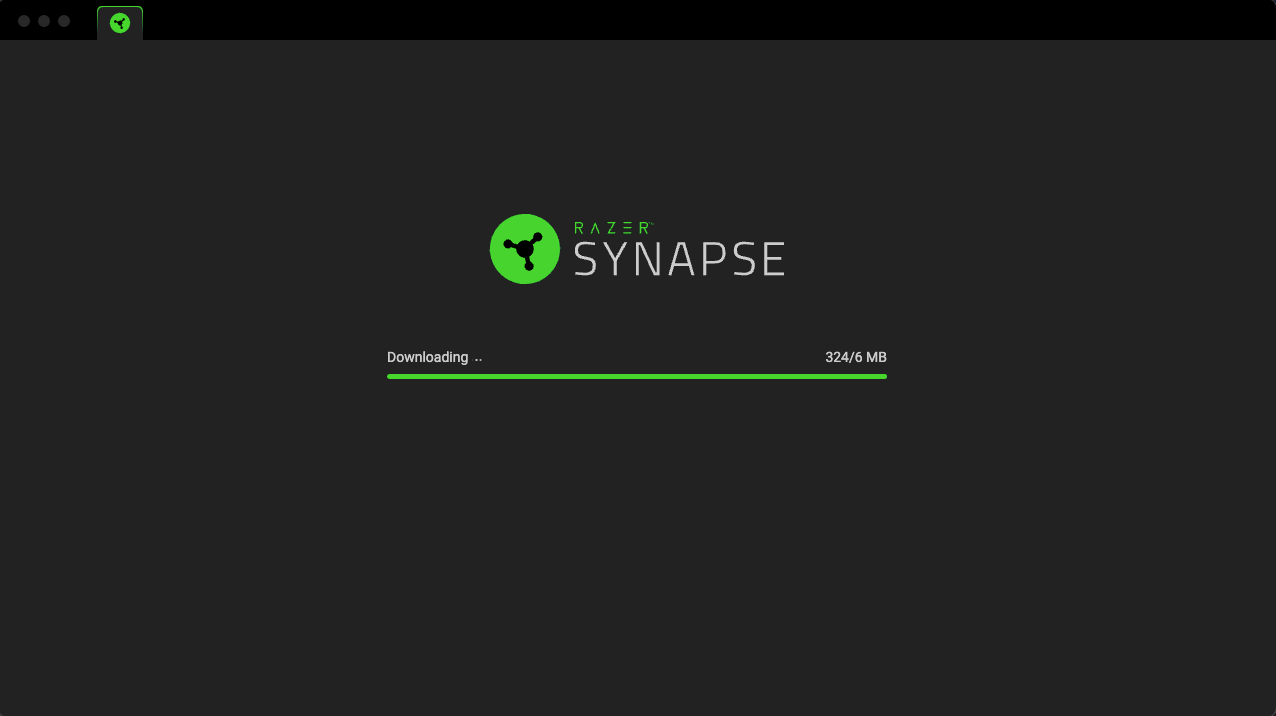
for me installation of synapse works fine. Afterwards I start it and I am able to login. Then it tries to download an update but it exceeds the mentioned update size and just continues and continues. I had this issue before and windows also. But after some time it worked. On mac it doesnt seem to solve itself. I am on a m4 pro with sequia 15.5. Any suggestion is highly appreciated. Thanks!


  • Insider Mini
  • August 20, 2025

Tool doesn’t work as intended. I’m using the Naga Pro V2 with 6 side buttons panel. I can map each button, that's great but MacBook Air M4 doesn’t recognize those mapped buttons as in-built keyboard, thus e.g. if I mapped “button 1” as “1” and use “shift” and “1” it gives back “1” instead of “!”. Please do something about it!

Hey bro! U fix it? 


Hi, when the app starts and I login it asks me to enable notifications in order to move to the next step, which is connecting my device, but even if I enable the notifications and even if I restart the app it still says enable notifications, so I can't usen the app to control my mouse (Deathadder 2021). My Mac is M2 MacBook Pro with macOS 26


base.Bricke
  • Insider Mini
  • October 3, 2025

Hello,
I’m reaching out to ask if there’s a master guide available for using the Kraken Pro V4 on a macOS system. I’m experiencing a few issues and would appreciate your assistance:
1. I’m having trouble setting up notifications on macOS—there seems to be limited support or unclear requirements.
2. I don’t see any settings available for controlling the headphones or Chroma RGB lighting.
3. Firmware updates appear to only be available as .exe files, which I can't run on macOS. Is there an alternative method for updating the firmware on a Mac?
4. I also use a Logitech Z553 speaker set near my workstation. With my previous SteelSeries headphones, I could plug the AUX cable into the hub and seamlessly switch between speakers and headphones. However, with the Kraken Pro V4, there’s no audio output from the speakers once the jack is connected. Is it possible to configure the Kraken Pro V4 to behave the same way—automatically switching between headphones and external speakers based on what's plugged in?

Thank you in advance for your help!


  • Insider Mini
  • October 7, 2025

Mac OS 26.0.1, Synapse Mac Preview 4.0.86.2509220756, Firefly V2
Installation of Synapse succeeds, and each of the permissions is granted up to Notifications. When I enable Notifications for Razer as requested, the Synapse app does not detect that they are enabled. All other permissions are recognized by Synapse. I have rebooted, restarted the app multiple times, with no success. I see others posting the same issue.

Thanks in advance for the help.


Razer Synapse for Mac Preview modifiers issue with Razer Basilisk V3 PRO

Razer Basilisk V3 PRO is listed as supported by the Mac Preview software.

Most functionality works correctly for customizing mouse buttons.

However, remapping Mouse Button 5 to a Modifier key has no effect.

Specifically, I am trying to remap Mouse Button 5 → Shift, which shows as remapped in the Razer Synapse for Mac Preview but has no effect, i.e. keys typed while holding down the remapped Mouse Button 5 are not uppercased.

Also tried remapping Mouse Button 5 → Ctrl and that had no effect either.