











[MONTHLY SILVER] July 2026 30,000 Silver Drawing
-
Recently active
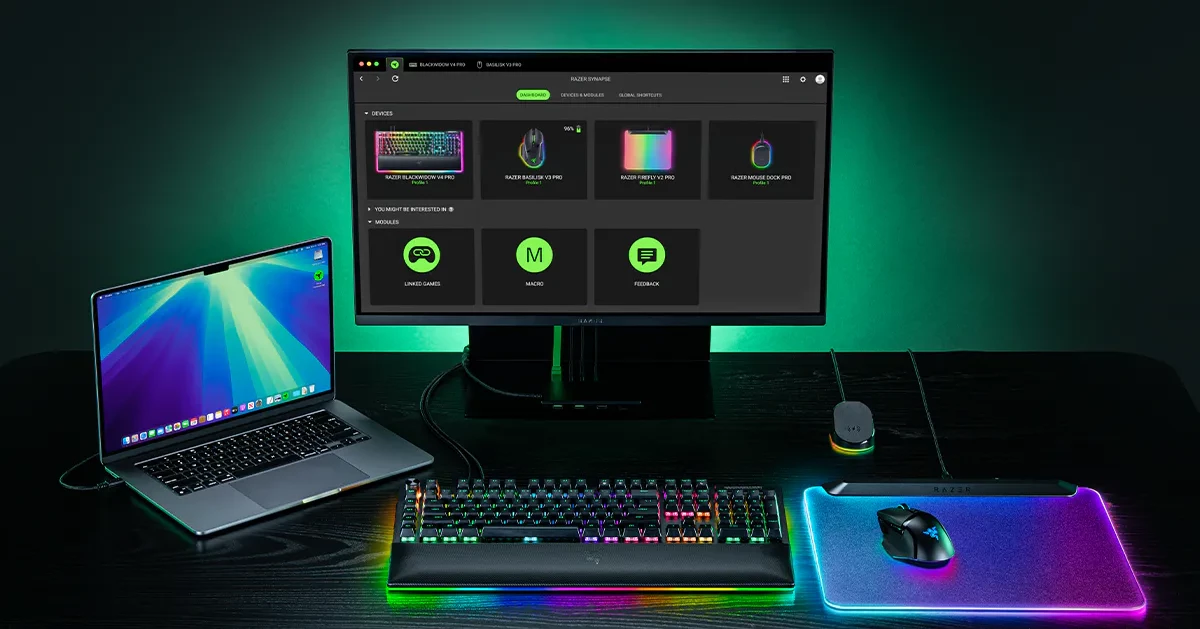
Welcome to the Razer Synapse for Mac Preview! THE RAZER SYNAPSE FOR MAC IS NOW AVAILABLE FOR PREVIEW. Hey Insiders, Welcome to the Razer Synapse for Mac Preview Program. We want your feedback to make the Razer Synapse for Mac App awesome. How to get the Razer Synapse for Mac Preview on your Mac: Download the latest Razer Synapse for Mac Preview app. The Razer Synapse for Mac installer will install the Razer Synapse for Mac App. What's new? The Synapse for Mac App provides functionalities and UI/UX experience similar to Synapse for Windows. Preview Feedback Let us know what you think of the new changes. Specifically: What do you like/dislike most about the Razer Synapse for Mac Preview App Stuff that is not working or any bugs (please list out separately) Stuff that could be done better (don't forget to suggest how) Stuff that looks odd or does not make sense to you Crashes (try to explain what happened up to the moment the app crashed) How to submit feedback: Razer Insider You
Hi Razer team,I'd like to request support for the Razer Basilisk V3 X HyperSpeed (model RZ01-04870100) in Synapse for Mac.My setup:- Device: Razer Basilisk V3 X HyperSpeed- Model: RZ01-04870100- Mac: MacBook Pro (Apple Silicon)- Synapse for Mac: latest version installed- Connection tested: both HyperSpeed wireless dongle and BluetoothCurrent situation:The mouse works as a basic pointing device, but Synapse for Mac does not detect it. This means I cannot configure:- Side buttons (Mouse 4, Mouse 5)- Middle click- Sensitivity Clutch (third side button)- DPI settings- RGB lighting- On-board profilesI see that Basilisk V3 Pro, V3 35K, and V3 Pro 35K are already supported. Could you please add the V3 X HyperSpeed (RZ01-0487) to the supported devices list as well? It's a current-generation product and many Mac users own it.Thanks for the work on bringing Synapse to macOS — looking forward to broader device support in future updates.
Please add support for the Razer Orochi v2 on Razer Synapse for Mac. I would love to be able to control my mouse on my Mac. It would really help me with playing GeForce Now and other games that I need to use the high dpi and other settings that are only available in Synapse like Hypershift.
SYSTEMMac mini (Mac16,11), Apple M4 Pro macOS 26.5.1 (build 25F80) Razer Synapse for MacAFFECTED DEVICES (all RGB devices in the setup)Razer Thunderbolt 5 Dock Chroma Razer Cobra Pro Razer Mouse Dock Pro Razer BlackWidow V4 Low-Profile TKL HyperSpeed (via HyperSpeed dongle)SUMMARYDynamic Chroma effects (Spectrum cycling, multi-device sync, audio-reactive, etc.) arerendered host-side by a single AppEngine (Electron) process and streamed to the devicesover USB / the HyperSpeed radio link. When macOS Game Mode activates (a game becomesfrontmost & fullscreen), the OS deprioritizes this background process and the effectrefresh rate collapses — lighting becomes visibly laggy/stuttering on all devices,worst on the wireless keyboard. It recovers instantly when the game loses focus. STEPS TO REPRODUCE1. Set any dynamic/animated Chroma effect on the devices.2. Launch a game that triggers macOS Game Mode (tested: Palworld, League of Legends, The Alters, Dota 2 and others); go fullscreen + fo
I’m recently bought a Huntmans V3 Pro Mini to connect to my mac mini along side a viper v3 pro for when I decide to do some cloud gaming. The Viper is identified and connected in Synapse (V4) but the huntsman does not seem to want to show as connected, even though I am typing with it right. I just am unable to use any of the additional functionality ie. set the arrow keys to the right side shift keys or change the color in Chroma.I’m not sure I can do. I’ve uninstalled and reinstalled Synapse. Disconnected my keyboard multiple times. Delete the devices from Synapse and let it get identified and reinstalled but it still wants to show as disconnected.
Synapse for Mac is relentlessly opening the system settings, prompting me to grant it permissions that it has absolutely no business asking for.I’m using a mouse with no RGB lighting, so Screen & System Audio Recording is unnecessary. Full Disk Access? Seriously? That’s a huge ask for an app that adjusts my mouse sensitivity. I don’t even need Bluetooth access, because this mouse has a dongle. It’s one thing to ask, but when the app is open, it constantly pops open the dialog asking for these things, and if you focus the window, it will open the related pages in the system settings. It’s extremely intrusive.
Getting Started Installation Guide Maximize your unfair advantage with the Razer Synapse for Mac Preview App, the unified cloud-based hardware configuration tool that takes your Razer devices to the next level. Refer to these steps on how to install the Razer Synapse for Mac Preview App.Check out this guide on how to uninstall the Razer Synapse for Mac Preview App. Full Technical Specifications Supported Operating System: macOS 13 and above, on Apple silicon based Mac Languages: English, German, Spanish, French, Japanese, Korean, Portuguese, Russian, Chinese Simplified, Chinese Traditional Supported Component: Device Configurator Supported Devices: The Razer Synapse for Mac Preview Supported Devices Frequently Asked Questions You can also find the FAQ on the official Razer support site.How do I create a Razer Synapse account? Go to Razer ID log in page. Click "REGISTER A NEW ACCOUNT" to register for a Razer ID. How do I update the Razer Synapse for Mac Preview? Launch the Razer Sy
Hey everyone,First off, big thanks to the Razer team for finally bringing Synapse to macOS.I recently bought several Razer products, but I just realized that not all of them are currently supported in the Synapse for macOS. Here’s what I’m using on my setup:MacBook Pro M3 (macOS 15.5)Kiyo Pro Webcam (RZ19-0364)Seiren V3 Chroma (RZ19-0506)Goliathus Chroma Extended Mousepad (RZ02-025003)BlackShark V2 X (RZ04-0324)Basilisk V3 Mouse (RZ01-04000)BlackWidow V4 Keyboard (RZ03-0469) I really hope these devices will be supported very soon as well. Thanks.
Hello everyone, first time razer customer here. I picked up a Tatarus V2 after seeing some people online talk about how great it works for video editing (my profession). I got really excited about it, but was sad to see that it isn’t supported in the synapse for max preview yet. My question is: is it planned to ever be supported on synapse for Mac? Will products as old as the Tartarus be included in this new software? Or should I just return the Tartarus to Best Buy Thanks
Hi,I have a Mac mini M4 with an internal storage of 256 GB. To reduce my storage cost, I use an external SSD (named ExtSSD in log file) and place my User Home Folder on this external SSD. I have 2 users on my Mac:- BootUser, an useless user on internal storage: /Users/bootuser- Vallevert, my user on my external SSD: /Volumes/ExtSSD/Users/Vallevert I installed Synapse with the official installer, no problem here.When I launch Synapse on BootUser, the software works normally.But, when I launch Synapse on Vallevert, the software returns me a pop-up:“Software not readyThis app is installed for another user.Install it on your account to use it.”Button 1: “Download and Install”Button 2: “Cancel” If I reinstall it, nothing changes, same problem.I found a way to use Synapse on my main user (Vallevert). I go to “/Users/vallevert/Library/Razer/RazerAppEngine” and launch “Razer.app”. This is not a perfect way to use Synapse, but at least it works in a degraded mode. I think the problem is that th
Thank you very much to the Razer team for developing drivers for macOS. I am a Pro Click Mini user, and I would like to know when support for the Pro Click Mini will be available?
When will you add support for the Razer Seiren V3 Chroma RGB USB Microphone?
Hello,I recently discovered an issue on my M2 Mac Studio where I was unable to open Hearthstone.Anytime I opened it, it would crash.After a lot of head scratching, digging into config files, and finally just wiping the SSD and installing a fresh version of Tahoe…I still had the problem!My post on the Hearthstone forums sat for days before there was any notice/traction and another person finally responded to say that Hearthstone worked after quitting the Synapse App.I tested this myself and sure enough, after quitting Synapse, Hearthstone ran without issue.Has anyone else run into this issue?If so, are there any solutions for it or are we just stuck with, “Close Synapse in order to play Hearthstone” until a fix is released?
A few days ago I was prompted to update Synapse, including a reboot for a driver update, if I’m remembering it correctly. Later, when I went to play a particular game through Steam, it started immediately crashing on launch. After trying several things to fix it, I remembered the Razer update. After quitting out of the Synapse app, the game launched without issue.Going through my library, I found four games that crash immediately on launch when Synapse is running (with or without any devices connected) but work fine if it’s not. The games that are crashing are Epistory, Kind Words, Kind Words 2, and Squeakross, and the only thing I can find in common between them is that they’re all built with Unity, but other Unity games I tried work fine.[I’m on an M1 MacBook Air running macOS 26.2 and Synapse for Mac 4.0.86.2601140839 with a Basilisk V3 Pro.]On a positive note, hiding Synapse from the Dock finally works! Yay!
Bug Reporting Guidelines Our goal is to collect reports on issues affecting the Razer Synapse for Mac Preview. This will be an extremely valuable tool for our team and will be the main source of information and issue tracking. Our staff and engineers will be monitoring this forum and will be working together to assess which bugs will need to be squished asap. If you don't see your bug being addressed, please bear in mind that there may be more critical issues that need to be dealt with. There may be times where we'll request more information regarding your issue, please be as accommodating as possible. It is crucial to stay on topic. Focus your threads around bug reports, workarounds and bug triggering. Opinions and criticisms should be directed to the General Discussion forum. Technical issues regarding installation, launching and staying connected to should be posted in the Technical Issues forum. Please don't double post your bugs. If you find multiple bugs, create a separate thr
The title really says it all - i'm so happy that Synapse Preview finally launched for Mac, but my Naga V2 Hyperspeed isn't supported. Given that the Naga V2 Pro is supported, but not the Naga V2 Hyperspeed, I’m really hoping the team would be open to adding support for it. Is posting here the best way to pass this request on to the team?? Specifically for me, it's one of the best options for video editing software like davinci resolve. Would be great for the large Mac creative community to be able to utilize it for these use-cases, as the pickings are relatively slim, and the work arounds are tedious.Thanks in advance!!
I am curious, are there plans or any existing workarounds to support the Deathstalker V2 Pro keyboard on macOS (latest version, e.g. macOS Sequoia v15.1.1 at time of this writing)? Looking forward to your replies!
I just bought the Razer Blackshark V3 Pro and wanted update the firmware. When I connect my headset to the Mac it doesn’t even recognize the headset in the Synapse software. What is the work around?
I am a long time Tartarus user, I used it extensively to speed up y work as a movie sound editor. I had to stop using the Tartarus when Razer cancelled Synapse compatibility with Mac Os. Please Razer! Add the Tartarus to you compatible devices list. Many professionnels like me are waiting for you! I will make a video on how to integrate Tartarus with Pro Tools and other Daws and you will sell many!
Hello,I’d like to share a few issues I’ve encountered while using Razer Synapse on macOS. My intention in writing this post is twofold:1. To help these issues be recognized and hopefully improved.2. To learn whether there are already known solutions or workarounds, and to share that information if available.Before getting into the details, here is my current setup:- Razer BlackWidow V4 Pro 75%- Razer Cobra ProNow to the main points. I’ve personally experienced two major inconveniences.The first issue is related to modifier keys such as Control, Command, and Option. These keys appear to be registered as if they are pressed multiple times, even when pressed only once. For example, when trying to register hotkeys in third-party applications, having Synapse installed causes Command or Option to be detected as if they were pressed twice or more.At first, I suspected this might be a conflict with specific applications. However, I noticed the same behavior with the system shortcut Control +
As shown above, Synapse remains in the dock even after I close the window. I have to use ⌘ + Q to quit it to prevent it from constantly appearing in the dock.I recently switched from Logi Options+, so I believe it should be possible to hide the icon while running in the background.Additionally, the icon does not align with the new design introduced in macOS 26.I hope the developers can work out a fix for this. My Envirnoment:Macbook Pro 14” (M1 Pro)macOS 26.0.1 (25A362)
I recently purchased a Deathstalker V2, and I was disappointed to see that Synapse for Mac does not include support for Deathstalker V2. Hoping this will be added soon.
Hey, Razer PLEASE add support for the DeathAdder essential mouse on Synapse for Mac Preview. Thanks!Love you!
In the Synapse Customize tab for the Naga V2 Pro, there are 4 pictures, 3 represent the 3 different side button panels you can have installed. The one currently installed has a green check mark, however if you change the panel out on the mouse the check mark does not move to the newly installed side panel, it stays on the one that was installed when Synapse started. You have to restart Synapse for it to recognize what side panel is installed. Razer Naga V2 Pro, Firmware Version 1.3.0.0 (latest) on the Mac Synapse 4 Preview Version 4.0.86.2504290730, on MacOs 15.5.
…. didn‘t support the Razer Naga Left Hand Edition? There are so many left-handed people! Many would surely love to use RNLH on their Macs. Please take this into account in the next update! Thank you in advance from a left-handed person who no longer wants to feel disadvantaged.
Already have an account? Login
No account yet? Create an account
Enter your E-mail address. We'll send you an e-mail with instructions to reset your password.