How I'm getting my new Razer Naga V3 Pro to work on my Mac. | Razer Insider
Skip to main content

How I'm getting my new Razer Naga V3 Pro to work on my Mac.


Show first post

37 Replies

I’ve downloaded karabiner elements, but it only seems to recognize left/right/middle/side1/side2 buttons.  The ring finger button isn’t recognized at all, which is the key I most want to modify.  I even tried to identify it in the event viewer, but pressing the button shows that the viewer doesn’t even recognize it as a button press.  So, I’m back to waiting for Razer to update their software, I guess.  I’m not really thrilled about downloading and using Parallels and don’t have access to any other Windows machines.

If anyone knows how to get other mouse buttons (ring finger or the two buttons on the left mouse button) to be recognized by karabiner elements, I’d love to know how!


I’ve downloaded karabiner elements, but it only seems to recognize left/right/middle/side1/side2 buttons.  The ring finger button isn’t recognized at all, which is the key I most want to modify.  I even tried to identify it in the event viewer, but pressing the button shows that the viewer doesn’t even recognize it as a button press.  So, I’m back to waiting for Razer to update their software, I guess.  I’m not really thrilled about downloading and using Parallels and don’t have access to any other Windows machines.

If anyone knows how to get other mouse buttons (ring finger or the two buttons on the left mouse button) to be recognized by karabiner elements, I’d love to know how!

No

Only the Side Buttons works with Karabiner. 


SCRUMDaddy
  • Insider Mini
  • October 12, 2026

Posting here to keep the thread alive and hoping Razer will push an update for us.
 

I am on the same boat. Bought the Naga v3 Pro for WOW Forever. I thought it would be compatible with Mac.


Krenz
  • Author
  • Insider Mini
  • October 12, 2026

Posting here to keep the thread alive…

I genuinely doubt that Razer is monitoring this particular thread. If they were monitoring this thread, they would have replied by now…

I think that you guys would get more attention by posting your own threads, or contacting Razer technical support directly.


OpenNaga can remap Buttons

It works fine.


  • Insider Mini
  • October 13, 2026

That’s amazing.  I wish DParent10 did something like this for the Tartarus as well


OpenNaga can remap Buttons

It works fine.

But it doesn’t work with the V3.  The software is expecting a V2 mouse, so I just get “No mouse detected” or that the mouse is “disconnected”.  If I make a change and try to save it to the mouse, it again says no mouse.  Searching the GitHub repository or searching online tells me the only way to make it work is to plug it into a windows machine, make the changes, and then save them to the mouse.  But if I had access to a windows machine, I wouldn’t need this OpenNaga software.

It seems no one supports the V3 on Mac, so the only choices are to wait until someone does or to find a windows machine to make changes to and save them to the mouse.


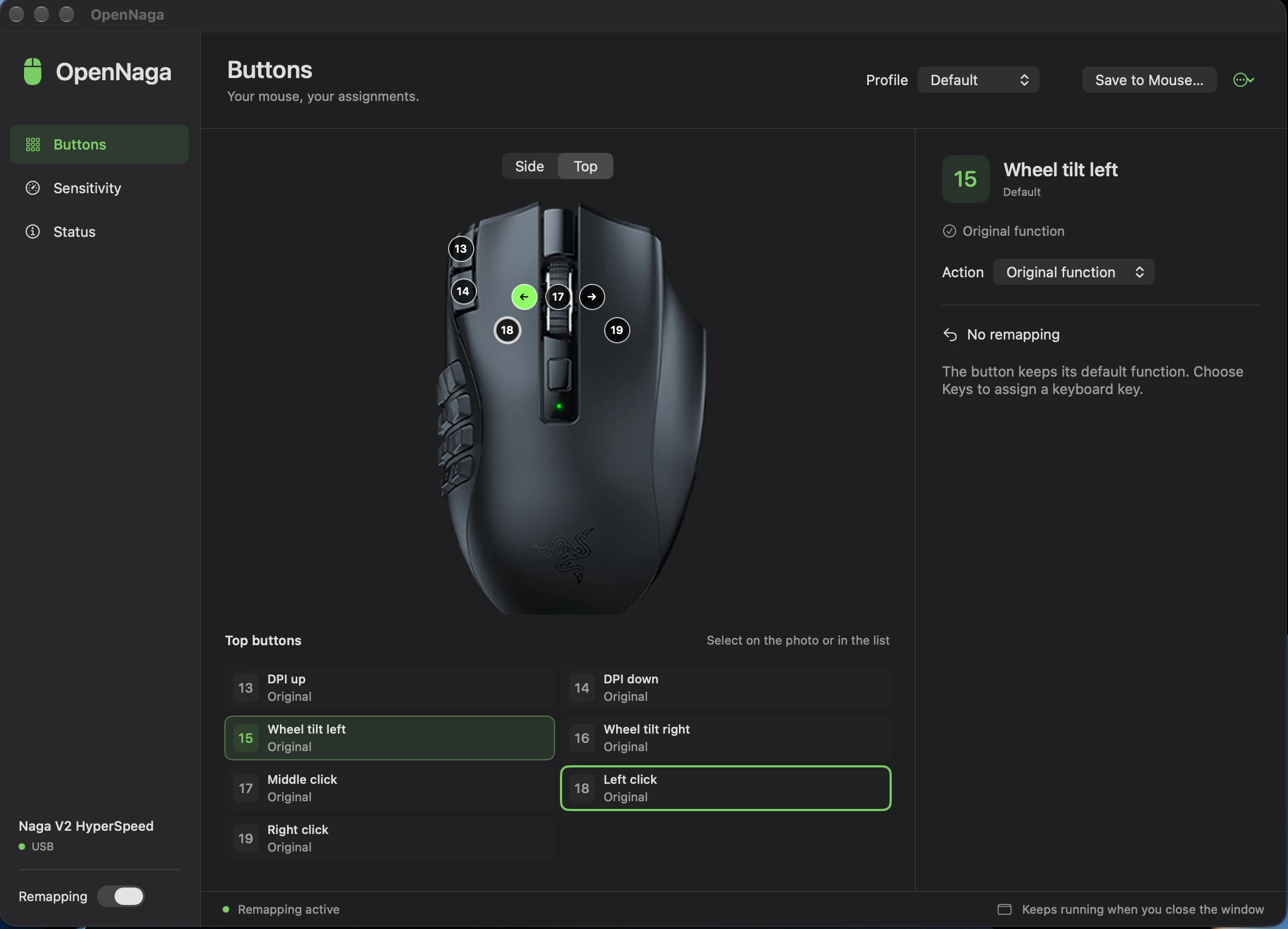
No, my V3 is recognized by OpenNaga, as you can see in the picture.

However, I tried Parallels Desktop again in the meantime. By using direct USB passthrough, I managed to save a profile to the mouse through the virtual machine. Unfortunately, that doesn't help me much either.

All I really want is for the software to detect when I launch a program and automatically load the corresponding button layout. Unfortunately, neither OpenNaga nor Parallels can do that.

So I guess all I can do is wait until Razer officially supports the mouse on Mac. In the meantime, though, both OpenNaga and Parallels work very well as temporary solutions.

Of course, you can configure up to four profiles and switch between them simply by pressing the button on the underside of the mouse. For example, I've now set up one profile for World of Warcraft, one for the desktop, and one for GeForce NOW.


No, my V3 is recognized by OpenNaga, as you can see in the picture.

However, I tried Parallels Desktop again in the meantime. By using direct USB passthrough, I managed to save a profile to the mouse through the virtual machine. Unfortunately, that doesn't help me much either.

All I really want is for the software to detect when I launch a program and automatically load the corresponding button layout. Unfortunately, neither OpenNaga nor Parallels can do that.

So I guess all I can do is wait until Razer officially supports the mouse on Mac. In the meantime, though, both OpenNaga and Parallels work very well as temporary solutions.

Of course, you can configure up to four profiles and switch between them simply by pressing the button on the underside of the mouse. For example, I've now set up one profile for World of Warcraft, one for the desktop, and one for GeForce NOW.

Your screenshot shows your mouse is connected, but it says it’s a V2.  I’m trying to remap the ring finger button, and again, in your screenshot, that button doesn’t have a mapping.  So even if you did manage to get a V3 mouse connected, it’s still recognizing it as a V2 because you can’t remap the ring finger button.  I’m not doubting that your V3 connects, but after installing it on my MacBook, it doesn’t recognize mine.  I don’t know how to make it see the mouse.  I, too, decided to download the trial of Parallels just to get a profile saved to the mouse.  Even if I only use it once, it might be good enough to get what I want.


I have a Naga V2 Hyperspeed which is also not supported in the native razer app and I use SteerMouse to program the buttons, it works flawlessly with the dongle, it's more limited with BT.

Not sure if the Naga V3 is fully supported, but the app has a trial, so maybe it's worth to give it a shot.


I’ve tried everything and simply can’t get it to work.  I tried karabiner and OpenNaga, neither worked.  I tried downloading parallels and configuring in the windows client and saving to mouse.  I couldn’t get that to work at all.  Since it took me so long to try to get this to work, the mouse was no longer covered by Razer’s 14-day return window, so I’m stuck with a 2 button mouse that has dozens of features that will never work.  

In the end I gave up on Razer, since they clearly gave up on me, and bought a Logitech mouse.  Works right out of the box with my Mac and I configured all the buttons exactly how I want them.  No fuss.  Works perfectly.


  • Insider Mini
  • October 21, 2026

same issue here after purchasing a Naga V2 Hyperspeed...i was able to get the bindings and sensitivity profiles i wanted by plugging the naga into my windows pc and setting everything up there then plugging back into the mac it keeps all the settings on the mouse.