


Is the Razer Basilisk V3 Pro 35K Phantom Green Edition still not supported? | Razer Insider
Skip to main content
Question

Is the Razer Basilisk V3 Pro 35K Phantom Green Edition still not supported?

  • June 20, 2025
  • 23 replies
  • 629 views

iLaoTech

Hi, is the Razer Basilisk V3 Pro 35K Phantom Green Edition still not supported?


https://mysupport.razer.com/app/answers/detail/a_id/14809

The Razer Synapse for Mac compatibility list shows support for Razer Basilisk V3 Pro 35K | RZ01-0524, but my Phantom Green version (Model No: RZ01-0524) is not recognized when plugged in.

All system permissions are granted, and the mouse works for basic input, but I can’t configure any settings.

23 Replies

iLaoTech
  • Author
  • August 25, 2025

any update?


  • Insider Mini
  • September 5, 2025

Can we have an update on this request?  I have just purchased a Razer Basilisk V3 Pro 35K Phantom Green Edition from Razer under the understanding it worked on Synapse for Mac based on the supported devices list and am not impressed to discover that it doesn’t show up in Synapse - how on earth can a different colour way mean that the device does not work with the software??? 


brownmy
  • Insider Mini
  • September 8, 2025

Same issues here. Had to use bettertouchtools to remap the button. 


iLaoTech
  • Author
  • September 13, 2025

Hi ​@dekades , could you please take a look at this issue~ Thanks!


  • Insider Mini
  • September 13, 2025

after months… still not include just this color in listed support models ?????


  • Insider Mini
  • September 25, 2025

I’ve opened a case. The support confirmed Synapse doesn’t support “Razer Basilisk V3 Pro 35K Phantom Green Edition”:

Currently, Razer Synapse for Mac does not support the Razer Basilisk V3 Pro 35K Phantom Green Edition, as the software is still in its Preview version. Rest assured, we’ll be sharing this feedback with our developer team for consideration in future updates.


I’ve asked about the ETA and got the following response:

In this case, we don't have the ETA as to when that feature will be available. In the meantime, you can check the Razer website from time to time to see if your device is compatible with Synapse for macOS.

Please note that once this case is closed, you can continue to check the Razer website for future updates on device compatibility.


Ridiculous situation, but we have what we have.


  • Insider Mini
  • September 25, 2025

Well if it makes you all feel a bit better I sent my Phantom edition  back to Razer as I was still in the return window and ordered the standard black version (which frustratingly works great with the software on the Mac ) but DHL (which Razer provided the return label for)  have lost the package and Razer are not even responding to my emails so currently I own a very expensive mouse ……..


iLaoTech
  • Author
  • September 25, 2025

I also opened a support ticket before, and the first response from customer service was — believe it or not — a driver cleaning tool for Windows (and it’s a CleanupRazerDrivers.exe for Synapse 3 ), even though I clearly mentioned I was using macOS. That’s when I basically gave up on getting a meaningful fix through support.


Eventually, they did get a technician to test the issue, and confirmed that the Phantom Green version is indeed not supported. They said it would be reported to the dev team.


If the dev team isn’t able to fix it anytime soon, then at the very least, the support document should clearly state that the Phantom Green variant is excluded.


All in all, this whole situation is just ridiculous.


  • Insider Mini
  • October 2, 2025

Received new updates Today:

Great news! We’ve just received an update that your device is now officially supported by Razer Synapse for macOS. You can now download the latest version and start customizing your device to suit your preferences.


Can’t try for next few days. Could anyone confirm?


  • Insider Mini
  • October 2, 2025

I am assuming that requires a software update for the supported devices to be updated - unless there is some form of server side push which would be a weird way to set it up 


Has anyone managed to find a way to get Synapse 4 to update? or do you have to wait for it to check for itself?


Anyone can confirm if the Phantom version is supported now?


iLaoTech
  • Author
  • October 26, 2025

Anyone can confirm if the Phantom version is supported now?

still not supported.


Anyone can confirm if the Phantom version is supported now?

still not supported.

Thank you for confirming. I would love to get the new Phantom White version, now I will stick to my V3 Pro.


  • Insider Mini
  • October 26, 2025

I purchased the "Phantom Green" mouse on the e-commerce platform. I initially thought that the computer couldn't recognize it because the mouse was broken, so I returned it and bought another one. However, the second mouse still couldn't be recognized. After some investigation, I found this page. It turns out that "Phantom Green" is just a semi-finished product for Razer...


2025/10/31, still not supported. (Mine is V3 Pro 35K Phantom white)


  • Insider Mini
  • November 2, 2025

2025/11/02, still not supported. (Mine is V3 Pro 35K Phantom white)


  • Insider Mini
  • November 3, 2025

2025/11/03, still not supported. (Mine is V3 Pro 35K Phantom white)


  • Insider Mini
  • November 3, 2025

2025/11/04, still not supported. (Mine is V3 Pro 35K Phantom white)


iLaoTech
  • Author
  • November 4, 2025

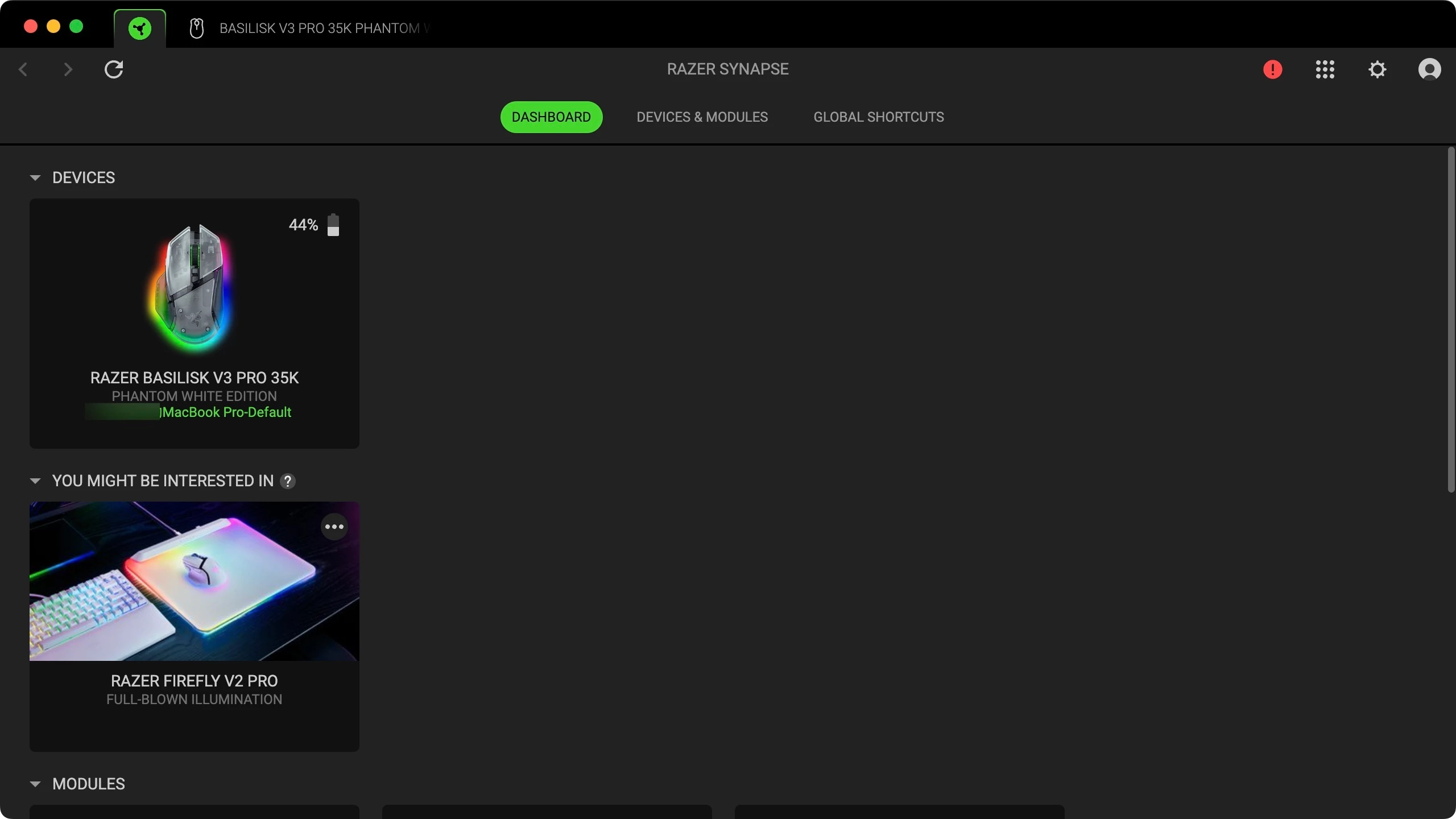
folks, after updating Synapse for Mac to version 4.0.86.251027, the Phantom Green version of the Basilisk V3 Pro is now fully recognized and configurable!

It took almost 4 months, but hey — it’s finally fixed.


Go grab the latest version from the official download page and give it a try!

https://www.razer.com/synapse-4-mac

@garethb ​@brownmy ​@SmokyBlack ​@max2k1 ​@classicVoltsource960 


  • Insider Mini
  • November 4, 2025

Goodjob!😎


That’s great! ​@iLaoTech  Thanks for updating this post!

@lujing227  Could you confirm if your Phantom White is supported too with the new version?


That’s great! ​@iLaoTech  Thanks for updating this post!

@lujing227  Could you confirm if your Phantom White is supported too with the new version?

It works! (Macbook pro M3 26.0.1)


That’s great! ​@iLaoTech  Thanks for updating this post!

@lujing227  Could you confirm if your Phantom White is supported too with the new version?

It works! (Macbook pro M3 26.0.1)

Hooray, thanks!!