
8 JULY 2026 - Synapse & Chroma for Windows | Razer Insider
Skip to main content
StickyPATCH NOTES

8 JULY 2026 - Synapse & Chroma for Windows

  • May 25, 2026
  • 52 replies
  • 6774 views

Show first post

52 Replies

Lrbrownii
  • Insider
  • June 3, 2026

I really wish I’ve had read feedback before “upgrading” to Synapse 4. It might work slightly faster and is a little less demanding for the PC but that means nothing because of the macros not working properly. EVERYTHING is worse about that part of Synapse. Macros literally slow down with each cycle they play out. A macro that takes a minute to complete will take 2,5 minutes to work after cycling like 4 times. Not to mention that the macro redacting experience is worse in every way. The mouse movement tracker (the absolute option) preview is completely off- whatever it shows in no way represents what I actually tried to record. Both X and Y axis are off to right and down. That does not affect how the macro actually plays out but the system overall is still unusable due to it slowing down significantly. I’ve tried to read up on this problem, found multiple posts on different sites including this very one. Some of those posts are months, almost a year old. I haven’t seen a single answer from Razer support. How is this even a problem? And how has this bug hasn’t been fixed?

I have been curious if things moving from saved position in Chroma has anything to do with Synapse 4 Chroma being off like this too.


Lrbrownii
  • Insider
  • June 3, 2026


  • Insider Mini
  • June 5, 2026

PLEASE HELP.


2 weeks ago, my Razer Huntsman V3 Pro keyboard volume wheel worked as expected. It raised and lowered the volume. Ever since then, it has scrolled up & down on the page I am focused on.


The only time it works is when I end the Razer Synapse task. The issue with that is I can’t use any keyboard profiles.


Paying $300 for a keyboard is far too much when basic functionality like the volume wheel does not work. I do not purchase a keyboard that has a volume wheel to then have to use my mouse and click multiple times to turn volume down manually.


Please reply to me, or push a hotfix, or provide me steps to fix this. Otherwise, I will have to return the keyboard as I am within the 90 day period.


  • Insider Mini
  • June 5, 2026

How do I download this version? Standard installer is installing old version 4.0.683 which keeps crashing and doesnt work at all


AKMHRL
  • Insider Mini
  • June 5, 2026

Razer never lets us down when it comes to worse and worse quality, rather its the physical product itself, or more and more useless software no one asked for. I feel ashamed myself that I still trying to see the good in razer, cause I grew up with it, but at this point I literally cant take it anymore. Always had problems with any bluetooth headsets, rather they just randomly fall apart because of bad quality or just always “great” software updates, which are supposed to make everything better, but somehow make everything worse, I dont even know how thats possible, but razer really keeps on suprising me, ngl.

Just the fact, that multiple people, face the same problems and yet still razer did not respond with any answer, let alone any fix, that is unacceptable. I always had microphone problems with ALL Razer bluetooth headsets and im actually stupid enought to buy the expensive ones, which anyone would assume, are state of the art and keep on improving, but ive been proven wrong so many times and this is literally just the final straw. Maybe it would be somewhat “ok” if the product alone would not need any software or tweaking and work out of the box, but dont use razer software or any enhancements and try to get anything to work, no chance. I could literally use some secondhand wired earbuds and have better mic and audio quality. Just the fact im writing this “review” or comment at all, never done that and propably never will again, and I also really dont think my comment, or just any comments in this thread or other ones are actually being taken serious or even read, which just makes this more absurd but anyways, enought of that, sorry if my english is not the best but im not even taking more steps to correct the grammar or whatsoever, im doing it the razer way and just put out the worst of the worst and dont bother looking back.

Also just a quick sidenote, the last update somehow also completly corrupted or keeps distracting my logitec wireless mouse, there is no software issue on logitecs site and nothing within my setup changed at all, except razers software, I cant even imagine how you manage to do such things but I dont even bother looking for a solution, just literally getting all new physical hardware and most definitly not from razer, thanks for reading, maybe.


Garrettec
  • Insider Mini
  • June 8, 2026

Razer never lets us down when it comes to worse and worse quality, rather its the physical product itself, or more and more useless software no one asked for. I feel ashamed myself that I still trying to see the good in razer, cause I grew up with it, but at this point I literally cant take it anymore. Always had problems with any bluetooth headsets, rather they just randomly fall apart because of bad quality or just always “great” software updates, which are supposed to make everything better, but somehow make everything worse, I dont even know how thats possible, but razer really keeps on suprising me, ngl.

Just the fact, that multiple people, face the same problems and yet still razer did not respond with any answer, let alone any fix, that is unacceptable. I always had microphone problems with ALL Razer bluetooth headsets and im actually stupid enought to buy the expensive ones, which anyone would assume, are state of the art and keep on improving, but ive been proven wrong so many times and this is literally just the final straw. Maybe it would be somewhat “ok” if the product alone would not need any software or tweaking and work out of the box, but dont use razer software or any enhancements and try to get anything to work, no chance. I could literally use some secondhand wired earbuds and have better mic and audio quality. Just the fact im writing this “review” or comment at all, never done that and propably never will again, and I also really dont think my comment, or just any comments in this thread or other ones are actually being taken serious or even read, which just makes this more absurd but anyways, enought of that, sorry if my english is not the best but im not even taking more steps to correct the grammar or whatsoever, im doing it the razer way and just put out the worst of the worst and dont bother looking back.

Also just a quick sidenote, the last update somehow also completly corrupted or keeps distracting my logitec wireless mouse, there is no software issue on logitecs site and nothing within my setup changed at all, except razers software, I cant even imagine how you manage to do such things but I dont even bother looking for a solution, just literally getting all new physical hardware and most definitly not from razer, thanks for reading, maybe.

Dude, I feel the very same thing. And will do the very same thing as well.  Next hardware update will not include any Razer pieces.


  • Insider Mini
  • June 9, 2026

Another user with Audio Mixer issues. When moving any volume slider all four channels mute and the XLR mic is turrned down to zero.

The fix for this is toggling every single slider and mute button to something else and back again to stop them all being somehow linked and bound to mute every single channel.

This must also be done every time your desktop/laptop is rebooted as the issue returns. A significantly frustrating experience.


I would like to report a long-term audio processing issue I have been experiencing with my Razer Blade 18 (2025).

First, this does not appear to be a timing, latency, or synchronization issue. Audio playback timing is correct.

The problem appears to be related to audio processing consistency at normal listening levels.

Since I purchased the device, I have noticed that in many contents, especially below around 30% volume, human voices can have missing syllables, missing letters, or parts of words that sound reduced or partially cut off.

Some examples:

  • A word may lose a letter or syllable.
  • Some voices are affected while others sound completely normal.
  • Similar behavior can sometimes be noticed with instruments or other sounds, but not consistently.

At higher volume levels (around 50% and above), the issue is much less noticeable or appears normal. However, these are not typical daily listening levels. The problem mainly exists at normal volume levels, and becomes worse as the volume is reduced.

This makes me suspect that the DSP processing chain may be incorrectly handling certain frequency ranges or audio characteristics at lower output levels. It feels like certain audio information is being reduced when it should not be.

I tested different configurations:

  • Original OEM Windows installation with Razer Synapse + THX + official drivers
  • Clean Windows installation without Synapse
  • Different Realtek SST driver configurations

The most interesting finding:
With a basic Realtek SST driver configuration, the audio becomes much more consistent. The missing syllable/letter issue is greatly reduced or disappears. However, the sound loses the quality, power and tuning because the Smart Amp / DSP processing is not active.

This suggests that the issue is not simply Realtek or THX alone. The Smart Amp / DSP processing layer appears to be involved.

The hardware itself is capable of producing excellent sound. When the processing works correctly, the speakers sound very impressive. The problem is consistency.

Another concern is that audio control is currently heavily dependent on Synapse. Many users report that they do not want to rely on Synapse because of stability issues.

I have also experienced possible Synapse-related problems:

  • occasional loss of communication with devices
  • Basilisk mouse button behavior becoming incorrect after long idle periods, recovering after closing Synapse
  • RGB/device control sometimes behaving unexpectedly
  • fan behavior becoming unnecessarily aggressive in some situations
  • possible impact on sleep/wake behavior in dGPU mode (currently testing a clean Windows installation without Synapse)

I believe separating the audio control layer from Synapse would improve reliability. A standalone THX/audio control application or more complete Windows/Realtek audio controls would give users an alternative.

The Blade 18 hardware is excellent, but the software processing layer currently prevents the device from reaching its full potential.

I hope the audio and Synapse teams can investigate the Smart Amp/DSP processing path.


VeryCrushed
  • Insider Mini
  • June 13, 2026

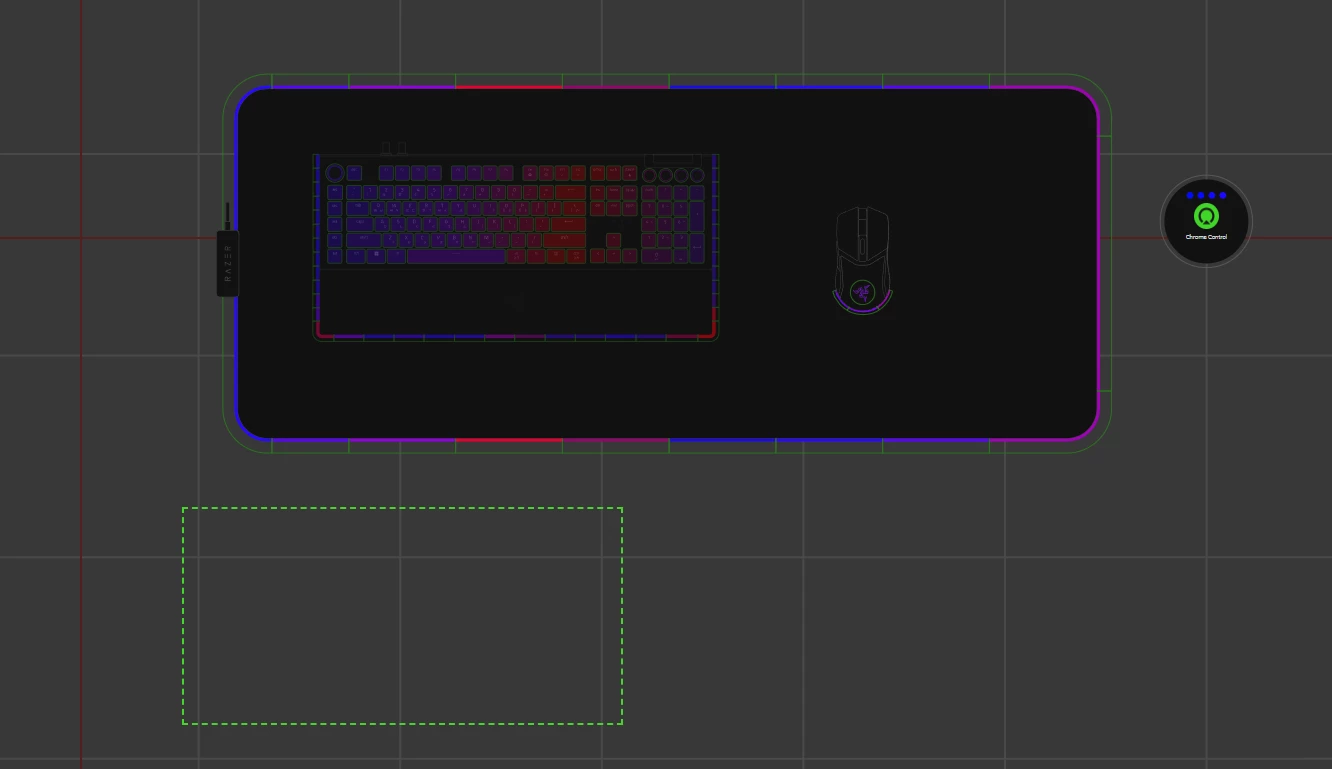
Idk what update it happened in, but I am unable to place my Blackwidow v4 Pro onto my Strider Chroma in Chroma Studio:


Zeroality
  • Insider Mini
  • June 13, 2026

The Razer Synapse 4 app just bugs out when attempting to configure the Razer Pro Type Ergo Keyboard’s programmable knob (right knob). You click any of the settings and immediately the software’s interface wipes all elements on the screen but the background color which is gray. See attached. I am in a Windows 11 environment, have tried uninstalling, running the razer driver cleanup tool, reinstalling 4 times with the same issue. Also yes, the Ergo keyboard is running the latest up to date firmware.


  • Insider Mini
  • June 15, 2026

any permanent fixes for the Razer Freyja?


DGtheDemiGod
  • Insider Mini
  • June 15, 2026

Synapse for Windows - V4.0.86.2605261036 / Chroma for Windows - V4.0.63.2605250927

RELEASE NOTES

9 JUNE 2026

Fixed

  • Razer Pro Type Ergo - Charging and power up issues
  • Crashing and instability issues
    • Razer Barracuda
    • Razer Barracuda Pro
    • Razer Kraken Kitty V2 Pro
    • Razer Kraken V3
    • Razer Kraken V3 HyperSense
    • Razer Kraken V4 Pro
    • Razer Nari Essential
    • Razer Nari
    • Razer Nari Ultimate
  • Muting causes microphone volume to be set to 0
    • Razer Barracuda
    • Razer Barracuda Pro
    • Razer BlackShark V2 HyperSpeed
    • Razer BlackShark V2 Pro
    • Razer Kraken Kitty Edition
    • Razer Kraken Kitty V2 Pro
    • Razer Kraken Ultimate
    • Razer Kraken V3
    • Razer Kraken V3 HyperSense
    • Razer Kraken V3 Pro
    • Razer Kraken V4
    • Razer Kraken V4 Pro
    • Razer Nari Essential
    • Razer Nari
    • Razer Nari Ultimate
    • Razer USB Audio Controller
    • Razer USB Sound Card


​​​​


I am losing it.

After 9 June update my Basilisk V3 Pro mouse and Ornata Chroma keyboard both lost it. Mouse silently clicks or click-and-drags, more interestingly the keyboard just opens up Windows search pop up (Win+S) or the date/notifications pop up (Win+N). These happen randomly and none of these actions are assigned to any key or macro. 

These devices are not even listed under this update for crying out loud!! How could you just break these very fundamental things??

I am looking a way for a rollback, but thanks to the same genious software devs they didn’t think of a “failsafe”. 

Unbelievable...


  • Insider Mini
  • June 16, 2026

I’m using a Razer Barracuda X Chroma, and after the latest update I started experiencing an issue with the microphone mute function.

When I start the computer, the first time I mute the mic volume is set to 0%, which is expected. However, when I unmute it, the volume should automatically return to its previous level. Instead, it stays at 0% every time, forcing me to manually open Synapse and restore the microphone volume. After the first adjustment, it works as expected until any random moment that it does the same problem again.

I have already tried the following:

  • Reinstalling Razer Synapse.
  • Adjusting and troubleshooting the microphone settings in Windows.

Unfortunately, neither of these solutions worked.

The only workaround I found is to completely close Synapse. When Synapse is not running, the mute/unmute button works correctly and the microphone volume is restored automatically after unmuting, as it should.

When can we expect a solution for this problem???


neoDD69
  • Insider Mini
  • June 20, 2026

PLEASE HELP.


2 weeks ago, my Razer Huntsman V3 Pro keyboard volume wheel worked as expected. It raised and lowered the volume. Ever since then, it has scrolled up & down on the page I am focused on.

...

Paying $300 for a keyboard is far too much when basic functionality like the volume wheel does not work. I do not purchase a keyboard that has a volume wheel to then have to use my mouse and click multiple times to turn volume down manually.


jmac112,

welcome to Razer Hell!

I'm a ten-year-old customer and I love Razer HW, but the guys in charge of SW development… they're so narrow-minded, they can't see past their own desk. It's years that I've been writing to Razer Support to signal some issues… but NOTHING.

I confirm that YOUR problem with the VOLUME KNOB is also mine, and I suppose also a lot of people around the world… but the world is not the desk of the CTO and is completely unknown to them.

Another proof of their narrow-minded vision: if you use Razer's magnificent HW for software development too, they've decided that VSCode and Visual Studio are not games — so they are DELIBERATELY EXCLUDED from Synapse.

The absurd part is that they actually let you add them, assign them to profiles, but then it DELIBERATELY DOESN'T WORK.

They're cowardly incompetents: they don't have the guts to just say "no, you can't use this for work — you're with us, so you game and that's it".

Unbelievable and unacceptable.


Davide,
Italy, 30 years XP in ICT and DEV


  • Insider Mini
  • June 21, 2026

This update on Windows broke button functionality on my Razer Basilisk v3 Pro; the side clutch and two top buttons before the scroll wheel no longer work when Synapse is running. What’s funny is that this is exactly how the macOS preview has been for a year+. On macOS, I have to set functions and then quit Synapse for those buttons to work, and now this what happens on Windows as well. Instead of fixing their macOS software, they just brought over the bugs from it to be consistent I guess. Such terrible software.


sTEFANMSRB

Razer, what are you people doing? 
Ever since todays update you guys totally broke driver for my Nommo Chroma 2.0 speakers.

They keep shutting down and powering on every 30 minutes. Everything was working perfectly well until you guys released today this bloody update.

Do you do any testing before releasing App Synapse 4 updates? 

Is anyone with knowledge working there?


Ka0s_Mak3r
  • Insider Mini
  • June 23, 2026

I’m using the Tartarus Pro and my analog stopped working after this update, had to uninstall synapse, just to make it work but now my other key binds are in screwed up…Razor please hotfix this


Alanthier117
  • Insider Mini
  • June 23, 2026

But still no fix for being unable to manually add a game to linked games? Its been 5+ months now. Fix your software already.


  • Insider Mini
  • June 24, 2026

I’m using the Tartarus v2 and my analog stopped working after this update, had to uninstall synapse, just to make it work but now my other key binds such as key 11 will not remap off of capslock and key 16 will not work at all now. This happened to me on 6/23, on 6/22 everything was working just fine. Please fix this


I’m using the Tartarus v2 and my analog stopped working after this update, had to uninstall synapse, just to make it work but now my other key binds such as key 11 will not remap off of capslock and key 16 will not work at all now. This happened to me on 6/23, on 6/22 everything was working just fine. Please fix this

Seconding this with my own Tartarus v2. The directional input begins functioning again immediately as soon as Synapse 4 is exited and ceases just as quickly when S4 is opened again - this isn’t a hardware issue. Creating new keymaps doesn’t help, either. 

Also began for me on 23 June (AEST). 


easytrendFeldspar804

RAzer Tartus V2 joystick stopped working after this. so thats sucks pls fix 


easytrendFeldspar804

RAzer Tartus V2 joystick stopped working after this. so thats sucks pls fix 

I uninstalled synapse and my tartus started working again, so definitely an issue with the software through synapse. 


easytrendFeldspar804

Synapse for Windows - V4.0.86.2606231034 / Chroma for Windows - V4.0.63.2606230949

RELEASE NOTES

30 JUNE 2026

Improvements

  • Added support for Battery Saver Mode
    • Razer Blade 14 (2025)
    • Razer Blade 16 (2025)
    • Razer Blade 18 (2025)

Fixed

  • Razer Huntsman V3 Tenkeyless 8KHz - Custom shortcuts, key mappings, Snap Trigger issues
  • Razer Barracuda X Chroma - Muting causes microphone volume to be set to 0
  • Minor UI bugs and issues


PREVIOUS RELEASE NOTES

22 JUNE 2026

Fixed

  • Razer Chroma Studio - Random crashing
  • Razer Aether Standing Light Bars - Inaccurate Starlight duration
  • Razer Huntsman V3 Pro Mini - Unable to customize in Chroma Studio
  • Razer Kraken Kitty V3 Pro - Unable to save microphone settings
  • Razer Ornata V3 X - Unwanted spamming of keystrokes
  • Scroll click issues
    • Razer Basilisk V3 X HyperSpeed
    • Razer DeathAdder V3 HyperSpeed
    • Razer DeathAdder V3 Pro
    • Razer Viper V3 HyperSpeed
  • Unable to retain mapping or settings
    • Razer BlackWidow V4 Tenkeyless Hyperspeed
    • Razer Huntsman Signature
    • Razer Tartarus Pro

9 JUNE 2026

Fixed

  • Razer Pro Type Ergo - Charging and power up issues
  • Crashing and instability issues
    • Razer Barracuda
    • Razer Barracuda Pro
    • Razer Kraken Kitty V2 Pro
    • Razer Kraken V3
    • Razer Kraken V3 HyperSense
    • Razer Kraken V4 Pro
    • Razer Nari Essential
    • Razer Nari
    • Razer Nari Ultimate
  • Muting causes microphone volume to be set to 0
    • Razer Barracuda
    • Razer Barracuda Pro
    • Razer BlackShark V2 HyperSpeed
    • Razer BlackShark V2 Pro
    • Razer Kraken Kitty Edition
    • Razer Kraken Kitty V2 Pro
    • Razer Kraken Ultimate
    • Razer Kraken V3
    • Razer Kraken V3 HyperSense
    • Razer Kraken V3 Pro
    • Razer Kraken V4
    • Razer Kraken V4 Pro
    • Razer Nari Essential
    • Razer Nari
    • Razer Nari Ultimate
    • Razer USB Audio Controller
    • Razer USB Sound Card

4 JUNE 2026

Fixed

  • Razer Kraken Kitty V2 BT - Detection, lighting, UI issues
  • Other minor UI bugs

25 MAY 2026

Fixed

  • Stability & Reliability
    • App Launch & Crashes
      • Synapse could fail to launch after updating from an older version
      • App could display a blank screen with persistent loading icons at launch
      • Crash when switching between Audio Mixer tabs while playing music
      • Chroma App could get stuck in a "Downloading" state and fail to update
      • Keyboards became non-functional after closing Synapse via Task Manager
    • Installation & Uninstallation
      • Certain devices could fail to install, showing "detecting devices" indefinitely when multiple peripherals were connected
      • RGUpdateInstaller component was not removed automatically when uninstalling Synapse and Chroma App
      • Device installation page could disappear mid-install for certain wireless mice, preventing setup from completing
      • Synapse could fail to install on certain system configurations
  • Device Detection & Connectivity
    • Devices could appear duplicated in the Devices & Modules list during driver installation or after disconnecting
    • Certain wireless mice were not detected by Synapse when connected via dongle
    • Special-edition devices appeared as base models when installed while the device was powered off — the correct edition now displays once the device wakes up
    • Certain laptops showed as "HID Keyboard Device" in Device Manager after installing Synapse
    • Keyboards could become non-functional after initial driver installation until a system restart
    • Synapse incorrectly prompted for a system restart after installing drivers alongside another peripheral
  • Chroma RGB
    • Brightness Controls
      • Adjusting the brightness slider did not reflect on the physical device
      • Brightness slider changes did not persist after refreshing the page
      • Default brightness toggle incorrectly displayed as OFF for certain wireless mice (Bluetooth mode)
      • On laptops, the asterisk brightness indicator was missing when the Plugged In / On Battery link was toggled above 80%
      • Device lighting could randomly stop responding to adjustments
    • Lighting Effects
      • Switching between lighting effects caused noticeable lag on certain keyboards
      • Chroma Studio did not display certain wireless mice connected via Bluetooth
      • Lighting effects could stutter or flicker persistently when Synapse was opened
      • Audio Meter effect was missing from Quick Effects for certain peripherals
    • Windows Dynamic Lighting (WDL)
      • Certain mice were incorrectly identified as WDL-compatible devices
      • Device brightness remained adjustable while set to WDL mode (the panel should be fully greyed out)
      • WDL tooltip was truncated on the Chroma App dashboard
    • Chroma App
      • Lighting icon was displayed incorrectly for certain peripherals in Chroma App
      • Module tile titles in Chroma were not aligned with their Synapse counterparts
      • Chroma tutorial button displayed "Install" instead of "Start Tour" after clearing cache, even when already installed
  • Key Mapping & Customization
    • Button Remapping
      • Keyboard-function assignments on mouse buttons did not work for certain wireless mice
      • Remapped buttons on M1–M5 appeared on unintended buttons on certain keyboards
      • The \ key was incorrectly recorded as the number 3 during Macro recording
      • Assigned button functions did not work on certain mice connected via Bluetooth
    • Hypershift
      • Key output remained active after releasing the Razer Hypershift button
      • HyperShift-bound keys did not work for certain mice
      • On laptops, the F key was pre-assigned to "Toggle Fan Speed Mode" in Hypershift by default, even without an eGPU connected
    • Macros
      • On-The-Fly Macros (OTFM) could be incorrectly assigned to the Multi-Functional Button via double/triple tap
      • "Play while assigned key is pressed" option was missing for macro-assigned sensitivity cycle buttons on certain mice
      • Scroll left/right macro keybinds incorrectly displayed as scroll up/down
      • Macro keybind tooltip appeared misaligned for the Multi-Functional Button
    • Global Shortcuts
      • Global Shortcuts did not trigger on the first attempt after creation
      • Device profile dropdown in Global Shortcuts was sorted in descending order instead of ascending
    • Gaming Mode
      • Gaming Mode could be toggled via FN+F10 even when "Apply in-game only" was enabled
    • Snap Tap & Actuation
      • Snap Tap settings were not retained after closing and reopening Synapse
      • Snap Tap settings carried over to newly created profiles instead of reverting to defaults
    • AI Launcher
      • AI Launcher option was missing from the key assignment panel on certain keyboards and mice
      • "Launch Windows Copilot" was missing from the Windows Shortcuts key assignment list
  • Audio & Sound
    • THX Spatial Audio
      • THX Spatial Audio settings reverted to Stereo upon PC restart for certain headsets
      • Manually adding a game to the THX game list did not work on Windows 11
    • Equalizer (EQ)
      • "Synapse Required" label was missing when adjusting non-custom EQ presets
      • EQ name notification was missing when switching EQ modes via the headset's physical button
    • Sensa HD (Haptics)
      • Haptic feedback was lost after power-cycling the device while Synapse was running — previously required an app restart to recover
      • Sensa HD game icons displayed incorrectly when playing supported games
      • Updated Sensa Mixer UI was not applied
      • Audio-to-Haptic (A2H) profile incorrectly showed as "disabled" on the dashboard even when enabled
    • Microphone
      • Mic enhancement tooltip displayed incorrect information on certain headsets
  • Performance & Hardware Controls
    • DPI & Polling Rate
      • DPI changes did not apply on certain wireless mice connected via Bluetooth
      • Polling rate values became incorrect after waking from sleep — e.g., a 1000 Hz setting could revert to 8000 Hz
      • Higher polling rate options (2000/4000 Hz) could not be selected on certain keyboards after system wake
    • Volume & Media Controls
      • Press-and-hold on dedicated volume buttons did not continuously adjust volume when Synapse was running
      • Command Dial Track Selector and Skip/Backwards media keys did not work in Chrome when Synapse was active
    • Laptop Performance (Blade series)
      • GPU temperature/power color bar displayed red even at low loads (incorrect thresholds)
      • Laptops with a single fan incorrectly showed two fan RPM readings
      • Hyperboost mode UI displayed incorrectly on the Performance tab
      • Fan control UI was cut off and could not be fully scrolled
  • Profiles & Settings
    • Mouse cursor jumped to a different position when switching profiles via a mouse button
    • Game-linked profiles reverted to default after some time
    • Profiles exported from Synapse 3 could not be imported into Synapse 4 (showing a "corrupted file" error)
    • Cloud sync prompts incorrectly appeared in Guest mode
    • Auto-Launch checkbox setting did not save after refreshing
    • Chroma lighting settings (Advanced Effects) reverted to defaults after PC restart on certain headsets
    • Low battery notification appeared even when the device was powered off
  • UI/UX
    • Keyboard layout button highlights were misaligned for certain regional variants (e.g., JP, TUR layouts)
    • Device image was missing from the dashboard for certain keyboards
    • Firmware version was not displayed on the help page for certain wireless mice (Bluetooth mode)
    • Grey-out overlay overlapped with profile options when plugging in a USB headphone on laptops
    • Devices were not shown in the navigation dropdown while viewing the device tab on certain laptops
    • Tutorial video skipped the hotkey information for the Factory Default profile on certain keyboards
    • Chroma Connect did not sync colors correctly on startup for certain third-party integrations
  • Localization
    • Haptic Intensity tooltip was not localized in Chinese, Japanese, and Korean
    • Breathing effect "Random color" and "Smart dimming" labels were not localized in the Lighting tab
    • Custom Mode OSD notification did not capitalize the first letter in Spanish and French
    • Equalizer Adjustment widget labels (Low/Mid/High) were not localized
    • "Pairing Failed" error message was not localized in non-English languages
    • Chroma App Release Notes were not localized in any non-English language
    • Snap Tap, Rapid Trigger, and Continuous Rapid Trigger names were being translated — these now remain in English as brand terms across all languages

Improvements

  • Updated Philips Hue libraries
  • Updated THX driver v3.2.3
    • Razer Nari Ultimate
    • Razer Nari
    • Razer Nari Essential
    • Razer Kraken V3 HyperSense
    • Razer Barracuda Pro
    • Razer Kraken Kitty V2 Pro
    • Razer Kraken V3
    • Razer BlackShark V2 Hyperspeed
    • Razer Barracuda

Tried reinstalling after it said bug fixes Tartus V2 Analog still does not work.


  • Insider Mini
  • June 30, 2026

Model: Razer Naga X

After the 30 June 2026 Synapse/Chroma update, my Naga X became unusable.

At first, the mouse had sudden 1-second freezes whenever I moved it.
The cursor would pause, then jump to the moved location.
After more troubleshooting/replugging, the mouse is now effectively locked out.

Current symptoms:
- When I unplug and plug in the Naga X, it works for around 1 second
- After that, the LED stays bright but the cursor no longer moves
- In Device Manager, the mouse appears when plugged in, then after around 1 second it becomes greyed out, meaning Windows has detached/lost the device
- It does not work properly in Windows
- It also does not work properly on another Windows PC
- It does not work properly in BIOS either

Troubleshooting already done:
- Installed and uninstalled Synapse
- Clean uninstalled Synapse/Chroma
- Removed Razer/Naga entries from Device Manager
- Deleted Razer folders from:
  - Program Files
  - Program Files (x86)
  - ProgramData
  - AppData Local
  - AppData Roaming
- Restarted the PC
- Tried different USB ports
- Tried another PC
- Tried hardware reset button combos

Result:
Still unusable.

I had to fall back to my old Naga Chroma, which has an over-responsive scroll wheel and unresponsive side buttons. I cannot properly play my MMO today because of this issue.

Please provide either:
1. A rollback installer for the 22 June 2026 Synapse/Chroma build,
2. A firmware recovery tool/instruction for Naga X, or
3. RMA guidance if this update caused the device firmware/onboard state to fail.


headSmokyBlackworld304

7월 8일 이후 바이퍼 v3 pro가 동작하지 않습니다. 신속한 대응 부탁드립니다.