
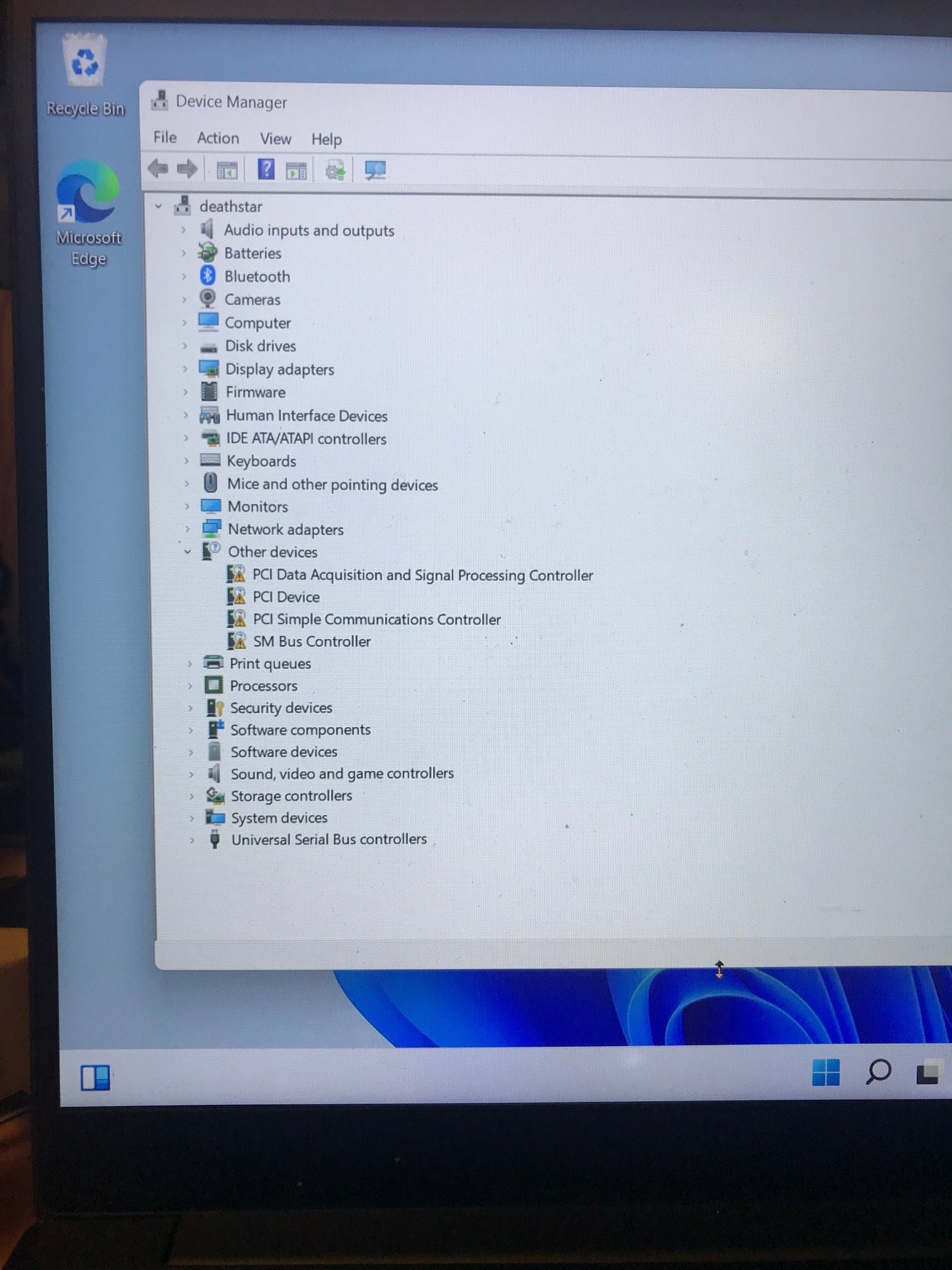

razer blade 2018 rz09-02705 w11 device manager shows drivers needed
The factory SSD on my "razer blade 2018 rz09-02705" failed.
I had to buy a new SSD and then install windows 11. Since the old failed SSD had the factory recovery installer on it, I had to install w11 from a MS w11 install file, thus all the drivers did not come along.
When I look at Device Manager I see items are flagged with an exclamtion mark as needing drivers, but from looking at:
https://mysupport.razer.com/app/answers/detail/a_id/3640/~/razer-blade-15%E2%80%9D-base-%282018%29-%7C-rz09-02705-support
it is not clear which drivers I am missing.
I ran windows updates and also intel's driver updater and still those items are flagged.
Which drivers am I missing?
This topic has been closed for replies.


Sign up
Already have an account? Login
Log in with Razer ID to create new threads and earn badges.
LOG INWelcome to Razer Insider
No account yet? Create an account
Log in with Razer ID to create new threads and earn badges.
LOG INEnter your E-mail address. We'll send you an e-mail with instructions to reset your password.