

Problem with keyboard lightning | Razer Insider
Skip to main content
Question

Problem with keyboard lightning

  • March 23, 2026
  • 1 reply
  • 16 views

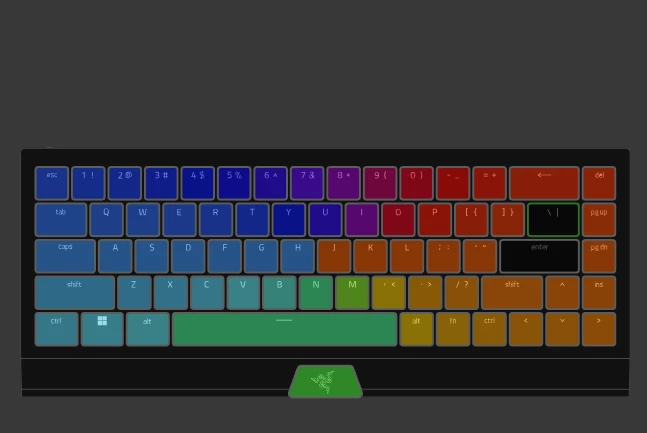
Hi i have a problem with my keyboard it is a Blackwidow v3 mini hyperspeed and this started recently that the 2 black keys on the pic wont light up when using advanced effects created in the chroma studio but they work when using quick effects any help is greatly appreciated

This topic has been closed for replies.

1 Reply

Razer.Zionzedd

Hi Stazer05


This issue is likely a software conflict between Chroma Studio and Windows, or a corrupt profile. First, disable Windows Dynamic Lighting in Settings > Personalization > Dynamic Lighting. If that fails, restart Synapse by exiting all Razer apps in the system tray, or do a hard reset: hold Esc + Caps + Space while plugging it in. If none of the steps resolve the issue, then PM me your Razer BlackWidow V3 Mini’s SN: (Follow steps here: https://mysupport.razer.com/app/answers/detail/a_id/548/~/how-to-find-the-serial%2C-product%2C-or-part-number-on-a-razer-device) and link of your receipt in a PDF format: (Save the shareable files via any online drive account listed here: https://mysupport.razer.com/app/answers/detail/a_id/4011?_ga=2.197232171.544708261.1744067200-1885068520.1744067200&_gl=1*vo487o*_ga_3TRK53PM75*MTc0NDA2NzE5OS4xLjEuMTc0NDA2NzM0My4yNC4wLjA). Kindly change the privacy settings to "anyone has link", so I can view the file/s without asking for permission. 


*Thread locked to PM.
