Profile shortcuts on Synapse 3 | Razer Insider
Skip to main content

Profile shortcuts on Synapse 3

  • March 9, 2019
  • 4 replies
  • 119 views

Hello, While assigning shortcuts (FN+some key) to color profiles in Synapse 2 was pretty easy, I just can't find out how it is done in Synapse 3. Also, it says here https://www2.razer.com/chroma-workshop/connected-devices That I can pair my razer software to my AMD fan's RGB and my MSI's GPU - how can I do it? Thank you
This topic has been closed for replies.

4 Replies

BlackFireDragon
cynicoren
While assigning shortcuts (FN+some key) to color profiles in Synapse 2 was pretty easy, I just can't find out how it is done in Synapse 3.
If you mean you want to give specific profile a difrent effect/color this you can do on Studio module.
cynicoren
Also, it says here https://www2.razer.com/chroma-workshop/connected-devices That I can pair my razer software to my AMD fan's RGB and my MSI's GPU - how can I do it?
You must have module called "chroma connect" from there you can sync supported devices Both module you find in synapse. Open synapse 3 and on top select modules and install both of them. They will apear on upper bar select module you want and make changes.

  • Author
  • March 11, 2019
Hi, I know the studio, but didn't see a way to assign a shortcut to a color design. It was very simple in Synapse 2.

BlackFireDragon
If you want something else the only thing is wait @RazerThe_Fiend post new feature that is going to be add to synapse soon, You can find more info here: /synapse-3-update-31-jan-2019-release-announcement.46599/page-3

  • March 14, 2019
cynicoren
Hello, While assigning shortcuts (FN+some key) to color profiles in Synapse 2 was pretty easy, I just can't find out how it is done in Synapse 3. Also, it says here https://www2.razer.com/chroma-workshop/connected-devices That I can pair my razer software to my AMD fan's RGB and my MSI's GPU - how can I do it? Thank you
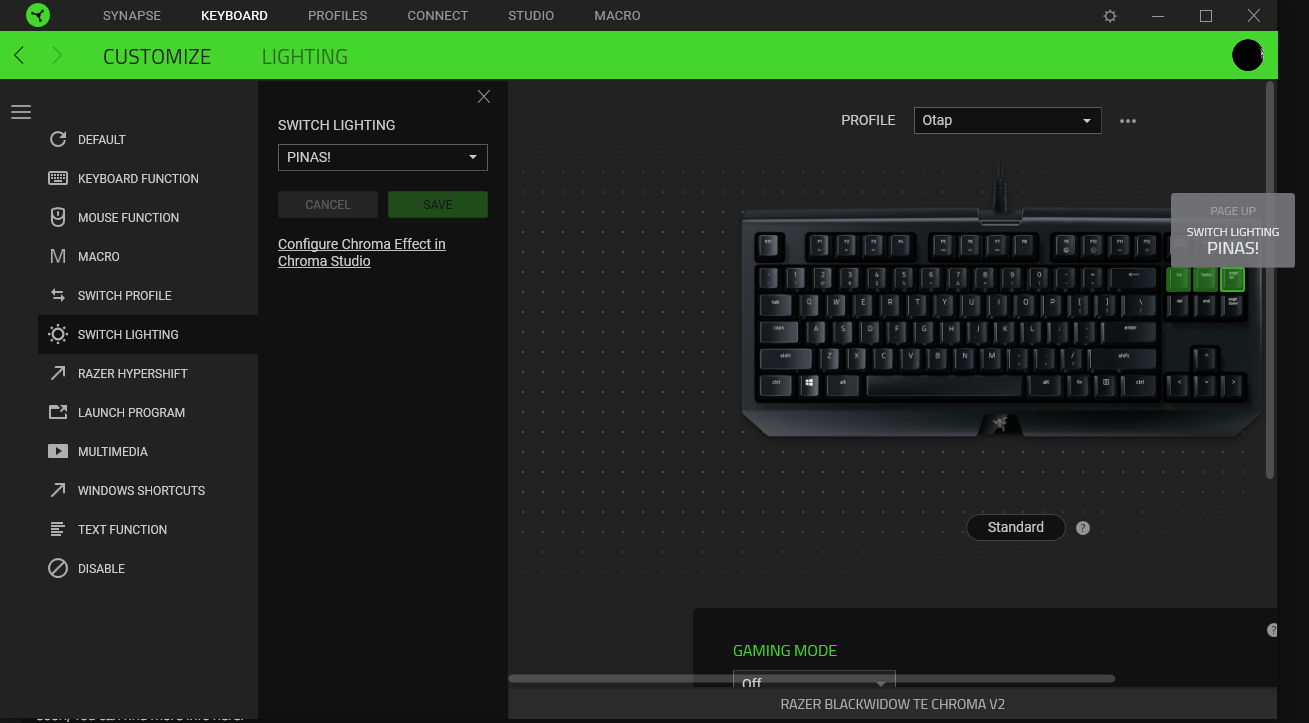
Hey there, hope this helps, you could assign a command (switch lighting) to any key you want to change your color profile.