rgb not loading on system startup-software set to start with windows | Razer Insider
Skip to main content
Question

rgb not loading on system startup-software set to start with windows

  • August 8, 2025
  • 39 replies
  • 1716 views

Show first post

39 Replies

Mattzzka
  • Insider Mini
  • August 11, 2025

no to the second image, only because I booted up this morning and suddenly my RGB is working properly again.


..did they stealth hotfix it or something under the current version and build or something?


Glad to hear it :),


I don’t really know, maybe it’s a good question after the big noise of XatheX and us complaining as far as concerning him, they did it i don’t really know someone in another post say they revert the UI version of the synapse prolly related to the chroma too.


It's a mystery, haha.


Mattzzka
  • Insider Mini
  • August 11, 2025

Sorry double post


  • Insider Mini
  • August 11, 2025

I had the same problem, and even after completely reinstalling the program and deleting the folders beforehand, there was no improvement. Synapse did not start automatically for me. When I set the app to start automatically, the icon appeared in the tray, but Synapse did not load and I could not log in. 

However, I found the following workaround:
By default, there is a shortcut for the Razer Synapse app under “C:\ProgramData\Microsoft\Windows\Start Menu\Programs\Razer” (installed under C:\ on my computer). You can also find it by clicking “Windows Start” and typing in Synapse. Then select it by right-clicking and selecting “Open file location.” This shortcut has the additional startup parameter “--url-params=apps=synapse,” which is used for the autostart of Synapse.

EDIT:

A task must be created in the task scheduler: 

Open the task scheduler and select “New Task.” Set the following parameters:

1. Run with highest privileges
2. Trigger: At logon, Every user, Delay 15 seconds
3. Action: Start program 
Path: “C:\Program Files\Razer\RazerAppEngine\RazerAppEngine.exe”
Arguments: --url-params=apps=synapse

After restarting, Synapse will start correctly – but in window mode. This must then be minimized manually. 


  • Insider Mini
  • August 11, 2025

Hey guys


I am writing you to let you know it seems it fix on the same number version, I installed again after a message on razer insider by XatheX which I would like to test it again if the problem is still persisting or not and my device is appearing as intended at the bootup (restart or full boot).


May you try to install again if the problem still persisting, please ?


The full process is :


  1. Logout and close the Razer Synapse 4.

  2. Uninstall ALL Razer programs and apps, then restart your computer.

  3. Delete all Razer folders you can find in C:\Program Files(x86) and C:\Program Data. The Program Data folder is set to be hidden by default so you might need to change the folder option first.

  4. Download the manual installer for Razer Synapse 4

  5. Reinstall Razer Synapse 4,

Works perfectly, finally the # key on the German layout can also be illuminated in Chroma.
Thank you.


Ingo00086
  • Insider Mini
  • August 12, 2025

Ja, ich auch. Gibt es eine Möglichkeit, die alte Version zu erhalten und Updates zu blockieren?

Ja, siehe hier:


  • Insider Mini
  • August 24, 2025

Has anyone found any other software that will do the same thing as chroma but work?


Ingo00086
  • Insider Mini
  • September 25, 2025

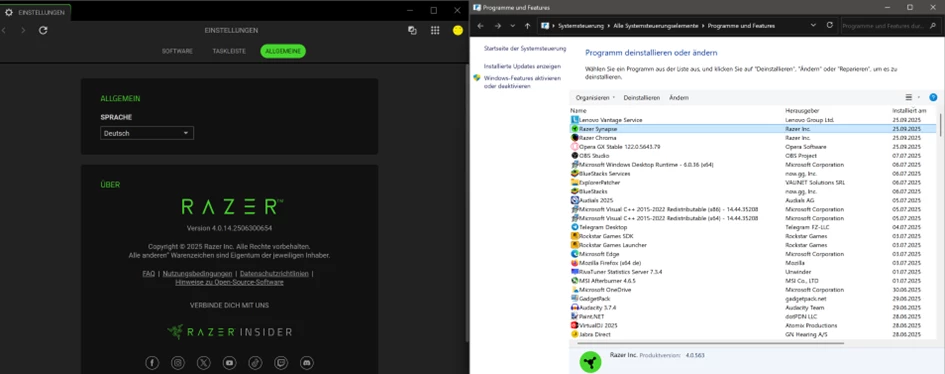
Mit dem Update scheint es wohl wieder zu gehen.. aber es ist immer noch eine 563… 


Ingo00086
  • Insider Mini
  • September 25, 2025

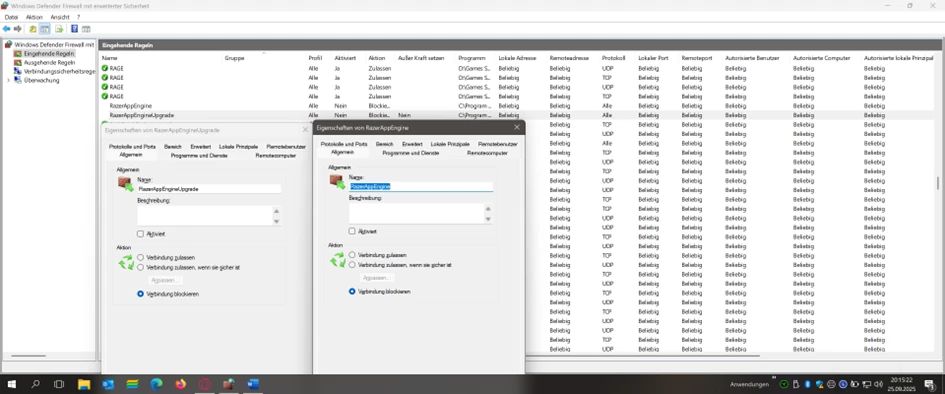
Mit der Version .654 (nur im Programm sichtbar) wurden neue Dienste eingeführt und in der Firewall deaktiviert (ausgehende gabs es keine), aus Sicherheit, damit die RGB Beleuchtung nicht wieder nach Update .560 kaputt geht, hier die Anleitung:


Ingo00086
  • Insider Mini
  • September 25, 2025

Diese beiden Dienste deaktivieren. Bisher keine negativen Erfahrungen.


Ingo00086
  • Insider Mini
  • September 26, 2025

Ich sehe, das Bild ist unscharf, daher nochmal die beiden Dienste: 
Dienst: „RazerAppEngineUpgrade“ und „RazerAppEngine“.


Rydik89
  • Insider Mini
  • September 28, 2025
Hello, in the new V4 riser, when playing any sounds, unless the checkbox is activated, the keyboard will not respond to the sound in time. In the old version, everything worked, but now they have made such a mess. I don’t really like the new version. Sorry, has anyone else experienced this?

Rydik89
  • Insider Mini
  • September 28, 2025
Hello, in the new V4 riser, when playing any sounds, unless the checkbox is activated, the keyboard will not respond to the sound in time. In the old version, everything worked, but now they have made such a mess. I don’t really like the new version. Sorry, has anyone else experienced this?
They split one application into two and now they can't work as one!

InSaneJeSter
  • Insider Mini
  • October 15, 2025

I had the same problem, and even after completely reinstalling the program and deleting the folders beforehand, there was no improvement. Synapse did not start automatically for me. When I set the app to start automatically, the icon appeared in the tray, but Synapse did not load and I could not log in. 

However, I found the following workaround:
By default, there is a shortcut for the Razer Synapse app under “C:\ProgramData\Microsoft\Windows\Start Menu\Programs\Razer” (installed under C:\ on my computer). You can also find it by clicking “Windows Start” and typing in Synapse. Then select it by right-clicking and selecting “Open file location.” This shortcut has the additional startup parameter “--url-params=apps=synapse,” which is used for the autostart of Synapse.

EDIT:

A task must be created in the task scheduler: 

Open the task scheduler and select “New Task.” Set the following parameters:

1. Run with highest privileges
2. Trigger: At logon, Every user, Delay 15 seconds
3. Action: Start program 
Path: “C:\Program Files\Razer\RazerAppEngine\RazerAppEngine.exe”
Arguments: --url-params=apps=synapse

After restarting, Synapse will start correctly – but in window mode. This must then be minimized manually. 

Hahaha, dude, this only works if the file you specified is working.
I'll add that it doesn't work for me, but the other one from the RazerAppEngine\app-4.0.563\RazerAppEngine.exe folder does. That's the problem, but the solution is clear, but Razer is clearly idiots for not being able to fix this problem.


Des573
  • Insider Mini
  • November 13, 2025

I had the same problem, and even after completely reinstalling the program and deleting the folders beforehand, there was no improvement. Synapse did not start automatically for me. When I set the app to start automatically, the icon appeared in the tray, but Synapse did not load and I could not log in. 

However, I found the following workaround:
By default, there is a shortcut for the Razer Synapse app under “C:\ProgramData\Microsoft\Windows\Start Menu\Programs\Razer” (installed under C:\ on my computer). You can also find it by clicking “Windows Start” and typing in Synapse. Then select it by right-clicking and selecting “Open file location.” This shortcut has the additional startup parameter “--url-params=apps=synapse,” which is used for the autostart of Synapse.

EDIT:

A task must be created in the task scheduler: 

Open the task scheduler and select “New Task.” Set the following parameters:

1. Run with highest privileges
2. Trigger: At logon, Every user, Delay 15 seconds
3. Action: Start program 
Path: “C:\Program Files\Razer\RazerAppEngine\RazerAppEngine.exe”
Arguments: --url-params=apps=synapse

After restarting, Synapse will start correctly – but in window mode. This must then be minimized manually. 


If you add --launch-force-hidden=synapse to the Attributes

So that they look like this:
Attribute line: --url-params=apps=synapse --launch-force-hidden=synapse

Then Synapse will launch minimized!