Tartarus V2 Keybinds stopped working | Razer Insider
Skip to main content
Question

Tartarus V2 Keybinds stopped working

  • September 9, 2026
  • 3 replies
  • 75 views

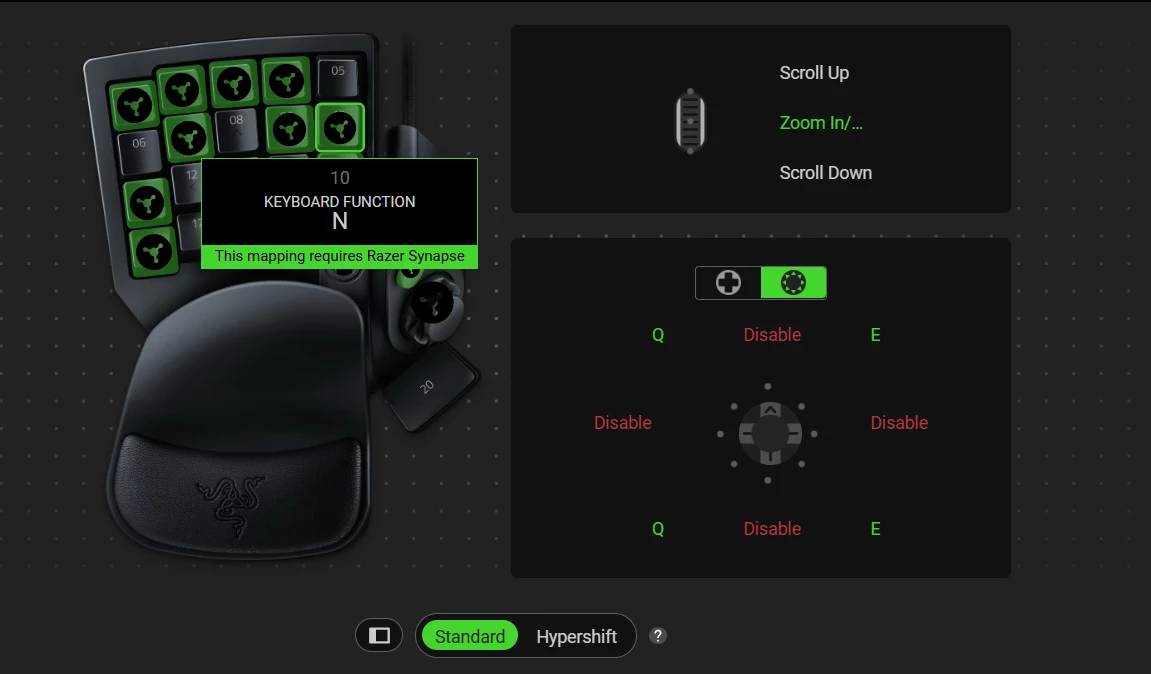
I was using my Tartarus V2 just fine. I was trying to get some new keybinds going to play Stalker. After being away from the PC for a while, I wanted to play Tarkov, but my keybinds stopped working. I looked at Synapse, but Synapse is telling me that Synapse needs to run in order for the keybinds to work . . . . . IT IS RUNNING. WTF am I'm supposed to do I play almost every serious game with the V2. I tried reinstalling. I tried everything I could imagine, but I can't get it to work anymore. I need help ASAP, please

3 Replies

  • Insider Mini
  • September 10, 2026

I have the same problem: I use the Tartarus D-pad as arrow keys, but since the latest Windows update, it’s being recognized as a gamepad. I’ve tried reinstalling Synapse and reconfiguring the keymap multiple times, but nothing works. If I close Synapse, it goes back to functioning as arrow keys.
P.S. The message you see stating that Synapse must be running is just a reminder that the D-pad mapping isn't saved to the device's internal memory—it only works at the software level. It doesn't mean Synapse isn't running. 😉


  • Insider Mini
  • September 14, 2026

Since I used mine Tart for just gaming I logged in and to Synapse 4, set my key binds up and then logged out of Synapse 4 and then logged into my game and matched my game key binding to what I have mapped to the Tart. For directionals I used the 8 way and set those up to game defaults where I could and then to additional key bindings not used in game and everything appears to be working. So far. Still, rather disappointed at the level of support from Razer on this and I many have issues! May need to shop for an alternate gamepad to use if this is the type of support that can be expected. 


  • Insider Mini
  • September 15, 2026

My Synape updated 2 days ago and now I got this on my Tartus v2. I tried eveything: UnInstall, re-Install, reset etc...Nothing fixes it. Oh the keybinds still work but why is the actual picture of my keybinds replaced with the logo and this message. As a Test I used Macrium reflect to restore an image from 1 week ago and boom everything back to normal but I had to put a firewall rule to stop Synape from auto updating. Is this issue going to be fixed?