

I’m here simply to advocate for Linux support. I have 3 Razer devices, headphones, keyboard and mouse and they struggle to work with Linux. Us Linux users should not have to settle for third part software like OpenRazer. While I respect their work it should not be on them to have to make these tools. We paid money for our devices, we expect support on Linux.
- Home
- Community Overview
- Razer Synapse
- Razer Synapse 4
- Synapse 4 on Linux!
Synapse 4 on Linux!
- June 15, 2025
- 127 replies
- 35273 views
127 Replies
- Insider Mini
- June 23, 2026
Being around as long as they have how is this not a thing already.
Serious lack of oversight here on Razer’s behalf.
Yes I can get RGB and polling rates working with open source software but all the buttons on my multiple Naga are useless which is not what I bought them for.
Seems if I want to put more time than I have into it I can finagle a workaround but honestly that should not be needed with what I paid for the products.
If you won’t support linux at least build in memory for marco and button assignments into the device itself like you did with the Nostromo collab with Belkin....back in 2007.
- Insider Mini
- July 9, 2026
I made an account just to advocate for this. Please add Linux support!


 +1
+1- VANGUARD
- July 10, 2026
https://www.phoronix.com/review/razer-blade-18-linux keep fingers crossed. Maybe something will happen in this matter - first “Linux certified” Razer Blade laptop… still no official Synapse on these, but maybe a small step in a good direction.
- Insider Mini
- July 13, 2026
https://www.phoronix.com/review/razer-blade-18-linux keep fingers crossed. Maybe something will happen in this matter - first “Linux certified” Razer Blade laptop… still no official Synapse on these, but maybe a small step in a good direction.
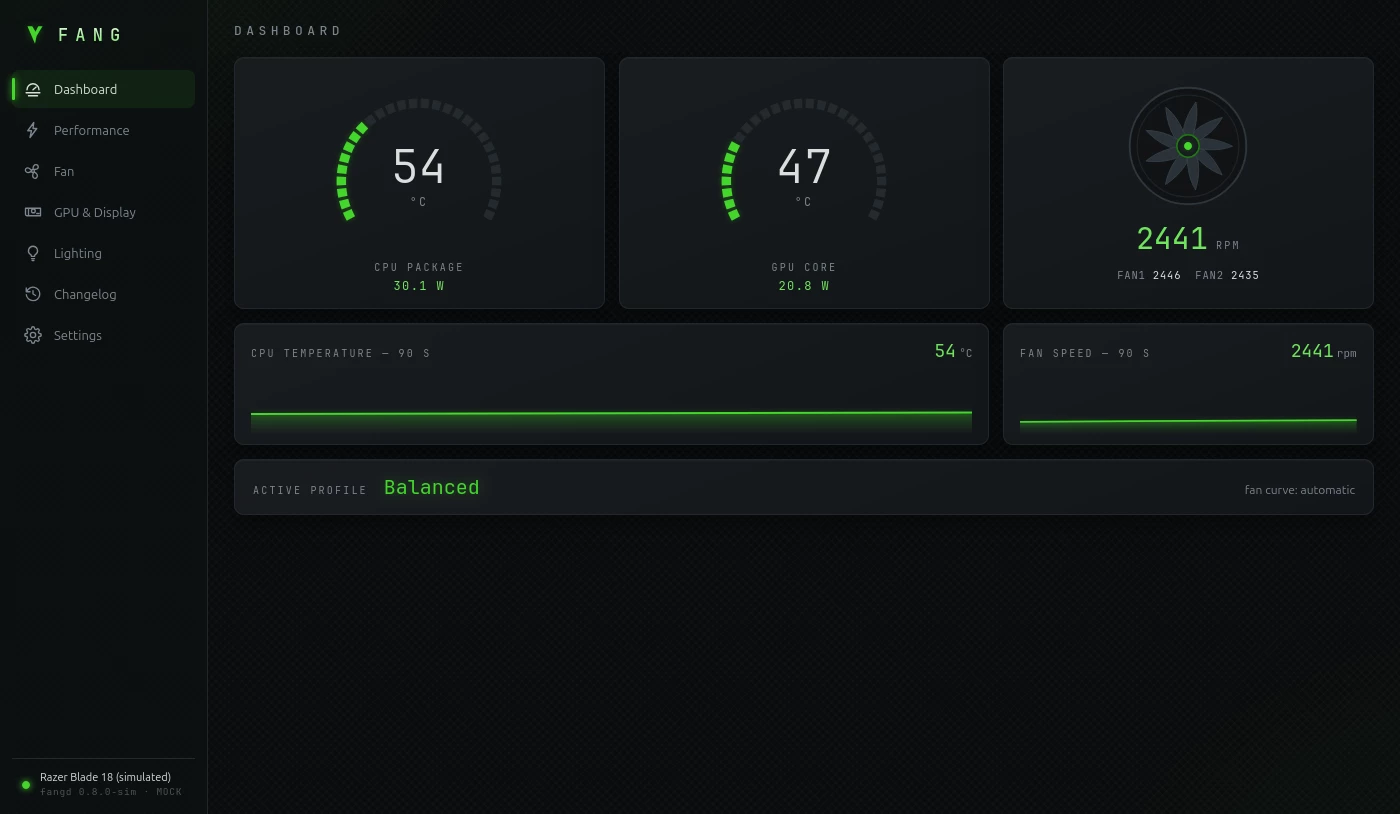
I did before Razer :D https://github.com/bladeandsoulx/fang-razer-linux
- Insider Mini
- July 16, 2026
I started writing software in Rust to support the Razer Naga Trinity mouse. I managed to get the program to detect changes to the side panel.
tony@StarkIndustries:~/Dokumenty/hidraw-harvester$ cargo run
Compiling hidraw-harvester v0.1.0 (/home/tony/Dokumenty/hidraw-harvester)
warning: field `program` is never read
--> src/config.rs:9:9
|
7 | pub struct Profil {
| ------ field in this struct
8 | pub nazwa: String,
9 | pub program: String,
| ^^^^^^^
|
= note: `Profil` has derived impls for the traits `Clone` and `Debug`, but these are intentionally ignored during dead code analysis
= note: `#[warn(dead_code)]` (part of `#[warn(unused)]`) on by default
warning: method `odczytaj_stan_panelu` is never used
--> src/devices/razer.rs:26:12
|
18 | impl RazerNagaTrinity {
| --------------------- method in this implementation
...
26 | pub fn odczytaj_stan_panelu(&self) -> i32 {
| ^^^^^^^^^^^^^^^^^^^^
warning: `hidraw-harvester` (bin "hidraw-harvester") generated 2 warnings
Finished `dev` profile [unoptimized + debuginfo] target(s) in 0.12s
Running `target/debug/hidraw-harvester`
=== Witamy w Hidraw Harvester ===
Skanuję porty /dev/hidraw* w poszukiwaniu kompatybilnych urządzeń...
Znaleziono: Razer Naga Trinity(ścieżka: "/dev/hidraw0")
Znaleziono: Razer Naga Trinity(ścieżka: "/dev/hidraw7")
Znaleziono: Razer Naga Trinity(ścieżka: "/dev/hidraw7")
Znaleziono: Razer Naga Trinity(ścieżka: "/dev/hidraw7")
Znaleziono: Razer Naga Trinity(ścieżka: "/dev/hidraw7")
Znaleziono: Razer Naga Trinity(ścieżka: "/dev/hidraw7")
Znaleziono: Razer Naga Trinity(ścieżka: "/dev/hidraw2")
Zarejestrowano myszkę Razer Naga Trinity na ścieżce: /dev/hidraw7
Wczytano profil dla: Profil do CS-a SiedemPrzyciskow
=== Rozpoczynam nasłuchiwanie na porcie /dev/hidraw7 ===
Odłącz boczny panel lub zmień go, aby przetestować...
[Zdarzenie] Zmiana stanu panelu: SiedemPrzyciskow
SUKCES: Panel z myszy pasuje do profilu `Profil do CS-a`! Aktywuję makra.
[Zdarzenie] Zmiana stanu panelu: Brak
OSTRZEŻENIE: Odłączono panel boczny. Dezaktywuję makra.
[Zdarzenie] Zmiana stanu panelu: DwanasciePrzyciskow
INFO: Podłączono inny panel (DwanasciePrzyciskow). Profil `Profil do CS-a` wymaga SiedemPrzyciskow
[Zdarzenie] Zmiana stanu panelu: Brak
OSTRZEŻENIE: Odłączono panel boczny. Dezaktywuję makra.
[Zdarzenie] Zmiana stanu panelu: DwaPrzyciski
INFO: Podłączono inny panel (DwaPrzyciski). Profil `Profil do CS-a` wymaga SiedemPrzyciskow
[Zdarzenie] Zmiana stanu panelu: Brak
OSTRZEŻENIE: Odłączono panel boczny. Dezaktywuję makra.
[Zdarzenie] Zmiana stanu panelu: DwanasciePrzyciskow
INFO: Podłączono inny panel (DwanasciePrzyciskow). Profil `Profil do CS-a` wymaga SiedemPrzyciskow
^C
- Insider Mini
- July 18, 2026
I now have full control over the side panels of the Razer Naga Trinity mouse; now I need to create a graphical interface and integrate my software with Polychromatic.

- Insider Mini
- July 18, 2026
I now have full control over the side panels of the Razer Naga Trinity mouse; now I need to create a graphical interface and integrate my software with Polychromatic.
that would be awesome.
personally I found my Trinity less of a problem because the buttons I rebound seemed to be imprinted onto the onboard memory. the next problem being if you have no access to a windows based pc to be able to run Synapse to change the buttons.
sadly my Orbweaver does not carry the same onboard mem so I had to use Input Remapper to fix that and I found that easier to do under Bazzite than I did on Mint.
thing that always puzzled me is why both Polychromatic and Razer Genie were not key remapping programs.
with Raxer Genie there is even a shortcut calling itself ‘Input remapping’ and yet can only only recommend IR when clicked.
it would be lovely if Razer Genie was able to everything that Synapse does or for Razer to finally make a working Linux program so we can move on.
that’s why we all here right?
- Insider Mini
- July 18, 2026
I now have full control over the side panels of the Razer Naga Trinity mouse; now I need to create a graphical interface and integrate my software with Polychromatic.
that would be awesome.
personally I found my Trinity less of a problem because the buttons I rebound seemed to be imprinted onto the onboard memory. the next problem being if you have no access to a windows based pc to be able to run Synapse to change the buttons.
sadly my Orbweaver does not carry the same onboard mem so I had to use Input Remapper to fix that and I found that easier to do under Bazzite than I did on Mint.
thing that always puzzled me is why both Polychromatic and Razer Genie were not key remapping programs.
with Raxer Genie there is even a shortcut calling itself ‘Input remapping’ and yet can only only recommend IR when clicked.
it would be lovely if Razer Genie was able to everything that Synapse does or for Razer to finally make a working Linux program so we can move on.
that’s why we all here right?
That is exactly the kind of program I am writing for Linux. I already have the ability to detect side panel changes, create profiles for games and applications, and launch them automatically when the specific game or program becomes active. I’m not building a graphical interface yet, but I do plan to add one eventually.
tony@StarkIndustries:~/Dokumenty/hidraw-harvester$ cargo run --bin hidraw-harvester
warning: method `pokaz_dpi` is never used
--> src/osd.rs:25:12
|
7 | impl OsdMenedzer {
| ---------------- method in this implementation
...
25 | pub fn pokaz_dpi(&mut self, wartosc_dpi: u32) {
| ^^^^^^^^^
|
= note: `#[warn(dead_code)]` (part of `#[warn(unused)]`) on by default
warning: `hidraw-harvester` (bin "hidraw-harvester") generated 1 warning
Finished `dev` profile [unoptimized + debuginfo] target(s) in 0.04s
Running `target/debug/hidraw-harvester`
=== Witamy w Hidraw Harvester ===
[Menedżer] Pomyślnie zaimportowano profile z makra.txt
[Wykrywanie] Sniffer dopasowany!
[Wykrywanie] Port panelu (stan): /dev/hidraw3
[Wykrywanie] Port przycisków (kliki): /dev/hidraw10
=== Rozpoczynam nasłuchiwanie ===
[Cache] Przywrócono zapamiętany panel boczny: DwanasciePrzyciskow
[Zdarzenie] Zmiana stanu panelu: DwanasciePrzyciskow
[Zdarzenie] Zmiana stanu panelu: Brak
[Zdarzenie] Zmiana stanu panelu: SiedemPrzyciskow
[Zdarzenie] Zmiana stanu panelu: Brak
[Zdarzenie] Zmiana stanu panelu: DwaPrzyciski
[Zdarzenie] Zmiana stanu panelu: Brak
[Zdarzenie] Zmiana stanu panelu: DwanasciePrzyciskow
1[DEBUG Okno] Wykryto nazwę: 'manager.rs - hidraw-harvester - visual studio code'
[Makra] [Profil Programisty (12 przycisków)] Wykonuję akcję dla przycisku: 1
4[DEBUG Okno] Wykryto nazwę: 'manager.rs - hidraw-harvester - visual studio code'
[Makra] [Profil Programisty (12 przycisków)] Wykonuję akcję dla przycisku: 4
0[DEBUG Okno] Wykryto nazwę: 'manager.rs - hidraw-harvester - visual studio code'
[Makra] [Profil Programisty (12 przycisków)] Wykonuję akcję dla przycisku: 10
cargo test=[DEBUG Okno] Wykryto nazwę: 'manager.rs - hidraw-harvester - visual studio code'
[Makra] [Profil Programisty (12 przycisków)] Wykonuję akcję dla przycisku: 12
[DEBUG Okno] Wykryto nazwę: 'synapse 4 on linux! | razer insider — librewolf'
[Makra] [Domyślny (12 przycisków)] Wykonuję akcję dla przycisku: 1
[DEBUG Okno] Wykryto nazwę: 'synapse 4 on linux! | razer insider — librewolf'
[Makra] [Domyślny (12 przycisków)] Wykonuję akcję dla przycisku: 4
[DEBUG Okno] Wykryto nazwę: 'synapse 4 on linux! | razer insider — librewolf'
[Makra] [Domyślny (12 przycisków)] Wykonuję akcję dla przycisku: 7
[DEBUG Okno] Wykryto nazwę: 'synapse 4 on linux! | razer insider — librewolf'
[Makra] [Domyślny (12 przycisków)] Wykonuję akcję dla przycisku: 10
[DEBUG Okno] Wykryto nazwę: '* (unsaved) - blender 5.2.0 lts'
[Makra] [blender (12 przycisków)] Wykonuję akcję dla przycisku: 4
[DEBUG Okno] Wykryto nazwę: '* (unsaved) - blender 5.2.0 lts'
[Makra] [blender (12 przycisków)] Wykonuję akcję dla przycisku: 10
[DEBUG Okno] Wykryto nazwę: '* (unsaved) - blender 5.2.0 lts'
[Makra] [blender (12 przycisków)] Wykonuję akcję dla przycisku: 7
[DEBUG Okno] Wykryto nazwę: '* (unsaved) - blender 5.2.0 lts'
[Makra] [blender (12 przycisków)] Wykonuję akcję dla przycisku: 2
^C
tony@StarkIndustries:~/Dokumenty/hidraw-harvester$ ^C
tony@StarkIndustries:~/Dokumenty/hidraw-harvester$
As you can see, it works.

- Insider Mini
- July 19, 2026
Found this thread while hunting around for a fix before I make my switch from Windows to CashyOS. I have a Kraken V4 Pro and it only dawned on me today as I was poking around in a live environment ahead of doing a full install that I had no idea if my headset would work right; it connects but no sign of the separated game and chat channels and by the looks of things no means of getting support?
For a company for gamers by gamers not supporting Linux seems like such a drastic oversight. One I hope they're working on in the background because I have literally only ever owned Razer peripherals dating back to the Carcharias and Megalodon headsets in the days before Chroma! I don't want to switch but I also don't want barely functional hardware I need to jump through hoops to get working ..
- Insider Mini
- July 19, 2026
I hear ya everW and sorry I can’t help you with sound software with regards to Razer.
when looking for solutions to driver problems I found a lot of help in youtube.
there is one thing you can try if you haven’t already.
open the console and type:
alsamixer
then enlarge the window that pops up to full screen and hit F6 to show all the various sound devices.
once you find the one you want use your arrow keys to move left n right - you might see some of the boxes there with MM meaning those parts are muted.
clicking on them with your mouse will unmute and using up and down keys will increase or decrease the gain on the bar you are on.
as you move left n right on each bar there will be an item description at the top left of your screen giving more of a clue as to which component it’s controlling.
hopefully in there something may make the sound suddenly start working.
if the colour aspect of the Kraken is important to you then Razer Genie and Polychromatic should help with that.
good luck with your journey and I hope alsamixer can provide a solutions to missing sound.
- Insider Mini
- July 20, 2026
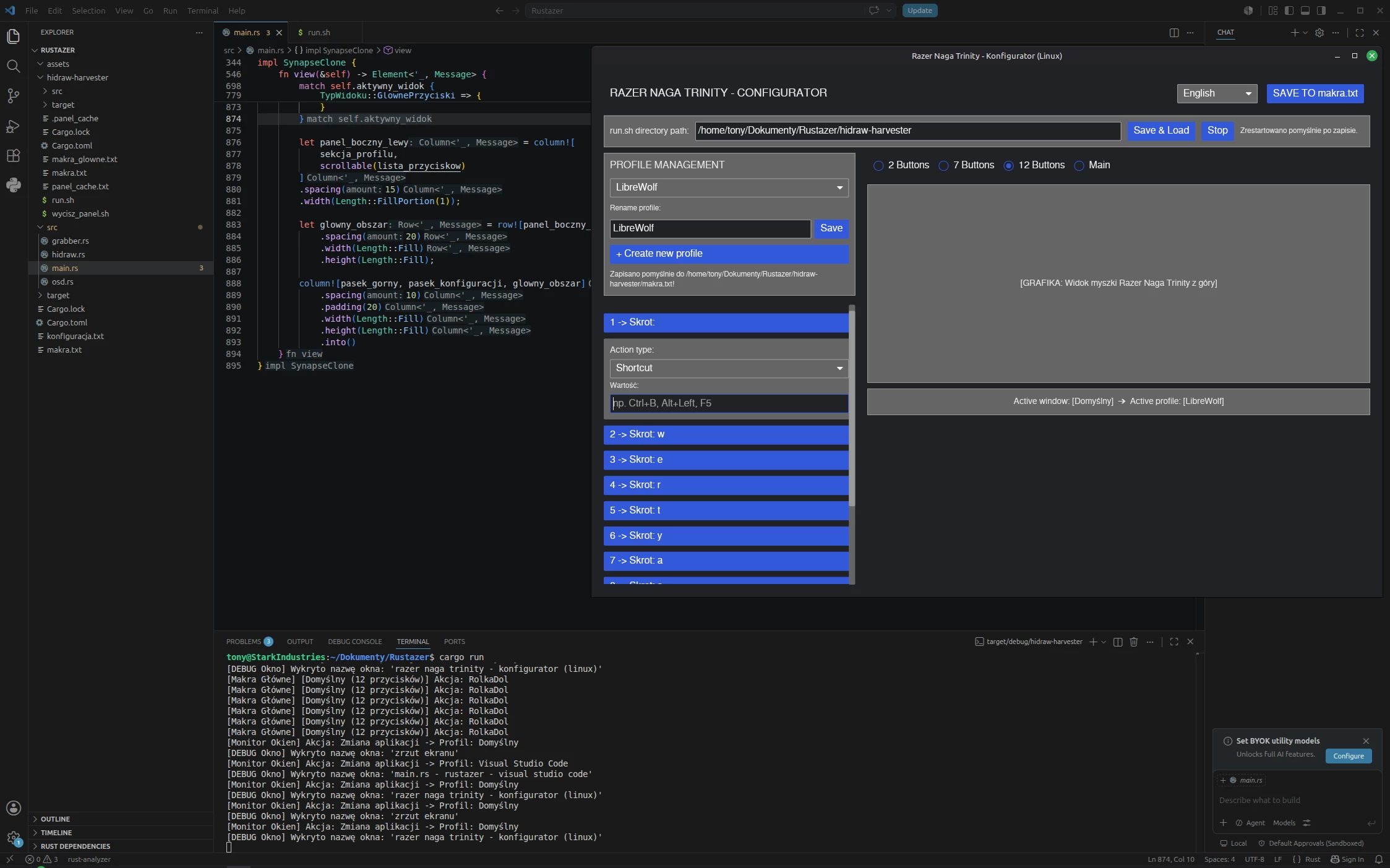
The program runs stably; if I disconnect the mouse from the USB and reconnect it, the program resumes correctly. It also displays notifications about panel disconnection or profile changes in the OSD window. I am currently working on adding further features, such as programming the main mouse buttons and adding DPI and RGB settings.
- Insider Mini
- July 20, 2026
The program runs stably; if I disconnect the mouse from the USB and reconnect it, the program resumes correctly. It also displays notifications about panel disconnection or profile changes in the OSD window. I am currently working on adding further features, such as programming the main mouse buttons and adding DPI and RGB settings.
seriously TS - that would be bloody awesome
maybe Razer should offer you a job helping them make Linux s/w
- Insider Mini
- July 21, 2026
The program runs stably; if I disconnect the mouse from the USB and reconnect it, the program resumes correctly. It also displays notifications about panel disconnection or profile changes in the OSD window. I am currently working on adding further features, such as programming the main mouse buttons and adding DPI and RGB settings.
seriously TS - that would be bloody awesome
maybe Razer should offer you a job helping them make Linux s/w
I get the feeling they don't really care. They probably don't even check this forum.
- Insider Mini
- July 21, 2026
must admit I keep hoping to see some comment from Razer about this.
- Insider Mini
- July 21, 2026
ok, the program doesn't have a full graphical interface yet, but I can now assign macros to all buttons except the buttons responsible for setting the DPI of the mouse. A question for people is whether to add these functions such as DPI and RGB settings or leave them under polychromatic control? Personally, I don't need it because the DPI profile and sensor calibration can be done in polychromatic, so I don't need the RGB setting, but if you want me to bother further, I will, but I'll tell you right now that implementing these functions may be problematic. Should I focus on the graphical interface?
- Insider Mini
- July 21, 2026
although it would be nice to have an all in one program - personally being able to reassign buttons is more important to me. would mean that I can setup my 2 backup Trinity’s without the need for windows.
I used Input Remapper on my Orbweaver and like I mentioned before, the Trinity I am using remembered all the rebinding I did. would be awesome to have a Linux interface to redo those buttons if needed.
do you think the principle of what you are making would be able to do Orbweavers and Tartarus?
- Insider Mini
- July 22, 2026
I'll post the program on github on Monday or Tuesday. I need a bunch of beta testers to report the blends and what's going wrong. program compatible with ubuntu debian. I wrote it under linux mint with cinamon architecture X11.
- Insider Mini
- July 22, 2026
well I am on Bazzite but happy to see if/how it works there if possible.
- Insider Mini
- July 23, 2026
well I am on Bazzite but happy to see if/how it works there if possible.
At the moment, it won't work on Bazzite. It will work on all Linux distributions based on Ubuntu/Debian that use X11.
- Insider Mini
- July 23, 2026
that is ok - I can pop Mint onto another drive - after all….only need it for reassigning Trinity buttons on backup mice anyways 😁
- Insider Mini
- July 23, 2026
ok - well not Mint - it was being twatty about install. (probably my bad)
already had MX installed but man that one is flaky for me so wiped it out and found Zorin is Debian based so threw it on in place of MX and it seemed to work ok and should be sufficient for testing purposes.
Mint was the first Linux distro I ever tried and was ok to start with but got more and more troublesome as I tried Steam, Battle.net, Epic and GoG so after some more trial and error I settled on Bazzite as the main difficulty for other Distros is the gaming aspect and Bazzite has seen off those problems with ease. Faugus is superb and has handed everything beautifully - specially when coupled with Proton-GE😁
Sign up
Already have an account? Login
Log in with Razer ID to create new threads and earn badges.
LOG INWelcome to Razer Insider
No account yet? Create an account
Log in with Razer ID to create new threads and earn badges.
LOG INEnter your E-mail address. We'll send you an e-mail with instructions to reset your password.