Plugged in, Not Charging | Razer Insider
Skip to main content
Solved

Plugged in, Not Charging

  • April 16, 2023
  • 68 replies
  • 23553 views

Show first post

68 Replies

  • Insider Mini
  • February 1, 2024

Has anyone found a solution for this?  I am in the same exact spot but my battery will not recharge after letting it fully drain.  New OEM battery not detected.  Laptop worked when unplugged at first so I know the battery was holding a charge, but after lettting it drain, im stuck only able to use my blade while plugged in!  This is so annoying, please help!


Asparagusautofun722

I have the same problem as everyone else and it is quite an annoyance that this issue has been going on for this long for so many people. I hope that Razer will own up to this soon as I have only had my Blade 14 for around 2 years. If I knew this problem was going to happen I would have refrained for buying one. 


  • Insider Mini
  • February 26, 2024

I also got the same Problem for Razer Blade 17 late 2021 (RZ09-0406).

I try charge it with 65watt type c charger for few minute and somehow 230W charger working again.

My problem also occur in windows 11 then I try downgrading to win 10 the issue not comeback.

Still not sure it software Issue or hardware Issue.


has the issue comeback at all might try to attempt to downgrade to windows 10


a_figment
  • Insider Mini
  • March 17, 2024

Can't believe I make the mistake of buying another blade. At least I didn't buy this new. Last model I had (2019) had a common issue where the Webcam would just stop working and was undetectable, and no one from razer seemed to have any clue what the cause was. They treated the issue the same as they are here. They are clearly doing damage control and not owning up to thier poor quality control. I boght this used 2021 model about a week ago and up til now, it was charging. Now it's not. FFS how can you make such a premium product and at the same time be so incompetent at supporting it. Something as simple as charging the device, or diagnosing the issue should be foolproof and trivial. On top of that these idiots have a proprietary charger that they won't get rid of, and what does this gain us/them. These flakes know exactly what the problem is, they are just deciding to screw us and hope we forgive and forget. This honestly needs to be made common knowledge amongst people shopping for mobile devices. Razer products will leave you stranded after you pay the premium price. I watched a lot of reviews and had I knnown this was an issue I would've passed on this thing. So very pissed, and very regretful that I bought another razer POS! I swear, some lead is literally telling support team to specify not address these issues. Watch them nuke this thread. And when they do, we must not let them hear the end of this.

Edit: And maybe the problem is windows 11. I've seen posts with people having the same problem with different laptops that originally had windows 10. If that's the case why don't they just make a PSA for users and communicate with Microsoft instead of having disgruntled users like me muck up the forums. This makes no sense. 


a_figment
  • Insider Mini
  • March 17, 2024

I have a theory. It's a flaw in their super special charging port design. I've seen a thread where someone resolders a new port and it fixes the issue. Razer doesn't want to admit this and just replaces the whole motherboard if they get thier hands on the device. Has anyone else tried this? I sure am. 

https://www.reddit.com/r/razer/comments/17n11hp/razer_blade_15_advanced_early_2021_charging_issues/


  • Insider Mini
  • March 22, 2024

I posted some months ago and now see many of you reporting even more cases.

Community coming together here which is great!

Still having the same issue and ended up sending my laptop to Razer. 

They quoted me a total of over $2000 to replace the Motherboard and battery. 


They need to be exposed for this.

So many of us and all for the same issues.

When are we going to put together a case for a Class Action suit?


One user on another thread I started noted that cleaning off and replacing the thermal paste on the CPU and GPU fixes the problem. 

Anyone here willing to make the attempt and report out?


  • Insider Mini
  • March 27, 2024

I posted some months ago and now see many of you reporting even more cases.

Community coming together here which is great!

Still having the same issue and ended up sending my laptop to Razer. 

They quoted me a total of over $2000 to replace the Motherboard and battery. 


They need to be exposed for this.

So many of us and all for the same issues.

When are we going to put together a case for a Class Action suit?


One user on another thread I started noted that cleaning off and replacing the thermal paste on the CPU and GPU fixes the problem. 

Anyone here willing to make the attempt and report out?

razer need to look into it cause if replacing the thermal paste fix it it would be a whole lot cheaper than replacing the whole motherboard to fix the issue


  • Insider Mini
  • April 6, 2024

Same problem here with my

Razer Blade 14" (2021) | RZ09-0370x
 

I generated a battery report as indicated here:

https://mysupport.razer.com/app/answers/detail/a_id/2198/~/how-to-get-a-battery-report-and-create-an-energy-report-from-a-razer-blade


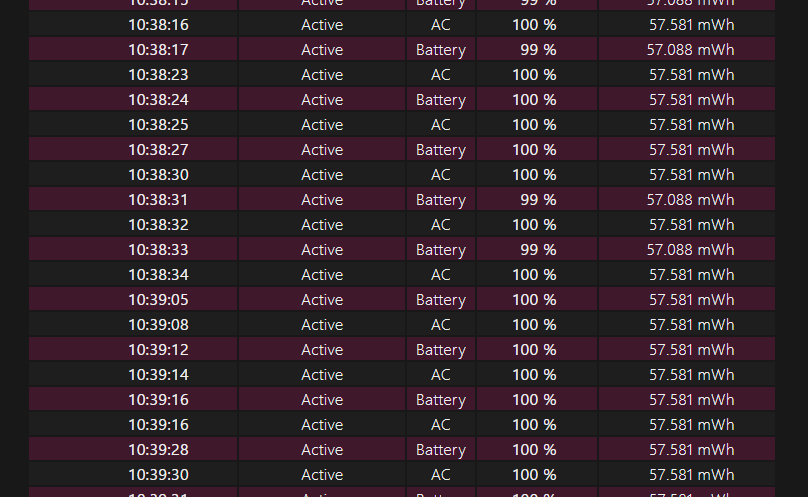
The report shows that power is quickly switching between AC and battery power:

This behaviour is not permanent but happens randomly and very frequently in recent days.


Tried almost everything proposed in this thread, no solution so far. :(


My Blade 2020 Laptop is currently acting normally for 3 month straight without this intermittent (on and off) charging issue, I just always make sure to always leave my laptop unplugged when I’m not using it and just stop gaming on my Blade entirely.

For me this issue first arrive when I’m playing AC Origins on my Blade for around 7-8 hours straight, It happened to me twice, but the charging problem fixed itself eventually when I just unplug my Blade and leaving it overnight, after the problem disappear it takes a while for it to come back again. And for me the problem did appear again which is cause by another 7-8 hour gameplay session of AC Origins. I just do the same thing to fix the problem.


I’m personally completely fine with not gaming on my Blade since I loved playing on PlayStation and collecting trophies so not gaming on my Blade is no biggie for me, but I absolutely would be vehemently opposed on anyone getting a Razer Blade for a gaming laptop, Like seriously just don’t. 


  • Insider Mini
  • April 17, 2024

happened again for me after working fine for a week or 2 

for some reason I have now notice whenever the problem triggers the razer blade is extremely hot even though there is barely any apps running, something in the background is triggering the spike in temperature not really displayed in task manager. My guess whatever it is could be either windows 11 related or synapse background processes causing the heat error and disabling the charging from the main point. 


Terkenn
  • Insider Mini
  • August 10, 2024

The issue I had wasn’t with the laptop (Razerblade 15) but with the charger itself. When the charger was plugged into an outlet, the green light on the little brick would not turn on. The charger used to work on every outlet but then I had to start unplugging and replugging multiple times until the little green light turned on again and the laptop started charging again. A strange thing is that the green light finally turned on when I opened Razer Synapse on my laptop. I don’t know if the issue was that I wasn’t opening Razer Synapse or if there was just something wrong with the charger, but it took a whole day to fix the issue. 


  • Insider Mini
  • August 11, 2024

I have a RB14 2021. It stopped charging with either USB nor its stock 230W charger. It works while connected to the charger, otherwise, does not come on as the battery is 0%. Essentially the notebook is now a desktop. 

I have tried the device manager recommendation and tried to use several USB chargers, some power the computer, others do nothing. But none charges it.


  • Insider Mini
  • August 18, 2024

other things I've tried is replacing the battery but the issue is still apparent, what I've also noticed dealing with this random ongoing issue is the the disk usage seem to have increase more than usual whenever the plugged in and no charging issue occurs.

In task manager is says system is using the extra disk usage, for content usually when the system is charging and functioning normal the disk usage for “system” is very low less than than a percentage.

the razer blade is warm to touch above the keyboard when nothing is running or in use when it should be cool to the touch as well.

will try to replace the thermals on the cpu/gpu to see if it fixes thing next.


Buckeroot
  • Insider Mini
  • August 27, 2024

My razer blade 15 advanced has the same problem. It won't charge but will hold the same battery percentage but it thinks I'm running off the battery so gaming isn't very good.


It's shame that so many people are having the same issue and it's not been dealt with 


ventureSiennasmart133

I finally figured out a solution that works for me!

Do this if you have the issue of a laptop not charging with the 3-prong charger, after having ruled out a faulty charger. 


1. DON’T USE USB-C CHARGING AT ALL. 
2. Let it run unplugged until the battery depletes, then wait a few hours. After waiting, connect it to the 3-prong charger and then again wait a few hours (while the laptop is powered off). 
3. Turn on the laptop. It should be able to charge again with the 3-prong charger.


More info here:
https://insider.razer.com/razer%2Dsupport%2D45/razer%2Dblade%2D15%2Dadvanced%2D2021%2Dwoes%2Dcan%2Dt%2Duse%2Dchargers%2D50311


This worked perfect for me!!!

So my problem was that when my laptop was plugged in, it was switching between charging and not charging every 2 sec.

I've let my battery run empty and then waited 3 hours, then plugged in the charger (kept te laptop off) and waited another 3 hours. Works perfect the last 2 days!


MrMettauer1
  • Insider Mini
  • September 6, 2025

Hey Guys,


i got a Razer Blade 15 advanced model 2021 RZ09-0409CGD3. A Year ago this problem showed up that suddenly i wasn't able to charge the Blade anymore. When i connect the charger it will charge 3 sec than it disappears at the battery symbol as well the keyboard lights because of the settings of the brightness, indicates the same. Charger will stay connected and all few minutes it repeats the cycle. So i left the Razer like two weeks byside completely drained. I switched him back on and the problem was fixed. So 6 months later the problem was showing up from nothing again. 


I thought i buy a new battery, and charger and lay it dissembled for 2 months away because i was on an business trip to investigate later further on. Now i came back got a new charger, new battery, assembled it together for a test run, same issue. I can tell you about how i got every 3 months a clean out of the dust behind the fans, so i always had an careful eye one. No I ordered a new DC Input Jack to get this next possible issue out. If this doesn't fix anything again, then i need to borrow a thermal camera in case it could be an MOSFET. But at least there is no indication for any visual damage's. Makes me crazy.  


What i know is, that if i take out the battery i'm able to power up the blade, so it's somehow charging (with low rates) but it doesn't indicates it on windows or its getting known that the power supply is full there. 


I hope razer can help in this case. 3600 Euros incl extended protection plan for an careful handled notebook without any mark's makes me not going to feel to buy again one. 


I feel like razer should step into, we are the community, the clients, we would love to get products which are sustainable and propper oriented costumer support. To come back an buy again products. ​@Razer Admin  


  • Insider Mini
  • November 5, 2025

Hi all, I just created an account to let you know of a solution on my Blade16 (2025 edition) that sometimes doesn’t charge when plugged in to the power outlet (not usb-c):


1) Open “Device Manager” (e.g. win+x and choose it from the menu),

2) Find the “Microsoft ACPI Compliant Control Method Battery”,

3) Uninstall this,

4) Choose “Action” menu and scan for hardware changes, this device will then be reinstalled, AND the battery starts charging when plugged in. 


I have had the error twice in the few 5 months I have had the laptop, this solved my problem both times.


  • Insider Mini
  • November 6, 2025

Hi again, this has now happened three times in the past 24 hours, and started after I updated the AMD Software Adrenaline Edition (but from the logs it seems like no drivers were updated, only the software). The ACPI uninstall/reinstall above worked every time (I unplug the pc btw before applying the steps, not sure if this is needed).


  • Insider Mini
  • November 9, 2025

This now happens every time I boot the PC. It has to be disconnected from the power outlet for the steps above to work. I added a task in Task Scheduler, to be excecuted at logon, and now the pc automatically uninstalls/reinstalls the ACPI battery. I have it execute the following two commands at logon:


cmd.exe /c pnputil /remove-device /deviceid "ACPI\PNP0C0A"

cmd.exe /c pnputil /scan-devices


Would be nice if Razer could find a more elegant solution.